

Cross-region image replication
Overview
Cross-region image replication is ideal for deploying instances and backing up data across regions. You can copy a custom image from one Baidu AI Cloud region to another and use it to create BCC instances in the target region, facilitating the deployment of identical instances with the same environment across different regions.
Application scenarios
Custom images are regional resources and are specific to the region where they were created. The table below illustrates their usage in different scenarios.
| Scenario | Operation steps | Description |
|---|---|---|
| Cross-region replication in the same account | Operate in the steps described below | After cross-region replication, a new image with a unique image ID is created in the target region. |
| Cross-region replication in the different accounts | First follow the steps below, and then operate according to Share Custom Image | After completing cross-region replication to the destination region, share the image with the target account. |
Usage restrictions
- Cross-region image replication is applicable only to custom images.
- Images linked to data disk snapshots cannot be replicated across regions.
- Data transmission across regions incurs traffic charges. Currently, this traffic is free of charge; specific pricing details will be announced by Baidu AI Cloud in the future.
Operation steps
Description:
Image replication typically takes between 10 and 30 minutes.
When the status is Replicating, you may click Cancel Replication at any time. After the task is canceled, the custom image will no longer appear in the list of images in the target region.
- Sign in to Baidu AI Cloud Platform and access the BCC Product page
- Select Image in the left navigation bar to enter the Image List page.
- Select the image to be replicated. The image type must be custom image. Click Cross-Region Replication in the operation column.
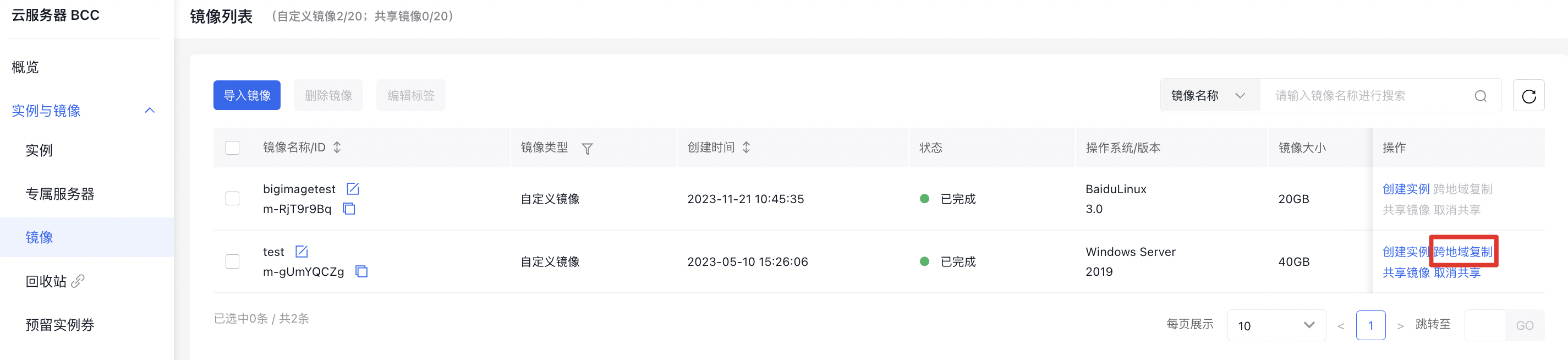
- In the Replicate Image dialog, you can see the name of the custom image selected.
- Select target region (multiple regions optional) and click OK.
- Switch to the target region, and view the progress of custom image replication. Replication is completed when the status changes to Completed.
Common API
You can use API to replicate custom image across regions. For API, refer to [Interface for Cross-Region Replication of Custom Image](BCC/API Reference/Image Related Interfaces/Replicate a custom image across regions.md).