

Delete a security group
Updated at:2025-10-20
Background
If your business no longer needs certain security groups, you can remove them. Deleting a security group also removes all its associated security group rules.
Prerequisites
- Security groups bound to instances cannot be deleted; To delete an instance, move it out of the security group. For specific operation, please refer to [Disassociate Security Group](BCC/Operation guide/Security/Security group/Disassociate security group.md).
Operation steps
- Sign in to BCC Console and enter the Instance List page.
- Click Security Group in the left navigation bar to enter the security group management page.
- On the Security Group List page, select one or more security groups and click the Deletebutton at the top.
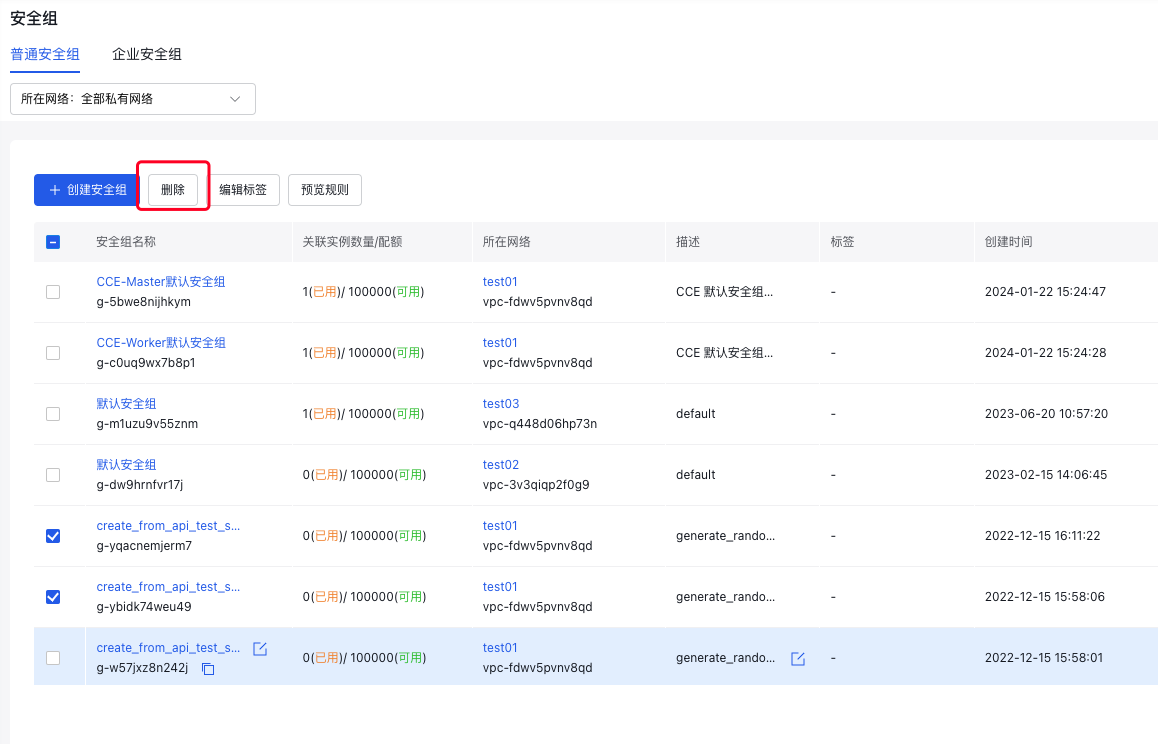
- In the Delete Security Group dialog, confirm the information and click OK.
Delete a security group via API
You can delete a specified security group via [Delete Security Group Interface](BCC/API Reference/Security Group Related Interfaces/Delete a security group.md).