System Activation

BCC BCC

  • API Reference
    • Appendix
    • Automatic Snapshot Policy Related Interfaces
      • Bind automatic snapshot policy
      • Create automatic snapshot policy
      • Delete automatic snapshot policy
      • Query details of automatic snapshot policy
      • Query the list of automatic snapshot policies
      • Unbind automatic snapshot policy
      • Update automatic snapshot policy
    • Cluster Management Related Interfaces
      • Create EHC Cluster
      • Delete EHC Cluster
      • EHC Cluster List
      • Modify EHC Cluster
    • Common Request Headers and Response Headers
    • Dedicated Cluster Related Interfaces
      • Canceling Dedicated Cluster Auto-Renewal
      • Create a dedicated cluster
      • Dedicated Cluster Renewal
      • Dedicated Cluster Tag Binding
      • Dedicated Cluster Tag Unbinding
      • Enabling Dedicated Cluster Auto-Renewal
      • Querying Dedicated Cluster Details
      • Querying Dedicated Cluster List
      • Resizing Dedicated Cluster
    • Deployment Group Related Interfaces
      • Adjust Deployment Group
      • Create Deployment Group
      • Delete Deployment Group
      • Get Deployment Group Details
      • Modify deployment group
      • Query the deployment group list
      • Remove Instance from Deployment Group
    • Disk Related Interfaces
      • Attach a CDS disk
      • Bind a tag to a disk
      • Cancel Auto-renewal
      • Create a CDS disk
      • Detach a CDS disk
      • Disk Expansion and Type Change
      • Enable auto-renewal
      • Get Purchasable Disk Information
      • Modify disk properties
      • Query CDS Price
      • Query disk details
      • Query the disk list
      • Release a CDS disk (new)
      • Release a CDS disk
      • Rename a disk
      • Renew a disk
      • Roll back disk data
      • Shift charge for disks
      • Unbind a tag from a disk
    • Error response
    • General Description
    • Image Related Interfaces
      • Bind a tag to an image
      • Cancel cross-region replication of custom images
      • Create a custom image
      • Delete a custom image
      • Import an image
      • Modify Custom Image Name
      • Query available public image based on instance specifications
      • Query image details
      • Query List of Users with Shared Image Access
      • Query OS information based on instance IDs in batch
      • Query the image list
      • Replicate a custom image across regions
      • Share a custom image
      • Unbind a tag from an image
      • Unshare a custom image
    • Instance Related Interfaces
      • Add an instance to a security group
      • Add IPv6
      • Batch Adding Secondary IP Addresses for Primary Network Interface Card
      • Batch Convert to Postpay
      • Batch Unsubscribe Prepaid Instances
      • Billing Change - Convert to Subscription
      • Bind a role
      • Bind a tag to an instance
      • Change the instance subnet
      • Change the instance VPC
      • Convert to prepay in batch
      • Create an instance (by specifying instance package specifications)
      • Create automatic renewal rules
      • Create instance
      • Delete automatic renewal rules
      • Delete secondary IP address from the primary network interface card in batch
      • Early Release of Prepaid Instances
      • Enter rescue mode
      • Exit rescue mode
      • Instance Resizing (By Specifying Instance Package Specification)
      • Modify instance attributes
      • Modify instance description
      • Modify instance hostname
      • Modify the instance password
      • Query Instance List by Instance ID
      • Query instance list
      • Query Multiple Instance Details
      • Query recycle bin instance list
      • Query resizing specifications
      • Query the custom data of the instance
      • Query the details of a specified instance
      • Query the list of BCC instances eligible for no charge for stopped instances
      • Query the VNC address of the instance
      • Reboot an instance
      • Reinstall an instance
      • Reinstall OS for Instances (Batch Reinstallation)
      • Release instances in batch
      • Release IPv6
      • Release Postpay Instances (Release via POST Request)
      • Release recycle bin instances
      • Remove an instance from a security group
      • Remove the relationship between an instance and its deployment group
      • Renew an instance
      • Resize instances in batches
      • Resuming Billing for BCC in Recycle Bin
      • Retrieve a list of instance roles
      • Retrieve network interface card information for an instance
      • Set Auto-release of Spot Instance EIP
      • Set Instance Deletion Protection
      • Setting Auto-Release for Postpay
      • Start an instance
      • Starting Instances (Batch Start)
      • Stop an instance
      • Stopping Instances (Batch Stop)
      • Unbind a role
      • Unbind a tag from an instance
    • Key Pair Related Interfaces
      • Bind a key pair
      • Change description of key pair
      • Create a key pair
      • Delete a key pair
      • Import a key pair
      • Query key pair details
      • Query the key pair list
      • Rename a key pair
      • Unbind a key pair
    • Maintenance platform APIs
      • Maintenance Records Related Interfaces
      • Maintenance Task Related Interfaces
      • Pre-authorization Related Interfaces
    • Other APIs
      • Query instance package price
      • Query instance package specifications (new)
      • Querying Availability Zones By Package Specification
    • Overview
    • Region and Availability Zone Related Interfaces
      • Query list of availability zones
      • Retrieve the Domain Name List API
    • Reserved Instance Related Interfaces
      • Accept Reserved Instance Transfer
      • Adjust reserved instance
      • Bind Tag to Reserved Instance
      • Create Auto-renewal Rule for Reserved Instance
      • Create reserved instances
      • Disable Auto-renewal Rule for Reserved Instance
      • Initiate Reserved Instance Transfer
      • Query Reserved Instance
      • Reject Reserved Instance Transfer
      • Renew reserved instances
      • Reserved Instance Inbound List
      • Reserved Instance Outbound List
      • Revoke Reserved Instance Transfer
      • Unbind Tag from Reserved Instance
    • Security Group Related Interfaces
      • Authorize security group rules
      • Create a security group
      • Delete a security group
      • Delete security group rules
      • Instance associating with security group
      • Query the security group list
      • Replace security group for instance
      • Revoke security group rules
      • Unbind security group from instance
      • Update security group rules
    • Service domain
    • Snapshot Related Interfaces
      • Bind a tag to a snapshot chain
      • Create a snapshot
      • Delete a snapshot
      • Query snapshot chain list
      • Query snapshot details
      • Query the snapshot list
      • Replicate a snapshot across regions
      • Unbind a tag from a snapshot chain
    • Spot Instance Related Interfaces
      • Cancel Spot Instance Order
      • Create spot instances
      • Query Spot Instance Packages
      • Query Spot Price
  • Cloud Assistant API and SDK Reference
    • Python SDK
      • Batch Retrieval of bsm-agent State within Instances
      • CaClient
      • Command Interface
      • Historical records
      • Initialization
      • Install SDK
      • Log API
  • Cloud Assistant API Reference
    • Batch Retrieve Instance BSM-Agent Status
    • Command Interface
    • Common Request and Response Headers
    • Error response
    • General Description
    • Historical records
    • Log API
    • Service domain
  • FAQs
    • Billing class
    • Common Questions Overview
    • Images
    • Instances
    • Network class
    • Performance
    • Reserved Instance
    • Security class
    • Snapshots
    • Storage class
    • Virtual machine operation and maintenance class
  • Fault handling
    • GPU Instance Downtime Troubleshooting
    • Linux Baidu Cloud Compute Entering Single User Mode to Reset Paasword Reports Error-Authentication token lock busy
    • Linux Baidu Cloud Compute Entering Single User Mode to Reset Paasword Reports Error-Authentication token manipulation error
    • Linux Baidu Cloud Compute Entering Single User Mode to Reset Root Paasword
    • Linux Baidu Cloud Compute Execution Yum Update Reports Dependency Conflict
    • Linux Baidu Cloud Compute Setting Login Method
    • Unable to Remotely Connect to Linux Instance
    • Unable to Remotely Connect to Windows Instance
    • Windows Server Cannot Ping
  • Function Release Records
  • Go-SDK
    • Automatic snapshot policy
    • Availability zone
    • Dedicated CDS Cluster
    • Deployment group
    • Disk
    • Elastic high-performance computing cluster
    • Image
    • Initialization
    • Instance
    • Key pair
    • Overview
    • Region
    • Reserved Instance
    • Security group
    • Snapshot
  • Java-SDK
    • Automatic snapshot policy
    • Availability zone
    • BCC instance
    • BccClient
    • Deployment group
    • Disk
    • Exception handling
    • Image
    • Install the SDK Package
    • Key pair
    • Log
    • Overview
    • Quick Start
    • Region
    • Reserved Instance
    • Security group
    • Snapshot
    • Version Change Records
  • Operation guide
    • Deployment group
      • Adjust Deployment Group for Existing Instances
      • Create BCC Instance within Deployment Group
      • Create Deployment Group
      • Delete Deployment Group
      • Modify Deployment Group Information
      • Overview of deployment policy
      • Remove BCC Instance from Deployment Group
    • Elastic high-performance computing cluster
      • Create Elastic High-performance Computing Cluster
      • Overview of elastic hyper-computing cluster
    • Image
      • Baidu AI Cloud Image Service Agreement
      • Create a custom image
      • Creating Linux Image Based on Local System
      • Cross-region image replication
      • Data and Personal Information Protection Statement
      • Delete a custom image
      • How to Set Network Adapter Multi-Queue Properties
      • Image List
      • Image Overview
      • Image Quick Guide
      • Import Custom Image
        • Checking Network Configuration
        • Checking Virtio Driver
        • Creating Instance Using Imported Custom Image
        • Detecting Image Using Image Detection Tool
        • Image format check
        • Image Format Conversion
        • Image Import Restrictions
        • Import Overview
        • Install cloudbase-init
        • Installing Virtio Driver
        • System Optimization Operations (Linux)
      • OS Official End of Maintenance Plan
      • Public Image Release Records
        • 2023 BCC Public Image Release Records
        • 2023 EBC Public Image Release Records
        • 2024 BCC Public Image Release Records
        • 2024 EBC Public Image Release Records
        • 2025 BCC Public Image Release Records
      • Reinstall OS
      • Share a custom image
      • Windows Image Creation
    • Instance
      • Batch Sequential Naming
      • Change Availability Zone
      • Change Charge Type
        • Postpay to Subscription
        • Subscription to Postpay
      • Change Instance Configuration
      • Create instance
        • Create Instance Navigation
        • Create Instance via Custom Image
        • Create Instance via Purchase Page
        • Create Instances with Launch Templates
        • Purchase Instance with Same Configuration
      • Cross-AZ migration
      • Functional restrictions
      • Instance Overview
      • Modify instance name
      • Postpay Instance No Charge for Stopped Instances
      • Reboot an instance
      • Reclaim instance
      • Release an instance
      • Renew an instance
      • Reset password
      • Set IAM Role
      • Sign in to instance
        • Log in to Linux Instance
          • Connect to Baidu Cloud Compute Using SmartTerm
          • Connect to Linux instance using user name-password certification
          • Log in to Linux Instance Using SSH Key on Linux or Mac
          • Log in to Linux Instance Using SSH Key via SecureCRT
          • Remotely sign in to Baidu Cloud Computer via VNC
          • Sign in to Linux instances via SSH key in Putty
          • Sign in to Linux instances via SSH key in Xshell
        • Log in to Windows Instance
          • Remotely sign in to Baidu Cloud Computer via VNC
          • Sign in to Windows instance via remote desktop
        • Login Method Overview
      • Spot instances
        • Create spot instances
        • What Is Spot Instance
      • Start an instance
      • Stop an instance
        • Elastic Baremetal Instance and Elastic High-performance Computing Cluster Instance Halt Capability Configuration Instructions
        • Stop an instance
      • View instance
    • Launch Template
    • Network
      • Bind and Unbind EIP
      • Change Internal IP
      • Change subnet
      • Change VPC
      • Configure Dual Network Interface Card External Network Access for Windows Baidu Cloud Compute
      • Configure IPv6 Address
      • Elastic network interface
        • Configure elastic network interface
        • Create elastic network interface
        • Elastic Network Interface Overview
        • Mount elastic network interface
      • Elastic RDMA Network Interface
        • Elastic RDMA Network Interface Overview
        • Instructions for use
    • Operations and Monitor
      • Cloud Assistant
        • Cloud Assistant Overview
        • Cloud Assistant Usage Notes
        • Create command
        • FAQs
        • Historical records
        • Identity and access management
        • Instance list
        • My commands
        • Public commands
        • Upload files
      • Evacuate Faulty Instance
      • Instance Health Check
      • Maintenance Platform
        • Maintenance Platform Access Instructions
        • Maintenance Platform Overview
        • Maintenance Records Query
        • Maintenance Task
        • Pre-authorization Rule Settings
      • Monitor and Alarm
      • Self-Service Diagnostic Tool
        • Application Performance Diagnostic Tool Btune
        • Self-Service Diagnostic Tool Overview
      • Use Rescue Mode
    • Reserved Instance
      • FAQ
      • Introduction to reserved instance
      • Renew reserved instances
      • Reserved Instance AZ Change
      • Reserved Instance Cross-Account Transfer
      • Reserved Instance EHC Cluster Change
      • Reserved Instance Purchase
    • Resource Assessment
    • Security
      • Identity and access management
        • Identity and access management
        • Price Permission Control
      • Key pair
        • Bind SSH Key Pair
        • Create SSH Key Pair
        • Delete SSH Key Pair
        • SSH Key Pair Overview
        • Unbind SSH Key Pair
      • Security group
        • Associate with security group
        • Copy security group
        • Create a security group
        • Delete a security group
        • Disassociate security group
        • Edit security group
        • Security group overview
    • Server Migration
      • Migration Operation Steps
      • Server Migration Operation Process
      • Server Migration Overview
    • Snapshot
      • Automatic snapshot
      • Create disk snapshot
      • Delete a snapshot
      • Rollback snapshot
      • Snapshot Overview
    • Storage
      • Overview
      • System disk expansion
    • Tag Management
      • Configure Tag
      • Tag Management Overview
      • View Resource Bill Based on Tag
  • Operations Reference
    • Linux Operations Reference
      • Baidu Cloud Compute Delete or Modify File Prompting File System Read-Only
      • CentOS 7 Install Docker
      • Configure Linux Analysis Tools atop and kdump
      • Enter Single User Mode
        • CentOS 6 Enter Single User
        • CentOS 7 Enter Single User
        • CentOS 8 Enter Single User
        • FreeBSD 11 Single User Modify Password SOP
        • opensuse42
          • 3 Enter Single User
        • Ubuntu Enter Single User
        • OpenSUSE 42_3 Enter Single User
      • How to Enable or Disable Intel CPU Vulnerability Patch in Linux Image
      • How to Handle System Boot Exception Caused by fstab Configuration
      • How to Resolve Unable to Log in to Linux BCC Instance via SSH
      • Linux BCC Instance Insufficient Space Issue Resolution
      • Linux BCC Instance Lagging Issue
      • Linux Format and Mount Instance Mount Local Disk
      • Linux Modify Default Remote Connection Port
      • Linux Server CPU and Memory Full Issue Troubleshooting
      • Linux System Install Graphical Interface and Remote Connection
        • CentOS
          • CentOS 8 Install Graphical Interface and Connect Using VNC Viewer
          • CentOS6
            • 5 Install KDE Desktop Graphical Interface and Connect Using VNC Viewer
          • CentOS7
            • 2 Install GNOME Graphical Interface and Connect Using VNC Viewer
          • Install GNOME GUI on CentOS 7_2 and Connect via VNC Viewer
          • Install GUI on CentOS 8 and Connect via VNC Viewer
          • Install KDE Desktop GUI on CentOS 6_5 and Connect via VNC Viewer
        • opensuse
          • opensuse42
            • 3 Install Graphical Interface and Connect Using VNC Viewer
          • Install GUI on OpenSUSE 42_3 and Connect via VNC Viewer
        • Ubuntu
          • Ubuntu14
            • 04 Install Graphical Interface and Connect Using VNC Viewer
          • Ubuntu18
            • 04 Install Graphical Interface and Connect Using VNC Viewer
          • Install GUI on Ubuntu 14_04 and Connect via VNC Viewer
          • Install GUI on Ubuntu 18_04 and Connect via VNC Viewer
      • Performance test
        • Linux CPU Performance Test
        • Linux Disk IO Performance Test
        • Linux Network Performance Test
      • Ubunut16_04 Subscription Extended Security Maintenance (ESM)
    • Server configuration
      • Debian 9 Software Source Configuration Update
      • Linux PIP Configuration with Baidu Source
      • Online Instance with OFED Driver Kernel Replacement Solution
      • Windows PIP Configuration with Baidu Source
    • Windows Operations Reference
      • Blue Screen Crash General Handling Method
      • Configure Multi-User Access to Windows Server
      • Connecting to Windows Server Using Xshell
      • Data Disk Not Displayed After Server Reboot
      • Desktop and Application Color Turning Black Handling Method
      • Local Playback of Sound from Windows Server
      • Performance Resources
      • Remote Connection to Windows Unable to Use Clipboard
      • System Activation
      • System Black Screen Handling Method
      • Tutorial on Disabling Windows Firewall
      • Windows Allow Single User to Connect Multiple Sessions Method
      • Windows automatic update-related configuration
      • Windows BCC Instance Achieve SID Uniqueness After Joining Domain
      • Windows BCC Instance Lagging Issue
      • Windows CPU and Memory Full Troubleshooting Steps
      • Windows Delete Hardware Reserved Memory
      • Windows Instance Disk Space Insufficient Cleanup Tutorial
      • Windows Modify Default Remote Connection Port
      • Windows Quick Login
      • Windows Server Disable IE Enhanced Security Configuration Tutorial
      • Windows Set Only Allow Local & Fixed IP Access Remote Port
      • Windows Virtual Machine Auto Login Failure Handling Method
  • Product Description
    • Application scenarios
    • Correspondence Between Original and New Model Names
    • Discontinued Instance Specifications
    • Models and Their Regions
    • Product advantages
    • Usage restrictions
    • What Is Baidu Cloud Compute BCC
    • Instance specification
  • Product pricing
    • Billing overview
    • Charge type
      • Postpay Pricing
      • Reserved instances
      • Subscription (Prepay) Pricing
      • Reserved Instance
    • Refund policy
  • Python-SDK
    • BccClient
    • Disk
    • Image
    • Initialization
    • Install the SDK Package
    • Instance
    • Overview
    • Region
    • Reserved Instance
    • Security group
    • Snapshot
    • Version Change Records
  • Python3-SDK
    • Automatic snapshot policy
    • BccClient
    • Dedicated CDS Cluster
    • Deployment group
    • Disk
    • Image
    • Initialization
    • Install the SDK Package
    • Instance
    • Key pair
    • Overview
    • Region
    • Reserved Instance
    • Security group
    • Snapshot
  • Quick Start
    • Baidu Cloud Compute Security Description
    • Quick Configuration of Linux Baidu Cloud Compute
    • Quick Configuration of Windows Baidu Cloud Compute
  • Resources
    • Baidu AI Cloud Image Service Agreement
    • Image Quick Guide
  • Service Level Agreement (SLA)
    • Baidu Intelligent Cloud Baidu Cloud Compute Trusted Cloud
    • BCC Service Level Agreement SLA (V3_0)
  • Tag Service API Reference
    • Appendix 1
    • Domain name
    • General Description
    • Interface List
      • Create tag
      • Delete tag
      • Tag List
      • View resources bound to a tag
    • Introduction
  • Transfer
    • Site Offline Migration Solution
    • Site Smooth Migration Solution
  • Typical Practices
    • Connecting to Windows Server Using Xshell
    • Environment Setup
      • Manual Deployment of SQL Server 2008 R2 Express Edition
      • One-Click Setup for Linux Palworld Server
      • One-Click Setup for Windows Palworld Server
      • Set Up FTP Service on Linux
      • Setting Up Baota on Linux
      • Setting Up Baota on Windows
      • Tutorial on Setting Up IIS and FTP on Windows
      • Typical Practice for Setting Up Access VPN
      • Installing MySQL 8_0 Using Yum on CentOS 7 yum
    • Set Up FTP Service on Linux
    • Tag Management Practice
    • Tutorial on Disabling IE Enhanced Security Configuration on Windows Server 2008
    • Tutorial on Disabling Windows Firewall
    • Website Building Tutorial
      • Building a Website Using IIS Service on Windows 2008 and Windows 2012
      • Deploy SSL Certificate on Baidu Cloud Compute - Apache
      • Deploy SSL Certificate on Baidu Cloud Compute - IIS
      • Deploy SSL Certificate on Baidu Cloud Compute - Nginx
      • Deploy SSL Certificate on Baidu Cloud Compute - Tomcat
      • Installing and Configuring Apache Environment on Windows
      • Installing and Configuring Nginx Environment on Windows
      • CentOS-7_2 LNMP Environment Deployment
      • Deploy LAMP Environment on CentOS-7_2
  • Video Zone
    • Fault handling
    • Operation guide
      • Basic Functions
      • Environment Setup
      • Network Related
      • Operations Reference
      • Paasword Function
    • Operation guide
    • Product introduction
All documents
menu
No results found, please re-enter

BCC BCC

  • API Reference
    • Appendix
    • Automatic Snapshot Policy Related Interfaces
      • Bind automatic snapshot policy
      • Create automatic snapshot policy
      • Delete automatic snapshot policy
      • Query details of automatic snapshot policy
      • Query the list of automatic snapshot policies
      • Unbind automatic snapshot policy
      • Update automatic snapshot policy
    • Cluster Management Related Interfaces
      • Create EHC Cluster
      • Delete EHC Cluster
      • EHC Cluster List
      • Modify EHC Cluster
    • Common Request Headers and Response Headers
    • Dedicated Cluster Related Interfaces
      • Canceling Dedicated Cluster Auto-Renewal
      • Create a dedicated cluster
      • Dedicated Cluster Renewal
      • Dedicated Cluster Tag Binding
      • Dedicated Cluster Tag Unbinding
      • Enabling Dedicated Cluster Auto-Renewal
      • Querying Dedicated Cluster Details
      • Querying Dedicated Cluster List
      • Resizing Dedicated Cluster
    • Deployment Group Related Interfaces
      • Adjust Deployment Group
      • Create Deployment Group
      • Delete Deployment Group
      • Get Deployment Group Details
      • Modify deployment group
      • Query the deployment group list
      • Remove Instance from Deployment Group
    • Disk Related Interfaces
      • Attach a CDS disk
      • Bind a tag to a disk
      • Cancel Auto-renewal
      • Create a CDS disk
      • Detach a CDS disk
      • Disk Expansion and Type Change
      • Enable auto-renewal
      • Get Purchasable Disk Information
      • Modify disk properties
      • Query CDS Price
      • Query disk details
      • Query the disk list
      • Release a CDS disk (new)
      • Release a CDS disk
      • Rename a disk
      • Renew a disk
      • Roll back disk data
      • Shift charge for disks
      • Unbind a tag from a disk
    • Error response
    • General Description
    • Image Related Interfaces
      • Bind a tag to an image
      • Cancel cross-region replication of custom images
      • Create a custom image
      • Delete a custom image
      • Import an image
      • Modify Custom Image Name
      • Query available public image based on instance specifications
      • Query image details
      • Query List of Users with Shared Image Access
      • Query OS information based on instance IDs in batch
      • Query the image list
      • Replicate a custom image across regions
      • Share a custom image
      • Unbind a tag from an image
      • Unshare a custom image
    • Instance Related Interfaces
      • Add an instance to a security group
      • Add IPv6
      • Batch Adding Secondary IP Addresses for Primary Network Interface Card
      • Batch Convert to Postpay
      • Batch Unsubscribe Prepaid Instances
      • Billing Change - Convert to Subscription
      • Bind a role
      • Bind a tag to an instance
      • Change the instance subnet
      • Change the instance VPC
      • Convert to prepay in batch
      • Create an instance (by specifying instance package specifications)
      • Create automatic renewal rules
      • Create instance
      • Delete automatic renewal rules
      • Delete secondary IP address from the primary network interface card in batch
      • Early Release of Prepaid Instances
      • Enter rescue mode
      • Exit rescue mode
      • Instance Resizing (By Specifying Instance Package Specification)
      • Modify instance attributes
      • Modify instance description
      • Modify instance hostname
      • Modify the instance password
      • Query Instance List by Instance ID
      • Query instance list
      • Query Multiple Instance Details
      • Query recycle bin instance list
      • Query resizing specifications
      • Query the custom data of the instance
      • Query the details of a specified instance
      • Query the list of BCC instances eligible for no charge for stopped instances
      • Query the VNC address of the instance
      • Reboot an instance
      • Reinstall an instance
      • Reinstall OS for Instances (Batch Reinstallation)
      • Release instances in batch
      • Release IPv6
      • Release Postpay Instances (Release via POST Request)
      • Release recycle bin instances
      • Remove an instance from a security group
      • Remove the relationship between an instance and its deployment group
      • Renew an instance
      • Resize instances in batches
      • Resuming Billing for BCC in Recycle Bin
      • Retrieve a list of instance roles
      • Retrieve network interface card information for an instance
      • Set Auto-release of Spot Instance EIP
      • Set Instance Deletion Protection
      • Setting Auto-Release for Postpay
      • Start an instance
      • Starting Instances (Batch Start)
      • Stop an instance
      • Stopping Instances (Batch Stop)
      • Unbind a role
      • Unbind a tag from an instance
    • Key Pair Related Interfaces
      • Bind a key pair
      • Change description of key pair
      • Create a key pair
      • Delete a key pair
      • Import a key pair
      • Query key pair details
      • Query the key pair list
      • Rename a key pair
      • Unbind a key pair
    • Maintenance platform APIs
      • Maintenance Records Related Interfaces
      • Maintenance Task Related Interfaces
      • Pre-authorization Related Interfaces
    • Other APIs
      • Query instance package price
      • Query instance package specifications (new)
      • Querying Availability Zones By Package Specification
    • Overview
    • Region and Availability Zone Related Interfaces
      • Query list of availability zones
      • Retrieve the Domain Name List API
    • Reserved Instance Related Interfaces
      • Accept Reserved Instance Transfer
      • Adjust reserved instance
      • Bind Tag to Reserved Instance
      • Create Auto-renewal Rule for Reserved Instance
      • Create reserved instances
      • Disable Auto-renewal Rule for Reserved Instance
      • Initiate Reserved Instance Transfer
      • Query Reserved Instance
      • Reject Reserved Instance Transfer
      • Renew reserved instances
      • Reserved Instance Inbound List
      • Reserved Instance Outbound List
      • Revoke Reserved Instance Transfer
      • Unbind Tag from Reserved Instance
    • Security Group Related Interfaces
      • Authorize security group rules
      • Create a security group
      • Delete a security group
      • Delete security group rules
      • Instance associating with security group
      • Query the security group list
      • Replace security group for instance
      • Revoke security group rules
      • Unbind security group from instance
      • Update security group rules
    • Service domain
    • Snapshot Related Interfaces
      • Bind a tag to a snapshot chain
      • Create a snapshot
      • Delete a snapshot
      • Query snapshot chain list
      • Query snapshot details
      • Query the snapshot list
      • Replicate a snapshot across regions
      • Unbind a tag from a snapshot chain
    • Spot Instance Related Interfaces
      • Cancel Spot Instance Order
      • Create spot instances
      • Query Spot Instance Packages
      • Query Spot Price
  • Cloud Assistant API and SDK Reference
    • Python SDK
      • Batch Retrieval of bsm-agent State within Instances
      • CaClient
      • Command Interface
      • Historical records
      • Initialization
      • Install SDK
      • Log API
  • Cloud Assistant API Reference
    • Batch Retrieve Instance BSM-Agent Status
    • Command Interface
    • Common Request and Response Headers
    • Error response
    • General Description
    • Historical records
    • Log API
    • Service domain
  • FAQs
    • Billing class
    • Common Questions Overview
    • Images
    • Instances
    • Network class
    • Performance
    • Reserved Instance
    • Security class
    • Snapshots
    • Storage class
    • Virtual machine operation and maintenance class
  • Fault handling
    • GPU Instance Downtime Troubleshooting
    • Linux Baidu Cloud Compute Entering Single User Mode to Reset Paasword Reports Error-Authentication token lock busy
    • Linux Baidu Cloud Compute Entering Single User Mode to Reset Paasword Reports Error-Authentication token manipulation error
    • Linux Baidu Cloud Compute Entering Single User Mode to Reset Root Paasword
    • Linux Baidu Cloud Compute Execution Yum Update Reports Dependency Conflict
    • Linux Baidu Cloud Compute Setting Login Method
    • Unable to Remotely Connect to Linux Instance
    • Unable to Remotely Connect to Windows Instance
    • Windows Server Cannot Ping
  • Function Release Records
  • Go-SDK
    • Automatic snapshot policy
    • Availability zone
    • Dedicated CDS Cluster
    • Deployment group
    • Disk
    • Elastic high-performance computing cluster
    • Image
    • Initialization
    • Instance
    • Key pair
    • Overview
    • Region
    • Reserved Instance
    • Security group
    • Snapshot
  • Java-SDK
    • Automatic snapshot policy
    • Availability zone
    • BCC instance
    • BccClient
    • Deployment group
    • Disk
    • Exception handling
    • Image
    • Install the SDK Package
    • Key pair
    • Log
    • Overview
    • Quick Start
    • Region
    • Reserved Instance
    • Security group
    • Snapshot
    • Version Change Records
  • Operation guide
    • Deployment group
      • Adjust Deployment Group for Existing Instances
      • Create BCC Instance within Deployment Group
      • Create Deployment Group
      • Delete Deployment Group
      • Modify Deployment Group Information
      • Overview of deployment policy
      • Remove BCC Instance from Deployment Group
    • Elastic high-performance computing cluster
      • Create Elastic High-performance Computing Cluster
      • Overview of elastic hyper-computing cluster
    • Image
      • Baidu AI Cloud Image Service Agreement
      • Create a custom image
      • Creating Linux Image Based on Local System
      • Cross-region image replication
      • Data and Personal Information Protection Statement
      • Delete a custom image
      • How to Set Network Adapter Multi-Queue Properties
      • Image List
      • Image Overview
      • Image Quick Guide
      • Import Custom Image
        • Checking Network Configuration
        • Checking Virtio Driver
        • Creating Instance Using Imported Custom Image
        • Detecting Image Using Image Detection Tool
        • Image format check
        • Image Format Conversion
        • Image Import Restrictions
        • Import Overview
        • Install cloudbase-init
        • Installing Virtio Driver
        • System Optimization Operations (Linux)
      • OS Official End of Maintenance Plan
      • Public Image Release Records
        • 2023 BCC Public Image Release Records
        • 2023 EBC Public Image Release Records
        • 2024 BCC Public Image Release Records
        • 2024 EBC Public Image Release Records
        • 2025 BCC Public Image Release Records
      • Reinstall OS
      • Share a custom image
      • Windows Image Creation
    • Instance
      • Batch Sequential Naming
      • Change Availability Zone
      • Change Charge Type
        • Postpay to Subscription
        • Subscription to Postpay
      • Change Instance Configuration
      • Create instance
        • Create Instance Navigation
        • Create Instance via Custom Image
        • Create Instance via Purchase Page
        • Create Instances with Launch Templates
        • Purchase Instance with Same Configuration
      • Cross-AZ migration
      • Functional restrictions
      • Instance Overview
      • Modify instance name
      • Postpay Instance No Charge for Stopped Instances
      • Reboot an instance
      • Reclaim instance
      • Release an instance
      • Renew an instance
      • Reset password
      • Set IAM Role
      • Sign in to instance
        • Log in to Linux Instance
          • Connect to Baidu Cloud Compute Using SmartTerm
          • Connect to Linux instance using user name-password certification
          • Log in to Linux Instance Using SSH Key on Linux or Mac
          • Log in to Linux Instance Using SSH Key via SecureCRT
          • Remotely sign in to Baidu Cloud Computer via VNC
          • Sign in to Linux instances via SSH key in Putty
          • Sign in to Linux instances via SSH key in Xshell
        • Log in to Windows Instance
          • Remotely sign in to Baidu Cloud Computer via VNC
          • Sign in to Windows instance via remote desktop
        • Login Method Overview
      • Spot instances
        • Create spot instances
        • What Is Spot Instance
      • Start an instance
      • Stop an instance
        • Elastic Baremetal Instance and Elastic High-performance Computing Cluster Instance Halt Capability Configuration Instructions
        • Stop an instance
      • View instance
    • Launch Template
    • Network
      • Bind and Unbind EIP
      • Change Internal IP
      • Change subnet
      • Change VPC
      • Configure Dual Network Interface Card External Network Access for Windows Baidu Cloud Compute
      • Configure IPv6 Address
      • Elastic network interface
        • Configure elastic network interface
        • Create elastic network interface
        • Elastic Network Interface Overview
        • Mount elastic network interface
      • Elastic RDMA Network Interface
        • Elastic RDMA Network Interface Overview
        • Instructions for use
    • Operations and Monitor
      • Cloud Assistant
        • Cloud Assistant Overview
        • Cloud Assistant Usage Notes
        • Create command
        • FAQs
        • Historical records
        • Identity and access management
        • Instance list
        • My commands
        • Public commands
        • Upload files
      • Evacuate Faulty Instance
      • Instance Health Check
      • Maintenance Platform
        • Maintenance Platform Access Instructions
        • Maintenance Platform Overview
        • Maintenance Records Query
        • Maintenance Task
        • Pre-authorization Rule Settings
      • Monitor and Alarm
      • Self-Service Diagnostic Tool
        • Application Performance Diagnostic Tool Btune
        • Self-Service Diagnostic Tool Overview
      • Use Rescue Mode
    • Reserved Instance
      • FAQ
      • Introduction to reserved instance
      • Renew reserved instances
      • Reserved Instance AZ Change
      • Reserved Instance Cross-Account Transfer
      • Reserved Instance EHC Cluster Change
      • Reserved Instance Purchase
    • Resource Assessment
    • Security
      • Identity and access management
        • Identity and access management
        • Price Permission Control
      • Key pair
        • Bind SSH Key Pair
        • Create SSH Key Pair
        • Delete SSH Key Pair
        • SSH Key Pair Overview
        • Unbind SSH Key Pair
      • Security group
        • Associate with security group
        • Copy security group
        • Create a security group
        • Delete a security group
        • Disassociate security group
        • Edit security group
        • Security group overview
    • Server Migration
      • Migration Operation Steps
      • Server Migration Operation Process
      • Server Migration Overview
    • Snapshot
      • Automatic snapshot
      • Create disk snapshot
      • Delete a snapshot
      • Rollback snapshot
      • Snapshot Overview
    • Storage
      • Overview
      • System disk expansion
    • Tag Management
      • Configure Tag
      • Tag Management Overview
      • View Resource Bill Based on Tag
  • Operations Reference
    • Linux Operations Reference
      • Baidu Cloud Compute Delete or Modify File Prompting File System Read-Only
      • CentOS 7 Install Docker
      • Configure Linux Analysis Tools atop and kdump
      • Enter Single User Mode
        • CentOS 6 Enter Single User
        • CentOS 7 Enter Single User
        • CentOS 8 Enter Single User
        • FreeBSD 11 Single User Modify Password SOP
        • opensuse42
          • 3 Enter Single User
        • Ubuntu Enter Single User
        • OpenSUSE 42_3 Enter Single User
      • How to Enable or Disable Intel CPU Vulnerability Patch in Linux Image
      • How to Handle System Boot Exception Caused by fstab Configuration
      • How to Resolve Unable to Log in to Linux BCC Instance via SSH
      • Linux BCC Instance Insufficient Space Issue Resolution
      • Linux BCC Instance Lagging Issue
      • Linux Format and Mount Instance Mount Local Disk
      • Linux Modify Default Remote Connection Port
      • Linux Server CPU and Memory Full Issue Troubleshooting
      • Linux System Install Graphical Interface and Remote Connection
        • CentOS
          • CentOS 8 Install Graphical Interface and Connect Using VNC Viewer
          • CentOS6
            • 5 Install KDE Desktop Graphical Interface and Connect Using VNC Viewer
          • CentOS7
            • 2 Install GNOME Graphical Interface and Connect Using VNC Viewer
          • Install GNOME GUI on CentOS 7_2 and Connect via VNC Viewer
          • Install GUI on CentOS 8 and Connect via VNC Viewer
          • Install KDE Desktop GUI on CentOS 6_5 and Connect via VNC Viewer
        • opensuse
          • opensuse42
            • 3 Install Graphical Interface and Connect Using VNC Viewer
          • Install GUI on OpenSUSE 42_3 and Connect via VNC Viewer
        • Ubuntu
          • Ubuntu14
            • 04 Install Graphical Interface and Connect Using VNC Viewer
          • Ubuntu18
            • 04 Install Graphical Interface and Connect Using VNC Viewer
          • Install GUI on Ubuntu 14_04 and Connect via VNC Viewer
          • Install GUI on Ubuntu 18_04 and Connect via VNC Viewer
      • Performance test
        • Linux CPU Performance Test
        • Linux Disk IO Performance Test
        • Linux Network Performance Test
      • Ubunut16_04 Subscription Extended Security Maintenance (ESM)
    • Server configuration
      • Debian 9 Software Source Configuration Update
      • Linux PIP Configuration with Baidu Source
      • Online Instance with OFED Driver Kernel Replacement Solution
      • Windows PIP Configuration with Baidu Source
    • Windows Operations Reference
      • Blue Screen Crash General Handling Method
      • Configure Multi-User Access to Windows Server
      • Connecting to Windows Server Using Xshell
      • Data Disk Not Displayed After Server Reboot
      • Desktop and Application Color Turning Black Handling Method
      • Local Playback of Sound from Windows Server
      • Performance Resources
      • Remote Connection to Windows Unable to Use Clipboard
      • System Activation
      • System Black Screen Handling Method
      • Tutorial on Disabling Windows Firewall
      • Windows Allow Single User to Connect Multiple Sessions Method
      • Windows automatic update-related configuration
      • Windows BCC Instance Achieve SID Uniqueness After Joining Domain
      • Windows BCC Instance Lagging Issue
      • Windows CPU and Memory Full Troubleshooting Steps
      • Windows Delete Hardware Reserved Memory
      • Windows Instance Disk Space Insufficient Cleanup Tutorial
      • Windows Modify Default Remote Connection Port
      • Windows Quick Login
      • Windows Server Disable IE Enhanced Security Configuration Tutorial
      • Windows Set Only Allow Local & Fixed IP Access Remote Port
      • Windows Virtual Machine Auto Login Failure Handling Method
  • Product Description
    • Application scenarios
    • Correspondence Between Original and New Model Names
    • Discontinued Instance Specifications
    • Models and Their Regions
    • Product advantages
    • Usage restrictions
    • What Is Baidu Cloud Compute BCC
    • Instance specification
  • Product pricing
    • Billing overview
    • Charge type
      • Postpay Pricing
      • Reserved instances
      • Subscription (Prepay) Pricing
      • Reserved Instance
    • Refund policy
  • Python-SDK
    • BccClient
    • Disk
    • Image
    • Initialization
    • Install the SDK Package
    • Instance
    • Overview
    • Region
    • Reserved Instance
    • Security group
    • Snapshot
    • Version Change Records
  • Python3-SDK
    • Automatic snapshot policy
    • BccClient
    • Dedicated CDS Cluster
    • Deployment group
    • Disk
    • Image
    • Initialization
    • Install the SDK Package
    • Instance
    • Key pair
    • Overview
    • Region
    • Reserved Instance
    • Security group
    • Snapshot
  • Quick Start
    • Baidu Cloud Compute Security Description
    • Quick Configuration of Linux Baidu Cloud Compute
    • Quick Configuration of Windows Baidu Cloud Compute
  • Resources
    • Baidu AI Cloud Image Service Agreement
    • Image Quick Guide
  • Service Level Agreement (SLA)
    • Baidu Intelligent Cloud Baidu Cloud Compute Trusted Cloud
    • BCC Service Level Agreement SLA (V3_0)
  • Tag Service API Reference
    • Appendix 1
    • Domain name
    • General Description
    • Interface List
      • Create tag
      • Delete tag
      • Tag List
      • View resources bound to a tag
    • Introduction
  • Transfer
    • Site Offline Migration Solution
    • Site Smooth Migration Solution
  • Typical Practices
    • Connecting to Windows Server Using Xshell
    • Environment Setup
      • Manual Deployment of SQL Server 2008 R2 Express Edition
      • One-Click Setup for Linux Palworld Server
      • One-Click Setup for Windows Palworld Server
      • Set Up FTP Service on Linux
      • Setting Up Baota on Linux
      • Setting Up Baota on Windows
      • Tutorial on Setting Up IIS and FTP on Windows
      • Typical Practice for Setting Up Access VPN
      • Installing MySQL 8_0 Using Yum on CentOS 7 yum
    • Set Up FTP Service on Linux
    • Tag Management Practice
    • Tutorial on Disabling IE Enhanced Security Configuration on Windows Server 2008
    • Tutorial on Disabling Windows Firewall
    • Website Building Tutorial
      • Building a Website Using IIS Service on Windows 2008 and Windows 2012
      • Deploy SSL Certificate on Baidu Cloud Compute - Apache
      • Deploy SSL Certificate on Baidu Cloud Compute - IIS
      • Deploy SSL Certificate on Baidu Cloud Compute - Nginx
      • Deploy SSL Certificate on Baidu Cloud Compute - Tomcat
      • Installing and Configuring Apache Environment on Windows
      • Installing and Configuring Nginx Environment on Windows
      • CentOS-7_2 LNMP Environment Deployment
      • Deploy LAMP Environment on CentOS-7_2
  • Video Zone
    • Fault handling
    • Operation guide
      • Basic Functions
      • Environment Setup
      • Network Related
      • Operations Reference
      • Paasword Function
    • Operation guide
    • Product introduction
  • Document center
  • arrow
  • BCCBCC
  • arrow
  • Operations Reference
  • arrow
  • Windows Operations Reference
  • arrow
  • System Activation
Table of contents on this page
  • Windows activation-related configuration
  • Description
  • Configuration
  • Windows Manual Activation System Tutorial
  • Handling of Windows activation failure
  • Communication failure
  • Time and timezone desynchronization
  • Client key error
  • Impact of third-party software
  • Service abnormal

System Activation

Updated at:2025-10-20

Windows activation-related configuration

Description

All images of Baidu AI Cloud are automatically activated upon login, requiring no manual intervention. If the system is found to be unactivated upon login (i.e., activation failure), please refer to [handling of Windows activation failure](#Handling of Windows activation failure). For manual reactivation, consult the document [Windows Manual Activation System Tutorial](#Windows Manual Activation System Tutorial).

All Baidu Cloud Compute OS source files (ISO) of Baidu AI Cloud originate from [Microsoft official website Microsoft Volume Licensing Service Center)] https://www.microsoft.com/licensing/servicecenter/.

Configuration

KMS client key configuration

All images created from OS source files are equipped with KMS client keys. The activation server of Baidu AI Cloud only supports activating OS images using KMS client keys. If the key is manually changed, it needs to be changed back in the following ways:

  • Open the command line with administrator permissions and enter slmgr.vbs /ipk [KMS Client Key]
  • KMS Client Key is publicly available and can be obtained from Microsoft official website: [Microsoft official site] https://technet.microsoft.com/en-us/library/jj612867(v=ws.11).aspx

    Note:

    Use the English document format when visiting the website, as the Chinese document is outdated and does not include descriptions for Windows Server 2016.

Client activation server configuration

The activation server data on the client is stored in the registry under HKEY_LOCAL_MACHINE\SOFTWARE\Microsoft\Windows NT\CurrentVersion\SoftwareProtectionPlatform. By default, the server points to kms.baidubce.com, with port 1688 as the default.

Additional information

  • If the image activation process fails, the system will automatically attempt reactivation every 120 minutes.

Windows Manual Activation System Tutorial

Baidu AI Cloud images automatically activate the system upon deployment. However, in certain scenarios, you may need to manually activate the Windows system, such as when automatic activation fails or when a custom image includes specific modifications to the activation server.

Below is the manual activation process for Windows system:

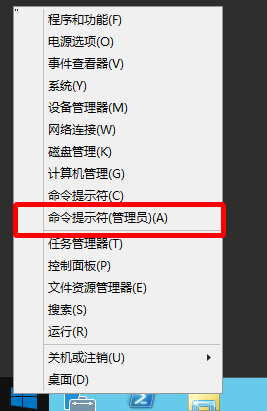
  1. Launch the command prompt with administrator privileges.
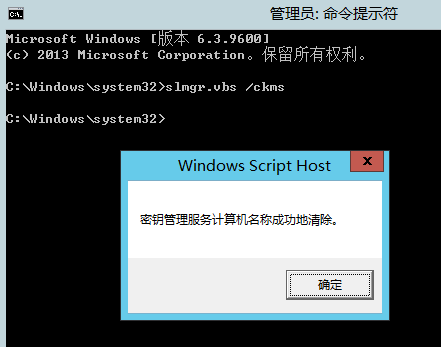
  1. Type slmgr.vbs /ckms in the command prompt to clear the KMS server settings.
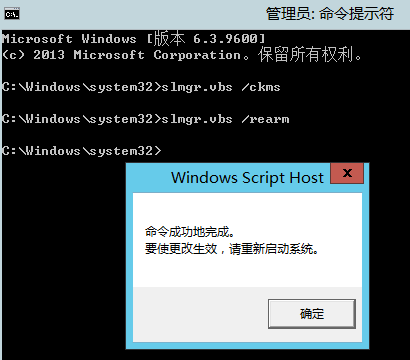
  1. Type slmgr.vbs /rearm in the command prompt to reset the system's activation key status.
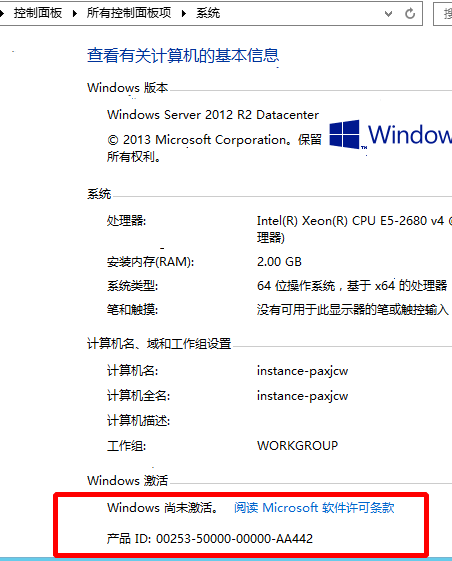
  1. Restart the BCC instance, and the activation status should then appear as expected.
  1. Open the command prompt again with administrator privileges and enter the command slmgr.vbs /skms kms.baidubce.com:1688.
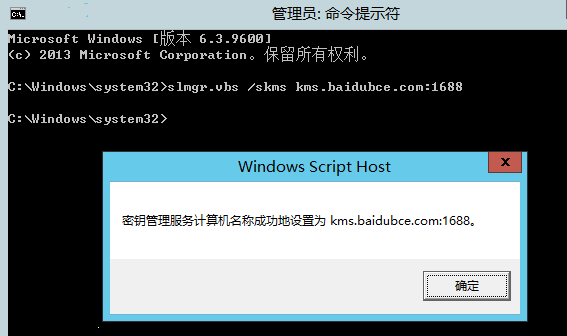
  1. Finally, enter the command slmgr.vbs /ato in the command prompt to complete the activation process.
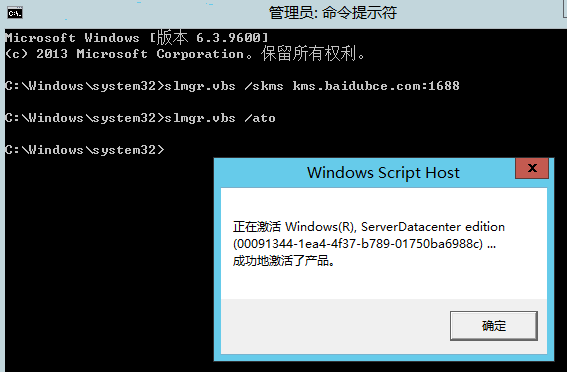
Note:

If activation still fails, refer to [handling of Windows activation failure](#Handling of Windows activation failure) or submit a ticket to contact Baidu AI Cloud customer service staff.

Handling of Windows activation failure

Note:

Certain steps outlined in this document require a basic understanding of the Windows operating system. If you encounter any difficulties, please contact customer service first. Before proceeding, it is strongly advised to create snapshots of both the system disk and the data disk to avoid potential data loss.

Activation failures occur for various reasons. Below summarizes some encountered activation failure scenarios:

  • Communication failure
  • Time and timezone desynchronization
  • Client key error
  • Impact of third-party software
  • Service abnormal

Among the activation failures we encountered, prompts like this frequently appear: Error: [Error Code], on a Computer Running Microsoft Windows Non-core Edition, Run slui.exe 0x2a [Error Code] to Display the Text. This means the running program encounters an activation client error but cannot display the string; running the command is required to obtain readable error information. slui.exe is the Windows activation client primarily used for license activation. Errors with this prompt are mainly caused by license-related issues. In such cases, first open the command line tool CMD, enter the mentioned string, and check the specific error. For example:
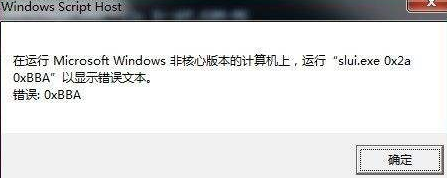
When you enter slui.exe 0x2a 0xBBA in the command prompt, a pop-up window will appear providing detailed and readable descriptions.
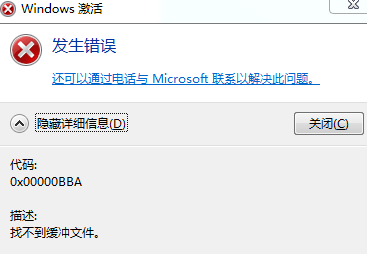
Below, we provide detailed documentation of some commonly encountered activation failure scenarios.

Communication failure

Phenomenon

When a Baidu AI Cloud Windows system is unactivated and encounters error code 0xC004F074 during activation attempts.
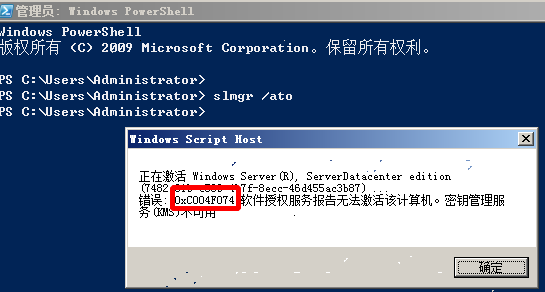
Cause

Baidu AI Cloud Windows activation depends on a KMS server. This error occurs due to connectivity issues between Windows and the KMS server. The KMS server is located within the cloud platform's intranet. Normally, connectivity is stable regardless of whether an EIP is added to Windows.

Solutions

  1. Check if the network interface card is disabled.
  2. Verify if pinging kms.baidubce.com is successful and whether the domain name kms.baidubce.com resolves correctly.
  3. Ensure no software or settings are restricting the port.

    3.1 Verify if the firewall is blocking TCP port 1688 for kms.baidubce.com.

    3.2 Check if IP security group policies are restricting TCP port 1688 for kms.baidubce.com.

    3.3 Confirm whether antivirus or security software is blocking TCP port 1688 for kms.baidubce.com.

  4. Inspect the route configuration by opening CMD with administrator privileges, then run the command route print to check if it's an intranet route.
  5. Check if telnet to kms.baidubce.com is successful.
  6. If no issues are found in the above steps, attempt reactivation by executing the following command in a CMD with administrator permissions. 6.1 slmgr /skms kms.baidubce.com:1688

    6.2 slmgr /ato

    6.3 For more detailed manual activation instructions, refer to Windows Manual Activation System Tutorial.

Time and timezone desynchronization

Phenomenon

When a Baidu AI Cloud Windows system is unactivated and displays error code 0x80072F8F during activation attempts.

Cause

Ensure the Windows system's time and timezone align with the KMS server's settings, as time discrepancies can cause activation issues.

Solutions

  1. Check for significant time deviations in the bottom-right corner of the desktop; if necessary, manually synchronize the system's time and timezone.
  2. Using the command line tool CMD.exe with administrator privileges, enter net start W32Timew32tm /resyn to complete synchronization, then attempt activation again.

Client key error

Phenomenon

Windows indicates the system is unactivated with error code 0xC004F015, or the activation section in system properties shows "Product ID Unavailable.\

Cause

The system reports that the authorized service license is missing, likely because the current system is not recognized by the VLK server. An investigation reveals the activation code used does not match the one provided by VLSC.

Solutions

Reinstall the KMS client key to resolve the issue.

  1. Download the KMS client key from Microsoft [official website] https://technet.microsoft.com/en-us/library/jj612867(v=ws.11).aspx.
    a. Note: Use English document format when accessing the website, as Chinese document is outdated and lacks Windows Server 2016 descriptions. b. Windows 2008 R2 Data Center:74YFP-3QFB3-KQT8W-PMXWJ-7M648。 c. Windows 2012 R2 Data Center:48HP8-DN98B-MYWDG-T2DCC-8W83P。 d. Windows 2016 Data Center: CB7KF-BWN84-R7R2Y-793K2-8XDDG。
  2. Install and reactivate the key using the following two commands. a. slmgr.vbs /ipk [KMS Client Key]。 b. slmgr.vbs /ato。

Impact of third-party software

Phenomenon

Third-party antivirus software or trojans might disrupt system activation. For instance, a service required for activation may be stopped by SafeDog Software, leading to failure. Third-party software may also generate various error codes, with "Access Denied" (error code 0xC0000022) being particularly common.

Solutions

Since third-party software often does not run in safe mode, access safe mode to verify whether activation succeeds. Follow these steps to enter safe mode:

  1. Open the command line and enter msconfig to launch the System Configuration interface.
  2. In the System Configuration window, go to General > Startup Selection, choose Diagnostic Startup, click OK, and restart the computer.
  3. During startup, press F8 to select Safe Mode and proceed with booting.
  4. Once in the OS, open a command line with administrator privileges and execute the command slmgr.vbs /ato for reactivation.

Service abnormal

Phenomenon

Windows activation involves several service programs, such as the Software Protection service, used for activating and verifying digital licenses. When these services encounter exceptions, activation may fail with different error codes, one example being 0x80070002 - "The system cannot find the specified file.\

Cause

If the Software Protection service is experiencing issues, the program sppsvc.exe, which the service uses, may not have started.

Solutions

  1. Restart the Software Protection service: Right-click on Computer, go to Manage > Services > Software Protection, then select Start.
  2. If the Software Protection service fails to start, possible reasons include:

    • If antivirus software is blocking the service, temporarily disable the antivirus software and try activation again.
    • For service configuration errors, the HKEY_LOCAL_MACHINE\SYSTEM\CurrentControlSet\Services\sppsvc registry key requires reconfiguration.

      1. First, back up the registry key by exporting it (e.g., backup.reg).
      2. Export a functional registry key file (e.g., normal.reg) from another system running the same version, then import it into the affected system.
      3. If the import fails, reimport the backup.reg file to the original computer and investigate other possible causes.

Previous
Remote Connection to Windows Unable to Use Clipboard
Next
System Black Screen Handling Method