

Release an instance
If an instance is no longer needed, you can release it.
Prerequisites
Only Postpaid instancesand expired subscribed instances can be released.
Background description
There are various release methods available for both subscription and postpaid instances.
-
Manual release: For expired subscription instances and postpaid instances without outstanding debts, you can manually release them.
Note: Instances with release protection enabled cannot be manually released. Enabling release protection does not affect scheduled releases, releases due to unpaid debts, or those triggered by instance expiration.
- Scheduled release: For postpaid instances, you can schedule an automatic instance release. Before the set time, you can adjust the release schedule or cancel it at any moment.
Note
- During the release process, a verification code is required to confirm the operation.
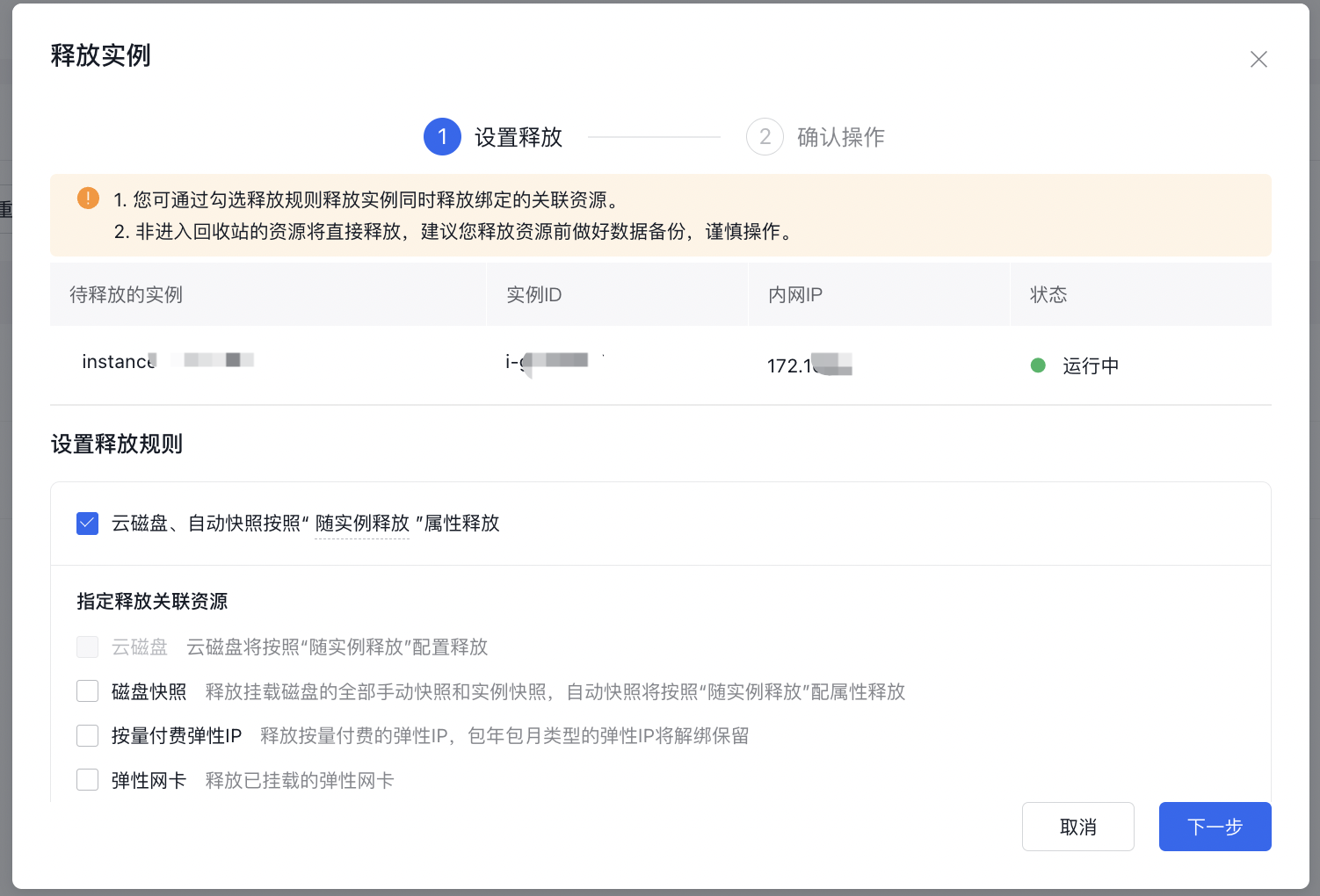
- You can opt to release related resources like pay-as-you-go public IPs, cloud disk servers, and snapshots during the release.
- If you encounter the error message "BCC instances in the recycle bin have reached the quota limit" during release, first delete the released BCC instances in that region's recycle bin before proceeding with other releases. The default quota for BCC instances in the recycle bin is 50.
- Once an instance is released, the attached CDS disk will automatically be detached, but the snapshots based on this CDS disk will be retained.
- After the instance is released, snapshots of the original system disk will be deleted automatically, but custom images created from the original system disk will remain available.
Manual release
- Sign in to BCC Console and enter the Instance List page.
-
Choose the appropriate release method based on your specific requirements.
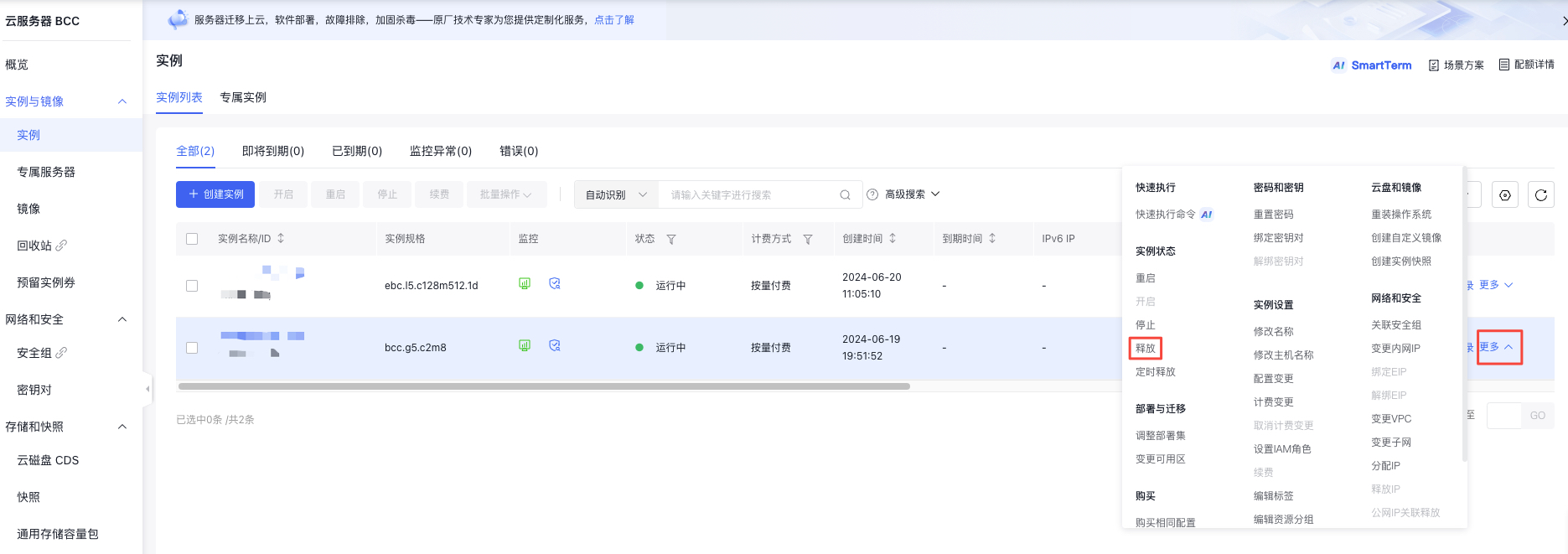
- To release a single instance, select the instance, then click "More - Instance Status - Release" in the right-hand operations menu, as shown in the example.
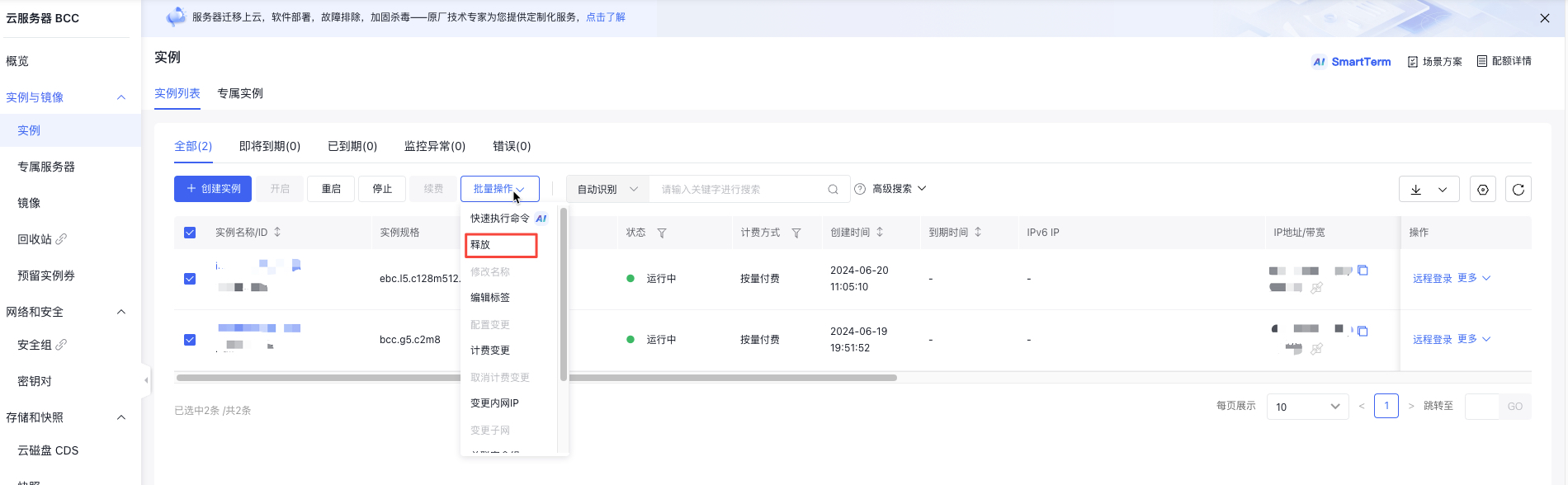
- To release multiple instances, select the instances you want to release, then click on "Batch Operation - Release" at the top of the page, as illustrated in the following figure.
-
In the OK box before release, confirm the instance to be released and select Release Associated Resources and whether to move to the recycle bin as needed, as shown below.
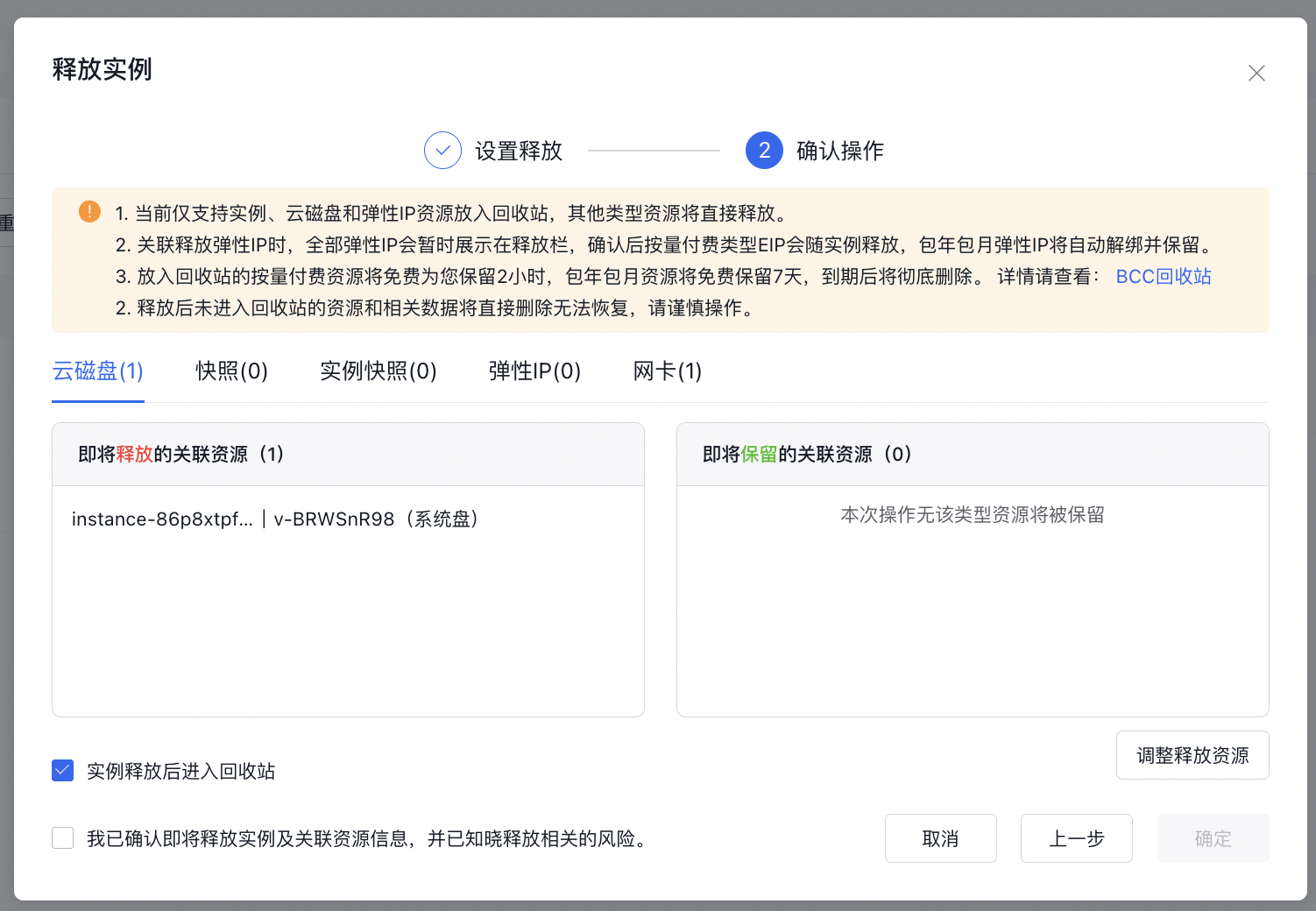
- Send a mobile verification code, click OK, and the instance will be immediately released after completing the security verification.
Scheduled release
- Sign in to BCC Console and enter the Instance List page.
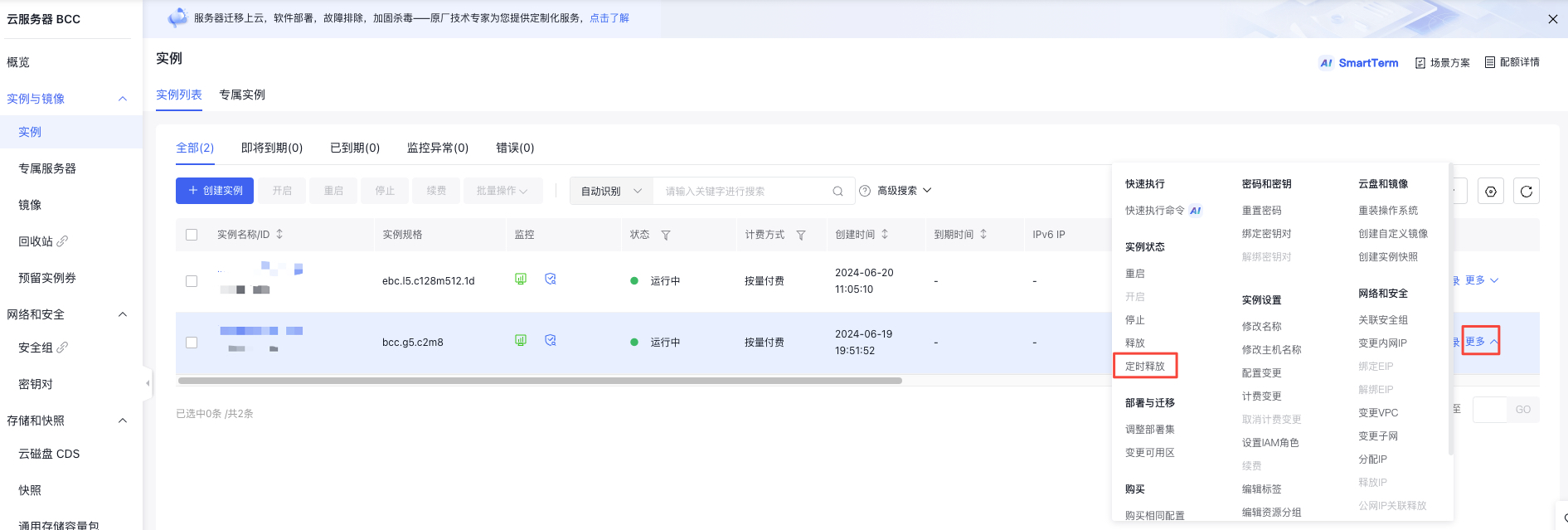
- Select the postpaid instance you want to release, and click "More - Instance Settings - Scheduled Release" in the right operation bar, as shown below.
- In the pop-up Create Release Plan dialog, enable Auto-release Settings, select the precise release time (down to the second) under Auto-release Time item, and click OK, as shown below.
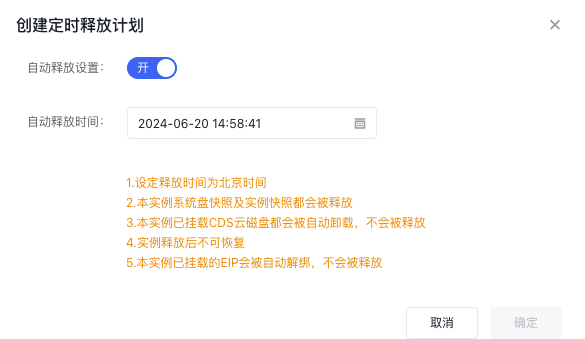
1> **Note: The release time must be at least 5 minutes later than the current time.**- Confirm changes in the Change Confirmation dialog, then click OK.
- Send the mobile verification code, click OK to finish setting the release time.
- After scheduling a release, you can review the set release time by clicking "More - Instance Settings - Scheduled Release" in the right-hand operations menu.
Cancel/Change scheduled release
- Sign in to Baidu Cloud Compute (BCC) Console and enter the Instance List page.
-
Select the pay-as-you-go instance for which you want to change the scheduled release, and click "More - Instance Settings - Scheduled Release" in the right operation bar, as shown below.
-
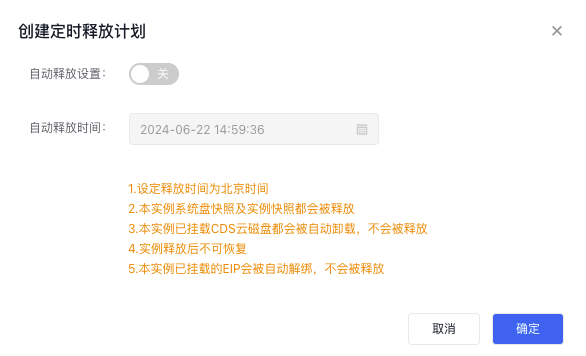
In the pop-up Create Release Plan dialog, select Disable Auto-release or Change Auto-release Time, then click OK, as shown below.
- Confirm changes in the Change Confirmation dialog, then click OK.
- Send the mobile verification code, click OK to finish the Cancellation or Change of the release time.
FAQs
Can the Public IP be released?
Users can release the idle EIP instances to save costs, except in the following three circumstances:
- Subscription EIP instances not expired;
- EIP already bound to BCC or BLB instances;
- EIP suspended due to attacks;
To release a subscription EIP instance that has not expired, submit a financial ticket to request a refund. Whether a refund is granted depends on the resolution of the ticket.
Will custom images and snapshots still exist after BCC is released?
- Custom Images: Once created, custom images will remain available indefinitely unless deleted.
- Snapshots: Snapshots created from the original system disk will be automatically deleted. If snapshots of an attached CDS disk are not released simultaneously, those snapshots will remain.
Release an instance via API
You can release specified instances via the [Release Instance API](BCC/API Reference/Instance Related Interfaces/Release an instance.md).