

Bind SSH Key Pair
Updated at:2025-10-20
An SSH key pair can be specified when creating an instance, or it can be bound after the instance is created. This document explains how to bind an SSH key pair post-creation.
Note
- Only Linux instances are supported.
- A key pair can be associated with multiple instances, but each instance can only have one key pair at a time. If you bind a new key pair to an instance, the previous key pair will be replaced.
- Instances can be bound in batches in both startup or stopped status.Instances can be bound in batches in the power-on and power-off States.When binding at startup, the virtual machine will automatically reboot to take effect; when binding at shutdown, you need to reboot the machine to take effect.
- After successfully binding a key pair, the original password for the virtual machine remains functional.
Operation steps
- Sign in to BCC Console and enter the Instance List page.
- Click Key Pair in the left navigation bar to enter the Key Pair List page.
- Select a region from the top-left dropdown menu in the status bar.
- Select the key pair to be operated, and click Bind Virtual Machine in the rightmost operation column.
-
In the pop-up Bind Virtual Machine dialog, select one or more instances and click OK.
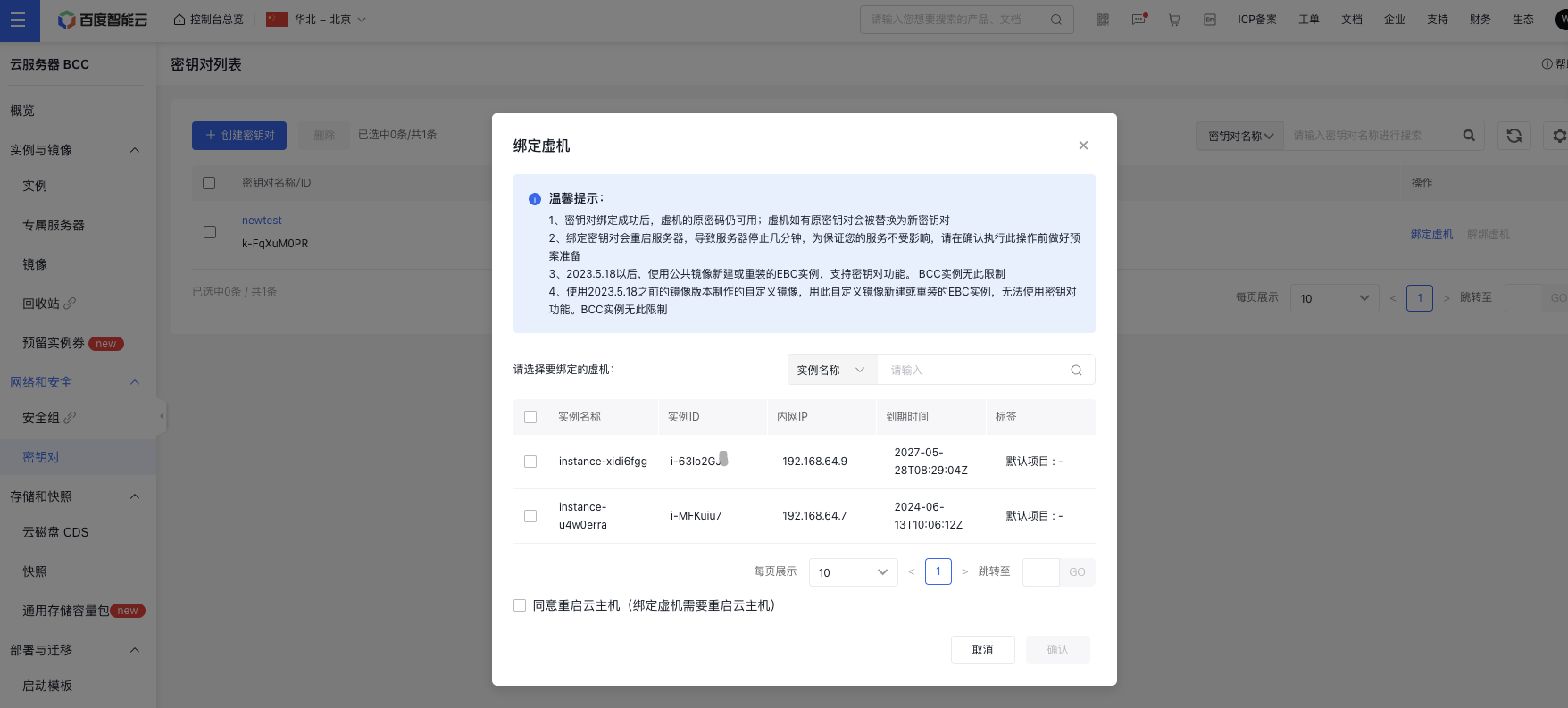
- After successful binding, you can view the count of currently bound virtual machines under Count of Bound Virtual Machines on the Key Pair List page.
Next steps
For how to sign in to a Linux instance using an SSH key pair, please refer to [sign in Linux Instances via SSH Keys](BCC/Operation guide/Instance/Sign in to instance/Log in to Linux Instance/Sign in to Linux instances via SSH key in Putty.md).