

Create Instance via Custom Image
Background
You can use custom images to create Baidu Cloud Compute instances with identical OS, applications, and data, optimizing work or delivery efficiency.
Prerequisites
Custom images must be created in the account and region where the instances will be set up.
If you haven't created a custom image, refer to the following methods:
| Image holding status | Method |
|---|---|
| Holding images on local devices or other platforms | Import custom images from local devices or other platforms into Baidu Cloud Compute. For details, please refer to [Import Custom Images](BCC/Operation guide/Image/Import Custom Image/Import Overview.md). |
| No custom image has been created, but there are instances that can serve as templates | [Create a custom image from an instance](BCC/Operation guide/Image/Create a custom image.md). |
| No custom image has been created, but there are snapshots that can serve as templates | [Create a custom image from a snapshot](CDS/Snapshot Operation Guide/Disk Snapshot/Create a custom image.md). |
| Holding custom images in other regions | Replicate the custom image to the region where the instance will be created. For details, refer to [Cross-region Image Replication](BCC/Operation guide/Image/Cross-Region Image Replication.md). |
| Holding custom images in other accounts | Share the custom images of other accounts to the account needing to create instances. For details, refer to [}Sharing Custom Images](BCC/Operation guide/Image/Share a custom image.md). |
Operation steps
- Sign in to the Baidu Cloud Compute (BCC) Console.
- Select Image in the left navigation bar.
- Find the image to be used and click Create Instance in the operation bar.
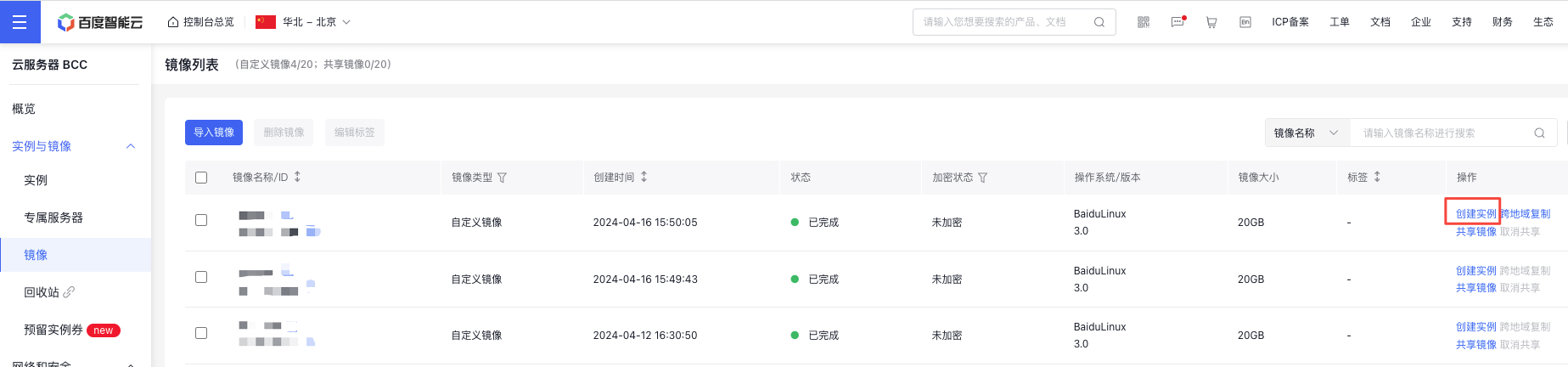
-
Provide the relevant instance details and finalize the instance creation process.
Region and image information have been filled automatically; you can configure other instance details as needed. For configuration descriptions, please refer to [Create Instances via Purchase Page](BCC/Operation guide/Instance/Create instance/Create Instance via Purchase Page.md).
Note: If the selected custom image contains one or more data disk snapshots, the system will automatically generate an equal number of Cloud Disk Servers as data disks based on these snapshots, with each Cloud Disk Server’s capacity matching its corresponding snapshot. You can increase the CDS capacity, but reducing it is not allowed.
FAQs
-
Are there restrictions on package size when Baidu Cloud Compute is created with custom images?
When creating a Baidu Cloud Compute instance using a custom image, there are no restrictions on the new server's parameters (e.g., CPU, memory).
-
Can the system be modified for Baidu Cloud Compute created through a custom image?
Supported. Simply choose Reinstall OS on the instance details page.
Create instances with custom images via API
You can create an instance with custom images via [Create Instance](BCC/API Reference/Instance Related Interfaces/Create instance.md).