

Public commands
Public commands
To help users quickly adopt the cloud assistant and improve O&M efficiency, we provide commonly used commands as public commands. All users can view and use these public commands, which are directly maintained by Baidu AI Cloud and cannot be deleted by users.
Operation step
- Sign in to BCC Console.
- Select the Region at the top of the page, click Cloud Assistant in the left menu bar, then click Public Commands to view all public commands.
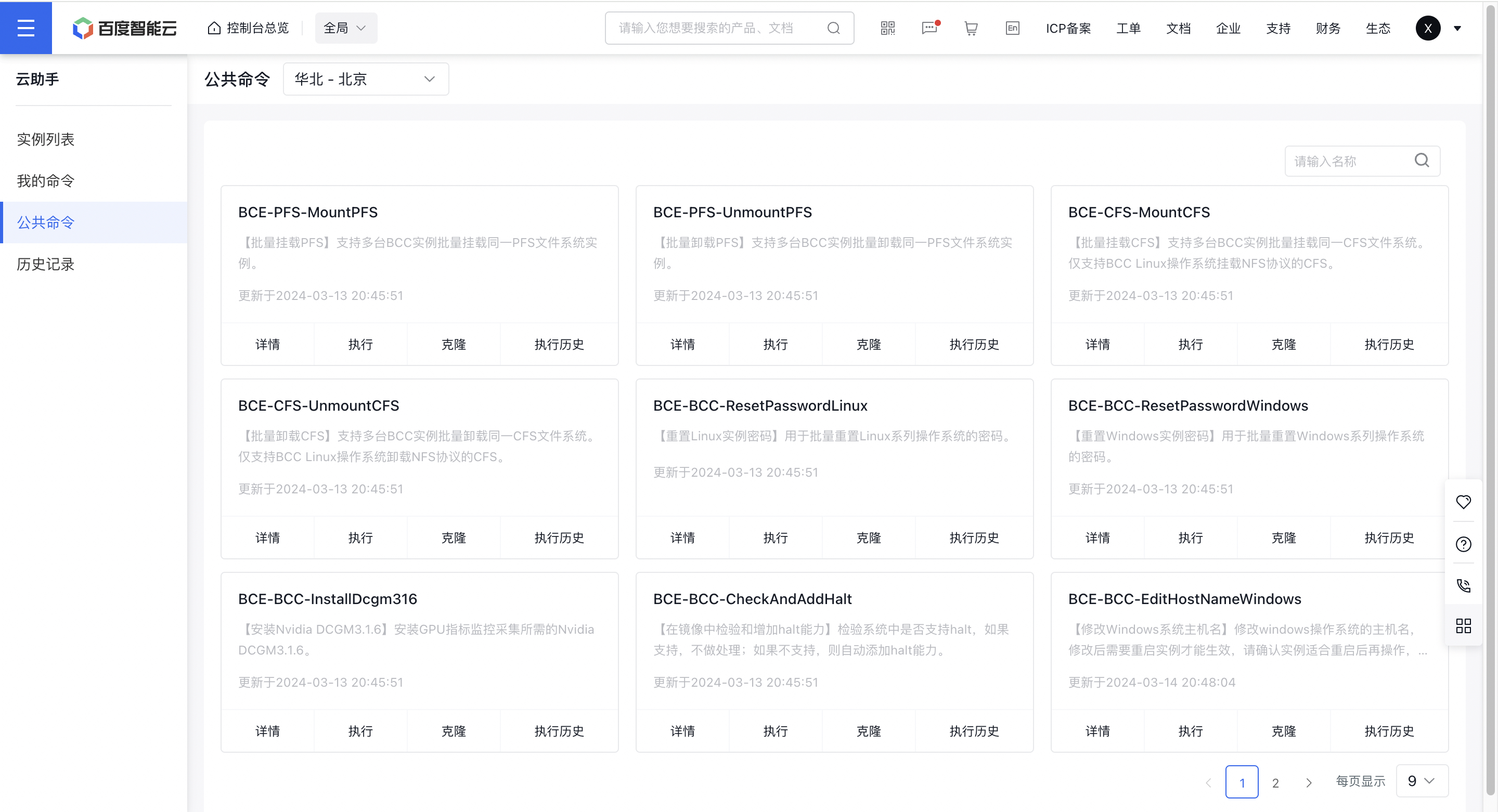
Description:
- Public commands are regularly updated and released.
View Command Details
Users can click the Details button on the command card to view detailed command information on the pop-up Command Details page.
Execution command
Users can click the Execute button on the command card to configure execution settings in the pop-up Execute Command page, and click Execute to proceed. For specific usage methods, please refer to My Commands - Execution section.
Clone Command
Users can click the Clone button on the command card to view and modify command information in the pop-up Clone Command page, and click Clone button to complete cloning. For specific usage methods, please refer to My Commands - Clone section.
Execution History
Users can click the Execution History button on the command card to navigate to the Execution Records page, viewing historical command executions. For specific usage methods, please refer to Historical Recordsection.