

GPU Instance Downtime Troubleshooting
Faults
When using GPU instances based on the Linux system, such as CentOS, where deployed services frequently allocate memory, the instance might crash.
Fault causes
For CentOS and other Linux operating systems with transparent huge pages enabled by default, if your GPU instance runs applications with frequent memory allocation operations, Transparent Huge Pages might continuously perform memory compaction and migration to consolidate huge pages. These operations can overload a CPU with IPI requests for TLB flushes. When excessive flush TLB requests accumulate, the CPU might fail to schedule other processes, potentially causing soft lockups or even system crashes.
Transparent Huge Pages (THP) is a generic Linux kernel feature that automatically merges small pages into larger ones, reducing TLB misses and improving memory access efficiency. However, Transparent Huge Pages can sometimes lead to system lag or crashes in severe cases. You should decide whether to enable or disable it based on your application scenarios.
If the application involves frequent short-lifecycle memory allocation scenarios, such as AI training or PFS, it is recommended to disable Transparent Huge Pages.
Troubleshooting steps
Check whether it is caused by transparent huge pages
Step 1: Sign in to the server
You can use SSH to remotely connect to the server. If remote connection fails, use VNC to log in.
Step 2: View system logs
- Use
cdto navigate to the/var/crashor/home/coresavedirectory. If any directory similar to127.0.0.1-2024-07-23-15:00:45exists, it indicates the kdump service has recorded the information from the crash event. Navigate to this directory to locate thevmcore-dmesg.txtfile:

- Open the
vmcore-dmesg.txtfile. If the exception stack trace contains function calls such asdo_huge_pmd_anonymous_page, it indicates the crash may be caused by ransparent huge pages.
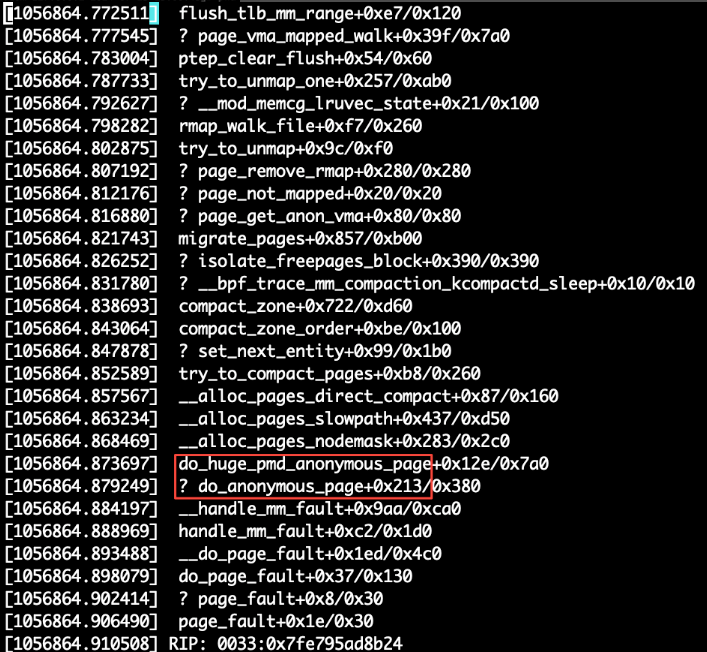
- Use the following command to check whether transparent huge pages are enabled on the current machine:
1cat /sys/kernel/mm/transparent_hugepage/enabledIf the output shows the following, it means Transparent Huge Pages are enabled:

Disable transparent huge pages
You can persistently disable Transparent Huge Pages by running the following command, but this will require a system reboot to take effect.
1sudo grubby --args="transparent_hugepage=never" --update-kernel="/boot/vmlinuz-$(uname -r)"If you prefer not to reboot the system now, you can temporarily disable transparent huge pages by running the following command:
1sudo sh -c 'echo "never" > /sys/kernel/mm/transparent_hugepage/enabled'This will disable Transparent Huge Pages without needing a system reboot. In case of a system reboot, the persistent disable command will take effect and Transparent Huge Pages will remain disabled.

After disabling transparent huge pages, run your application and observe for a period of time to check if crashes still occur. If crashes persist, Submit A Ticket to contact technical personnel for assistance in troubleshooting.