

Create SSH Key Pair
Baidu AI Cloud does not store your private key information. The system allows you to download the private key locally only once during its creation. Be sure to store it securely. This document explains how to generate an SSH key pair through the BCC console.
Note
- After binding a BCC instance to a key pair, you will not be able to access the BCC instance without the corresponding private key.
- You can create up to 500 key pairs per region.
Operation steps
- Sign in to BCC Console and enter the Instance Inventory page.
- Click Key Pair in the left navigation bar to enter the Key Pair List page.
-
On the Key Pair List page, select the target Region and click Create Key Pair.
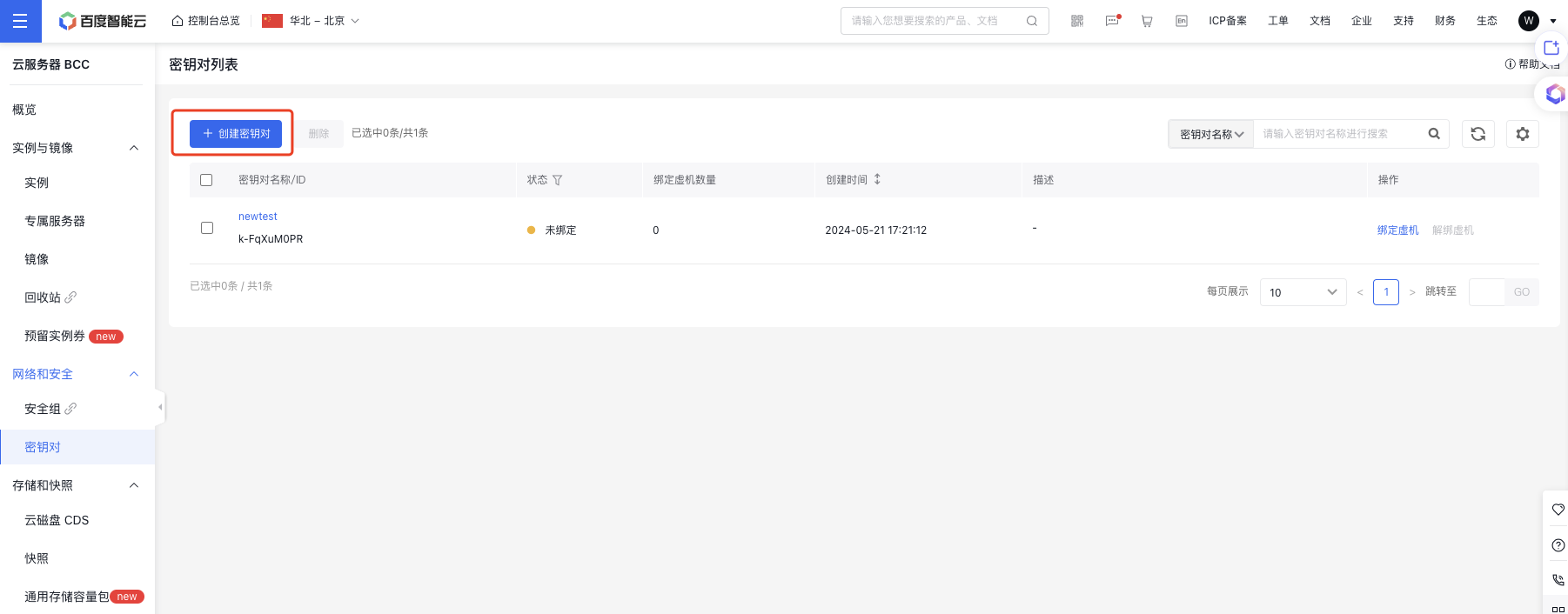
-
On the Create Key Pair page, select the key pair creation method, set the key pair name, and fill in the key pair description information.
- If selecting Create New Key Pair as the creation method, enter the key pair name and description, and then click OK;
- If selecting Use Existing Public Key as the creation method, enter the key pair name and description and the existing public key information, and then click OK;
Note: Baidu AI Cloud does not store your private key information. Upon clicking "OK", the system will automatically download the private key locallySpecial note: If the download is canceled, the private key cannot be retrieved again.
- Once a key pair is successfully created, you can view its details, such as the name, status, number of bound virtual machines, and more, in the Key Pair List.
View key pair details
You can click on the key pair name link to see additional details about the key pair.