

Adjust Deployment Group for Existing Instances
Updated at:2025-10-20
Prerequisites
- You have created at least one BCC instance. For more details, please refer to Create Instance.
- You have created at least one deployment group. For more details, please refer to Create Deployment Group.
- The target instance for deployment group adjustments must be in the Running status.
Note
Adjusting the deployment group for existing instances will trigger an instance restart. Please operate with caution.
Certain BCC instance families with local disks (e.g., local SSD l3d, l5; big data d1, d1s), GPU instances, and EBC bare-metal instances do not support deployment group adjustments.
Operation steps
- Sign in to BCC Console;
- Select an instance in the left navigation bar, and select the target instance region in the upper left corner;
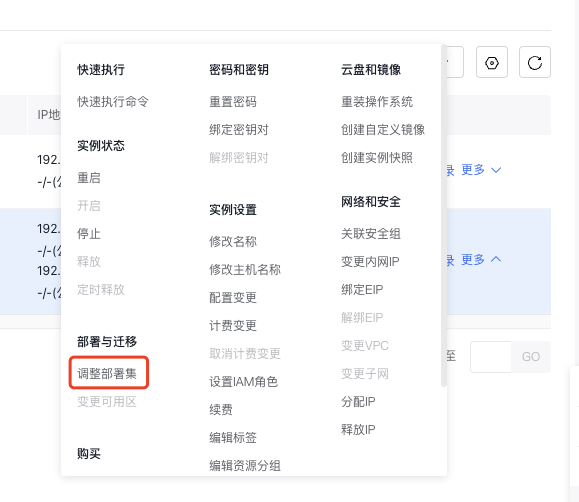
- In the Instance List, click Operation -> More -> Instance Settings -> Adjust Deployment Group for the target instance;
- In the Adjust Deployment Group pop-up box, select the deployment group to be added/removed;
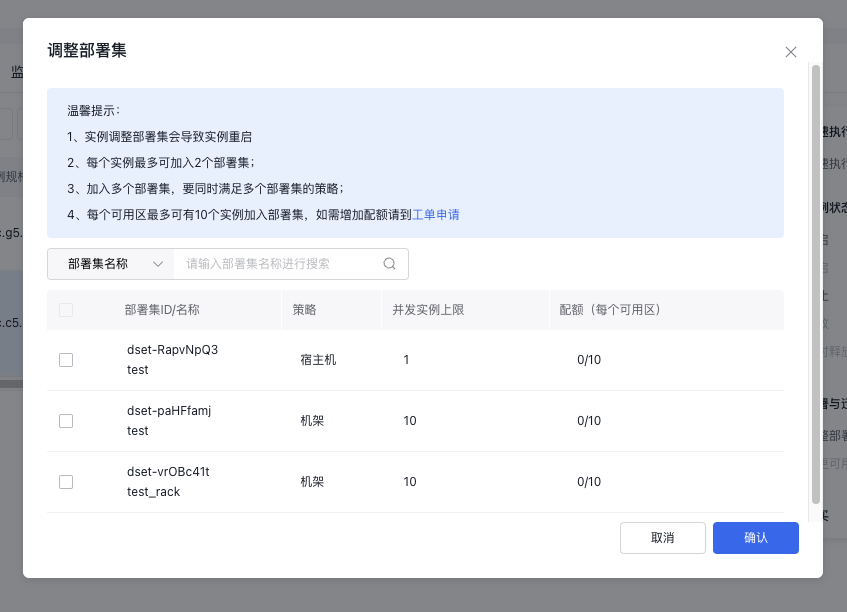
- Click "OK" to complete the process.