

Instructions for use
Create RDMA network-enhanced instance
Refer to Instance Creation Guide to create RDMA network-enhanced instance. For RDMA network-enhanced instance, refer to Instance Specifications.
Create and mount an elastic RDMA interface
Refer to Create Elastic Network Interface. It is noted that you must select the RDMA type for network interface to create an ERI, as shown below. Besides, UDP port 4791 must not be restricted in the security group.
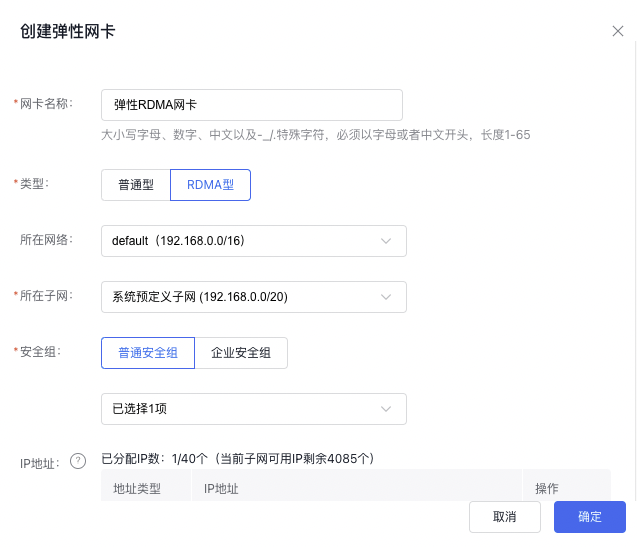
Refer to the Mount Elastic Network Interface instructions to mount ERI to the instance. Elastic RDMA interfaces support mounting to RDMA network-enhanced instances.
Configure elastic RDMA interface
Refer to Configure Elastic Network Interface to set up IP addresses and routing.
Test elastic RDMA interface
Test the ERI performance between two RDMA network-enhanced instances
- Install OFED drivers
Visit the OFED download link to download the OFED version suitable for system environment. We recommend that you download LTS 5.4-3.1.0 version. If using CentOS7u8 or CentOS 8u4, you must download additional dependency packages
CentOS 7u8:
1yum install createrepo
2yum install elfutils-libelf-devel python-devel redhat-rpm-config rpm-build libtool
CentOS 8u4:
1yum install createrepo
2yum install kernel-rpm-macros python36 elfutils-libelf-devel python36-devel gdb-headless rpm-build libtool gcc
After decompressing the driver installation package, execute the following command in the installation directory
1./mlnxofedinstall --without-fw-update --add-kernel-support --skip-distro-check- View information on network interface card device
Use the "show_gids" command to view the GID table for the network interface card and locate the INDEX under the desired ERI device and IP address listed in the VER v2 column.
- RDMA bandwidth of ERI by perftest
In the first instance, ib_write_bw -d mlx5_1 -x 3 -q 16 --report_gbits is used as the server side
As a second example, the command "ib_write_bw -d mlx5_1 -x 3 -q 16 --report_gbits 192.168.0.3" can be executed on the client side. This allows you to view and analyze the bandwidth test results.
Parameter explanation:
-d: Fill in the DEV field in step 2
-x: Fill in the INDEX field in step 2
-Fill in IPv4 address of the server-side ERI in the client side
Monitor elastic RDMA interface
Support monitoring at the granularity of ERI with bound RDMA, including the following metrics:
| Metric name | MetricName |
|---|---|
| Total data received by the port | RdmaPortRcvData |
| Total data transmitted by the port | RdmaPortXmitData |
| Total packets received by the port | RdmaPortRcvPackets |
| Total packets transmitted by the port | RdmaPortXmitPackets |
| Times the port link is closed | RdmaPortLinkDowned |
| Total outbound packets discarded at the port (due to port closure or congestion) | RdmaPortXmitDiscards |