

Subscription to Postpay
Overview
After creating a prepaid instance, you can switch from the prepaid model to postpay based on application requirements, allowing for more flexible and on-demand use of Baidu Cloud Compute instances. When switching to postpay, ensure your account balance is sufficient to avoid disruptions caused by outstanding debts.
Shifting prepay to postpay supports two methods:
- AtOnce Mode: The postpaid pricing model is applied immediately.
- Switch to postpay at the end of the billing cycle: The postpay mode becomes active only after the current prepay cycle concludes.
Prerequisites
- The instance must be in either the Running or Stopped state.
- Expired instances cannot switch to postpay.
- Instances with auto-renewal enabled cannot be transitioned to postpay.
- Switching from prepay to postpay requires the combined total of your account balance and vouchers/cash coupons to exceed RMB 100. If this condition is not met, the order will fail and be canceled.
- Instances with a market image OS type cannot switch to postpay.
Background description
When a prepaid instance is switched to postpay, the BCC instance, system disk, and attached subscription data disks will also switch to postpay. However, the charge type for EIP and public network bandwidth will remain the same.
The refund rules for AtOnce are as follows:
- Refunds are deducted from your credit quota. If the monthly credit quota is exceeded, refunds will be unavailable until it resets on the 1st day of the following month. The credit quota is displayed as points, calculated monthly based on your consumption during the previous month. The exact points are shown on the page.
- Only actual payments are refunded to the original channel. Used vouchers and discount coupons are non-refundable. For the refund calculation formula of shifting from prepay to postpay, please refer to Refund Instructions.
- For renewal orders that have not taken effect, a full refund will be provided. For those already in effect, only a partial refund will be issued.
Operation steps
AtOnce
- Sign in to BCC Console and enter the Instance List page.
-
Choose different operation types according to your needs.
- Single-instance shift: Select the subscribed instance to switch, click "More - Shift Charge" in the right operations menu, as illustrated below.
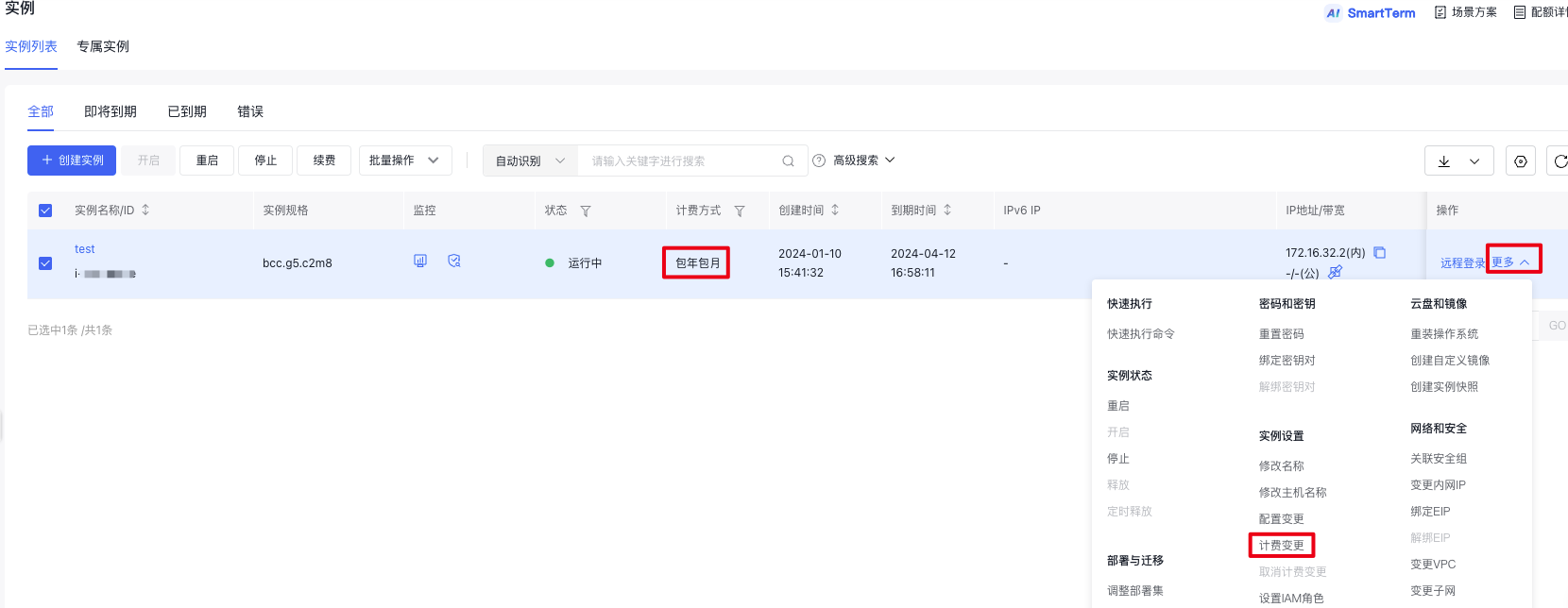
- Batch instance shift: Select multiple subscribed instances to switch, click "Batch Operation - Shift Charge" in the top operations menu, as illustrated below.
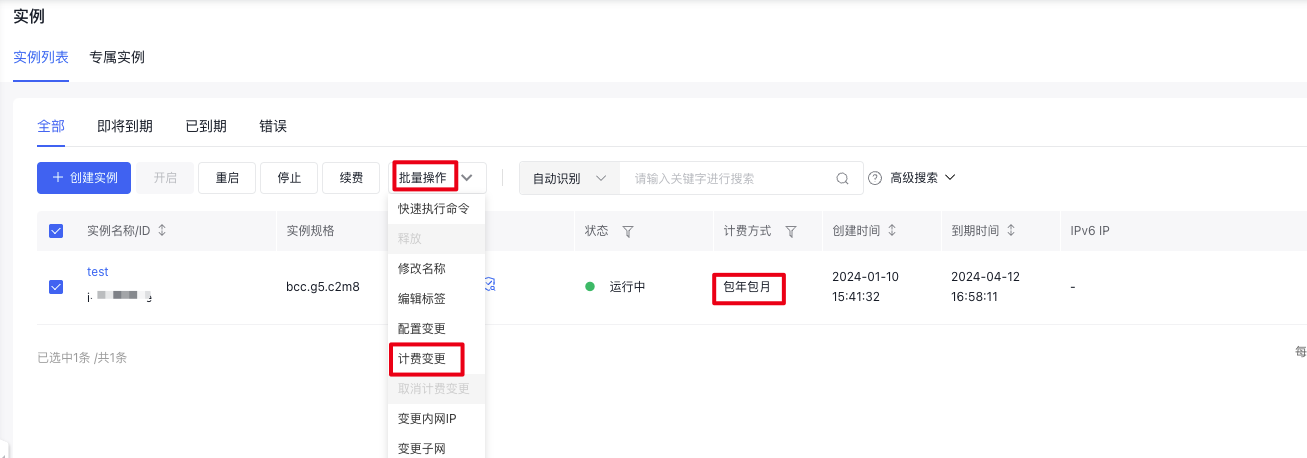
- In the pop-up Shift Charge (Shift to Postpay) dialog, select "AtOnce", verify the refund amount, check "I have read and agree to the Rules of Baidu Cloud Compute (BCC) for Shifting Subscription to Postpay", then click the Confirm Shift button to complete the charge shift of the instance.
Shift to Postpay upon expiration
- Sign in to Baidu Cloud Compute (BCC) Console and enter the Instance List page.
-
Choose different operation types according to your needs.
- Single-instance shift: Select the prepaid instance to switch, click "More - Shift Charge" in the right operations menu, as illustrated below.
- Batch instance shift: Select multiple prepaid instances to switch, click "Batch Operation - Shift Charge" in the top operations menu, as illustrated below.
- In the pop-up Shift Charge (Shift to Postpay) dialog, check "I have read and agree to the Rules of Baidu Cloud Compute (BCC) for Shifting Prepay to Postpay", then click the Confirm Shift button to complete the charge shift of the instance.
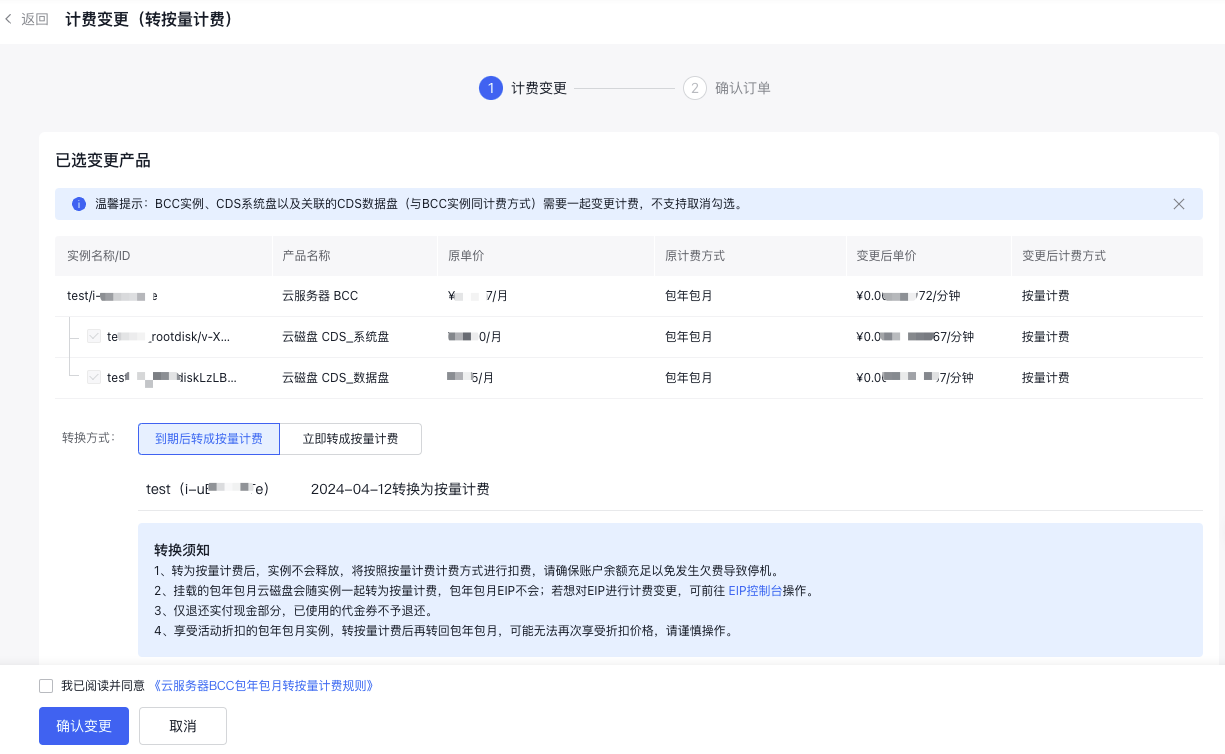
Shift prepay to postpay via API
You can use the Batch Convert to Postpay API to shift one or multiple prepaid instances to postpay charge type.