Detecting Image Using Image Detection Tool

BCC BCC

  • API Reference
    • Appendix
    • Automatic Snapshot Policy Related Interfaces
      • Bind automatic snapshot policy
      • Create automatic snapshot policy
      • Delete automatic snapshot policy
      • Query details of automatic snapshot policy
      • Query the list of automatic snapshot policies
      • Unbind automatic snapshot policy
      • Update automatic snapshot policy
    • Cluster Management Related Interfaces
      • Create EHC Cluster
      • Delete EHC Cluster
      • EHC Cluster List
      • Modify EHC Cluster
    • Common Request Headers and Response Headers
    • Dedicated Cluster Related Interfaces
      • Canceling Dedicated Cluster Auto-Renewal
      • Create a dedicated cluster
      • Dedicated Cluster Renewal
      • Dedicated Cluster Tag Binding
      • Dedicated Cluster Tag Unbinding
      • Enabling Dedicated Cluster Auto-Renewal
      • Querying Dedicated Cluster Details
      • Querying Dedicated Cluster List
      • Resizing Dedicated Cluster
    • Deployment Group Related Interfaces
      • Adjust Deployment Group
      • Create Deployment Group
      • Delete Deployment Group
      • Get Deployment Group Details
      • Modify deployment group
      • Query the deployment group list
      • Remove Instance from Deployment Group
    • Disk Related Interfaces
      • Attach a CDS disk
      • Bind a tag to a disk
      • Cancel Auto-renewal
      • Create a CDS disk
      • Detach a CDS disk
      • Disk Expansion and Type Change
      • Enable auto-renewal
      • Get Purchasable Disk Information
      • Modify disk properties
      • Query CDS Price
      • Query disk details
      • Query the disk list
      • Release a CDS disk (new)
      • Release a CDS disk
      • Rename a disk
      • Renew a disk
      • Roll back disk data
      • Shift charge for disks
      • Unbind a tag from a disk
    • Error response
    • General Description
    • Image Related Interfaces
      • Bind a tag to an image
      • Cancel cross-region replication of custom images
      • Create a custom image
      • Delete a custom image
      • Import an image
      • Modify Custom Image Name
      • Query available public image based on instance specifications
      • Query image details
      • Query List of Users with Shared Image Access
      • Query OS information based on instance IDs in batch
      • Query the image list
      • Replicate a custom image across regions
      • Share a custom image
      • Unbind a tag from an image
      • Unshare a custom image
    • Instance Related Interfaces
      • Add an instance to a security group
      • Add IPv6
      • Batch Adding Secondary IP Addresses for Primary Network Interface Card
      • Batch Convert to Postpay
      • Batch Unsubscribe Prepaid Instances
      • Billing Change - Convert to Subscription
      • Bind a role
      • Bind a tag to an instance
      • Change the instance subnet
      • Change the instance VPC
      • Convert to prepay in batch
      • Create an instance (by specifying instance package specifications)
      • Create automatic renewal rules
      • Create instance
      • Delete automatic renewal rules
      • Delete secondary IP address from the primary network interface card in batch
      • Early Release of Prepaid Instances
      • Enter rescue mode
      • Exit rescue mode
      • Instance Resizing (By Specifying Instance Package Specification)
      • Modify instance attributes
      • Modify instance description
      • Modify instance hostname
      • Modify the instance password
      • Query Instance List by Instance ID
      • Query instance list
      • Query Multiple Instance Details
      • Query recycle bin instance list
      • Query resizing specifications
      • Query the custom data of the instance
      • Query the details of a specified instance
      • Query the list of BCC instances eligible for no charge for stopped instances
      • Query the VNC address of the instance
      • Reboot an instance
      • Reinstall an instance
      • Reinstall OS for Instances (Batch Reinstallation)
      • Release instances in batch
      • Release IPv6
      • Release Postpay Instances (Release via POST Request)
      • Release recycle bin instances
      • Remove an instance from a security group
      • Remove the relationship between an instance and its deployment group
      • Renew an instance
      • Resize instances in batches
      • Resuming Billing for BCC in Recycle Bin
      • Retrieve a list of instance roles
      • Retrieve network interface card information for an instance
      • Set Auto-release of Spot Instance EIP
      • Set Instance Deletion Protection
      • Setting Auto-Release for Postpay
      • Start an instance
      • Starting Instances (Batch Start)
      • Stop an instance
      • Stopping Instances (Batch Stop)
      • Unbind a role
      • Unbind a tag from an instance
    • Key Pair Related Interfaces
      • Bind a key pair
      • Change description of key pair
      • Create a key pair
      • Delete a key pair
      • Import a key pair
      • Query key pair details
      • Query the key pair list
      • Rename a key pair
      • Unbind a key pair
    • Maintenance platform APIs
      • Maintenance Records Related Interfaces
      • Maintenance Task Related Interfaces
      • Pre-authorization Related Interfaces
    • Other APIs
      • Query instance package price
      • Query instance package specifications (new)
      • Querying Availability Zones By Package Specification
    • Overview
    • Region and Availability Zone Related Interfaces
      • Query list of availability zones
      • Retrieve the Domain Name List API
    • Reserved Instance Related Interfaces
      • Accept Reserved Instance Transfer
      • Adjust reserved instance
      • Bind Tag to Reserved Instance
      • Create Auto-renewal Rule for Reserved Instance
      • Create reserved instances
      • Disable Auto-renewal Rule for Reserved Instance
      • Initiate Reserved Instance Transfer
      • Query Reserved Instance
      • Reject Reserved Instance Transfer
      • Renew reserved instances
      • Reserved Instance Inbound List
      • Reserved Instance Outbound List
      • Revoke Reserved Instance Transfer
      • Unbind Tag from Reserved Instance
    • Security Group Related Interfaces
      • Authorize security group rules
      • Create a security group
      • Delete a security group
      • Delete security group rules
      • Instance associating with security group
      • Query the security group list
      • Replace security group for instance
      • Revoke security group rules
      • Unbind security group from instance
      • Update security group rules
    • Service domain
    • Snapshot Related Interfaces
      • Bind a tag to a snapshot chain
      • Create a snapshot
      • Delete a snapshot
      • Query snapshot chain list
      • Query snapshot details
      • Query the snapshot list
      • Replicate a snapshot across regions
      • Unbind a tag from a snapshot chain
    • Spot Instance Related Interfaces
      • Cancel Spot Instance Order
      • Create spot instances
      • Query Spot Instance Packages
      • Query Spot Price
  • Cloud Assistant API and SDK Reference
    • Python SDK
      • Batch Retrieval of bsm-agent State within Instances
      • CaClient
      • Command Interface
      • Historical records
      • Initialization
      • Install SDK
      • Log API
  • Cloud Assistant API Reference
    • Batch Retrieve Instance BSM-Agent Status
    • Command Interface
    • Common Request and Response Headers
    • Error response
    • General Description
    • Historical records
    • Log API
    • Service domain
  • FAQs
    • Billing class
    • Common Questions Overview
    • Images
    • Instances
    • Network class
    • Performance
    • Reserved Instance
    • Security class
    • Snapshots
    • Storage class
    • Virtual machine operation and maintenance class
  • Fault handling
    • GPU Instance Downtime Troubleshooting
    • Linux Baidu Cloud Compute Entering Single User Mode to Reset Paasword Reports Error-Authentication token lock busy
    • Linux Baidu Cloud Compute Entering Single User Mode to Reset Paasword Reports Error-Authentication token manipulation error
    • Linux Baidu Cloud Compute Entering Single User Mode to Reset Root Paasword
    • Linux Baidu Cloud Compute Execution Yum Update Reports Dependency Conflict
    • Linux Baidu Cloud Compute Setting Login Method
    • Unable to Remotely Connect to Linux Instance
    • Unable to Remotely Connect to Windows Instance
    • Windows Server Cannot Ping
  • Function Release Records
  • Go-SDK
    • Automatic snapshot policy
    • Availability zone
    • Dedicated CDS Cluster
    • Deployment group
    • Disk
    • Elastic high-performance computing cluster
    • Image
    • Initialization
    • Instance
    • Key pair
    • Overview
    • Region
    • Reserved Instance
    • Security group
    • Snapshot
  • Java-SDK
    • Automatic snapshot policy
    • Availability zone
    • BCC instance
    • BccClient
    • Deployment group
    • Disk
    • Exception handling
    • Image
    • Install the SDK Package
    • Key pair
    • Log
    • Overview
    • Quick Start
    • Region
    • Reserved Instance
    • Security group
    • Snapshot
    • Version Change Records
  • Operation guide
    • Deployment group
      • Adjust Deployment Group for Existing Instances
      • Create BCC Instance within Deployment Group
      • Create Deployment Group
      • Delete Deployment Group
      • Modify Deployment Group Information
      • Overview of deployment policy
      • Remove BCC Instance from Deployment Group
    • Elastic high-performance computing cluster
      • Create Elastic High-performance Computing Cluster
      • Overview of elastic hyper-computing cluster
    • Image
      • Baidu AI Cloud Image Service Agreement
      • Create a custom image
      • Creating Linux Image Based on Local System
      • Cross-region image replication
      • Data and Personal Information Protection Statement
      • Delete a custom image
      • How to Set Network Adapter Multi-Queue Properties
      • Image List
      • Image Overview
      • Image Quick Guide
      • Import Custom Image
        • Checking Network Configuration
        • Checking Virtio Driver
        • Creating Instance Using Imported Custom Image
        • Detecting Image Using Image Detection Tool
        • Image format check
        • Image Format Conversion
        • Image Import Restrictions
        • Import Overview
        • Install cloudbase-init
        • Installing Virtio Driver
        • System Optimization Operations (Linux)
      • OS Official End of Maintenance Plan
      • Public Image Release Records
        • 2023 BCC Public Image Release Records
        • 2023 EBC Public Image Release Records
        • 2024 BCC Public Image Release Records
        • 2024 EBC Public Image Release Records
        • 2025 BCC Public Image Release Records
      • Reinstall OS
      • Share a custom image
      • Windows Image Creation
    • Instance
      • Batch Sequential Naming
      • Change Availability Zone
      • Change Charge Type
        • Postpay to Subscription
        • Subscription to Postpay
      • Change Instance Configuration
      • Create instance
        • Create Instance Navigation
        • Create Instance via Custom Image
        • Create Instance via Purchase Page
        • Create Instances with Launch Templates
        • Purchase Instance with Same Configuration
      • Cross-AZ migration
      • Functional restrictions
      • Instance Overview
      • Modify instance name
      • Postpay Instance No Charge for Stopped Instances
      • Reboot an instance
      • Reclaim instance
      • Release an instance
      • Renew an instance
      • Reset password
      • Set IAM Role
      • Sign in to instance
        • Log in to Linux Instance
          • Connect to Baidu Cloud Compute Using SmartTerm
          • Connect to Linux instance using user name-password certification
          • Log in to Linux Instance Using SSH Key on Linux or Mac
          • Log in to Linux Instance Using SSH Key via SecureCRT
          • Remotely sign in to Baidu Cloud Computer via VNC
          • Sign in to Linux instances via SSH key in Putty
          • Sign in to Linux instances via SSH key in Xshell
        • Log in to Windows Instance
          • Remotely sign in to Baidu Cloud Computer via VNC
          • Sign in to Windows instance via remote desktop
        • Login Method Overview
      • Spot instances
        • Create spot instances
        • What Is Spot Instance
      • Start an instance
      • Stop an instance
        • Elastic Baremetal Instance and Elastic High-performance Computing Cluster Instance Halt Capability Configuration Instructions
        • Stop an instance
      • View instance
    • Launch Template
    • Network
      • Bind and Unbind EIP
      • Change Internal IP
      • Change subnet
      • Change VPC
      • Configure Dual Network Interface Card External Network Access for Windows Baidu Cloud Compute
      • Configure IPv6 Address
      • Elastic network interface
        • Configure elastic network interface
        • Create elastic network interface
        • Elastic Network Interface Overview
        • Mount elastic network interface
      • Elastic RDMA Network Interface
        • Elastic RDMA Network Interface Overview
        • Instructions for use
    • Operations and Monitor
      • Cloud Assistant
        • Cloud Assistant Overview
        • Cloud Assistant Usage Notes
        • Create command
        • FAQs
        • Historical records
        • Identity and access management
        • Instance list
        • My commands
        • Public commands
        • Upload files
      • Evacuate Faulty Instance
      • Instance Health Check
      • Maintenance Platform
        • Maintenance Platform Access Instructions
        • Maintenance Platform Overview
        • Maintenance Records Query
        • Maintenance Task
        • Pre-authorization Rule Settings
      • Monitor and Alarm
      • Self-Service Diagnostic Tool
        • Application Performance Diagnostic Tool Btune
        • Self-Service Diagnostic Tool Overview
      • Use Rescue Mode
    • Reserved Instance
      • FAQ
      • Introduction to reserved instance
      • Renew reserved instances
      • Reserved Instance AZ Change
      • Reserved Instance Cross-Account Transfer
      • Reserved Instance EHC Cluster Change
      • Reserved Instance Purchase
    • Resource Assessment
    • Security
      • Identity and access management
        • Identity and access management
        • Price Permission Control
      • Key pair
        • Bind SSH Key Pair
        • Create SSH Key Pair
        • Delete SSH Key Pair
        • SSH Key Pair Overview
        • Unbind SSH Key Pair
      • Security group
        • Associate with security group
        • Copy security group
        • Create a security group
        • Delete a security group
        • Disassociate security group
        • Edit security group
        • Security group overview
    • Server Migration
      • Migration Operation Steps
      • Server Migration Operation Process
      • Server Migration Overview
    • Snapshot
      • Automatic snapshot
      • Create disk snapshot
      • Delete a snapshot
      • Rollback snapshot
      • Snapshot Overview
    • Storage
      • Overview
      • System disk expansion
    • Tag Management
      • Configure Tag
      • Tag Management Overview
      • View Resource Bill Based on Tag
  • Operations Reference
    • Linux Operations Reference
      • Baidu Cloud Compute Delete or Modify File Prompting File System Read-Only
      • CentOS 7 Install Docker
      • Configure Linux Analysis Tools atop and kdump
      • Enter Single User Mode
        • CentOS 6 Enter Single User
        • CentOS 7 Enter Single User
        • CentOS 8 Enter Single User
        • FreeBSD 11 Single User Modify Password SOP
        • opensuse42
          • 3 Enter Single User
        • Ubuntu Enter Single User
        • OpenSUSE 42_3 Enter Single User
      • How to Enable or Disable Intel CPU Vulnerability Patch in Linux Image
      • How to Handle System Boot Exception Caused by fstab Configuration
      • How to Resolve Unable to Log in to Linux BCC Instance via SSH
      • Linux BCC Instance Insufficient Space Issue Resolution
      • Linux BCC Instance Lagging Issue
      • Linux Format and Mount Instance Mount Local Disk
      • Linux Modify Default Remote Connection Port
      • Linux Server CPU and Memory Full Issue Troubleshooting
      • Linux System Install Graphical Interface and Remote Connection
        • CentOS
          • CentOS 8 Install Graphical Interface and Connect Using VNC Viewer
          • CentOS6
            • 5 Install KDE Desktop Graphical Interface and Connect Using VNC Viewer
          • CentOS7
            • 2 Install GNOME Graphical Interface and Connect Using VNC Viewer
          • Install GNOME GUI on CentOS 7_2 and Connect via VNC Viewer
          • Install GUI on CentOS 8 and Connect via VNC Viewer
          • Install KDE Desktop GUI on CentOS 6_5 and Connect via VNC Viewer
        • opensuse
          • opensuse42
            • 3 Install Graphical Interface and Connect Using VNC Viewer
          • Install GUI on OpenSUSE 42_3 and Connect via VNC Viewer
        • Ubuntu
          • Ubuntu14
            • 04 Install Graphical Interface and Connect Using VNC Viewer
          • Ubuntu18
            • 04 Install Graphical Interface and Connect Using VNC Viewer
          • Install GUI on Ubuntu 14_04 and Connect via VNC Viewer
          • Install GUI on Ubuntu 18_04 and Connect via VNC Viewer
      • Performance test
        • Linux CPU Performance Test
        • Linux Disk IO Performance Test
        • Linux Network Performance Test
      • Ubunut16_04 Subscription Extended Security Maintenance (ESM)
    • Server configuration
      • Debian 9 Software Source Configuration Update
      • Linux PIP Configuration with Baidu Source
      • Online Instance with OFED Driver Kernel Replacement Solution
      • Windows PIP Configuration with Baidu Source
    • Windows Operations Reference
      • Blue Screen Crash General Handling Method
      • Configure Multi-User Access to Windows Server
      • Connecting to Windows Server Using Xshell
      • Data Disk Not Displayed After Server Reboot
      • Desktop and Application Color Turning Black Handling Method
      • Local Playback of Sound from Windows Server
      • Performance Resources
      • Remote Connection to Windows Unable to Use Clipboard
      • System Activation
      • System Black Screen Handling Method
      • Tutorial on Disabling Windows Firewall
      • Windows Allow Single User to Connect Multiple Sessions Method
      • Windows automatic update-related configuration
      • Windows BCC Instance Achieve SID Uniqueness After Joining Domain
      • Windows BCC Instance Lagging Issue
      • Windows CPU and Memory Full Troubleshooting Steps
      • Windows Delete Hardware Reserved Memory
      • Windows Instance Disk Space Insufficient Cleanup Tutorial
      • Windows Modify Default Remote Connection Port
      • Windows Quick Login
      • Windows Server Disable IE Enhanced Security Configuration Tutorial
      • Windows Set Only Allow Local & Fixed IP Access Remote Port
      • Windows Virtual Machine Auto Login Failure Handling Method
  • Product Description
    • Application scenarios
    • Correspondence Between Original and New Model Names
    • Discontinued Instance Specifications
    • Models and Their Regions
    • Product advantages
    • Usage restrictions
    • What Is Baidu Cloud Compute BCC
    • Instance specification
  • Product pricing
    • Billing overview
    • Charge type
      • Postpay Pricing
      • Reserved instances
      • Subscription (Prepay) Pricing
      • Reserved Instance
    • Refund policy
  • Python-SDK
    • BccClient
    • Disk
    • Image
    • Initialization
    • Install the SDK Package
    • Instance
    • Overview
    • Region
    • Reserved Instance
    • Security group
    • Snapshot
    • Version Change Records
  • Python3-SDK
    • Automatic snapshot policy
    • BccClient
    • Dedicated CDS Cluster
    • Deployment group
    • Disk
    • Image
    • Initialization
    • Install the SDK Package
    • Instance
    • Key pair
    • Overview
    • Region
    • Reserved Instance
    • Security group
    • Snapshot
  • Quick Start
    • Baidu Cloud Compute Security Description
    • Quick Configuration of Linux Baidu Cloud Compute
    • Quick Configuration of Windows Baidu Cloud Compute
  • Resources
    • Baidu AI Cloud Image Service Agreement
    • Image Quick Guide
  • Service Level Agreement (SLA)
    • Baidu Intelligent Cloud Baidu Cloud Compute Trusted Cloud
    • BCC Service Level Agreement SLA (V3_0)
  • Tag Service API Reference
    • Appendix 1
    • Domain name
    • General Description
    • Interface List
      • Create tag
      • Delete tag
      • Tag List
      • View resources bound to a tag
    • Introduction
  • Transfer
    • Site Offline Migration Solution
    • Site Smooth Migration Solution
  • Typical Practices
    • Connecting to Windows Server Using Xshell
    • Environment Setup
      • Manual Deployment of SQL Server 2008 R2 Express Edition
      • One-Click Setup for Linux Palworld Server
      • One-Click Setup for Windows Palworld Server
      • Set Up FTP Service on Linux
      • Setting Up Baota on Linux
      • Setting Up Baota on Windows
      • Tutorial on Setting Up IIS and FTP on Windows
      • Typical Practice for Setting Up Access VPN
      • Installing MySQL 8_0 Using Yum on CentOS 7 yum
    • Set Up FTP Service on Linux
    • Tag Management Practice
    • Tutorial on Disabling IE Enhanced Security Configuration on Windows Server 2008
    • Tutorial on Disabling Windows Firewall
    • Website Building Tutorial
      • Building a Website Using IIS Service on Windows 2008 and Windows 2012
      • Deploy SSL Certificate on Baidu Cloud Compute - Apache
      • Deploy SSL Certificate on Baidu Cloud Compute - IIS
      • Deploy SSL Certificate on Baidu Cloud Compute - Nginx
      • Deploy SSL Certificate on Baidu Cloud Compute - Tomcat
      • Installing and Configuring Apache Environment on Windows
      • Installing and Configuring Nginx Environment on Windows
      • CentOS-7_2 LNMP Environment Deployment
      • Deploy LAMP Environment on CentOS-7_2
  • Video Zone
    • Fault handling
    • Operation guide
      • Basic Functions
      • Environment Setup
      • Network Related
      • Operations Reference
      • Paasword Function
    • Operation guide
    • Product introduction
All documents
menu
No results found, please re-enter

BCC BCC

  • API Reference
    • Appendix
    • Automatic Snapshot Policy Related Interfaces
      • Bind automatic snapshot policy
      • Create automatic snapshot policy
      • Delete automatic snapshot policy
      • Query details of automatic snapshot policy
      • Query the list of automatic snapshot policies
      • Unbind automatic snapshot policy
      • Update automatic snapshot policy
    • Cluster Management Related Interfaces
      • Create EHC Cluster
      • Delete EHC Cluster
      • EHC Cluster List
      • Modify EHC Cluster
    • Common Request Headers and Response Headers
    • Dedicated Cluster Related Interfaces
      • Canceling Dedicated Cluster Auto-Renewal
      • Create a dedicated cluster
      • Dedicated Cluster Renewal
      • Dedicated Cluster Tag Binding
      • Dedicated Cluster Tag Unbinding
      • Enabling Dedicated Cluster Auto-Renewal
      • Querying Dedicated Cluster Details
      • Querying Dedicated Cluster List
      • Resizing Dedicated Cluster
    • Deployment Group Related Interfaces
      • Adjust Deployment Group
      • Create Deployment Group
      • Delete Deployment Group
      • Get Deployment Group Details
      • Modify deployment group
      • Query the deployment group list
      • Remove Instance from Deployment Group
    • Disk Related Interfaces
      • Attach a CDS disk
      • Bind a tag to a disk
      • Cancel Auto-renewal
      • Create a CDS disk
      • Detach a CDS disk
      • Disk Expansion and Type Change
      • Enable auto-renewal
      • Get Purchasable Disk Information
      • Modify disk properties
      • Query CDS Price
      • Query disk details
      • Query the disk list
      • Release a CDS disk (new)
      • Release a CDS disk
      • Rename a disk
      • Renew a disk
      • Roll back disk data
      • Shift charge for disks
      • Unbind a tag from a disk
    • Error response
    • General Description
    • Image Related Interfaces
      • Bind a tag to an image
      • Cancel cross-region replication of custom images
      • Create a custom image
      • Delete a custom image
      • Import an image
      • Modify Custom Image Name
      • Query available public image based on instance specifications
      • Query image details
      • Query List of Users with Shared Image Access
      • Query OS information based on instance IDs in batch
      • Query the image list
      • Replicate a custom image across regions
      • Share a custom image
      • Unbind a tag from an image
      • Unshare a custom image
    • Instance Related Interfaces
      • Add an instance to a security group
      • Add IPv6
      • Batch Adding Secondary IP Addresses for Primary Network Interface Card
      • Batch Convert to Postpay
      • Batch Unsubscribe Prepaid Instances
      • Billing Change - Convert to Subscription
      • Bind a role
      • Bind a tag to an instance
      • Change the instance subnet
      • Change the instance VPC
      • Convert to prepay in batch
      • Create an instance (by specifying instance package specifications)
      • Create automatic renewal rules
      • Create instance
      • Delete automatic renewal rules
      • Delete secondary IP address from the primary network interface card in batch
      • Early Release of Prepaid Instances
      • Enter rescue mode
      • Exit rescue mode
      • Instance Resizing (By Specifying Instance Package Specification)
      • Modify instance attributes
      • Modify instance description
      • Modify instance hostname
      • Modify the instance password
      • Query Instance List by Instance ID
      • Query instance list
      • Query Multiple Instance Details
      • Query recycle bin instance list
      • Query resizing specifications
      • Query the custom data of the instance
      • Query the details of a specified instance
      • Query the list of BCC instances eligible for no charge for stopped instances
      • Query the VNC address of the instance
      • Reboot an instance
      • Reinstall an instance
      • Reinstall OS for Instances (Batch Reinstallation)
      • Release instances in batch
      • Release IPv6
      • Release Postpay Instances (Release via POST Request)
      • Release recycle bin instances
      • Remove an instance from a security group
      • Remove the relationship between an instance and its deployment group
      • Renew an instance
      • Resize instances in batches
      • Resuming Billing for BCC in Recycle Bin
      • Retrieve a list of instance roles
      • Retrieve network interface card information for an instance
      • Set Auto-release of Spot Instance EIP
      • Set Instance Deletion Protection
      • Setting Auto-Release for Postpay
      • Start an instance
      • Starting Instances (Batch Start)
      • Stop an instance
      • Stopping Instances (Batch Stop)
      • Unbind a role
      • Unbind a tag from an instance
    • Key Pair Related Interfaces
      • Bind a key pair
      • Change description of key pair
      • Create a key pair
      • Delete a key pair
      • Import a key pair
      • Query key pair details
      • Query the key pair list
      • Rename a key pair
      • Unbind a key pair
    • Maintenance platform APIs
      • Maintenance Records Related Interfaces
      • Maintenance Task Related Interfaces
      • Pre-authorization Related Interfaces
    • Other APIs
      • Query instance package price
      • Query instance package specifications (new)
      • Querying Availability Zones By Package Specification
    • Overview
    • Region and Availability Zone Related Interfaces
      • Query list of availability zones
      • Retrieve the Domain Name List API
    • Reserved Instance Related Interfaces
      • Accept Reserved Instance Transfer
      • Adjust reserved instance
      • Bind Tag to Reserved Instance
      • Create Auto-renewal Rule for Reserved Instance
      • Create reserved instances
      • Disable Auto-renewal Rule for Reserved Instance
      • Initiate Reserved Instance Transfer
      • Query Reserved Instance
      • Reject Reserved Instance Transfer
      • Renew reserved instances
      • Reserved Instance Inbound List
      • Reserved Instance Outbound List
      • Revoke Reserved Instance Transfer
      • Unbind Tag from Reserved Instance
    • Security Group Related Interfaces
      • Authorize security group rules
      • Create a security group
      • Delete a security group
      • Delete security group rules
      • Instance associating with security group
      • Query the security group list
      • Replace security group for instance
      • Revoke security group rules
      • Unbind security group from instance
      • Update security group rules
    • Service domain
    • Snapshot Related Interfaces
      • Bind a tag to a snapshot chain
      • Create a snapshot
      • Delete a snapshot
      • Query snapshot chain list
      • Query snapshot details
      • Query the snapshot list
      • Replicate a snapshot across regions
      • Unbind a tag from a snapshot chain
    • Spot Instance Related Interfaces
      • Cancel Spot Instance Order
      • Create spot instances
      • Query Spot Instance Packages
      • Query Spot Price
  • Cloud Assistant API and SDK Reference
    • Python SDK
      • Batch Retrieval of bsm-agent State within Instances
      • CaClient
      • Command Interface
      • Historical records
      • Initialization
      • Install SDK
      • Log API
  • Cloud Assistant API Reference
    • Batch Retrieve Instance BSM-Agent Status
    • Command Interface
    • Common Request and Response Headers
    • Error response
    • General Description
    • Historical records
    • Log API
    • Service domain
  • FAQs
    • Billing class
    • Common Questions Overview
    • Images
    • Instances
    • Network class
    • Performance
    • Reserved Instance
    • Security class
    • Snapshots
    • Storage class
    • Virtual machine operation and maintenance class
  • Fault handling
    • GPU Instance Downtime Troubleshooting
    • Linux Baidu Cloud Compute Entering Single User Mode to Reset Paasword Reports Error-Authentication token lock busy
    • Linux Baidu Cloud Compute Entering Single User Mode to Reset Paasword Reports Error-Authentication token manipulation error
    • Linux Baidu Cloud Compute Entering Single User Mode to Reset Root Paasword
    • Linux Baidu Cloud Compute Execution Yum Update Reports Dependency Conflict
    • Linux Baidu Cloud Compute Setting Login Method
    • Unable to Remotely Connect to Linux Instance
    • Unable to Remotely Connect to Windows Instance
    • Windows Server Cannot Ping
  • Function Release Records
  • Go-SDK
    • Automatic snapshot policy
    • Availability zone
    • Dedicated CDS Cluster
    • Deployment group
    • Disk
    • Elastic high-performance computing cluster
    • Image
    • Initialization
    • Instance
    • Key pair
    • Overview
    • Region
    • Reserved Instance
    • Security group
    • Snapshot
  • Java-SDK
    • Automatic snapshot policy
    • Availability zone
    • BCC instance
    • BccClient
    • Deployment group
    • Disk
    • Exception handling
    • Image
    • Install the SDK Package
    • Key pair
    • Log
    • Overview
    • Quick Start
    • Region
    • Reserved Instance
    • Security group
    • Snapshot
    • Version Change Records
  • Operation guide
    • Deployment group
      • Adjust Deployment Group for Existing Instances
      • Create BCC Instance within Deployment Group
      • Create Deployment Group
      • Delete Deployment Group
      • Modify Deployment Group Information
      • Overview of deployment policy
      • Remove BCC Instance from Deployment Group
    • Elastic high-performance computing cluster
      • Create Elastic High-performance Computing Cluster
      • Overview of elastic hyper-computing cluster
    • Image
      • Baidu AI Cloud Image Service Agreement
      • Create a custom image
      • Creating Linux Image Based on Local System
      • Cross-region image replication
      • Data and Personal Information Protection Statement
      • Delete a custom image
      • How to Set Network Adapter Multi-Queue Properties
      • Image List
      • Image Overview
      • Image Quick Guide
      • Import Custom Image
        • Checking Network Configuration
        • Checking Virtio Driver
        • Creating Instance Using Imported Custom Image
        • Detecting Image Using Image Detection Tool
        • Image format check
        • Image Format Conversion
        • Image Import Restrictions
        • Import Overview
        • Install cloudbase-init
        • Installing Virtio Driver
        • System Optimization Operations (Linux)
      • OS Official End of Maintenance Plan
      • Public Image Release Records
        • 2023 BCC Public Image Release Records
        • 2023 EBC Public Image Release Records
        • 2024 BCC Public Image Release Records
        • 2024 EBC Public Image Release Records
        • 2025 BCC Public Image Release Records
      • Reinstall OS
      • Share a custom image
      • Windows Image Creation
    • Instance
      • Batch Sequential Naming
      • Change Availability Zone
      • Change Charge Type
        • Postpay to Subscription
        • Subscription to Postpay
      • Change Instance Configuration
      • Create instance
        • Create Instance Navigation
        • Create Instance via Custom Image
        • Create Instance via Purchase Page
        • Create Instances with Launch Templates
        • Purchase Instance with Same Configuration
      • Cross-AZ migration
      • Functional restrictions
      • Instance Overview
      • Modify instance name
      • Postpay Instance No Charge for Stopped Instances
      • Reboot an instance
      • Reclaim instance
      • Release an instance
      • Renew an instance
      • Reset password
      • Set IAM Role
      • Sign in to instance
        • Log in to Linux Instance
          • Connect to Baidu Cloud Compute Using SmartTerm
          • Connect to Linux instance using user name-password certification
          • Log in to Linux Instance Using SSH Key on Linux or Mac
          • Log in to Linux Instance Using SSH Key via SecureCRT
          • Remotely sign in to Baidu Cloud Computer via VNC
          • Sign in to Linux instances via SSH key in Putty
          • Sign in to Linux instances via SSH key in Xshell
        • Log in to Windows Instance
          • Remotely sign in to Baidu Cloud Computer via VNC
          • Sign in to Windows instance via remote desktop
        • Login Method Overview
      • Spot instances
        • Create spot instances
        • What Is Spot Instance
      • Start an instance
      • Stop an instance
        • Elastic Baremetal Instance and Elastic High-performance Computing Cluster Instance Halt Capability Configuration Instructions
        • Stop an instance
      • View instance
    • Launch Template
    • Network
      • Bind and Unbind EIP
      • Change Internal IP
      • Change subnet
      • Change VPC
      • Configure Dual Network Interface Card External Network Access for Windows Baidu Cloud Compute
      • Configure IPv6 Address
      • Elastic network interface
        • Configure elastic network interface
        • Create elastic network interface
        • Elastic Network Interface Overview
        • Mount elastic network interface
      • Elastic RDMA Network Interface
        • Elastic RDMA Network Interface Overview
        • Instructions for use
    • Operations and Monitor
      • Cloud Assistant
        • Cloud Assistant Overview
        • Cloud Assistant Usage Notes
        • Create command
        • FAQs
        • Historical records
        • Identity and access management
        • Instance list
        • My commands
        • Public commands
        • Upload files
      • Evacuate Faulty Instance
      • Instance Health Check
      • Maintenance Platform
        • Maintenance Platform Access Instructions
        • Maintenance Platform Overview
        • Maintenance Records Query
        • Maintenance Task
        • Pre-authorization Rule Settings
      • Monitor and Alarm
      • Self-Service Diagnostic Tool
        • Application Performance Diagnostic Tool Btune
        • Self-Service Diagnostic Tool Overview
      • Use Rescue Mode
    • Reserved Instance
      • FAQ
      • Introduction to reserved instance
      • Renew reserved instances
      • Reserved Instance AZ Change
      • Reserved Instance Cross-Account Transfer
      • Reserved Instance EHC Cluster Change
      • Reserved Instance Purchase
    • Resource Assessment
    • Security
      • Identity and access management
        • Identity and access management
        • Price Permission Control
      • Key pair
        • Bind SSH Key Pair
        • Create SSH Key Pair
        • Delete SSH Key Pair
        • SSH Key Pair Overview
        • Unbind SSH Key Pair
      • Security group
        • Associate with security group
        • Copy security group
        • Create a security group
        • Delete a security group
        • Disassociate security group
        • Edit security group
        • Security group overview
    • Server Migration
      • Migration Operation Steps
      • Server Migration Operation Process
      • Server Migration Overview
    • Snapshot
      • Automatic snapshot
      • Create disk snapshot
      • Delete a snapshot
      • Rollback snapshot
      • Snapshot Overview
    • Storage
      • Overview
      • System disk expansion
    • Tag Management
      • Configure Tag
      • Tag Management Overview
      • View Resource Bill Based on Tag
  • Operations Reference
    • Linux Operations Reference
      • Baidu Cloud Compute Delete or Modify File Prompting File System Read-Only
      • CentOS 7 Install Docker
      • Configure Linux Analysis Tools atop and kdump
      • Enter Single User Mode
        • CentOS 6 Enter Single User
        • CentOS 7 Enter Single User
        • CentOS 8 Enter Single User
        • FreeBSD 11 Single User Modify Password SOP
        • opensuse42
          • 3 Enter Single User
        • Ubuntu Enter Single User
        • OpenSUSE 42_3 Enter Single User
      • How to Enable or Disable Intel CPU Vulnerability Patch in Linux Image
      • How to Handle System Boot Exception Caused by fstab Configuration
      • How to Resolve Unable to Log in to Linux BCC Instance via SSH
      • Linux BCC Instance Insufficient Space Issue Resolution
      • Linux BCC Instance Lagging Issue
      • Linux Format and Mount Instance Mount Local Disk
      • Linux Modify Default Remote Connection Port
      • Linux Server CPU and Memory Full Issue Troubleshooting
      • Linux System Install Graphical Interface and Remote Connection
        • CentOS
          • CentOS 8 Install Graphical Interface and Connect Using VNC Viewer
          • CentOS6
            • 5 Install KDE Desktop Graphical Interface and Connect Using VNC Viewer
          • CentOS7
            • 2 Install GNOME Graphical Interface and Connect Using VNC Viewer
          • Install GNOME GUI on CentOS 7_2 and Connect via VNC Viewer
          • Install GUI on CentOS 8 and Connect via VNC Viewer
          • Install KDE Desktop GUI on CentOS 6_5 and Connect via VNC Viewer
        • opensuse
          • opensuse42
            • 3 Install Graphical Interface and Connect Using VNC Viewer
          • Install GUI on OpenSUSE 42_3 and Connect via VNC Viewer
        • Ubuntu
          • Ubuntu14
            • 04 Install Graphical Interface and Connect Using VNC Viewer
          • Ubuntu18
            • 04 Install Graphical Interface and Connect Using VNC Viewer
          • Install GUI on Ubuntu 14_04 and Connect via VNC Viewer
          • Install GUI on Ubuntu 18_04 and Connect via VNC Viewer
      • Performance test
        • Linux CPU Performance Test
        • Linux Disk IO Performance Test
        • Linux Network Performance Test
      • Ubunut16_04 Subscription Extended Security Maintenance (ESM)
    • Server configuration
      • Debian 9 Software Source Configuration Update
      • Linux PIP Configuration with Baidu Source
      • Online Instance with OFED Driver Kernel Replacement Solution
      • Windows PIP Configuration with Baidu Source
    • Windows Operations Reference
      • Blue Screen Crash General Handling Method
      • Configure Multi-User Access to Windows Server
      • Connecting to Windows Server Using Xshell
      • Data Disk Not Displayed After Server Reboot
      • Desktop and Application Color Turning Black Handling Method
      • Local Playback of Sound from Windows Server
      • Performance Resources
      • Remote Connection to Windows Unable to Use Clipboard
      • System Activation
      • System Black Screen Handling Method
      • Tutorial on Disabling Windows Firewall
      • Windows Allow Single User to Connect Multiple Sessions Method
      • Windows automatic update-related configuration
      • Windows BCC Instance Achieve SID Uniqueness After Joining Domain
      • Windows BCC Instance Lagging Issue
      • Windows CPU and Memory Full Troubleshooting Steps
      • Windows Delete Hardware Reserved Memory
      • Windows Instance Disk Space Insufficient Cleanup Tutorial
      • Windows Modify Default Remote Connection Port
      • Windows Quick Login
      • Windows Server Disable IE Enhanced Security Configuration Tutorial
      • Windows Set Only Allow Local & Fixed IP Access Remote Port
      • Windows Virtual Machine Auto Login Failure Handling Method
  • Product Description
    • Application scenarios
    • Correspondence Between Original and New Model Names
    • Discontinued Instance Specifications
    • Models and Their Regions
    • Product advantages
    • Usage restrictions
    • What Is Baidu Cloud Compute BCC
    • Instance specification
  • Product pricing
    • Billing overview
    • Charge type
      • Postpay Pricing
      • Reserved instances
      • Subscription (Prepay) Pricing
      • Reserved Instance
    • Refund policy
  • Python-SDK
    • BccClient
    • Disk
    • Image
    • Initialization
    • Install the SDK Package
    • Instance
    • Overview
    • Region
    • Reserved Instance
    • Security group
    • Snapshot
    • Version Change Records
  • Python3-SDK
    • Automatic snapshot policy
    • BccClient
    • Dedicated CDS Cluster
    • Deployment group
    • Disk
    • Image
    • Initialization
    • Install the SDK Package
    • Instance
    • Key pair
    • Overview
    • Region
    • Reserved Instance
    • Security group
    • Snapshot
  • Quick Start
    • Baidu Cloud Compute Security Description
    • Quick Configuration of Linux Baidu Cloud Compute
    • Quick Configuration of Windows Baidu Cloud Compute
  • Resources
    • Baidu AI Cloud Image Service Agreement
    • Image Quick Guide
  • Service Level Agreement (SLA)
    • Baidu Intelligent Cloud Baidu Cloud Compute Trusted Cloud
    • BCC Service Level Agreement SLA (V3_0)
  • Tag Service API Reference
    • Appendix 1
    • Domain name
    • General Description
    • Interface List
      • Create tag
      • Delete tag
      • Tag List
      • View resources bound to a tag
    • Introduction
  • Transfer
    • Site Offline Migration Solution
    • Site Smooth Migration Solution
  • Typical Practices
    • Connecting to Windows Server Using Xshell
    • Environment Setup
      • Manual Deployment of SQL Server 2008 R2 Express Edition
      • One-Click Setup for Linux Palworld Server
      • One-Click Setup for Windows Palworld Server
      • Set Up FTP Service on Linux
      • Setting Up Baota on Linux
      • Setting Up Baota on Windows
      • Tutorial on Setting Up IIS and FTP on Windows
      • Typical Practice for Setting Up Access VPN
      • Installing MySQL 8_0 Using Yum on CentOS 7 yum
    • Set Up FTP Service on Linux
    • Tag Management Practice
    • Tutorial on Disabling IE Enhanced Security Configuration on Windows Server 2008
    • Tutorial on Disabling Windows Firewall
    • Website Building Tutorial
      • Building a Website Using IIS Service on Windows 2008 and Windows 2012
      • Deploy SSL Certificate on Baidu Cloud Compute - Apache
      • Deploy SSL Certificate on Baidu Cloud Compute - IIS
      • Deploy SSL Certificate on Baidu Cloud Compute - Nginx
      • Deploy SSL Certificate on Baidu Cloud Compute - Tomcat
      • Installing and Configuring Apache Environment on Windows
      • Installing and Configuring Nginx Environment on Windows
      • CentOS-7_2 LNMP Environment Deployment
      • Deploy LAMP Environment on CentOS-7_2
  • Video Zone
    • Fault handling
    • Operation guide
      • Basic Functions
      • Environment Setup
      • Network Related
      • Operations Reference
      • Paasword Function
    • Operation guide
    • Product introduction
  • Document center
  • arrow
  • BCCBCC
  • arrow
  • Operation guide
  • arrow
  • Image
  • arrow
  • Import Custom Image
  • arrow
  • Detecting Image Using Image Detection Tool
Table of contents on this page
  • Linux system image detection tool
  • Introduction to bd_diagnosis tool
  • Operation steps
  • Detection result description
  • Windows system image detection tool

Detecting Image Using Image Detection Tool

Updated at:2025-10-20

Linux system image detection tool

Before importing a custom image to Baidu AI Cloud, use the image detection tool bd_diagnosis to check import compatibility. This helps ensure the quality of custom images, thus enabling smooth deployment of fully functional and well-compatible instances. This document will introduce how to use the bd_diagnosis tool to detect custom images.

Introduction to bd_diagnosis tool

bd_diagnosis is a Linux system image detection tool provided by Baidu AI Cloud, used to scan system and service configurations in images and generate detection reports. This report describes image details and any exceptions detected.

The FreeBSD system is currently not supported.

Operation steps

  1. Log in to the target server using the root account.
  2. Run the following commands sequentially to download and unzip the bd_diagnosis tool.
Bash
1wget https://wanjuan-docs.bj.bcebos.com/bd_diagnosis.tar.gz
2tar xf bd_diagnosis.tar.gz

Alternatively, you can download the bd_diagnosis tool via browser.

  1. Execute the following command to run the detection tool
Bash
1cd bd_diagnosis
2./main

The detection tool primarily checks the following ConfigMap:

Item Level Description Recommendations
virtio driver High Verify if the virtio driver is installed. Instance operations require support from appropriate virtual device drivers. If these drivers are not installed, it may result in instance startup issues. Install virtio.
cloud-init High Confirm whether cloud-init is installed. Cloud-init dynamically completes system initialization during startup, including hostname and SSH keys configuration, and executes scripts from instance custom data (user data). Without it, the system initialization configuration will be incomplete. Install Cloud-init.
fstab config High Ensure that the disk attachment information in the image's /etc/fstab file is correctly configured. Incorrect configurations, such as missing device information or device UUID errors, may lead to system startup issues. None
grub High Check if the grub boot file in the image is functioning properly. Device configuration issues, missing devices, or UUID errors may cause system startup problems. None
root High Verify the existence of the root user in the system. If the root user is missing, management permissions will be restricted, increasing security risks. You can modify the root user configuration in /etc/passwd to: root:x:0:0:root:/root:/bin/bash
sshd service High Inspect the configuration file for the sshd service (commonly located at /etc/ssh/sshd_config) to ensure it is functioning correctly. If issues exist, the instance's SSH connection will fail. None
passwd command High Check the existence and read-write permission of /etc/shadow and /etc/passwd files
. Without read-write permission, operations like instance password modification will be invalid.
You can restore read-write permissions for the files by executing chmod +rw /etc/shadow /etc/passwd as the root user.
DHCP High Verify whether the network configuration is set to DHCP. If the image is configured for static mode, it may result in network configuration issues after the instance starts up. Set the network to DHCP mode for dynamic IP address allocation and clear the 70-persistent-net.rules file.
disk size High Check whether the disk size in the system exceeds 500GB.
Baidu AI Cloud supports up to 500GB system disks. Your disk partition size should not exceed 500GB. Otherwise, the import will fail.
None
disk partition High Check whether system disk partition type is correct.
BCC instances started in BIOS mode use MBR disk partitioning. EBC instances typically starts in UEFI mode where GPT disk partition is used, but will cause startup failure because it is incompatible with the system.
None
file system type High Check the type of file system in use. It is recommended to use ext2, ext3, or ext4 file systems, as other types may cause system stability issues. None
selinux Medium Ensure SELinux is disabled, as enabling it might cause system startup problems. SELinux must be disabled.
Firewall Medium Check whether the firewall service is active. It is recommended to disable the firewall service and instead use security groups to manage ingress and egress traffic for cloud server instances. Enabling the system firewall may result in access issues. Disable the firewall service.
LVM Medium Inspect the usage and configuration of LVM disk partitions. Using LVM can lead to mounting failures, which may prevent access to the root disk partition container. Its use is not recommended. None
disk uuid Medium Check whether the Linux system root disk partition is attached via UUID.
When the root disk partition is mounted by device name, name changes during system startup will cause failure to locate the root file system and result in startup failure. It is recommended to attach the root partition via UUID.
You can run the blkid command to retrieve the disk partition UUID and replace the partition identifier in /etc/fstab with the UUID.
mlx5 driver Medium Verify if the Mellanox network interface card driver is installed. If not, instance types relying on Mellanox network interface cards (like bcc.ga2, bcc.ica2, bcc.ma2, bcc.la2, etc.) cannot be utilized. If your image application instance specifications depend on this network interface card driver, please install the Mellanox network interface card driver.
Kernel config Medium Verify the kernel configuration on the Linux system to ensure critical features (such as hardware hot-plugging) are enabled. Disabling these features does not impact instance operation, but the system will be unable to support kernel functionalities like hardware hot-plugging. For example, for instances in the g4/c4/ic4/m4 families, a reboot will be required for online resizing operations to take effect. The exception does not affect instance operation and can be configured as needed after image import.
halt Medium Check if halt is properly configured. Shutting down an EBC instance depends on this functionality. If the image is being used to create EBC instances, it is recommended to configure halt. The exception does not affect instance startup and can be configured as needed after image import.
SshPort Low Ensure that port 22 is enabled. If port 22 is disabled, operations like login and data transfer will not be possible through this port. The exception does not affect instance startup and can be configured as needed after image import.
online resize fs Low Determine whether the image supports automatic expansion of the root disk partition. For instance, if the virtual disk size of your image is 10 GB and the purchased instance system disk is 200 GB, tools like cloud-init and growpart will automatically expand the root disk partition and file system to utilize the full 200 GB during instance initialization. The exception does not affect instance operation and can be configured as needed after import.
graphic Low Verify whether the Ubuntu system has graphical desktop functionalities enabled. When using Ubuntu for EBC instances, it is advised not to enable the graphical desktop, as this could potentially lead to sleep mode and subsequently cause SSH login failures. For EBC instances, it is recommended to disable the graphical desktop.
bsm agent Medium Check for the installation of bsm-agent. This agent streamlines the automatic management of BCC and BBC instances. Installing bsm-agent is advisable. The exception does not affect instance startup, but disables cloud assistant and operation orchestration service capabilities. If required, after image import and instance creation, install bsm-agent.
bcm agent Medium Confirm whether bcm-agent is installed. BCM-Agent functions as a client-side data collection tool, gathering and transmitting critical monitoring information, enabling users to proactively assess system conditions. Installing bcm-agent is recommended. The exception does not affect instance startup, but makes the instance cannot monitor metric data. If required, after image import and instance creation, install bcm-agent.
has agent Medium Check whether has-agent is installed. This agent facilitates real-time monitoring of hardware component health and reports any anomalies, aiding operation personnel in diagnosing and resolving hardware issues quickly. Installing has-agent is suggested for hardware monitoring purposes. The exception does not affect instance startup, but may delay the detection of EBC Instance hardware failures. If required, after image import and instance creation, install has-agent.
hosteye Medium Verify if the Hosteye client is installed. Hosteye, the host security monitoring tool, extends monitoring and security measures at the user service level, offering robust host security with high stability and lightweight deployment. Installing the Hosteye client along with relevant rule settings is recommended for enhanced protection. The exception does not affect instance startup, but reduces cloud security protection. If required, after image import and instance creation, install hosteye.

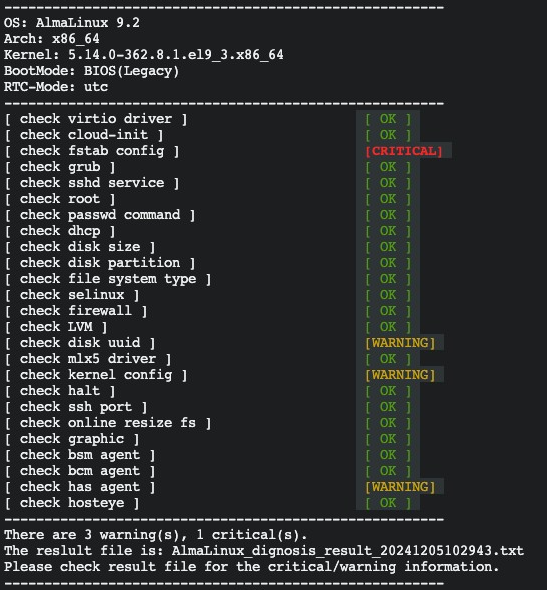
Once the detection tool completes its analysis, it will return results similar to the following information.
9bd5945c3e6fe62ce3616e91f53e46b8.png

Based on the severity level of each item, the detection tool will return results labeled OK, CRITICAL, or WARNING.

Detection result description

  • OK: All detection items are compliant with the requirements.
  • CRITICAL: It is highly recommended to fix these items. Instances created with the custom image may encounter critical issues like failure to startup, network exception. It is recommended to fix these errors before importing the image.
  • WARNING: It is recommended to optimize these items.It does not affect the startup of instances created with this custom image, but causes incapability in automated operation of cloud assistant. You may ignore error messages and proceed with image import, but it is recommended to optimize it after creating instance with imported image as needed to enhance the operation efficiency on the cloud server.

Windows system image detection tool

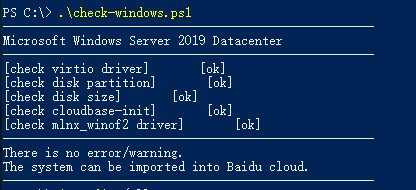
Detection items are as follows:

Item Description Suggestion
VirtIO drivers Baidu AI Cloud supports KVM virtual technology. To import an image into Baidu AI Cloud, KVM virtio drivers must be installed For instructions on how to install virtio drivers for your system, please refer to Install VirtIO Drivers
Disk partition type Baidu AI Cloud BCC supports MBR disk partition type by default None
Disk Size BCC supports a maximum 2TB system disk None
cloudbase-init It is recommended to install cloudbase-init for configuring hostname, passwords, etc. For instructions on how to install cloudbase-init for the system, please refer to Install cloudbase-init
MLNX_WinOF2 network driver For Windows Server 2016, 2019 and 2022, it is recommended to installMLNX_WinOF2 network interface card driver; for some specifications, such as bcc.ga2, bcc.ica2, bcc.ma2 and bcc.la2, it is required to install this network interface card to identify the network device For instructions on how to install MLNX_WinOF2 driver, please refer to Install MLNX_WinOF2 Driver

Download the detection tool check-windows.ps1 to your system, open a PowerShell window, and execute the script:
windows show

Previous
Creating Instance Using Imported Custom Image
Next
Image format check