

Reset password
Operation scenarios
If you forgot to set the password or did not set it during instance creation, you can reset the login password via the console.
Note: Resetting the password will reboot the server, causing it to stop for a few minutes. Please prepare a contingency plan before confirming this operation to ensure that your services are not affected.
Note
- The instance must be in the Stopped or Running status.
- Passwords cannot be reset for instances that are part of a scaling group.
- Batch password reset is not supported.
Operation steps
Follow these steps to modify the login password of the instance on the console:
- Log in to the Baidu AI Cloud Management Console and navigate to Product Service > Compute > Baidu Cloud Compute (BCC).
- Choose the region where your Baidu Cloud Compute resides and review the instances listed under Baidu Cloud Compute.
- In the operation toolbar, click More > Password and Key > Reset Password.
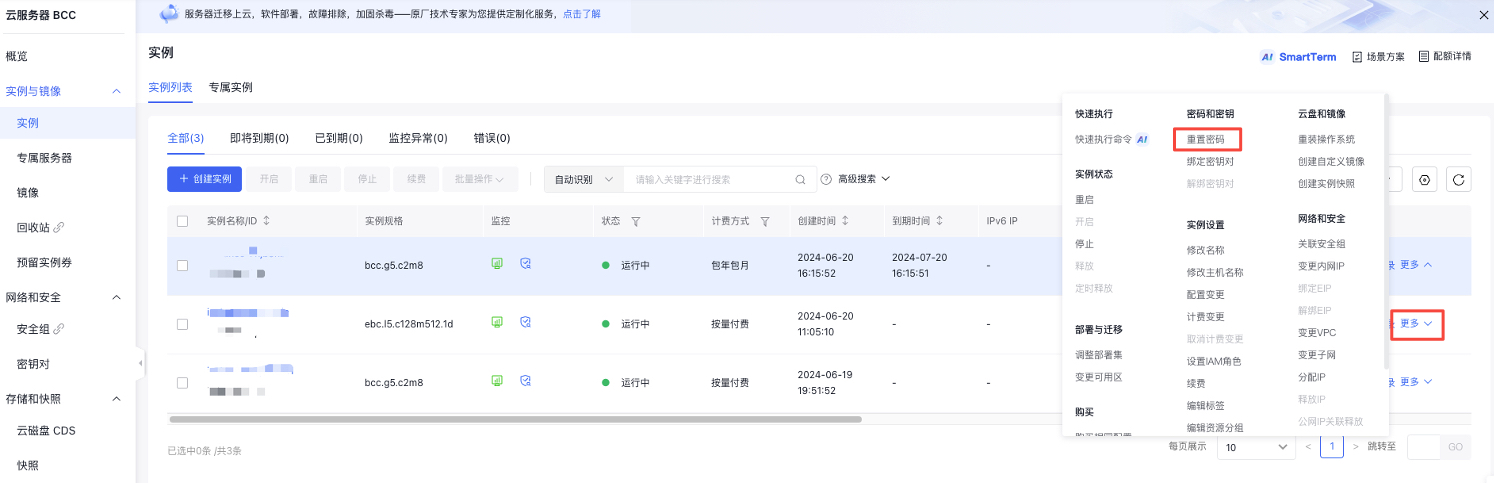
- Enter a new password that meets the compliance requirements in the pop-up dialog box.
| Parameters | Rule | Example |
|---|---|---|
| Password | Password length ranges from 8 to 32 characters. The password must contain English letters, numbers, and symbols (limited to !@#$%^*()). |
Inst12#@ |
- Click OK to confirm the password.
- Provide the mobile verification code for secondary authentication and click OK again.
-
New password takes effect:
- The originally running Baidu Cloud Compute will automatically reboot, and the new password will take effect.
- For previously stopped Baidu Cloud Compute, manually start the instance and the new password will take effect.
More operations
On the "Instance Details" page, you can also click Reset Password to update the instance’s login password.
FAQs
Why can't I reset my BCC password?
For security reasons, the password rules on the overview page for resetting password are relatively complex and must meet the following requirements:
- 8-32 characters
- English letters, digits, and symbols must coexist
- Symbols are limited to !@#$%^*()
Ensure that your new password complies with the specified rules. Only the special symbols listed in the rules are allowed.
Reset password via API
You can use [Modify Instance Password API](BCC/API Reference/Instance Related Interfaces/Modify the instance password.md) to reset passwords for specified instances.