

Windows Virtual Machine Auto Login Failure Handling Method
Problem phenomenon
Some rendering clients of Baidu AI Cloud modify the Administrator account password and enable password-free auto-login based on Windows public image of Baidu AI Cloud. The configuration method is as follows:
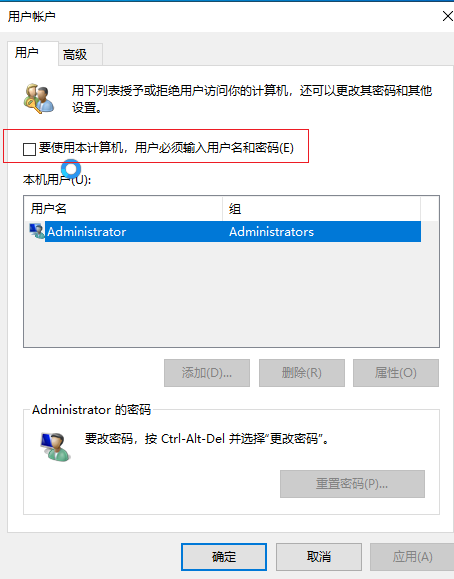
Next, create a custom image. Users can then build a virtual machine based on this custom image (the password provided during the virtual machine creation must match the password of the custom image). However, there’s a high likelihood of automatic login failure during the first startup of the virtual machine. The issue is as follows:
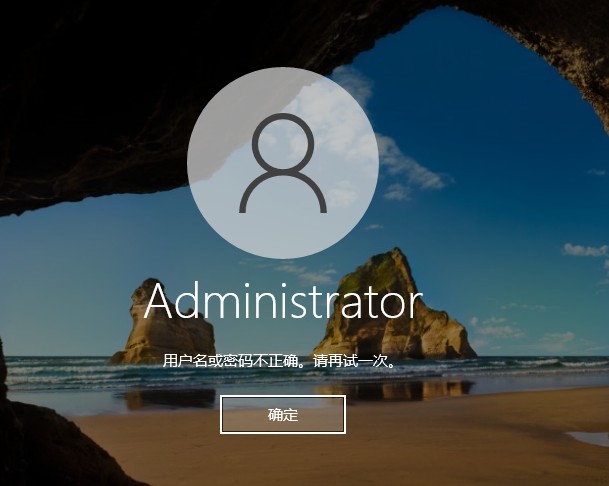
Cause of problem
During the initial startup of the newly created virtual machine, a random password is set before the specified password from the creation process is applied. This precaution is taken for security, to ensure that no single password is universally applied in case of a password injection failure. However, the timing of the random password injection and Windows auto-login is inconsistent. If the password is injected after auto-login, the auto-login process will fail. The solution is to adjust the createuser.py script in cloudbase-init so that it directly applies the user-specified password during custom image creation, instead of using a random password.
Troubleshooting steps
- Create a backup of C:\Program Files\Cloudbase Solutions\Cloudbase-Init\Python\Lib\site-packages\cloudbaseinit\plugins\common\createuser.py.
- Replace C:\Program Files\Cloudbase Solutions\Cloudbase-Init\Python\Lib\site-packages\cloudbaseinit\plugins\common\createuser.py with the createuser.py file provided in this document.
- Recreate the custom image.