

Site Smooth Migration Solution
This document outlines how to migrate user sites to Baidu AI Cloud. Baidu AI Cloud offers comprehensive solutions and tools to ensure seamless site migration without interruptions to online services.
Note
- During site migration, users must ensure the integrity and confidentiality of their data, usernames, and passwords.
- Users are accountable for the security of the systems, applications, services, or code being migrated, ensuring no backdoors, vulnerabilities, or other security risks.
Prerequisites
- Analyze the current site's systems and their dependencies, including mapping the front-end main site to the back-end databases.
- Establish the migration sequence based on interdependencies, prioritizing the migration of heavily interconnected databases.
- Prepare database usernames and passwords before migration.
- The user’s database must have public network egress capabilities to establish a connection with Baidu AI Cloud.
- Document the business functions that require testing to verify the migration results.
- Complete the Baidu AI Cloud Account Registration, and purchase relevant services based on business needs.
Migration
Users can opt to migrate either the front-end applications first (Solution 1) or the database first (Solution 2). Solution 1 is recommended as it simplifies system-wide rollbacks in the event of migration issues.
Solution 1: Migrate frontend applications at first, and then migrate the database.
This solution focuses solely on the site migration approach. Specific procedures should be customized based on the on-site environment and business needs.
-
Establish the frontend business platform within the Baidu AI Cloud BCC environment and link it to the user’s existing database.

- Test the frontend business to verify optimal performance and functionality.
-
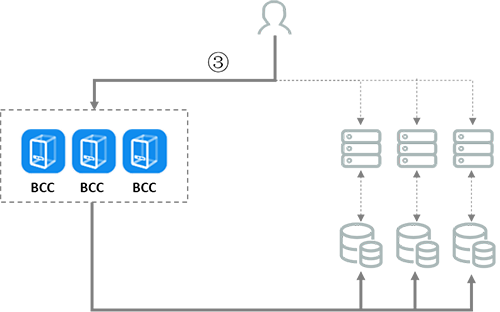
Once tests are successful, gradually redirect traffic to Baidu AI Cloud in stages. For example, start by redirecting 10% of the traffic, monitor the system's performance, and then progressively raise the migration percentage as stability is confirmed until all traffic is fully migrated.
-
Use Baidu AI Cloud's self-developed tools to migrate the user's database to Baidu AI Cloud while maintaining incremental transfers (for the operation method of the migration tool, please refer to RDS Online Data Migration);
Static files, such as videos and images, can be stored using Baidu AI Cloud Object Storage (BOS). Choose one of the two provided solutions based on the data size and network conditions.
- For terabytes (TB) of data requiring more than a week for upload: Use the Data Import Service along with the BOS CLI synchronization solution.
- Small data volumes with quick upload times: BOS CLI sync solution.
For specific operation plans to migrate local data to BOS, refer to Best Practices for Business Migration to BOS.
Plain Text1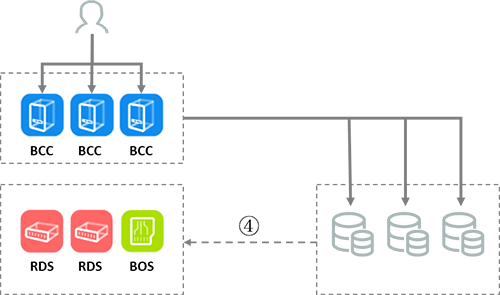 -
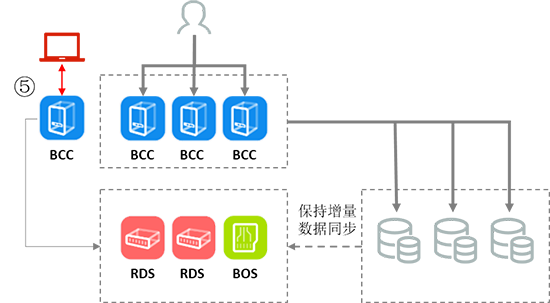
Create a new frontend business on Baidu AI Cloud to connect to the migrated database and test its functionality. Note: During this phase, the online business continues to use the user’s existing database while incremental data is synced to Baidu AI Cloud.
-
After the frontend business passes testing, reconfigure the Baidu AI Cloud frontend application to connect to the newly migrated database.
Confirm whether any residual traffic remains on the user’s original database. If residual traffic is detected, check all modules to determine the cause. If none is found, incremental synchronization can be safely disabled.
-
Transfer the site domain name to Baidu AI Cloud and set the DNS resolution information. Change the DNS server information at the original domain name registrar to Baidu AI Cloud DNS. For detailed steps, refer to Domain Name Transfer.
Since DNS changes require at least 24 hours to propagate nationwide, the user’s local front-end systems must remain functional for at least 48 hours to guarantee accessibility across all regions.
- File the migrated site. For specific guidance, refer to Filing Help.
Solution 2: Migrate the database at first, and then migrate the frontend applications.
This solution focuses solely on the site migration approach. Specific procedures should be customized based on the on-site environment and business needs.
-
Use Baidu AI Cloud's self-developed tools to migrate the user's database to Baidu AI Cloud while maintaining incremental transfers (for the operation method of the migration tool, please refer to RDS Online Data Migration);
Static files, such as videos and images, can be stored using Baidu AI Cloud Object Storage (BOS). Choose one of the two provided solutions based on the data size and network conditions.
- For terabytes (TB) of data requiring more than a week for upload: Use the Data Import Service along with the BOS CLI synchronization solution.
- Small data volumes with quick upload times: BOS CLI sync solution.
For specific operation plans to migrate local data to BOS, refer to Best Practices for Business Migration to BOS.
During this stage, the online business continues to operate from the user's current environment.
Plain Text1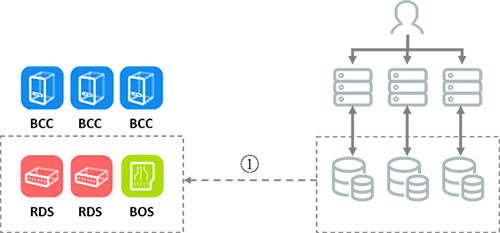 -
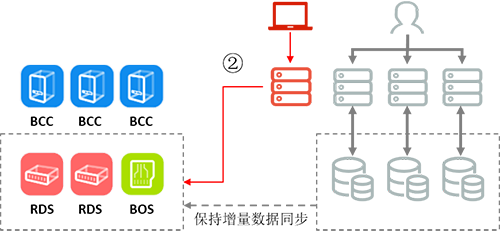
Set up a new frontend business on the user’s side to connect with the migrated database, and ensure the frontend is tested for normal operation. Note: During this phase, the online business remains supported by the user's existing environment, with incremental data transfers ongoing.
-
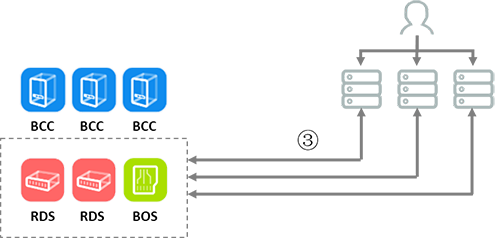
After the frontend business passes testing, migrate the entirety of the user’s databases to Baidu AI Cloud.
-
Deploy the frontend business platform in the Baidu AI Cloud BCC environment and establish connection with the Baidu AI Cloud database.
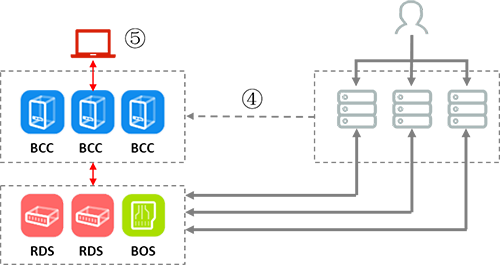
- Test the frontend business to verify optimal performance and functionality.
-
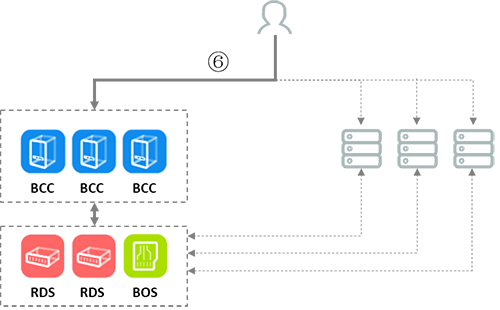
Redirect traffic to Baidu AI Cloud in phases. For instance, initially divert 10% of traffic to Baidu AI Cloud, monitor business performance, and after ensuring stable operations, progressively increase the migrated traffic until all traffic is shifted to Baidu AI Cloud.
-
Transfer the site domain name to Baidu AI Cloud and set the DNS resolution information. Change the DNS server information at the original domain name registrar to Baidu AI Cloud DNS. For detailed steps, refer to Domain Name Transfer.
Since DNS changes require at least 24 hours to propagate nationwide, the user’s local front-end systems must remain functional for at least 48 hours to guarantee accessibility across all regions.
- File the migrated site. For specific guidance, refer to Filing Help.