

Create disk snapshot
Updated at:2025-10-20
Background
You can create snapshots as backups of the data status of cloud disk servers at a specific time for scenarios such as daily data backups, major server update backups, disk data rollbacks and creating custom images. This document introduces how to create disk snapshots on the BCC console. For instructions on instance snapshots, click Instance Snapshot to view.
Prerequisites
- If you are taking a snapshot of a data disk, it must be in either a attached or detached status. For data security, snapshot operations are not allowed in other statuses.
- If you are taking a snapshot of a system disk, it must be in either a running or normal status.
Note
- Each Cloud Disk Server (CDS) can have a total of 512 snapshots created, including 256 manual snapshots and 256 automatic snapshots.
- If the maximum automatic snapshot quota for a disk is reached, the earliest-generated automatic snapshot will be deleted automatically to make room, ensuring that new automatic snapshots are unaffected.
- If the maximum manual snapshot quota for a disk is reached, creating new manual snapshots will be blocked. Please clean up unnecessary manual snapshot data promptly.
- The time required for a snapshot to be created and become effective depends on its size. Typically, this process takes anywhere from a few seconds to a few minutes.
- Snapshot content includes only the data written to the disk at the time of creation; data in the cache is excluded. To ensure data integrity, it's recommended either to detach the disk or to confirm that all write operations are completed beforehand.
Operation steps
- Sign in to Baidu Cloud Compute (BCC) Console and enter the Instance List page.
- Go to the Disk page, select the disk for which a snapshot is needed, and click the “Create Snapshot” button on the right.
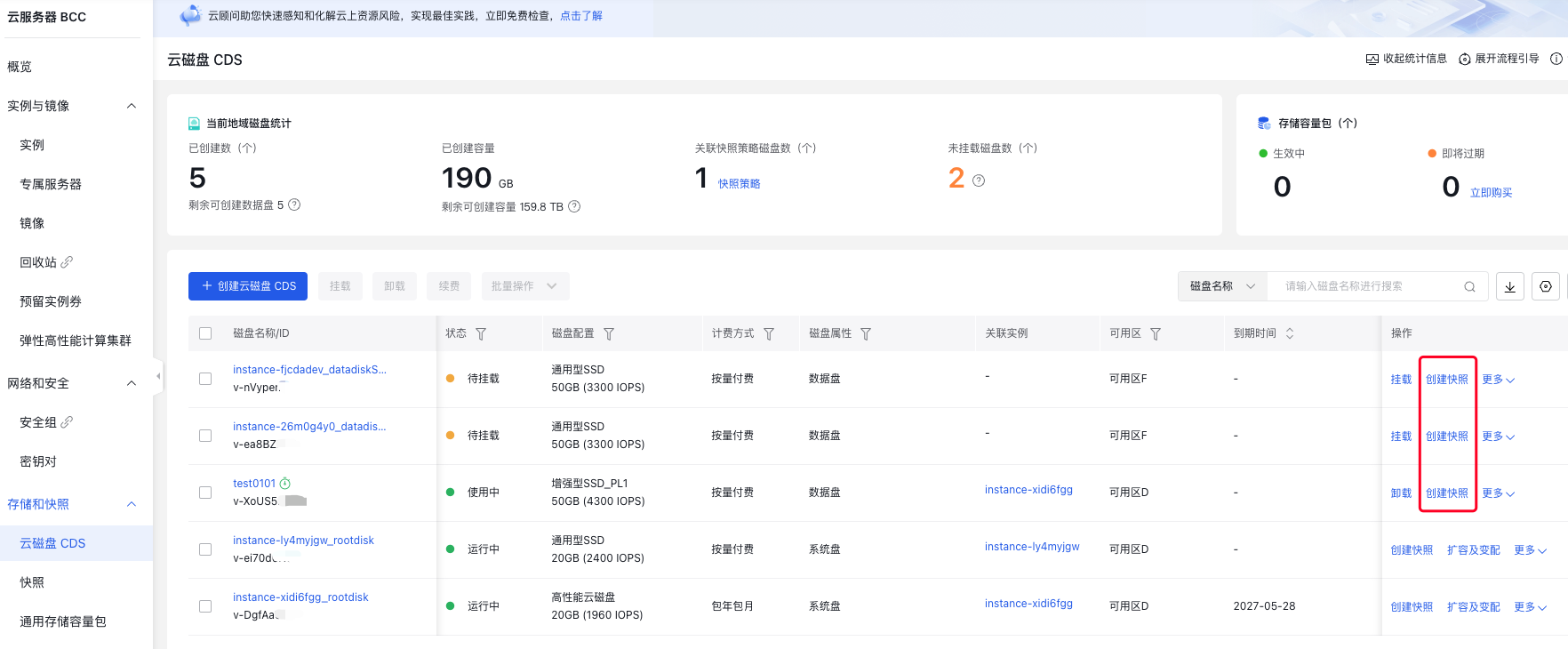
- In the pop-up Create Snapshot dialog box, enter the snapshot name and choose whether to create Instance Snapshot (an instance snapshot includes snapshots of both the system disk and data disks, eliminating the need to create snapshots for individual disks separately). If you are creating a snapshot for only a single disk, you can select Not Create and then click OK.

- The instance status will change to creating snapshot. When the status changes back to running, it indicates that the snapshot creation has been completed.
Other methods
- Sign in to Baidu Cloud Compute (BCC) Console and enter the Instance List page.
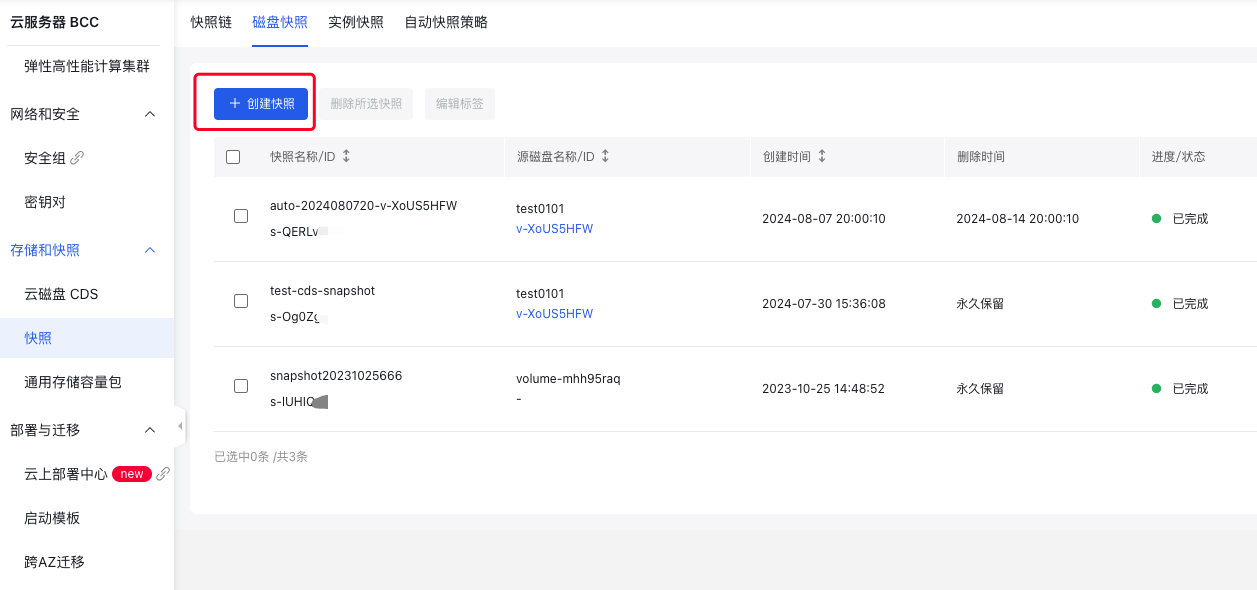
- From the left navigation menu, select Snapshot -> Snapshot List to access the Snapshot List page.
- Click Create Snapshot.
-
In the pop-up Create Snapshot dialog box, complete the settings for snapshot type, disk ID and snapshot name and then click OK
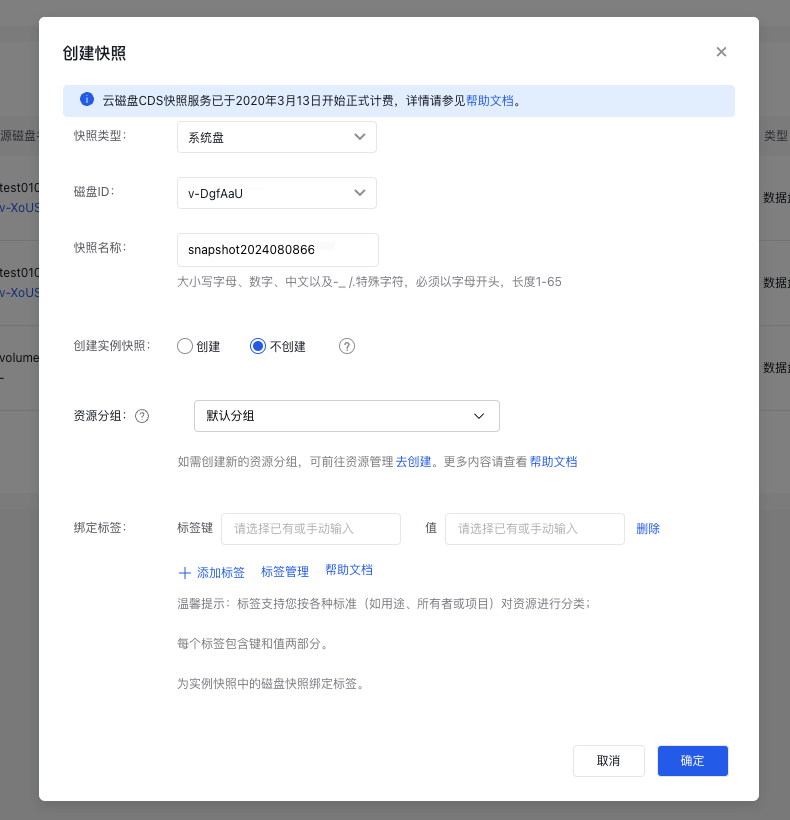
- A new snapshot with a status of creating will be added to the snapshot list. When the status changes to completed, it indicates that the snapshot has been successfully created.
FAQs
- Will BCC be disabled when creating a snapshot?
- No, you don't need to disable BCC when creating a snapshot.
- Will custom images and snapshots still exist after BCC is released?
- Custom Images: Once created, custom images will remain available indefinitely unless deleted.
- Snapshots: Snapshots will be deleted when BCC is released.
Create snapshots via API
You can create a snapshot from a specified disk via [Create Snapshot API](BCC/API Reference/Snapshot Related Interfaces/Create a snapshot.md).