

Create a security group
Background
A security group is a virtual firewall for BCC instances, and each BCC instance must belong to at least one security group. If you do not create a security group when creating an instance, you may choose the default security group for BCC. The default security group allows all ingress and egress access. For details, please refer to [Security group overview](BCC/Operation guide/Security/Security group/Security group overview.md).
To configure an Allow List of ingress and egress rules for a BCC instance, first create a new security group. Define the desired ingress and egress access rules within this group. Then, associate the BCC instance with the new security group, and disassociate it from the default security group. Detailed instructions for creating a security group using the console are provided in the documentation.
Related rules
Users can create security groups via the console. The rules for creating a security group are as follows:
- Each account can create up to 100 security groups;
- When the security group quota is exhausted, the button will be grayed out and cannot be clicked;
- When creating a security group, you may set detailed rules via the Ingress and Egress tabs under Port Settings;
- A security group can hold a maximum of 50 ingress rules and 50 egress rules.
Operation steps
- Sign in to BCC Console and enter the Instance List page.
- Click Security Group in the left navigation bar to enter the security group management page.
- After clicking Create Security Group, you can also select the region in the top left corner of the top status bar.
-
Configure relevant properties of the security group on the Create Security Group page.
Plain Text1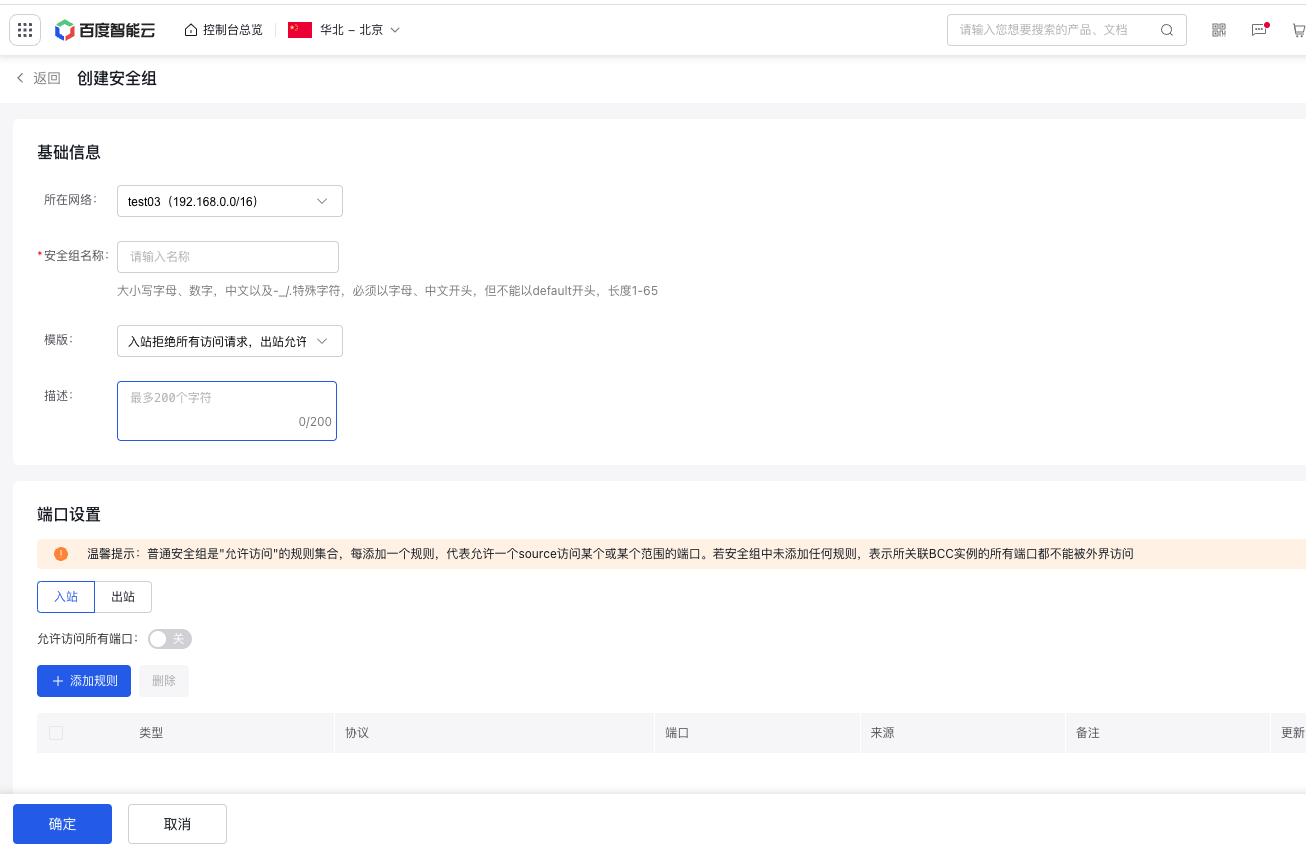 2 3<br />Configuration Description Security Group Name Specify a name for the security group. Description Provide a brief description of the security group to simplify future management. Port Settings Select the port setting method. Ingress and egress access rule settings are divided into two separate tabs, with the following methods for rule setting.
- When Allow Access to All Ports is OFF, you can select Add Rule to configure ingress and egress access rules. After setting the rules, click **OK** to proceed with adding the next rule.

- When Allow Access to All Ports is ON, all service ports of BCC will be fully exposed to the network environment, which may pose certain security risks. Therefore, please select this option with caution.
- When Allow access to all ports is OFF and no rules are added, this will cause BCC unable to communicate with the outside world. In this case, BCC can only be accessed via remote VNC login. Therefore, please select this option with caution.
Tag Add tags to the security group for easier resource classification and management. - When Allow Access to All Ports is OFF, you can select Add Rule to configure ingress and egress access rules. After setting the rules, click **OK** to proceed with adding the next rule.
- Click OK to complete the creation of the security group.
Relevant operations
- If you need to modify security group rules, you can update the security group information via [Edit the security group](BCC/Operation guide/Security/Security group/Edit security group.md).
- You can add an instance to one or more security groups via [Associate Security Group](BCC/Operation guide/Security/Security group/Associate with security group.md).
Create a security group via API
You can create a security group through [Create Security Group via API](BCC/API Reference/Security Group Related Interfaces/Create a security group.md).