

Reserved Instance AZ Change
Updated at:2025-10-20
Function description
This document details how to modify the attributes of a reserved instance. You can update the name of a reserved instance or, in the event of a regional business change, modify the availability zone attribute of the reserved instance. For clarification, the reserved instance being modified is referred to as the original coupon, and the modified version is referred to as the target coupon.
Prerequisites
- The original coupon is currently active.
- No other requests are made to alter the availability zone of the original coupon.
Operation steps
- Sign in to the Baidu Cloud Compute Console, select Reserved Instance tab page from the left sidebar to enter the Reserved Instance List page.
- Select a Target Region from the top left corner of the top menu bar.
- Locate the instance of which availability zone is modified in the Reserved Instance List, and click Modify Availability Zone under its Operation.

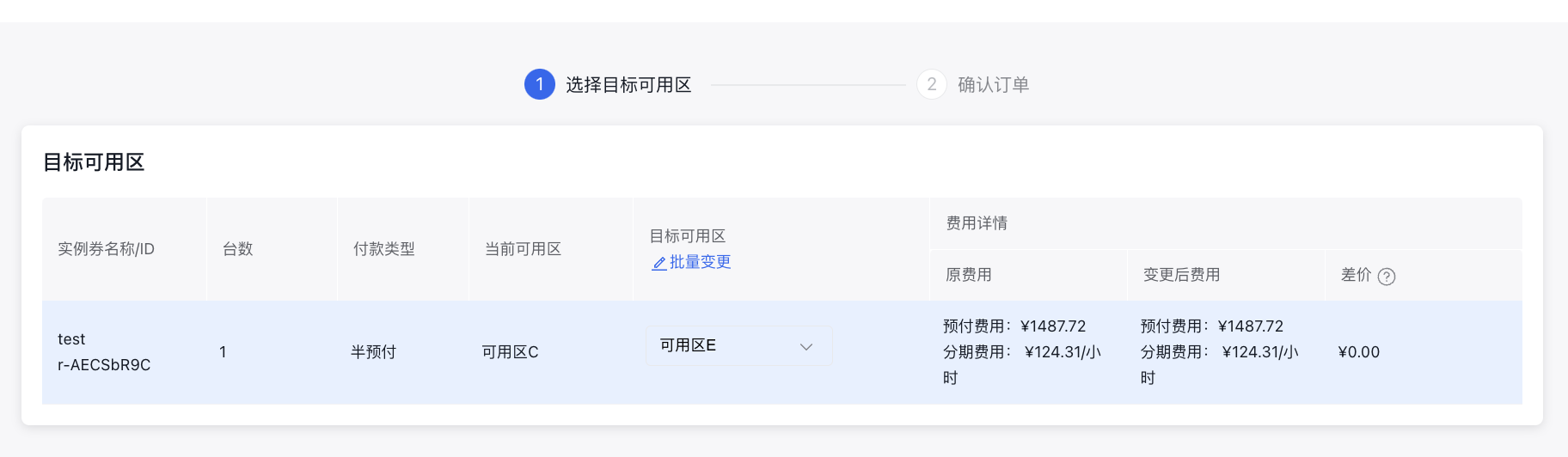
- Navigate to Order Confirmation page, select the Modified Available Zone for each target instance in the Target Available Zone field, or select Modified Available Zones uniformly for all target instances in batch. Confirm whether the modified charges meet expectations.
- Click Next, check Agree to Baidu AI Cloud Online Ordering Agreement on the Order Confirmation page, and click Confirm Order.
Final result
On the Reserved Instance List page, you can view Reserved Instances of which the Availability Zones are successfully modified. These instances can deduct the bills of pay-as-you-go - postpaid BCC instances of the same instance specifications in the current availability zone.
Resource reservation
- After purchasing a reserved instance, Baidu AI Cloud ensures that, at a minimum, the same specifications and quantity of pay-as-you-go postpaid BCC resources are available in the corresponding availability zone under the customer's account.
- After a reserved instance is purchased, there will be certain risks in resource reservation if a Deployment Group is added during the purchase of pay-as-you-go - postpaid BCC instances. If there are stringent requirements for resources, please use deployment groups with caution.