

Server Migration Overview
Updated at:2025-10-20
Overview
Server migration enables users to transfer one or multiple servers to Baidu AI Cloud. This feature simplifies the migration of systems and applications from on-premises data centers (IDCs) or other cloud platforms to Baidu AI Cloud, addressing business needs such as enterprise cloud migration and cross-cloud platform migration.
Basic concepts
- Migration Source: The migration source (source server) refers to the user's IDC server, cloud server, or cloud servers from other platforms to be migrated.
- Migration Task: You can view the migration source information of a specific server, the information of the current migration server, and the migration progress.
- Migration Center: It helps to realize resource migration between users' intranets, extranets, across Baidu AI Cloud accounts, and among Baidu AI Cloud resources in different regions. This document pertains solely to the migration of users' extranet resources.
- Migration agent: It is required to download and start the migration agent from the source server, report the source server information, and cooperate to migrate the server data to Baidu AI Cloud.
Application scenarios
Online migration is applicable to the following scenarios (including but not limited to):
- Cloud migration for IT architecture
- Hybrid cloud architecture deployment
- Cross-cloud migration
- Cross-account or cross-region migration
Usage restrictions
- The current migration source location OS versions supported by the migration center include:
| Types | OS version |
|---|---|
| Linux | CentOS 6/7/8 |
| Ubuntu 16.04/18.04/20.04/22.04/24.04 | |
| Rocky Linux 8/9 | |
| Debian 9/10/11/12 | |
| AlmaLinux 8/9 | |
| Oracle Linux 6/7/8 | |
| OpenSUSE 15/SUSE 15 | |
| Kylin V10 | |
| Alibaba Cloud Linux 2.1903/3.2104 | |
| TencentOS 2.4/3.1 | |
| openEuler 20.03/22.03 | |
| Alibaba OS veLinux 1.0/1.0 Centos compatible version Alibaba OS veLinux 2.0 | veLinux 2.0 Centos compatible version |
|
| Redhat 6/7/8/9 | |
| Windows | Windows Server 2008R2/2012R2/2016/2019/2022 |
- Both your source location server and target Baidu Cloud Compute need to have public network access capability.
Linux system usage restrictions:
- To ensure normal operation of the BCC after migration, it is recommended to install cloud-init on the migration source before migration. For details, please refer to Installing cloudbase-init.
- Before proceeding, ensure that rsync version 3.1.0 or higher is installed on the migration source. Among the supported operating systems listed above, only CentOS 6 is not supported. If the source server you are migrating uses CentOS 6, you must upgrade rsync.
- Currently, the migration target only supports ext4 and XFS system disks and data disks. If the migration source uses a different file system type, it will be automatically converted to an ext4 file system after migration.
- CentOS 6 as a migration source does not preserve the disk partition structure; each partition will be treated as an independent disk after migration.
- CentOS 6 does not support migration when the source is started in UEFI mode. For other OS sources started in UEFI mode, they will be booted in Legacy mode after migration.
Windows system usage restrictions:
- Only the migration of basic disks is supported.
- Only the migration of file systems in NTFS format is supported.
- The source server must be logged into with a user account that belongs to the administrator group.
Migration principle
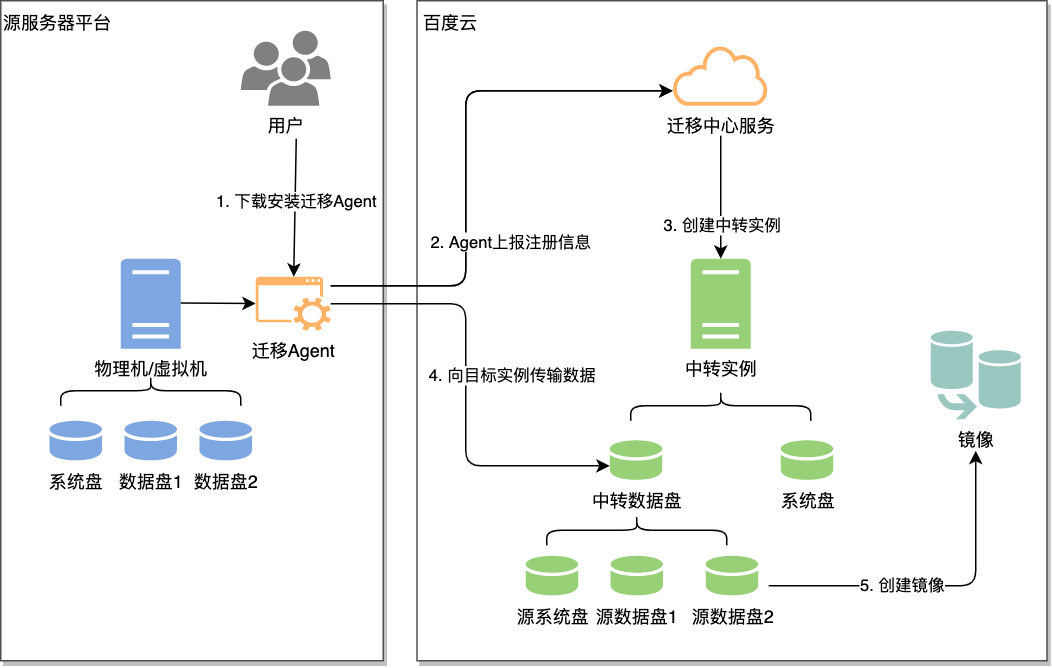
The migration principle is as follows:
- Download and install the migration agent on the source server.
- Start the migration agent on the source server. The migration agent will register the source server and report its information to the Server Migration Center via the public network.
- Once the migration task is created and started, the Server Migration Center will create a temporary intermediate instance (for Linux, inbound port 22 must be opened in the security group of the intermediate instance; for Windows, inbound port 12121 must be opened in the security group of the intermediate instance).
- The Server Migration Center establishes communication by connecting to port 22 of the intermediate instance and transfers the source server's disk data to the data disk of the intermediate instance.
- The Server Migration Center generates an image from the system disk data of the intermediate instance and creates a snapshot from the data disk data.
Migration billing
| Charge item | Description | Charge type |
|---|---|---|
| BCC instance (intermediate instance) | During migration, the system automatically creates an intermediate instance (configuration: 2-core 2GB), which will be automatically released after the migration is completed. Note: If a migration task is incomplete (failed or paused), the intermediate instance will remain for a period of time along with the task, incurring additional charges. If you have confirmed that the task will not be performed again, you can delete the task to automatically clean up the intermediate instance to avoid unnecessary deduction. |
Note to postpay: To avoid creation failure of intermediate instance, your account balance must not be less than RMB 100. |
| Cloud disk | During migration, the system mounts the intermediate cloud disk to the intermediate instance. Upon completion of migration, the intermediate cloud disk is released along with the intermediate instance. Note: The intermediate cloud disk is released along with the intermediate instance and will not affect the source system. |
Postpay |
| Snapshot | Once the data migration is complete, the system will create a snapshot of the data disk and save its contents. | Note to postpay: Snapshots are charged for storage based on snapshot capacity and storage duration, with postpay as the default. |
| Public network bandwidth | An EIP is created when creating a migration task. Migrate data from the source server to the intermediate instance via public network bandwidth. Network charges will be incurred during data transmission. Note:-3-} EIP bandwidth is created according to the size filled in by the user. If 0 is filled or left blank, it is created according to the maximum bandwidth of 200. |
Pay by traffic |
| Custom image | When data migration is finished, a custom image of the system disk will be created. | Free |