Checking Virtio Driver
Check virtio driver on Linux system
Run the command “grep -i virtio /boot/config-$(uname -r)” to check if the kernel of the current OS supports the virtio driver.
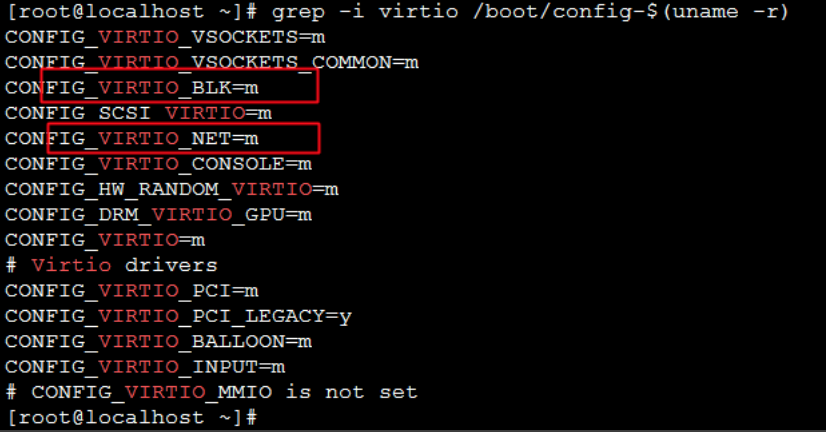
Description:
- If VIRTIO_BLK and VIRTIO_NET information is missing from the output, the OS does not have virtio drivers installed. You will need to recompile the Linux kernel and install the virtio driver on your server.
- If the parameters CONFIG_VIRTIO_BLK and CONFIG_VIRTIO_NET are set to "y," the system includes the virtio driver and supports image imports to Baidu AI Cloud.
- If the parameters CONFIG_VIRTIO_BLK and CONFIG_VIRTIO_NET are set to "m," ensure that the virtio driver is properly included in the initramfs or initrd file.
- Command to execute: lsinitrd /boot/initramfs-$(uname -r).img | grep virtio; verify if the virtio driver is included in the initramfs or initrd file.

Notes If the information on
virtiodriver cannot be found ininitramfsorinitrd file, determine whether it has been compiled into the kernel. Usegrep -i virtio /boot/config-$(uname -r)command to view configuration options related to thevirtiodriver. The configuration option with a value of y indicates that the relevant driver has been compiled into the kernel and installed correctly. Execute thelsinitrd /boot/initramfs-$(uname -r).img | grep virtiocommand, and fail to display the corresponding driver module information; the configuration option with a value of m indicates that the relevant driver has been added toinitramfsorinitrd. If no relevant driver information is found ininitramfsorinitrd, the driver needs to be manually added toinitramfsorinitramfs.
Check the virtio driver of Windows system
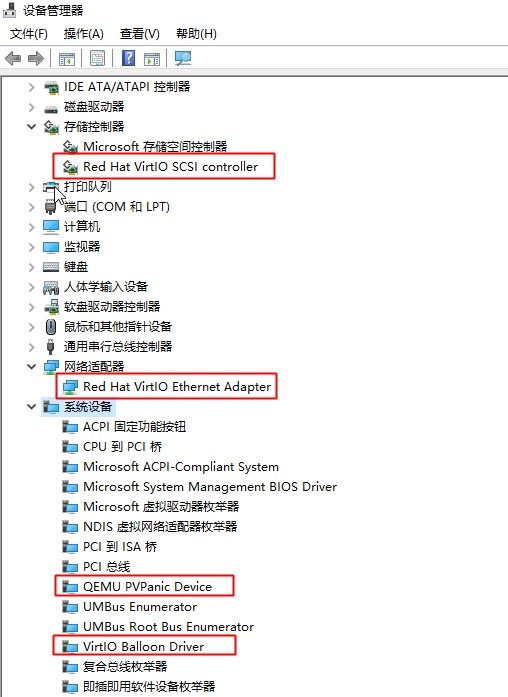
Open the Device Manager, find Disk Drive, Network Adapter, and System Devices, and check if the virtio driver is installed. If not, proceed to install the virtio driver.