

Instance list
List of instances
To facilitate instance selection and improve command execution efficiency, the instance list provided by the cloud assistant categorizes Baidu Cloud Compute (BCC) and baremetal BBC instances by product type, allowing quick command selection and execution.
Quick command execution
You may select the target instance in the cloud assistant console, Baidu Cloud Compute (BCC) console, or baremetal server BBC console, then click the Quick Execute Command button to open the quick command execution dialog.
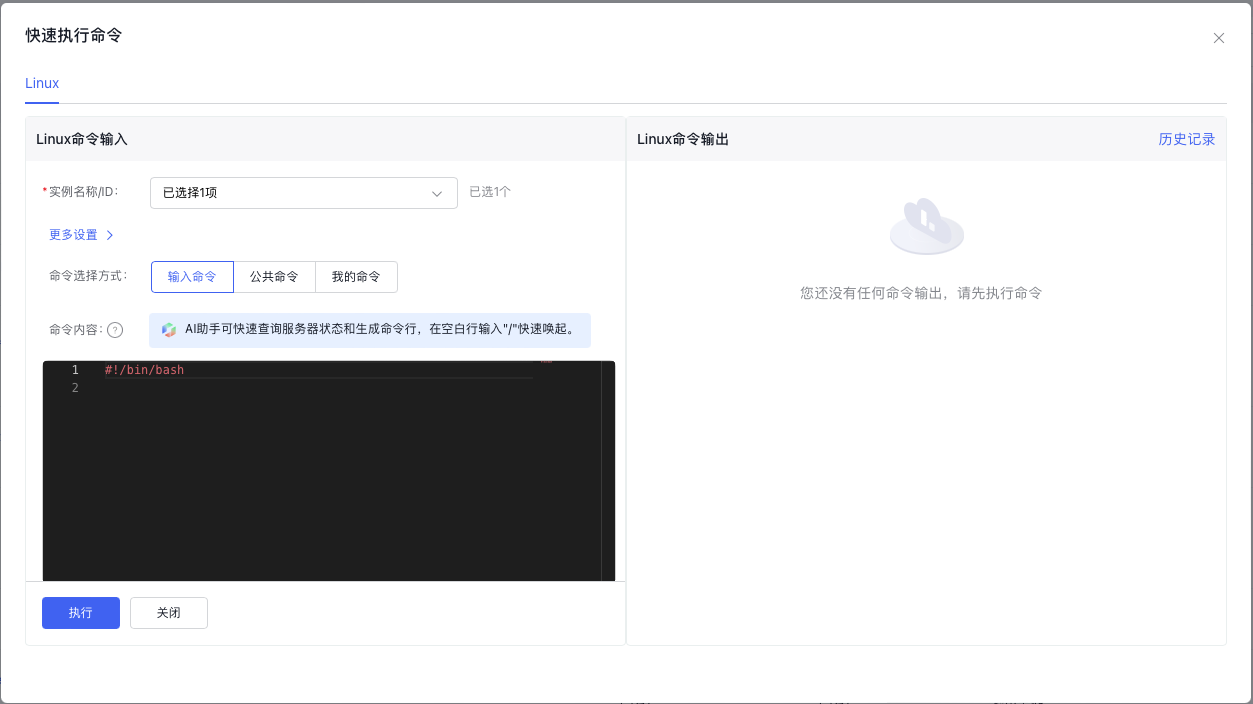
The instance must be in a running state, and its BSM-Agent must be online.
Adjust Selected Instances
You can re-execute commands for failed instances in partially successful execution scenarios by readjusting the selected instances using the instance name or ID.
Commands differ based on the OS. When selecting both Linux and Windows instances, they are displayed under separate tabs. Click the corresponding tabs at the top of the dialog box to view the instances for each OS.
More Settings
In advanced settings, you can modify parameters such as the execution user and the command timeout duration.
Select and Enter Commands
You can execute a command once by directly entering it or select Public Commands or My Commands for direct execution.
Ensure that the execution user and timeout duration align with your command requirements. If a command requires extended execution time but the timeout duration is kept at the default 60 seconds, the command will fail due to execution timeout.
AI Assistant - Intelligent Command Generation
The quick command execution capacity integrates AI assistant capabilities based on large models. Enter "/" in the command content input box to activate the AI assistant. You may inquire about various commands related to instances.
Cloud assistant's AI assistant currently allows 20 Q&A/day, which is shared with the AI assistant's Q&A times at SmartTerm console of Baidu Cloud Compute (BCC). Usage will be reset daily at 00:00. Command content is for reference only; please select based on actual needs.
Execution Results
After command execution, the execution results for each instance will be displayed in the right command output area. You can click the Name to toggle and view specific execution results. Alternatively, click Historical Records to view all execution records.
AI Assistant - Intelligent Analysis of Command Results
After execution, command results can be intelligently analyzed with a single click. The AI assistant provides targeted recommendations for failures, though the analysis results are for reference only.