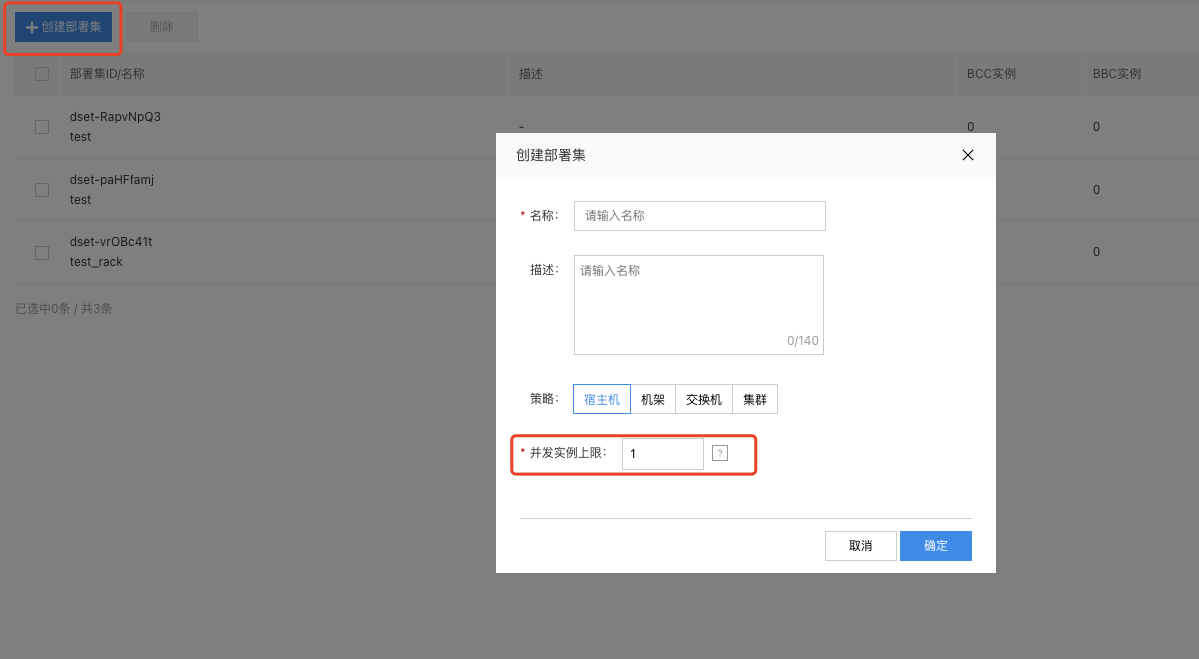
Create Deployment Group
This section details the process of creating a deployment group in the BCC management console.
Operation step
- Sign in to BCC Management Console.
- Select a Region from the top left corner of the top status bar.
- In the left navigation bar, click Deployment Group.
- On the Create Deployment Group page, click to create Deployment Group.
-
In the pop-up window, enter the Deployment Group Name and Description, select the Deployment Group Strategy and Upper Limit of Concurrent Instances.
For the descriptions of deployment group policy, refer to [Overview of Deployment Policy](BCC/Operation guide/Deployment group/Overview of deployment policy.md#Deployment policy).
Upper limit of concurrent instances: It refers to the upper limit of the count of concurrent instances allowed in a single host/rack/switch/cluster for this deployment group, which can only be increased when editing.
For example, if the maximum concurrent instances for a deployment group is set to 3 under a user's host policy, the instances in the deployment group will prioritize being distributed across different hosts. If resources are insufficient, up to 3 instances from the group may be allocated to the same host.
- After filling in, click the OK button to complete the creation of deployment group.