

Customizing Kubelet Parameters
Updated at:2025-10-27
Kubelet offers various parameters to tailor node behavior. This guide explains how to customize Kubelet parameters during node creation.
Prerequisites
- A K8S Cluster CCE has been created. For specific operations, refer to Create a K8S Cluster CCE.
Operation steps
- Sign in to the Baidu AI Cloud management console. Navigate to Product Services - Cloud Native - Cloud Container Engine (CCE). Click Cluster Management - Cluster List, then select the target cluster to enter the Cluster Details page. In the sidebar, click Node Management - Node.
-
Click Add Node in the node list, then configure custom kubelet parameters in Advanced Settings. For parameter details, see Supported Kubelet Parameters below.
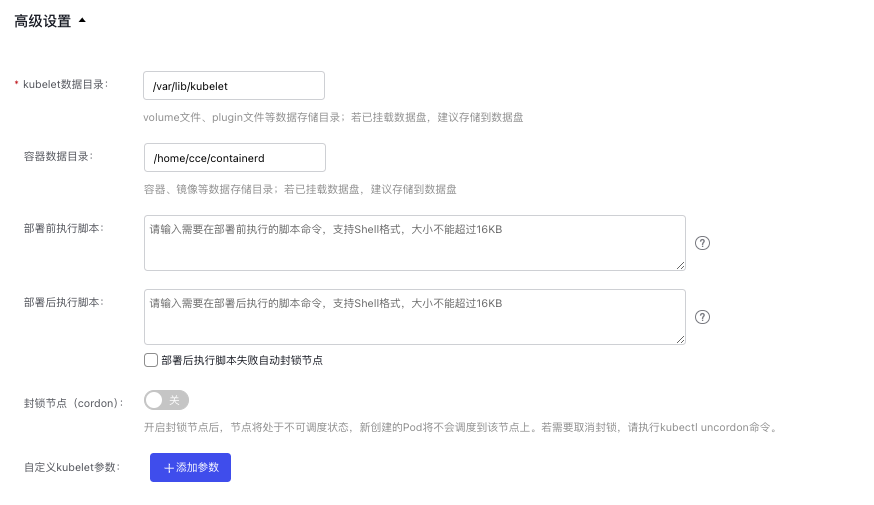
- Click OK to complete the configuration of node kubelet parameter.
Supported kubelet parameters
The following custom Kubelet parameters are supported, as detailed in the table below.
Note
Changing Kubelet parameters such as topologyManagerPolicy, topologyManagerScope, and QoSResourceManager in featureGates will prompt a restart of Kubelet. This recalculates the resource allocation for container instances, possibly causing running containers to restart or resulting in resource allocation failures. Proceed with caution. As Kubernetes versions advance, certain parameters or featureGates might become deprecated or removed from the codebase. If custom parameters managed by the Kubernetes container service are no longer compatible with the new version, the corresponding configurations will be deprecated and removed during the cluster upgrade process.
| Field | Description | Default value | Recommemded value range |
|---|---|---|---|
| kubeReserved | Resource configurations reserved by the Kubernetes system. | Automatically adjusted based on node specifications. | For details, refer to CCE Resource Reservation Description. |
| systemReserved | Resource configurations reserved by the system. | Automatically configure based on node specifications | For details, refer to CCE Resource Reservation Description. |
| allowedUnsafeSysctls | Configure allowed unsafe sysctls or sysctl patterns with wildcards (wildcard patterns ending with *). Use a string sequence separated by English half-width commas (,). |
Not applicable | Support sysctl configurations with the following prefixes: |
| containerLogMaxFiles | The maximum number of log files in a container. This value must be at least 2, and the container runtime must be containerd. | 5 | 2~10 |
| containerLogMaxSize | The maximum threshold for container log file size before generating alternate new files. The container runtime must be containerd. | 10Mi | Not applicable |
| cpuCFSQuota | Allow the imposing of CPU CFS quota constraints for containers with CPU limits. | true | Optional values |
| cpuCFSQuotaPeriod | Set the CPU CFS quota period value. Ensure the CustomCPUCFSQuotaPeriod feature gate is enabled. |
100ms | Range between 1 millisecond and 1 second (inclusive). |
| cpuManagerPolicy | Define the CPU manager policy for nodes. | none | Optional values |
| eventBurst | The maximum allowed burst count for event records. This represents the temporarily permissible event record count under the condition that the event-qps threshold is met. Used only when event-qps is greater than 0. | 50 | 1~100 |
| eventRecordQPS | The number of events that can be generated per second. | 50 | 1~50 |
| evictionHard | A set of hard thresholds that initiate pod eviction actions. | "imagefs.available": "15%", "memory.available": "100Mi", "nodefs.inodesFree": "5%", "nodefs.available": "7%" | Not applicable |
| evictionSoft | Configure a set of eviction thresholds. | None | Not applicable |
| evictionSoftGracePeriod | Define a set of eviction grace periods. |
"5m" | Not applicable |
| featureGates | Experimental feature toggle group. Each switch is represented in key=value form. For more information, see Feature Gates. |
Not applicable | Not applicable |
| ImageGCHighThresholdPercent | Set the disk usage percentage threshold for images. When the image usage exceeds this threshold, image garbage collection will run continuously. The percentage is determined by dividing the specified value by 100, so this field must range from 0 to 100 (inclusive). When configuring, ensure this value is higher than the imageGCLowThresholdPercent value. | 85 | 60~95 |
| ImageGCLowThresholdPercent | Set the disk usage percentage threshold for images. When the image usage falls below this threshold, image garbage collection will cease. This value also serves as the minimum usage boundary for image garbage collection. The percentage is determined by dividing the specified value by 100, so this field must range from 0 to 100 (inclusive). When configuring, ensure this value is lower than the imageGCHighThresholdPercent value. | 80 | 30~90 |
| kubeAPIBurst | The maximum number of burst requests that can be sent to the APIServer per second. | 500 | 1~500 |
| kubeAPIQPS | The number of queries sent to the APIServer per second. | 500 | 1~500 |
| maxPods | The maximum number of pods that can run on a kubelet. | 128 | Not applicable; it depends on factors like machine specifications and container network configurations. |
| memoryManagerPolicy | The strategy employed by the memory manager. |
None | Optional values:
Before using this strategy, you should complete the following operations: |
| podPidsLimit | The maximum number of processes allowed per pod. | -1 | The value varies based on user requirements. The default value is recommended, where -1 signifies no limit. |
| readOnlyPort | Unauthenticated read-only port for kubelet. The service on this port does not support identity certification or authorization. This port number must be between 1 and 65535 (inclusive). Setting this field to 0 disables the read-only service. Note:Risks of exposing the read-only port of kubelet container monitor (10255). |
0 | 0 |
| registryPullQPS | The QPS limit for the image registry. If --registry-qps is set to a value greater than 0, it restricts the QPS limit for the image registry. If set to 0, it means there is no limit. | 5 | 1~50 |
| registryBurst | The maximum burst image pull count. Allows pulling images up to the specified count temporarily, as long as it does not exceed the set --registry-qps value (default is 10). Applicable only if --registry-qps is greater than 0. | 10 | 1~100 |
| reservedMemory | The list of reserved memory for NUMA nodes. |
Not applicable | Not applicable |
| resolvConf | The DNS resolution configuration file used within containers. |
/etc/resolv.conf | Not applicable |
| runtimerequesttimeout | Specifies the timeout duration for all runtime requests, excluding long-running ones like pull, logs, exec, and attach. | 120s | Not applicable |
| serializeImagePulls | Serial image pull. It is recommended to retain the default values for nodes running Docker daemon versions below 1.9 or those using the Aufs storage backend. | true | Optional values: |
| topologyManagerPolicy | Topology manager policy. With the NUMA architecture, data can be allocated to the same NUMA node, to reduce cross-node access and improve system performance. The topology manager can make resource allocation decisions for the topology structure. For more information, see Topology Management Policy on Control Nodes. | none | Optional values |
| topologyManagerScope | The scope of the topology manager: topology prompts are generated by prompt providers and delivered to the topology manager. | container | Optional values |