CCE Event Center
Overview
Kubernetes Events encompass cluster operations and resource scheduling details, aiding maintenance personnel in monitoring resources and pinpointing issues. By default, Kubernetes only retains events from the last hour. CCE supports configuring event persistence across all clusters, allowing real-time export of events to configured storage and enabling event queries for up to 7 days. This document explains how to view event data on the CCE console.
Instructions for use
- Sign in to the Baidu AI Cloud Container Engine (CCE) Console, and select Cluster Management - Cluster List in the left navigation bar.
- In the Cluster List page, click the target cluster name to access the cluster details page, then select O&M & Management - Event Center in the left navigation bar.
- On the Event Center's event list, you can query events generated within the past hour by default. Use the dropdown list above the table to filter events associated with specific namespaces and resource objects. Detailed event information is accessible through the event list, with each column representing its corresponding meaning as explained.
| Column name | Description |
|---|---|
| Event type | Normal or Warning |
| Object | Resource objects in K8S, such as pods, deployments, etc. |
| Object name | Object name |
| Reason | Cause summary, such as image pull failure or mount failure |
| Messages | Specific cause of the exception |
| Total | Retry count |
| First seen time | Earliest time |
| Last seen time | Last time |
-
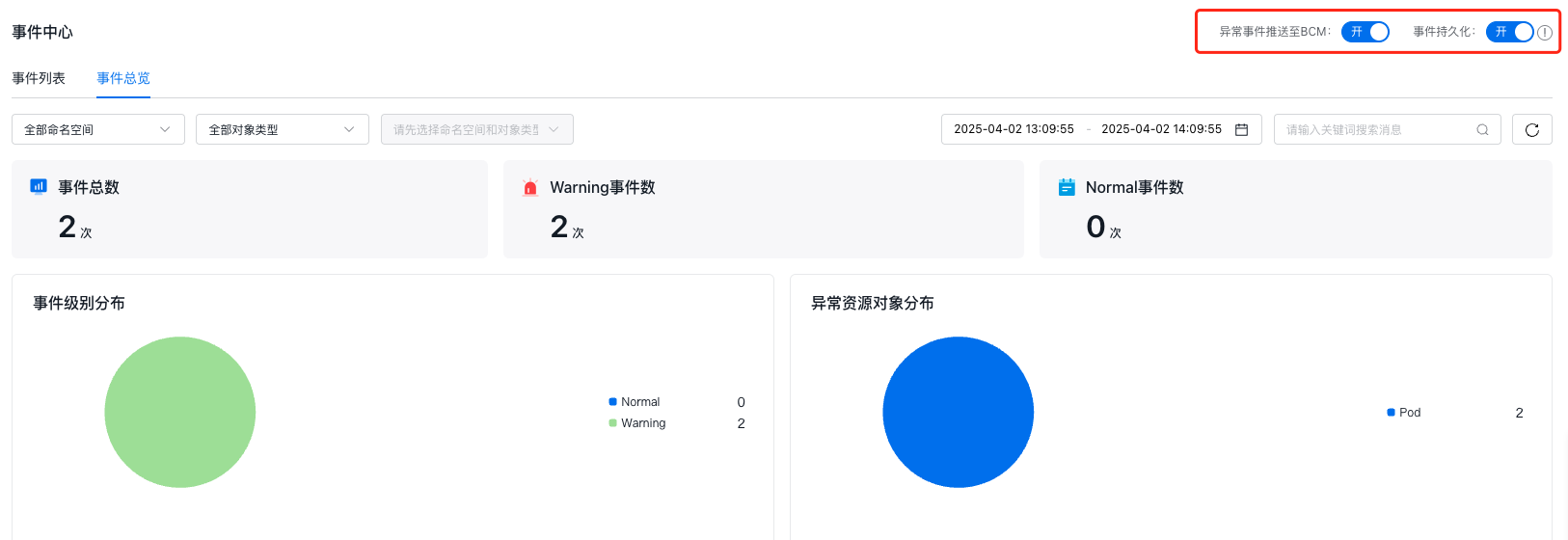
Enable the Event Persistence switch in the upper right corner to query events within the last 7 days. Additionally, click Event Overview in the top navigation bar to access the cluster event overview dashboard, where you can visually view the total count of events, distribution of events at different levels, and distribution of abnormal resource objects.
Note: After enabling event persistence, it may take some time to take effect. Please wait patiently.
- To further improve monitoring efficiency, you can also push exception events to the Baidu Cloud Monitor (BCM) by enabling Push Exception Events to BCM in the upper right corner. To view these exception events or customize alarm configurations, proceed to the relevant page of Baidu Cloud Monitor (BCM) for operation.