

CCE Resource Recommender User Documentation
Component introduction
-
Kubernetes enhances business orchestration and resource utilization
- Kubernetes enhances business orchestration capabilities and resource utilization effectively, but without additional support, the improvements remain limited.
- The main cause of low resource utilization in Kubernetes clusters lies in its resource scheduling logic. When creating Kubernetes workloads, users often need to configure appropriate resource requests, defining both resource occupation and limits, where the resource request has the most significant impact on utilization.
- To ensure their workload's resources aren't preempted by others or to meet demands during peak traffic, users tend to set higher resource request values.
- The gap between requested and actual resource usage cannot be leveraged by other workloads, leading to resource waste.
- Setting unreasonable resource request values results in low resource utilization within Kubernetes clusters.
- Baidu AI Cloud CCE allows the installation of the CCE Resource Recommender component in the cluster. This component suggests container-level resource request values for Kubernetes workloads, thereby minimizing resource waste.
Resource objects deployed in the cluster
Install the CCE Resource Recommender component, which will deploy the following Kubernetes objects in the cluster:
| Kubernetes object name | Types | Namespaces to which Kubernetes object belongs |
|---|---|---|
| analytics.analysis.baidubce.com | CustomResourceDefinition | - |
| recommendations.analysis.baidubce.com | CustomResourceDefinition | - |
| analysis-default | Analytics | kube-system |
| recommendation-configuration | ConfigMap | kube-system |
| recommenderd | ClusterRole | - |
| recommenderd | ClusterRoleBinding | - |
| recommenderd | Service | kube-system |
| recommenderd | ClusterRoleBinding | kube-system |
| recommenderd | ServiceAccount | kube-system |
| recommenderd | Deployment | kube-system |
Function description
Support intelligent recommendation of appropriate resource requests for each container in Deployment, StatefulSet, and DaemonSet. Support maintaining request ratios: Recommended requests will preserve the ratios between the initial container-set requests in the workload.
CCE Resource Recommender recommendation principles
The component creates an analytics CR object in the kube-system namespace, covering all Kubernetes-native workloads (Deployment, DaemonSet, StatefulSet) across all clusters, analyzing up to 14 days of monitor data and updating recommended values every 12 hours. And then, based on analytics, generate a recommendation CR object for each workload in the cluster to store the recommended data. If the recommendation CR generates recommended data, it will write this data into the annotation of the corresponding workload.
Note
Environmental requirements
- Kubernetes version: 1.18+
- Connect to Cloud Managed Service for Prometheus (CProm or self-built Prometheus data source)
Controlled resource requirements
- Supports Deployment, StatefulSet, and DaemonSet workloads.
- Does not support Job, CronJob, or standalone Pods that are not part of a workload.
Recommended calculation
- Minimum recommended values: A single container should request at least 0.125 CPU cores (125m) and 125Mi of memory.
- This component analyzes historical monitoring data of workloads automatically to recommend suitable resource request values.
- Installation of this component does not take immediate effect. Historical resource usage data needs to be analyzed to calculate accurate recommendations.
- The calculation time may vary for different workloads, and workloads within the cluster could impact each other's calculations.
- After installing this component, recommended data will be generated for workloads that have been running for a minimum of one day.
- For workloads created after the component installation, it typically takes one day to generate the recommended data for these workloads.
- It is advised to update the workload with the recommended values after it has been running smoothly for a period.
Instructions for use
Install component
Install the official Baidu AI Cloud Helm Chart.
Installation process
1. Enable CProm
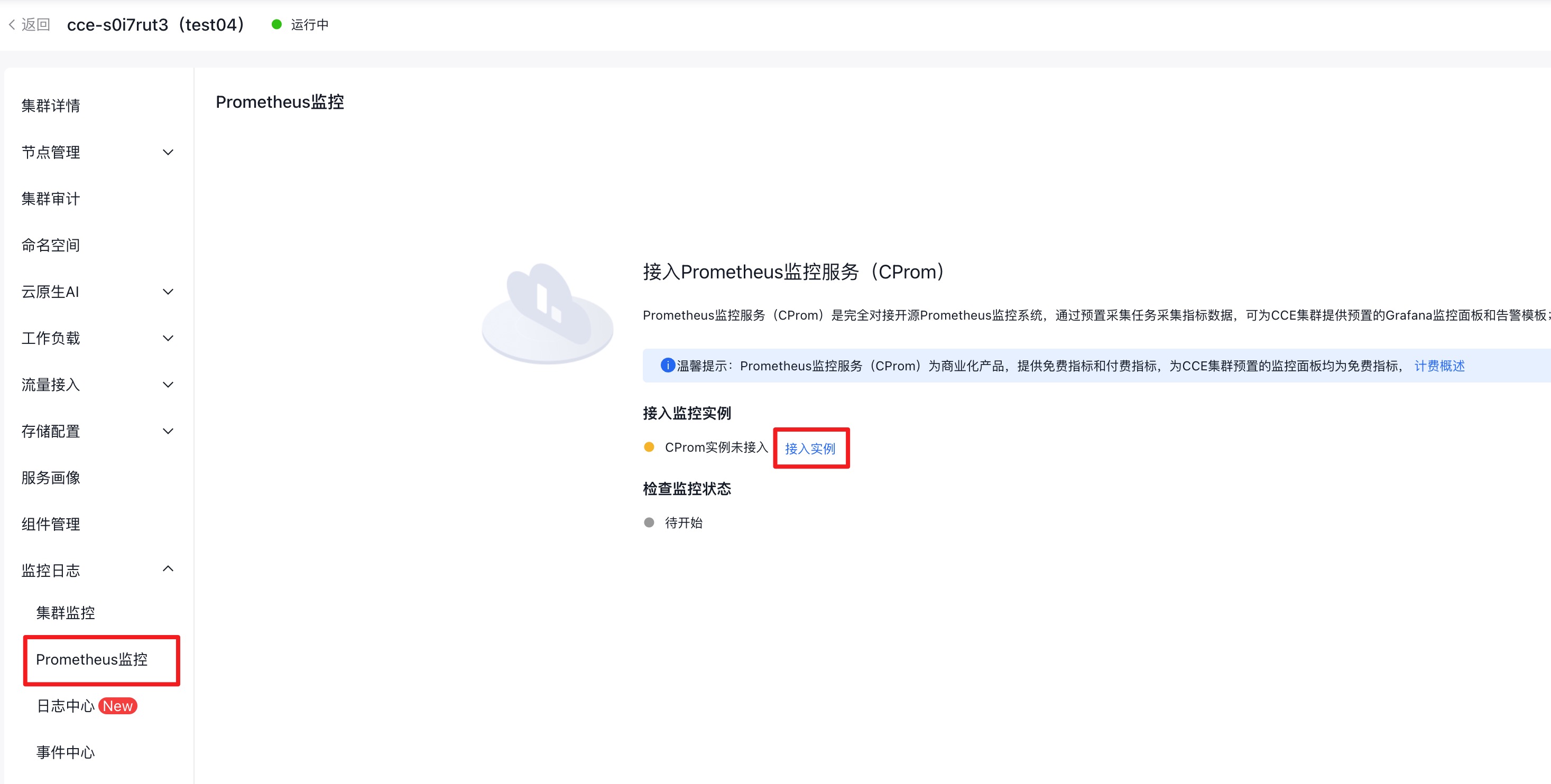
- Log in to the CCE management console, navigate to Monitor Logs > Prometheus Monitor, and select Connect Instance.
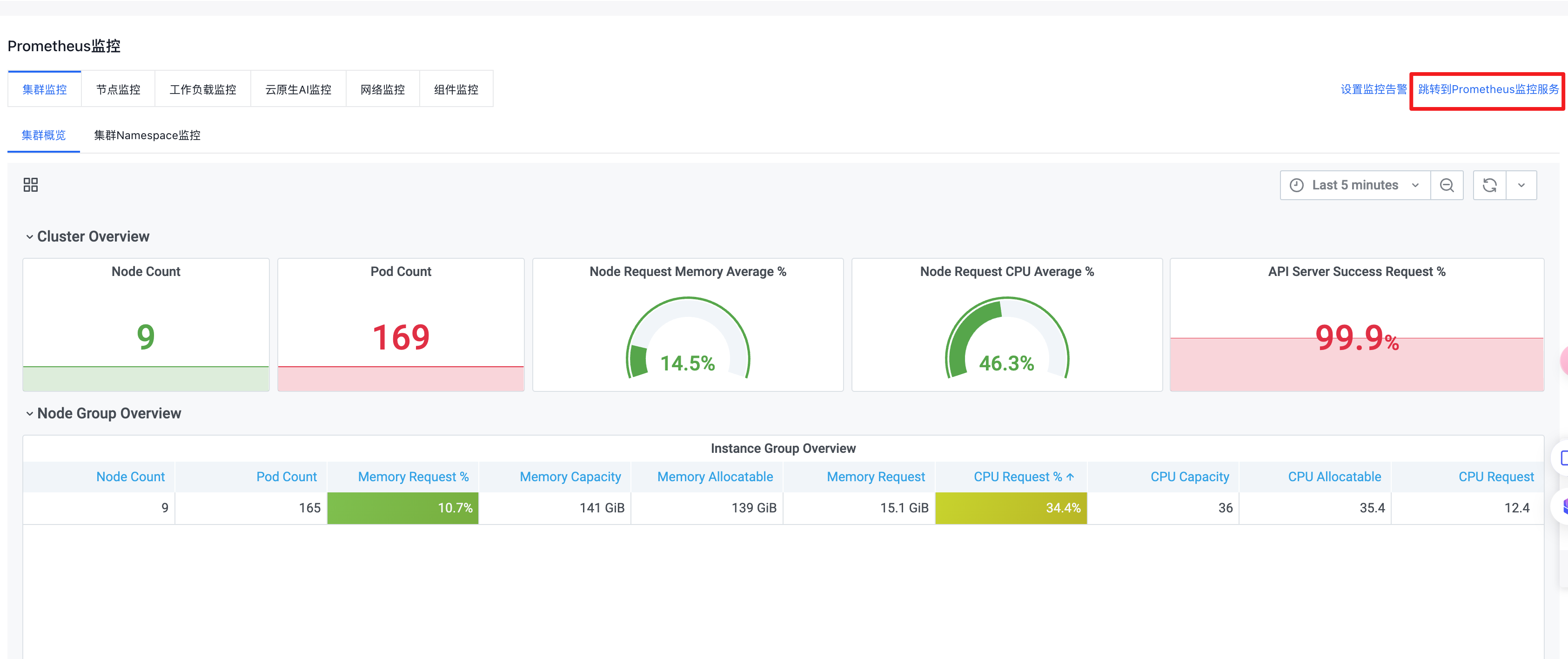
- Once instance access is successful, click Redirect to Cloud Managed Service for Prometheus.
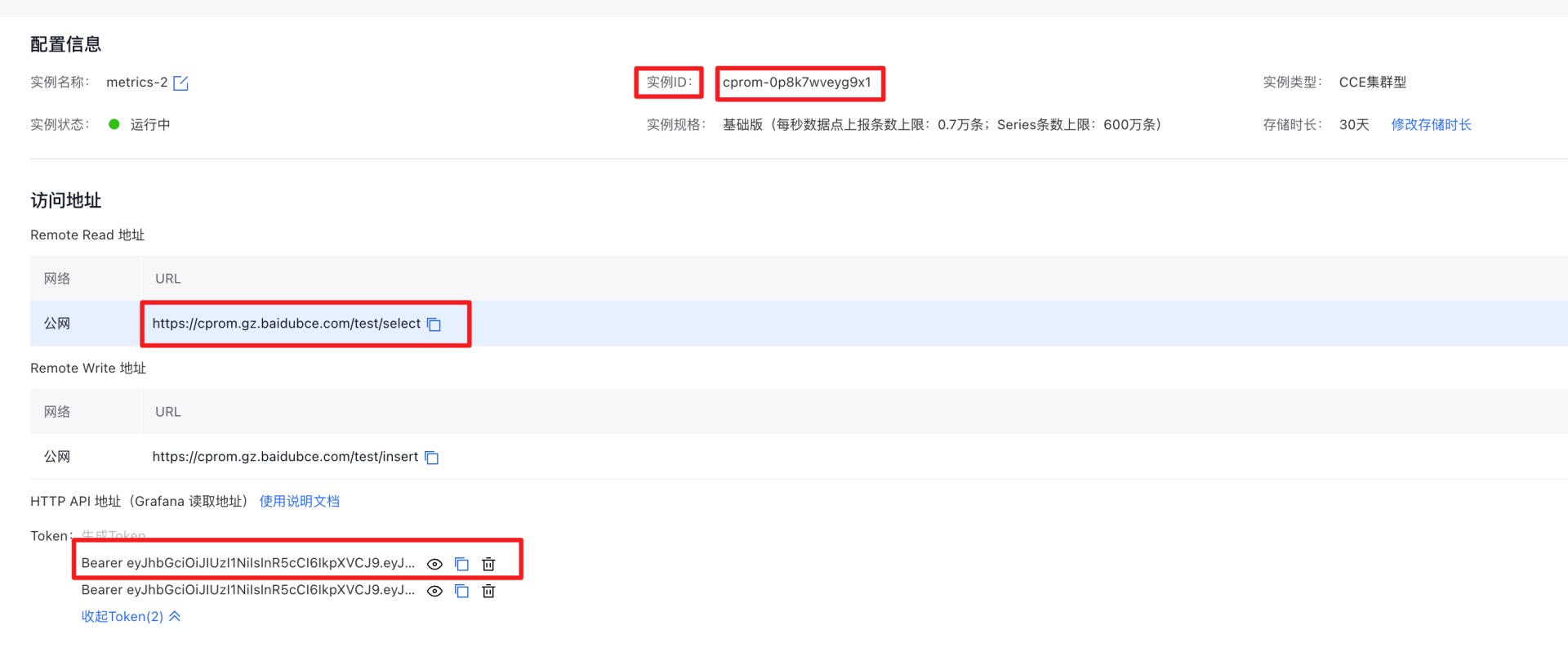
- On the Prometheus Instance page, copy the instance ID and remote read address, then generate and copy the token. This information will be needed in the next installation step.
2. Install CCE Resource Recommender
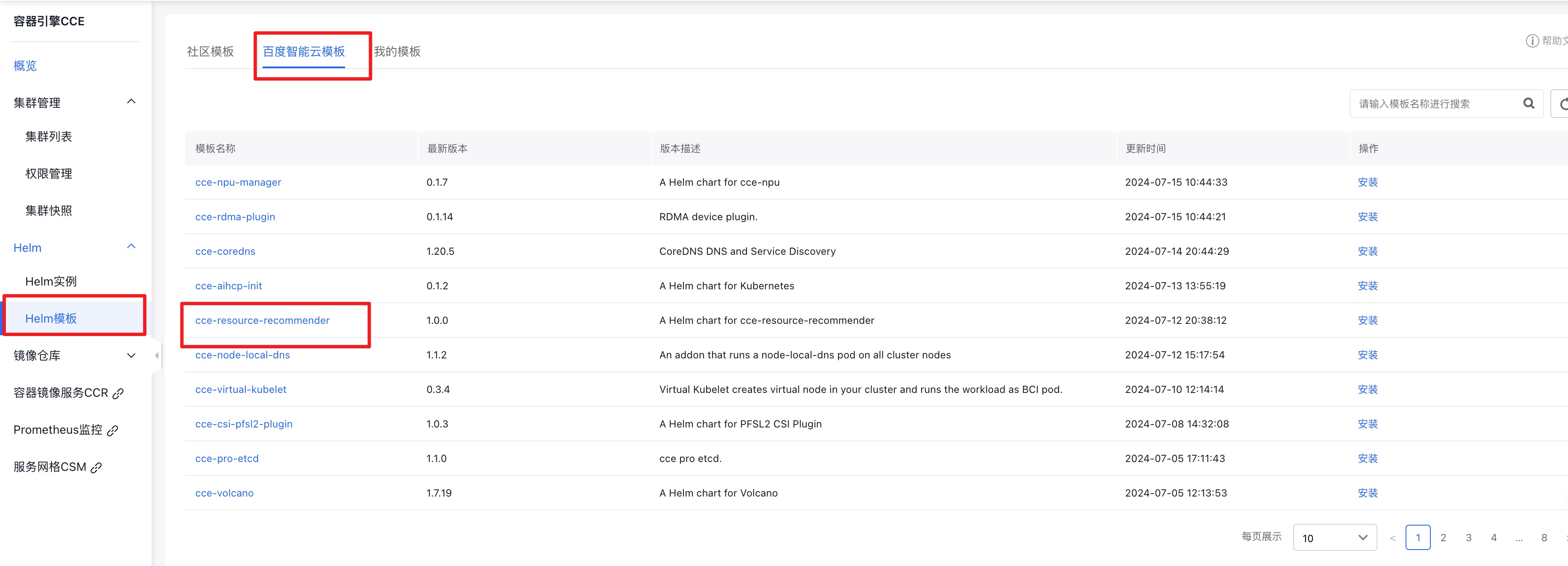
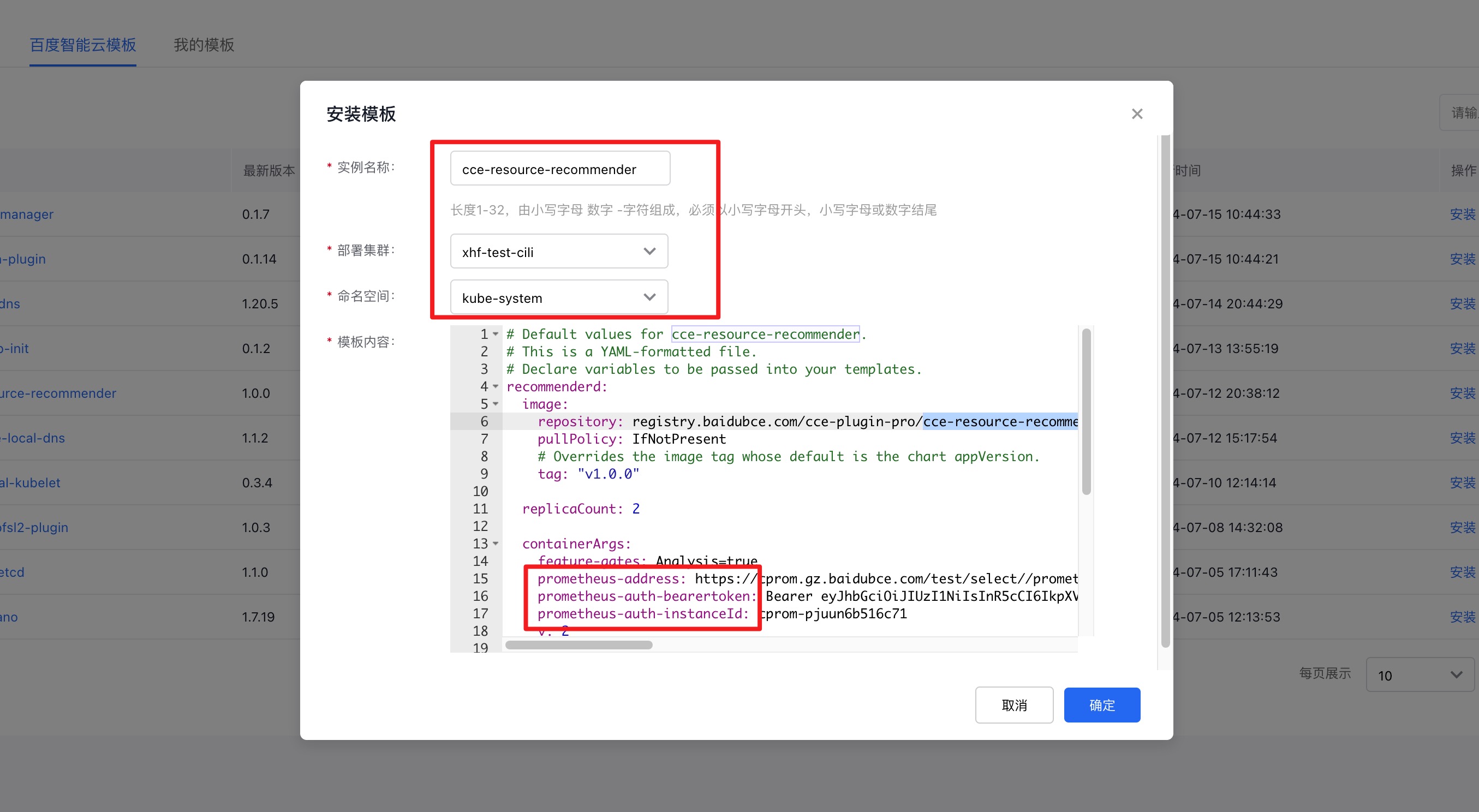
| Parameters | Description | Default value | Required or not |
|---|---|---|---|
| recommenderd.containerArgs.prometheus-address | Prometheus address for recommenderd | Empty (add /Prometheus after the Cprom address) | Yes |
| recommenderd.containerArgs.prometheus-auth-instanceId | Instance ID of recommenderd CProm | Empty | Yes |
| recommenderd.containerArgs.prometheus-auth-bearertoken | CProm token information for recommenderd | Empty | Yes |
| analysisDefault.enable | Whether to enable global resource recommendation default configuration | ||
| Default configuration | true | No |
- Example of adding parameters
1# Default values for cce-resource-recommender.
2# This is a YAML-formatted file.
3# Declare variables to be passed into your templates.
4recommenderd:
5  image:
6    repository: registry.baidubce.com/cce-plugin-pro/cce-resource-recommender
7    pullPolicy: IfNotPresent
8    # Overrides the image tag whose default is the chart appVersion.
9    tag: "v1.0.0"
10  replicaCount: 2
11  containerArgs:
12    feature-gates: Analysis=true
13    v: 2
14	prometheus-address: https://cprom.gz.baidubce.com/test/select/prometheus
15    prometheus-auth-instanceId: cprom-pjuun6b516c71
16    prometheus-auth-bearertoken: Bearer eyJhbGciOiJIUzI1NiIsInR5cCI6IkpXVCJ9.eyJuYW1lc3BhY2UiOiJjcHJvbS1wanV1bjZiNTE2YzcxIiwic2VjcmV0TmFtZSI6ImVjYTk3ZTE0OGNiNzRlOTY4M2Q3YjcyNDA4MjlkMWZmIiwiZXhwIjoxNzgzODUwMTkyLCJpc3MiOiJjcHJvbSJ9.U5VkXlKbSJvOqPHWW_gGOhaEJA-hDdvsOyIHgYijacA
17  podAnnotations: { }
18  resources: { }
19  nodeSelector: { }
20  tolerations: [ ]
21  affinity: { }
22analysisDefault:
23  enable: true
3. Verify whether the installation is successful
Use the following command to check if the installed deployment is normal:
kubectl get deploy recommenderd -n kube-system
The results similar to the following information will be returned:
1NAME           READY   UP-TO-DATE   AVAILABLE   AGE
2recommenderd   2/2     2            2           37s
Uninstall CCE Resource Recommender
helm --kubeconfig {$kubeconfig} uninstall cce-resource-recommender -n kube-system
Obtain recommended values in the backend
Workload
The CCE Resource Recommender component saves the recommended values into the YAML file of the respective workload. You can retrieve recommended values for each workload via the standard Kubernetes API and integrate them into your business release system. Check the request recommendations for each container under the workload as follows:
1apiVersion: apps/v1
2kind: Deployment
3metadata:
4  annotations:
5    analysis.baidubce.com/resource-recommendation: |
6      containers:
7# If a Pod contains multiple containers, each container has recommended values for CPU and memory requests
8      - containerName: nginx
9        target:
10          cpu: 125m
11 memory: 125Mi # If the unit is missing here, it displays the string "58243235", with the omitted unit of byte
12    deployment.kubernetes.io/revision: "1"
13  creationTimestamp: "2024-06-11T03:15:57Z"
14  generation: 1
15  labels:
16    app: nginx
17  name: deployment-example
18  namespace: default
19  resourceVersion: "1118119"
20  uid: 8b6d54d9-c683-4e76-a95e-658e14a954b1
21spec:
22  progressDeadlineSeconds: 600
23  replicas: 1
24  revisionHistoryLimit: 10
25  selector:
26    matchLabels:
27      app: nginx
28  strategy:
29    rollingUpdate:
30      maxSurge: 25%
31      maxUnavailable: 25%
32    type: RollingUpdate
33  template:
34    metadata:
35      creationTimestamp: null
36      labels:
37        app: nginx
38    spec:
39      containers:
40      - image: hub.baidubce.com/cce/nginx-alpine-go:latest
41        imagePullPolicy: Always
42        livenessProbe:
43          failureThreshold: 3
44          httpGet:
45            path: /
46            port: 80
47            scheme: HTTP
48          initialDelaySeconds: 20
49          periodSeconds: 5
50          successThreshold: 1
51          timeoutSeconds: 5
52        name: nginx
53        ports:
54        - containerPort: 80
55          protocol: TCP
56        readinessProbe:
57          failureThreshold: 3
58          httpGet:
59            path: /
60            port: 80
61            scheme: HTTP
62          initialDelaySeconds: 5
63          periodSeconds: 5
64          successThreshold: 1
65          timeoutSeconds: 1
66        resources:
67          limits:
68            cpu: 250m
69            memory: 512Mi
70          requests:
71            cpu: 250m
72            memory: 512Mi
73        terminationMessagePath: /dev/termination-log
74        terminationMessagePolicy: File
75      dnsPolicy: ClusterFirst
76      restartPolicy: Always
77      schedulerName: default-scheduler
78      securityContext: {}
79      terminationGracePeriodSeconds: 30
Recommendation CR
The CCE Resource Recommender component generates a recommendation CR object for each workload in the cluster based on analysis results to store recommended data, while also saving recommended values to the workload's YAML
1apiVersion: analysis.baidubce.com/v1alpha1
2kind: Recommendation
3metadata:
4  annotations:
5    analysis.baidubce.com/run-number: "1"
6  creationTimestamp: "2024-06-11T04:54:27Z"
7  generateName: analysis-default-resource-
8  generation: 2
9  labels:
10    analysis.baidubce.com/analytics-uid: 83cccfd5-b3c5-45aa-a92a-d9dd607dc75f
11    analysis.baidubce.com/recommendation-rule-name: analysis-default
12    analysis.baidubce.com/recommendation-rule-recommender: Resource
13    analysis.baidubce.com/recommendation-rule-uid: bce27929-64d6-4b5f-89e4-001cbed5ed64
14    analysis.baidubce.com/recommendation-target-kind: StatefulSet
15    analysis.baidubce.com/recommendation-target-name: agent-q7vl19h81
16    analysis.baidubce.com/recommendation-target-version: v1
17    app.kubernetes.io/component: vmagent
18    app.kubernetes.io/instance: agent-q7vl19h81
19    app.kubernetes.io/managed-by: Helm
20    app.kubernetes.io/name: monitor-agent
21    app.kubernetes.io/version: 0.2.0
22    helm.sh/chart: monitor-agent-0.3.6
23  name: analysis-default-resource-2gzjt
24  namespace: default
25  ownerReferences:
26  - apiVersion: analysis.baidubce.com/v1alpha1
27    blockOwnerDeletion: false
28    controller: false
29    kind: RecommendationRule
30    name: analysis-default
31    uid: bce27929-64d6-4b5f-89e4-001cbed5ed64
32  resourceVersion: "1118082"
33  uid: 4793159d-83b5-45db-8c34-c3443a7c45cd
34spec:
35  adoptionType: StatusAndAnnotation
36  completionStrategy:
37    completionStrategyType: Once
38  targetRef:
39    apiVersion: apps/v1
40    kind: StatefulSet
41    name: agent-q7vl19h81
42    namespace: cprom-system
43  type: Resource
44status:
45  action: Patch
46  conditions:
47  - lastTransitionTime: "2024-06-11T04:54:28Z"
48    message: Recommendation is ready
49    reason: RecommendationReady
50    status: "True"
51    type: Ready
52  currentInfo: '{"spec":{"template":{"spec":{"containers":[{"name":"sidecar","resources":{"requests":{"cpu":"100m","memory":"100Mi"}}},{"name":"vmagent","resources":{"requests":{"cpu":"100m","memory":"100Mi"}}}]}}}}'
53  lastUpdateTime: "2024-06-11T04:54:28Z"
54  recommendedInfo: '{"spec":{"template":{"spec":{"containers":[{"name":"sidecar","resources":{"requests":{"cpu":"125m","memory":"125Mi"}}},{"name":"vmagent","resources":{"requests":{"cpu":"125m","memory":"125Mi"}}}]}}}}'
55  recommendedValue: |
56    resourceRequest:
57      containers:
58      - containerName: sidecar
59        target:
60          cpu: 125m
61          memory: 125Mi
62      - containerName: vmagent
63        target:
64          cpu: 125m
65          memory: 125Mi
66  targetRef: {}
In this example:
- The recommended TargetRef points to the StatefulSet of cprom-system: agent-q7vl19h81
- The recommended type is resource recommendation
- adoptionType is StatusAndAnnotation, indicating that recommendation results are displayed in recommendation.status and the annotation of deployment
- recommendedInfo displays the recommended resource configuration, and currentInfo shows the current resource configuration in Json format, which can be updated to TargetRef via Kubectl Patch