

Managing Node Tag
Updated at:2025-10-27
In Kubernetes, labels and taints can be used to manage and schedule resources in the cluster. Labels support the identification and classification of Kubernetes objects (e.g., nodes). It is recommended to refer to the Kubernetes official document Labels and Selectors to understand the composition and usage of labels. This document explains how to manage node labels on the Cloud Container Engine (CCE) console, including batch adding labels and quick deleting labels.
Add node labels in batch
Prerequisites
- You have successfully created a Kubernetes cluster. For details, see [Create Cluster](CCE/Operation guide/Cluster management/Create cluster.md).
Operation steps
- Sign in to the Baidu AI Cloud official website and enter the Cloud Container Engine (CCE) management console.
- Click Cluster Management - Cluster List in the left navigation bar, then click the target cluster name on the Cluster List page to access the Cluster Management page.
- On the Cluster Management page, click Node - Label and Taint Management to access the Label and Taint Management page.
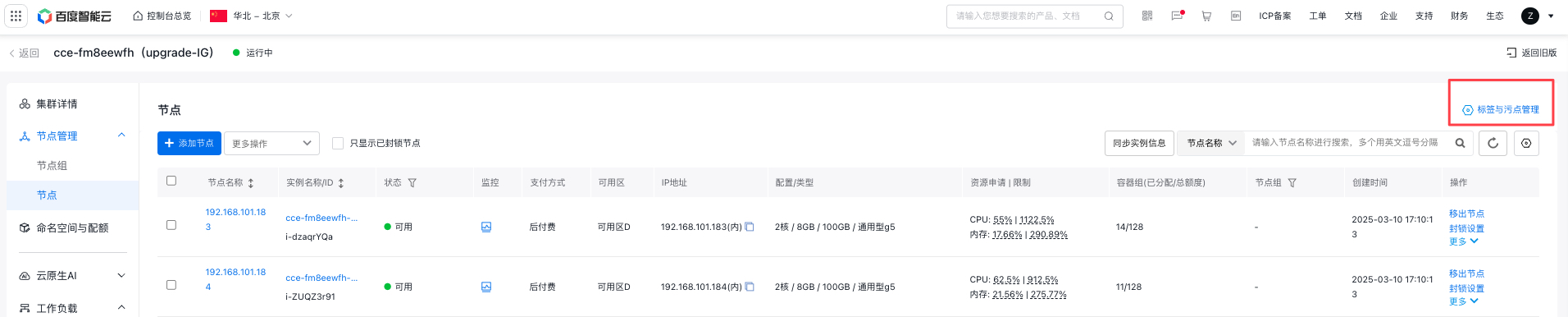
- On the Label and Taint Management page, select nodes in batch and click Edit Labels.
- Select a single node to manage all its labels, except those defined by the system.
- Nodes are created with specific system-defined labels that cannot be removed.
- Batch tag editing can only be used to add tags and cannot modify existing ones.
- Set the label key and value in the “Edit Label” pop-up dialog. For node label usage instructions, refer to Instructions for K8S Label.
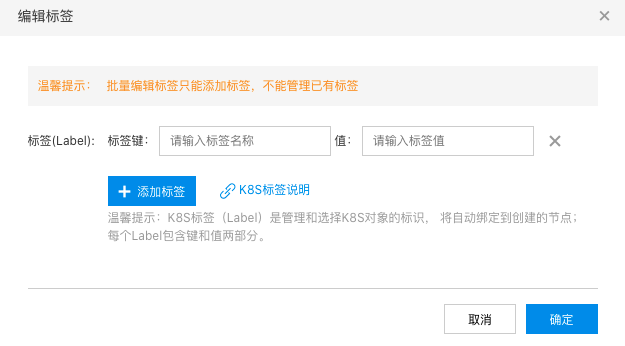
- Click the “OK” button to complete the batch addition of node labels.
Delete node tags
Prerequisites
- You have successfully created a Kubernetes cluster. For details, see [Create Cluster](CCE/Operation guide/Cluster management/Create cluster.md).
Operation steps
- Sign in to the Baidu AI Cloud official website and enter the Cloud Container Engine (CCE) management console.
- Click Cluster Management - Cluster List in the left navigation bar, then click the target cluster name on the Cluster List page to access the Cluster Management page.
- On the Cluster Management page, click Worker - Label and Taint Management to access the Label and Taint Management page.

- On the Label and Taint Management page, choose a node and click the Delete icon next to the label.
- Click the OK button in the deletion confirmation dialog to quickly remove node labels.
Labels added to CCE nodes by default
CCE will automatically assign some default labels to nodes in the cluster.
Labels added to all nodes:
| Tag | Description | Example |
|---|---|---|
| beta.kubernetes.io/cce-instance-type | Node instance specifications | "bcc.g5.c2m8" |
| node.kubernetes.io/cce-instance-type | Node instance specifications | "bcc.g5.c2m8" |
| beta.kubernetes.io/instance-type | Node model (models below k8s 1.17 are outdated) | "BCC" |
| node.kubernetes.io/instance-type | Node model | "BCC" |
| beta.kubernetes.io/arch | Node architecture | "amd64" |
| kubernetes.io/arch | Node architecture | "amd64" |
| beta.kubernetes.io/os | Node OS type | "linux" |
| kubernetes.io/os | Node OS type | "linux" |
| cce.baidubce.com/gpu-share-device-plugin | GPU node exclusive or shared type | "disable/enable" |
| cce.baidubce.com/kubelet-dir | Record the hex code of the instance kubelet root directory | "2f7661722f6c69622f6b7562656c6574" |
| cluster-id | Cluster ID | "cce-xxx" |
| cluster-role | Node role | "node/master" |
| kubernetes.io/hostname | Node name | "192.168.0.60" |
| failure-domain.beta.kubernetes.io/region | Node location (models below k8s 1.17 are outdated) | "bj" |
| topology.kubernetes.io/region | Node location | "bj" |
| failure-domain.beta.kubernetes.io/zone | Node availability zone (Availability zone below k8s 1.17 are outdated) | "zoneA" |
| topology.kubernetes.io/zone | Node's availability zone (AZ) | "zoneA" |
| beta.kubernetes.io/instance-gpu | Check whether the node has GPU resources | "true" |
| beta.kubernetes.io/instance-npu | Check whether the node has NPU resources | "false" |
| kubernetes.io/tor | ID of the physical switch to which the instance belongs | "sw-hzinnW1kCF96rcLUR664Nw" |
Labels exclusive to cloud-edge cluster nodes:
| Tag | Description | Example |
|---|---|---|
| pools.apps.cce.io/cloud | Check whether the node is a cloud node; this label exists only in the true status | "true" |
| pools.apps.cce.io/bcc | Check whether the node is a BCC; this label exists only in the true status | "true" |
| pools.apps.cce.io/{BEC-CITY}-{Provider} | BEC node location city and carrier; it exists only for BEC nodes | pools.apps.cce.io/guangzhou-u |