

CCE Ingress NGINX Controller Description
Component introduction
The CCE Ingress Nginx Controller manages ingress resources within Kubernetes clusters, offering optimizations for certain parameters based on the Kubernetes community’s Ingress Nginx Controller.
Component function
The controller leverages Nginx as a reverse proxy and load balancer to manage the semantics and functionality of Kubernetes Ingress.
- Beyond the configurations provided by Kubernetes Ingress, it offers a wide range of custom configuration options, enabling users to implement more versatile and detailed load balancing strategies.
- The component includes a load balancer service. After deployment, CCE will associate and create an application BLB to manage traffic ingress to the component’s Pods within the cluster.
Application scenarios
When BLB ingress cannot meet requirements, you can use Nginx Ingress to achieve more flexible and fine-grained load balancing strategies.
Usage restrictions
- When operating with Nginx Ingress, data traffic passes through the component’s Pods. To ensure resources are not monopolized by other Pods, the component should be deployed in a separate node group.
Install component
- Sign in to the Baidu AI Cloud official website and enter the management console.
- Select Product Tour > Containers > Baidu Container Engine and click to enter the CCE management console.
- Click Cluster Management > Cluster List in the left navigation bar.
- Click on the target cluster name in the Cluster List page to navigate to the cluster management page.
- On the Cluster Management page, click O&M & Management > Component Management.
- Select the CCE Ingress Nginx Controller component from the component management list and click Install, then complete the relevant configurations in the pop-up box.
| ConfigMap | Required/Optional | Configuration |
|---|---|---|
| IngressClass name | Required | Specify the name of the IngressClass. This unique name identifies different ingress controllers. When creating an ingress, you can assign it to this controller by specifying its name. |
| Namespace | Required | Indicate the namespaces that the IngressClass can monitor for ingress resources. |
| Deployment methods | Required | Currently, only Node Group DaemonSet Deployment is supported. The component will be deployed in the specified node group in the form of DaemonSet. Later, you can scale the count of instance replicas by adjusting the number of node groups. |
| Select a node group | Required | Define the target node group for deploying the component. |
| Container resources | Required | Specify the CPU and memory request and limit values allocated for the Pods running the deployed component. CPU request: The minimum CPU value required by the container. CPU limit: The maximum CPU value allowed for the container. The container will be terminated if this limit is exceeded. Memory request: The minimum memory value required by the container. Memory limit: The maximum memory value allowed for the container. The container will be terminated if this limit is exceeded. |
| Toleration settings | Optional | Set toleration criteria for the Pods deployed by the component, allowing them to be scheduled to nodes that match corresponding taints. |
| Service access | Required | Create a LoadBalancer service for the ingress controller to provide an access entry, supporting: Public network: The system will create an application load balancer (BLB) and bind an elastic IP (EIP). Intranet: The system will only create an application load balancer (BLB). |
| Public network bandwidth | Required | This parameter needs to be configured when Service Access is set to Public Network. Configure the public network bandwidth for BLB-bound EIP, supporting: Billed by traffic usage: After specifying the bandwidth peak, billing is based on the actual usage of public network traffic, regardless of the duration of use. Billed by bandwidth usage: After specifying the bandwidth peak, billing is based on usage duration, regardless of actual traffic. |
| Bandwidth peak | Required | This parameter needs to be configured when Service Access is set to Public Network. Configure the maximum bandwidth limit for the BLB-bound EIP. |
- Click the OK button to complete the component installation.
- You can click Add Instance again to create multiple Nginx Ingress Controllers with different configurations to meet different service access scenarios. When creating an ingress resource object, select the IngressClass to specify the corresponding Nginx Ingress Controller for it.
Uninstall component
The component management console does not currently support uninstalling installed Nginx Ingress Controller instances. If you want to uninstall, you can find the target instance in Helm > Helm Instances and delete it
Deploy components using Baidu AI Cloud templates
The CCE Ingress NGINX Controller component has many configuration items, but the configurations available in the component management function are limited. You can also find the cce-ingress-nginx-controller template in Helm > Helm Templates for deployment and configuration modification.
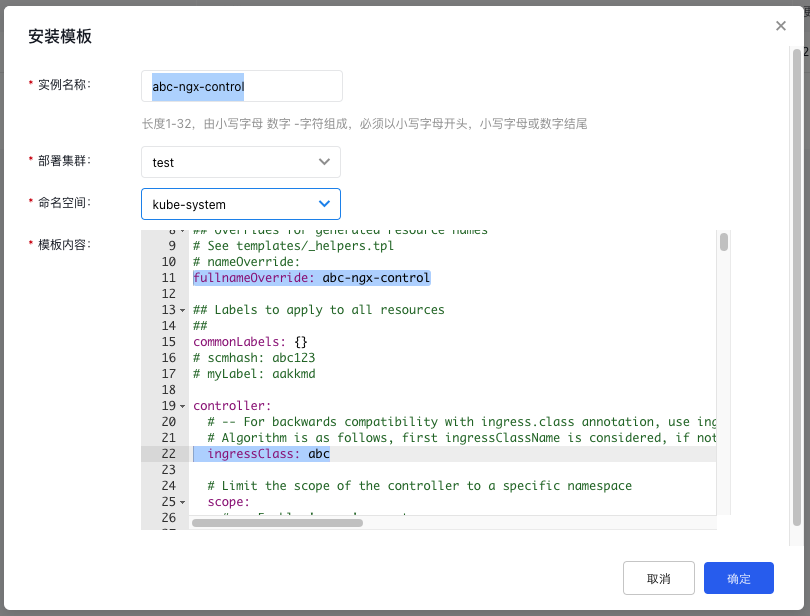
If you want to deploy the component in the cluster independently and achieve linkage with component management, the following conditions must be met during Helm deployment:
- The Helm Instance Name is {ingress-class}-ngx-control.
- The deployment parameter fullnameOverride is {ingress-class}-ngx-control.
Among them, the value of {ingress-class} is consistent with the controller.ingressClass parameter in the deployment parameters, as shown in the figure:
Deployment status
After installing the CCE Ingress NGINX Controller component, several resource objects will be deployed in the Kubernetes cluster. The actual deployment content may vary depending on the chosen configuration.
- Some objects are only deployed in the cluster when relevant deployment parameters are enabled. The names and namespaces of some objects depend on the deployment configuration of the plugin.
| Object name | Namespace | Resource usage | Types |
|---|---|---|---|
| cce-reserved | kube-system | - | ConfigMap |
| clusterrole | - | - | ClusterRole |
| clusterrolebinding | - | - | ClusterRoleBinding |
| controller-configmap | Depend on deployment parameters | - | ConfigMap |
| controller-configmap-addheaders | Depend on deployment parameters | - | ConfigMap |
| controller-configmap-proxyheaders | Depend on deployment parameters | - | ConfigMap |
| controller-configmap-tcp | Depend on deployment parameters | - | ConfigMap |
| controller-configmap-udp | Depend on deployment parameters | - | ConfigMap |
| controller-daemonset | Depend on deployment parameters | Depend on deployment parameters | DaemonSet |
| controller-deployment | Depend on deployment parameters | Depend on deployment parameters | Deployment |
| controller-hpa | Depend on deployment parameters | - | HorizontalPodAutoscaler |
| controller-keda | Depend on deployment parameters | - | ScaledObject |
| controller-poddisruptionbudget | Depend on deployment parameters | - | PodDisruptionBudget |
| controller-prometheusrules | Depend on deployment parameters | - | PrometheusRule |
| controller-psp | Depend on deployment parameters | - | PodSecurityPolicy |
| controller-role | Depend on deployment parameters | - | Role |
| controller-rolebinding | Depend on deployment parameters | - | RoleBinding |
| controller-service | Depend on deployment parameters | - | Service |
| controller-service-internal | Depend on deployment parameters | - | Service |
| controller-service-metrics | Depend on deployment parameters | - | Service |
| controller-service-webhook | Depend on deployment parameters | - | Service |
| controller-serviceaccount | Depend on deployment parameters | - | ServiceAccount |
| controller-servicemonitor | Depend on deployment parameters | - | ServiceMonitor |
| default-backend-deployment | Depend on deployment parameters | - | Deployment |
| default-backend-hpa | Depend on deployment parameters | - | HorizontalPodAutoscaler |
| default-backend-poddisruptionbudget | Depend on deployment parameters | - | PodDisruptionBudget |
| default-backend-psp | Depend on deployment parameters | - | PodSecurityPolicy |
| default-backend-role | Depend on deployment parameters | - | Role |
| default-backend-rolebinding | Depend on deployment parameters | - | RoleBinding |
| default-backend-service | Depend on deployment parameters | - | Service |
| default-backend-serviceaccount | Depend on deployment parameters | - | ServiceAccount |
| dh-param-sercret | Depend on deployment parameters | - | Secret |
| controller-ingressclass | Depend on deployment parameters; exist only in version 4.2.5 | - | IngressClass |
| controller-wehbooks-networkpolicy | Depend on deployment parameters; exist only in version 4.2.5 | - | NetworkPolicy |
Version records
| Version No. | Cluster version compatibility | Update time | Update content | Community version |
|---|---|---|---|---|
| 4.11.5 | CCE/v1.26/v1.28/v1.30 | 2025-03-31 | Update to community v1.11.5, and fix vulnerabilities in CVE-2025-1097, CVE-2025-1098, CVE-2025-1974, CVE-2025-24513 and CVE-2025-24514 | v1.11.5 |
| 4.11.2 | CCE/v1.26/v1.28/v1.30 | 2024-09-20 | Support use in Kubernetes v1.26 and above clusters | v1.11.2 |
| 4.2.5 | CCE/v1.20/v1.22/v1.24 | 2022-11-01 | Support use in Kubernetes v1.22/v1.24 clusters | v1.3.1 |
| 3.29.0 | CCE/v1.16/v1.18/v1.20 | 2022-06-29 | First release | v0.45.0 |