Example of RDMA Distributed Training Based on NCCL

CCE CCE

  • Function Release Records
  • Common Tools
    • Command Line Scenario Examples
  • API Reference
    • Overview
    • Common Headers and Error Responses
    • General Description
  • Product Announcement
    • Announcement on the Discontinuation of CCE Standalone Clusters
    • CCE New Cluster Management Release Announcement
    • Upgrade Announcement for CCE Cluster Audit Component kube-external-auditor
    • CCE Console Upgrade Announcement
    • Announcement on Management Fees for CCE Managed Clusters
    • Container Runtime Version Release Notes
    • Announcement on the Decommissioning of CCE Image Repository
    • Kubernetes Version Release Notes
      • CCE Release of Kubernetes v1_26 History
      • CCE Kubernetes Version Update Notes
      • CCE Release of Kubernetes v1_24 History
      • CCE Release of Kubernetes v1_30 History
      • CCE Release of Kubernetes v1_22 History
      • CCE Release of Kubernetes v1_18 History
      • CCE Release of Kubernetes v1_20 History
      • CCE Release of Kubernetes v1_28 History
      • Release Notes for CCE Kubernetes 1_31 Version
      • Kubernetes Version Overview and Mechanism
    • Security Vulnerability Fix Announcement
      • Vulnerability CVE-2019-5736 Fix Announcement
      • Vulnerability CVE-2021-30465 Fix Announcement
      • CVE-2025-1097, CVE-2025-1098, and Other Vulnerabilities Fix Announcement
      • CVE-2020-14386 Vulnerability Fix Announcement
      • Impact Statement on runc Security Issue (CVE-2024-21626)
  • Service Level Agreement (SLA)
    • CCE Service Level Agreement SLA (V1_0)
  • Typical Practices
    • Pod Anomaly Troubleshooting
    • Adding CGroup V2 Node
    • Common Linux System Configuration Parameters Description
    • Encrypting etcd Data Using KMS
    • Configuring Container Network Parameters Using CNI
    • CCE - Public Network Access Practice
    • Practice of using private images in CCE clusters
    • Unified Access for Virtual Machines and Container Services via CCE Ingress
    • User Guide for Custom CNI Plugins
    • CCE Cluster Network Description and Planning
    • Cross-Cloud Application Migration to Baidu CCE Using Velero
    • CCE Resource Recommender User Documentation
    • Continuous Deployment with Jenkins in CCE Cluster
    • CCE Best Practice-Guestbook Setup
    • CCE Best Practice-Container Network Mode Selection
    • CCE Usage Checklist
    • VPC-ENI Mode Cluster Public Network Access Practice
    • CCE Container Runtime Selection
    • Cloud-native AI
      • Elastic and Fault-Tolerant Training Using CCE AITraining Operator
      • Deploy the TensorFlow Serving inference service
      • Best Practice for GPU Virtualization with Optimal Isolation
  • FAQs
    • How do business applications use load balancer
    • Using kubectl on Windows
    • Cluster management FAQs
    • Common Questions Overview
    • Auto scaling FAQs
    • Create a simple service via kubectl
  • Operation guide
    • Prerequisites for use
    • Identity and access management
    • Permission Management
      • Configure IAM Tag Permission Policy
      • Permission Overview
      • Configure IAM Custom Permission Policy
      • Configure Predefined RBAC Permission Policy
      • Configure IAM Predefined Permission Policy
      • Configure Cluster OIDC Authentication
    • Configuration Management
      • Configmap Management
      • Secret Management
    • Traffic access
      • BLB ingress annotation description
      • Use K8S_Service via CCE
      • Use K8S_Ingress via CCE
      • Implement Canary Release with CCE Based on Nginx-Ingress
      • Create CCE_Ingress via YAML
      • LoadBalancer Service Annotation Description
      • Service Reuses Existing Load Balancer BLB
      • Use Direct Pod Mode LoadBalancer Service
      • NGINX Ingress Configuration Reference
      • Create LoadBalancer_Service via YAML
      • Use NGINX Ingress
    • Virtual Node
      • Configuring BCIPod
      • Configuring bci-profile
      • Managing virtual nodes
    • Node management
      • Add a node
      • Managing Taints
      • Setting Node Blocking
      • Setting GPU Memory Sharing
      • Remove a node
      • Customizing Kubelet Parameters
      • Kubelet Container Monitor Read-Only Port Risk Warning
      • Managing Node Tag
      • Drain node
    • Component Management
      • CCE CSI CDS Plugin Description
      • CCE Fluid Description
      • CCE CSI PFS L2 Plugin
      • CCE Calico Felix Description
      • CCE Ingress Controller Description
      • CCE QoS Agent Description
      • CCE GPU Manager Description
      • CCE Ingress NGINX Controller Description
      • CCE P2P Accelerator Description
      • CCE Virtual Kubelet Component
      • CoreDNS Description
      • CCE Log Operator Description
      • CCE Node Remedier Description
      • CCE Descheduler Description
      • CCE Dynamic Scheduling Plugin Description
      • Kube Scheduler Documentation
      • CCE NPU Manager Description
      • CCE CronHPA Controller Description
      • CCE LB Controller Description
      • Kube ApiServer Description
      • CCE Backup Controller Description
      • CCE Network Plugin Description
      • CCE CSI PFS Plugin Description
      • CCE Credential Controller Description
      • CCE Deep Learning Frameworks Operator Description
      • Component Overview
      • CCE Image Accelerate Description
      • CCE CSI BOS Plugin Description
      • CCE Onepilot Description
      • Description of Kube Controller Manager
      • CCE_Hybrid_Manager Description
      • CCE NodeLocal DNSCache Description
      • CCE Node Problem Detector Description
      • CCE Ascend Mindx DL Description
      • CCE RDMA Device Plugin Description
      • CCE AI Job Scheduler Description
    • Image registry
      • Image Registry Basic Operations
      • Using Container Image to Build Services
    • Helm Management
      • Helm Template
      • Helm Instance
    • Cluster management
      • Upgrade Cluster Kubernetes Version
      • CCE Node CDS Dilatation
      • Managed Cluster Usage Instructions
      • Create cluster
      • CCE Supports GPUSharing Cluster
      • View Cluster
      • Connect to Cluster via kubectl
      • CCE Security Group
      • CCE Node Resource Reservation Instructions
      • Operate Cluster
      • Cluster Snapshot
    • Serverless Cluster
      • Product overview
      • Using Service in Serverless Cluster
      • Creating a Serverless Cluster
    • Storage Management
      • Using Cloud File System
      • Overview
      • Using Parallel File System PFS
      • Using RapidFS
      • Using Object Storage BOS
      • Using Parallel File System PFS L2
      • Using Local Storage
      • Using Cloud Disk CDS
    • Inspection and Diagnosis
      • Cluster Inspection
      • GPU Runtime Environment Check
      • Fault Diagnosis
    • Cloud-native AI
      • Cloud-Native AI Overview
      • AI Monitoring Dashboard
        • Connecting to a Prometheus Instance and Starting a Job
        • NVIDIA Chip Resource Observation
          • AI Job Scheduler component
          • GPU node resources
          • GPU workload resources
          • GPUManager component
          • GPU resource pool overview
        • Ascend Chip Resource Observation
          • Ascend resource pool overview
          • Ascend node resource
          • Ascend workload resource
      • Task Management
        • View Task Information
        • Create TensorFlow Task
        • Example of RDMA Distributed Training Based on NCCL
        • Create PaddlePaddle Task
        • Create AI Training Task
        • Delete task
        • Create PyTorch Task
        • Create Mxnet Task
      • Queue Management
        • Modify Queue
        • Create Queue
        • Usage Instructions for Logical Queues and Physical Queues
        • Queue deletion
      • Dataset Management
        • Create Dataset
        • Delete dataset
        • View Dataset
        • Operate Dataset
      • AI Acceleration Kit
        • AIAK Introduction
        • Using AIAK-Training PyTorch Edition
        • Deploying Distributed Training Tasks Using AIAK-Training
        • Accelerating Inference Business Using AIAK-Inference
      • GPU Virtualization
        • GPU Exclusive and Shared Usage Instructions
        • Image Build Precautions in Shared GPU Scenarios
        • Instructions for Multi-GPU Usage in Single-GPU Containers
        • GPU Virtualization Adaptation Table
        • GPU Online and Offline Mixed Usage Instructions
        • MPS Best Practices & Precautions
        • Precautions for Disabling Node Video Memory Sharing
    • Elastic Scaling
      • Container Timing Horizontal Scaling (CronHPA)
      • Container Horizontal Scaling (HPA)
      • Implementing Second-Level Elastic Scaling with cce-autoscaling-placeholder
      • CCE Cluster Node Auto-Scaling
    • Network Management
      • How to Continue Dilatation When Container Network Segment Space Is Exhausted (VPC-ENI Mode)
      • Container Access to External Services in CCE Clusters
      • CCE supports dual-stack networks of IPv4 and IPv6
      • Using NetworkPolicy Network Policy
      • Traffic Forwarding Configuration for Containers in Peering Connections Scenarios
      • CCE IP Masquerade Agent User Guide
      • Creating VPC-ENI Mode Cluster
      • How to Continue Dilatation When Container Network Segment Space Is Exhausted (VPC Network Mode)
      • Using NetworkPolicy in CCE Clusters
      • Network Orchestration
        • Container Network QoS Management
        • VPC-ENI Specified Subnet IP Allocation (Container Network v2)
        • Cluster Pod Subnet Topology Distribution (Container Network v2)
      • Network Connectivity
        • Container network accesses the public network via NAT gateway
      • Network Maintenance
        • Common Error Code Table for CCE Container Network
      • DNS
        • CoreDNS Component Manual Dilatation Guide
        • DNS Troubleshooting Guide
        • DNS Principle Overview
    • Namespace Management
      • Set Limit Range
      • Set Resource Quota
      • Basic Namespace Operations
    • Workload
      • CronJob Management
      • Set Workload Auto-Scaling
      • Deployment Management
      • Job Management
      • View the Pod
      • StatefulSet Management
      • Password-Free Pull of Container Image
      • Create Workload Using Private Image
      • DaemonSet Management
    • Monitor Logs
      • Monitor Cluster with Prometheus
      • CCE Event Center
      • Cluster Service Profiling
      • CCE Cluster Anomaly Event Alerts
      • Java Application Monitor
      • Cluster Audit Dashboard
      • Logging
      • Cluster Audit
      • Log Center
        • Configure Collection Rules Using CRD
        • View Cluster Control Plane Logs
        • View Business Logs
        • Log Overview
        • Configure Collection Rules in Cloud Container Engine Console
    • Application management
      • Overview
      • Secret
      • Configuration dictionary
      • Deployment
      • Service
      • Pod
    • NodeGroup Management
      • NodeGroup Management
      • NodeGroup Node Fault Detection and Self-Healing
      • Configuring Scaling Policies
      • NodeGroup Introduction
      • Adding Existing External Nodes
      • Custom NodeGroup Kubelet Configuration
      • Adding Alternative Models
      • Dilatation NodeGroup
    • Backup Center
      • Restore Management
      • Backup Overview
      • Backup Management
      • Backup repository
  • Quick Start
    • Quick Deployment of Nginx Application
    • CCE Container Engine Usage Process Overview
  • Product pricing
    • Product pricing
  • Product Description
    • Application scenarios
    • Introduction
    • Usage restrictions
    • Features
    • Advantages
    • Core concepts
  • Solution-Fabric
    • Fabric Solution
  • Development Guide
    • EFK Log Collection System Deployment Guide
    • Using Network Policy in CCE Cluster
    • Creating a LoadBalancer-Type Service
    • Prometheus Monitoring System Deployment Guide
    • kubectl Management Configuration
  • API_V2 Reference
    • Overview
    • Common Headers and Error Responses
    • Cluster Related Interfaces
    • Instance Related Interfaces
    • Service domain
    • General Description
    • Kubeconfig Related Interfaces
    • RBAC Related Interfaces
    • Autoscaler Related Interfaces
    • Network Related Interfaces
    • InstanceGroup Related Interfaces
    • Appendix
    • Component management-related APIs
    • Package adaptation-related APIs
    • Task Related Interfaces
  • Solution-Xchain
    • Hyperchain Solution
  • SDK
    • Go-SDK
      • Overview
      • NodeGroup Management
      • Initialization
      • Install the SDK Package
      • Cluster management
      • Node management
All documents
menu
No results found, please re-enter

CCE CCE

  • Function Release Records
  • Common Tools
    • Command Line Scenario Examples
  • API Reference
    • Overview
    • Common Headers and Error Responses
    • General Description
  • Product Announcement
    • Announcement on the Discontinuation of CCE Standalone Clusters
    • CCE New Cluster Management Release Announcement
    • Upgrade Announcement for CCE Cluster Audit Component kube-external-auditor
    • CCE Console Upgrade Announcement
    • Announcement on Management Fees for CCE Managed Clusters
    • Container Runtime Version Release Notes
    • Announcement on the Decommissioning of CCE Image Repository
    • Kubernetes Version Release Notes
      • CCE Release of Kubernetes v1_26 History
      • CCE Kubernetes Version Update Notes
      • CCE Release of Kubernetes v1_24 History
      • CCE Release of Kubernetes v1_30 History
      • CCE Release of Kubernetes v1_22 History
      • CCE Release of Kubernetes v1_18 History
      • CCE Release of Kubernetes v1_20 History
      • CCE Release of Kubernetes v1_28 History
      • Release Notes for CCE Kubernetes 1_31 Version
      • Kubernetes Version Overview and Mechanism
    • Security Vulnerability Fix Announcement
      • Vulnerability CVE-2019-5736 Fix Announcement
      • Vulnerability CVE-2021-30465 Fix Announcement
      • CVE-2025-1097, CVE-2025-1098, and Other Vulnerabilities Fix Announcement
      • CVE-2020-14386 Vulnerability Fix Announcement
      • Impact Statement on runc Security Issue (CVE-2024-21626)
  • Service Level Agreement (SLA)
    • CCE Service Level Agreement SLA (V1_0)
  • Typical Practices
    • Pod Anomaly Troubleshooting
    • Adding CGroup V2 Node
    • Common Linux System Configuration Parameters Description
    • Encrypting etcd Data Using KMS
    • Configuring Container Network Parameters Using CNI
    • CCE - Public Network Access Practice
    • Practice of using private images in CCE clusters
    • Unified Access for Virtual Machines and Container Services via CCE Ingress
    • User Guide for Custom CNI Plugins
    • CCE Cluster Network Description and Planning
    • Cross-Cloud Application Migration to Baidu CCE Using Velero
    • CCE Resource Recommender User Documentation
    • Continuous Deployment with Jenkins in CCE Cluster
    • CCE Best Practice-Guestbook Setup
    • CCE Best Practice-Container Network Mode Selection
    • CCE Usage Checklist
    • VPC-ENI Mode Cluster Public Network Access Practice
    • CCE Container Runtime Selection
    • Cloud-native AI
      • Elastic and Fault-Tolerant Training Using CCE AITraining Operator
      • Deploy the TensorFlow Serving inference service
      • Best Practice for GPU Virtualization with Optimal Isolation
  • FAQs
    • How do business applications use load balancer
    • Using kubectl on Windows
    • Cluster management FAQs
    • Common Questions Overview
    • Auto scaling FAQs
    • Create a simple service via kubectl
  • Operation guide
    • Prerequisites for use
    • Identity and access management
    • Permission Management
      • Configure IAM Tag Permission Policy
      • Permission Overview
      • Configure IAM Custom Permission Policy
      • Configure Predefined RBAC Permission Policy
      • Configure IAM Predefined Permission Policy
      • Configure Cluster OIDC Authentication
    • Configuration Management
      • Configmap Management
      • Secret Management
    • Traffic access
      • BLB ingress annotation description
      • Use K8S_Service via CCE
      • Use K8S_Ingress via CCE
      • Implement Canary Release with CCE Based on Nginx-Ingress
      • Create CCE_Ingress via YAML
      • LoadBalancer Service Annotation Description
      • Service Reuses Existing Load Balancer BLB
      • Use Direct Pod Mode LoadBalancer Service
      • NGINX Ingress Configuration Reference
      • Create LoadBalancer_Service via YAML
      • Use NGINX Ingress
    • Virtual Node
      • Configuring BCIPod
      • Configuring bci-profile
      • Managing virtual nodes
    • Node management
      • Add a node
      • Managing Taints
      • Setting Node Blocking
      • Setting GPU Memory Sharing
      • Remove a node
      • Customizing Kubelet Parameters
      • Kubelet Container Monitor Read-Only Port Risk Warning
      • Managing Node Tag
      • Drain node
    • Component Management
      • CCE CSI CDS Plugin Description
      • CCE Fluid Description
      • CCE CSI PFS L2 Plugin
      • CCE Calico Felix Description
      • CCE Ingress Controller Description
      • CCE QoS Agent Description
      • CCE GPU Manager Description
      • CCE Ingress NGINX Controller Description
      • CCE P2P Accelerator Description
      • CCE Virtual Kubelet Component
      • CoreDNS Description
      • CCE Log Operator Description
      • CCE Node Remedier Description
      • CCE Descheduler Description
      • CCE Dynamic Scheduling Plugin Description
      • Kube Scheduler Documentation
      • CCE NPU Manager Description
      • CCE CronHPA Controller Description
      • CCE LB Controller Description
      • Kube ApiServer Description
      • CCE Backup Controller Description
      • CCE Network Plugin Description
      • CCE CSI PFS Plugin Description
      • CCE Credential Controller Description
      • CCE Deep Learning Frameworks Operator Description
      • Component Overview
      • CCE Image Accelerate Description
      • CCE CSI BOS Plugin Description
      • CCE Onepilot Description
      • Description of Kube Controller Manager
      • CCE_Hybrid_Manager Description
      • CCE NodeLocal DNSCache Description
      • CCE Node Problem Detector Description
      • CCE Ascend Mindx DL Description
      • CCE RDMA Device Plugin Description
      • CCE AI Job Scheduler Description
    • Image registry
      • Image Registry Basic Operations
      • Using Container Image to Build Services
    • Helm Management
      • Helm Template
      • Helm Instance
    • Cluster management
      • Upgrade Cluster Kubernetes Version
      • CCE Node CDS Dilatation
      • Managed Cluster Usage Instructions
      • Create cluster
      • CCE Supports GPUSharing Cluster
      • View Cluster
      • Connect to Cluster via kubectl
      • CCE Security Group
      • CCE Node Resource Reservation Instructions
      • Operate Cluster
      • Cluster Snapshot
    • Serverless Cluster
      • Product overview
      • Using Service in Serverless Cluster
      • Creating a Serverless Cluster
    • Storage Management
      • Using Cloud File System
      • Overview
      • Using Parallel File System PFS
      • Using RapidFS
      • Using Object Storage BOS
      • Using Parallel File System PFS L2
      • Using Local Storage
      • Using Cloud Disk CDS
    • Inspection and Diagnosis
      • Cluster Inspection
      • GPU Runtime Environment Check
      • Fault Diagnosis
    • Cloud-native AI
      • Cloud-Native AI Overview
      • AI Monitoring Dashboard
        • Connecting to a Prometheus Instance and Starting a Job
        • NVIDIA Chip Resource Observation
          • AI Job Scheduler component
          • GPU node resources
          • GPU workload resources
          • GPUManager component
          • GPU resource pool overview
        • Ascend Chip Resource Observation
          • Ascend resource pool overview
          • Ascend node resource
          • Ascend workload resource
      • Task Management
        • View Task Information
        • Create TensorFlow Task
        • Example of RDMA Distributed Training Based on NCCL
        • Create PaddlePaddle Task
        • Create AI Training Task
        • Delete task
        • Create PyTorch Task
        • Create Mxnet Task
      • Queue Management
        • Modify Queue
        • Create Queue
        • Usage Instructions for Logical Queues and Physical Queues
        • Queue deletion
      • Dataset Management
        • Create Dataset
        • Delete dataset
        • View Dataset
        • Operate Dataset
      • AI Acceleration Kit
        • AIAK Introduction
        • Using AIAK-Training PyTorch Edition
        • Deploying Distributed Training Tasks Using AIAK-Training
        • Accelerating Inference Business Using AIAK-Inference
      • GPU Virtualization
        • GPU Exclusive and Shared Usage Instructions
        • Image Build Precautions in Shared GPU Scenarios
        • Instructions for Multi-GPU Usage in Single-GPU Containers
        • GPU Virtualization Adaptation Table
        • GPU Online and Offline Mixed Usage Instructions
        • MPS Best Practices & Precautions
        • Precautions for Disabling Node Video Memory Sharing
    • Elastic Scaling
      • Container Timing Horizontal Scaling (CronHPA)
      • Container Horizontal Scaling (HPA)
      • Implementing Second-Level Elastic Scaling with cce-autoscaling-placeholder
      • CCE Cluster Node Auto-Scaling
    • Network Management
      • How to Continue Dilatation When Container Network Segment Space Is Exhausted (VPC-ENI Mode)
      • Container Access to External Services in CCE Clusters
      • CCE supports dual-stack networks of IPv4 and IPv6
      • Using NetworkPolicy Network Policy
      • Traffic Forwarding Configuration for Containers in Peering Connections Scenarios
      • CCE IP Masquerade Agent User Guide
      • Creating VPC-ENI Mode Cluster
      • How to Continue Dilatation When Container Network Segment Space Is Exhausted (VPC Network Mode)
      • Using NetworkPolicy in CCE Clusters
      • Network Orchestration
        • Container Network QoS Management
        • VPC-ENI Specified Subnet IP Allocation (Container Network v2)
        • Cluster Pod Subnet Topology Distribution (Container Network v2)
      • Network Connectivity
        • Container network accesses the public network via NAT gateway
      • Network Maintenance
        • Common Error Code Table for CCE Container Network
      • DNS
        • CoreDNS Component Manual Dilatation Guide
        • DNS Troubleshooting Guide
        • DNS Principle Overview
    • Namespace Management
      • Set Limit Range
      • Set Resource Quota
      • Basic Namespace Operations
    • Workload
      • CronJob Management
      • Set Workload Auto-Scaling
      • Deployment Management
      • Job Management
      • View the Pod
      • StatefulSet Management
      • Password-Free Pull of Container Image
      • Create Workload Using Private Image
      • DaemonSet Management
    • Monitor Logs
      • Monitor Cluster with Prometheus
      • CCE Event Center
      • Cluster Service Profiling
      • CCE Cluster Anomaly Event Alerts
      • Java Application Monitor
      • Cluster Audit Dashboard
      • Logging
      • Cluster Audit
      • Log Center
        • Configure Collection Rules Using CRD
        • View Cluster Control Plane Logs
        • View Business Logs
        • Log Overview
        • Configure Collection Rules in Cloud Container Engine Console
    • Application management
      • Overview
      • Secret
      • Configuration dictionary
      • Deployment
      • Service
      • Pod
    • NodeGroup Management
      • NodeGroup Management
      • NodeGroup Node Fault Detection and Self-Healing
      • Configuring Scaling Policies
      • NodeGroup Introduction
      • Adding Existing External Nodes
      • Custom NodeGroup Kubelet Configuration
      • Adding Alternative Models
      • Dilatation NodeGroup
    • Backup Center
      • Restore Management
      • Backup Overview
      • Backup Management
      • Backup repository
  • Quick Start
    • Quick Deployment of Nginx Application
    • CCE Container Engine Usage Process Overview
  • Product pricing
    • Product pricing
  • Product Description
    • Application scenarios
    • Introduction
    • Usage restrictions
    • Features
    • Advantages
    • Core concepts
  • Solution-Fabric
    • Fabric Solution
  • Development Guide
    • EFK Log Collection System Deployment Guide
    • Using Network Policy in CCE Cluster
    • Creating a LoadBalancer-Type Service
    • Prometheus Monitoring System Deployment Guide
    • kubectl Management Configuration
  • API_V2 Reference
    • Overview
    • Common Headers and Error Responses
    • Cluster Related Interfaces
    • Instance Related Interfaces
    • Service domain
    • General Description
    • Kubeconfig Related Interfaces
    • RBAC Related Interfaces
    • Autoscaler Related Interfaces
    • Network Related Interfaces
    • InstanceGroup Related Interfaces
    • Appendix
    • Component management-related APIs
    • Package adaptation-related APIs
    • Task Related Interfaces
  • Solution-Xchain
    • Hyperchain Solution
  • SDK
    • Go-SDK
      • Overview
      • NodeGroup Management
      • Initialization
      • Install the SDK Package
      • Cluster management
      • Node management
  • Document center
  • arrow
  • CCECCE
  • arrow
  • Operation guide
  • arrow
  • Cloud-native AI
  • arrow
  • Task Management
  • arrow
  • Example of RDMA Distributed Training Based on NCCL
Table of contents on this page
  • Overview
  • Prerequisites
  • Environment verification
  • Submit task
  • Submit tasks via YAML
  • Preparation
  • Task example
  • Key parameter description
  • Submit tasks via the console

Example of RDMA Distributed Training Based on NCCL

Updated at:2025-10-27

Overview

Remote Direct Memory Access (RDMA) is an advanced network communication technology that allows direct memory-to-memory data transfer between systems without involving the operating system or central processor. In large-scale distributed training, RDMA effectively mitigates server-side latency during network data transmission, enabling high-throughput, low-latency communication and enhancing training efficiency.

This document provides a guide on using RDMA networks for distributed training in cloud-native AI environments.

Description:
1. Due to the specificity of RDMA networks, the following examples may not be applicable in self-built K8s clusters.
2. There is almost no difference in usage between IB and RoCE. Unless otherwise specified, RoCE will be used as an example below, and no changes are required on the application side for IB.
3. The NCCL dependency library is required in the application image. It is recommended to use the basic image provided by NVIDIA GPU Cloud (NGC). The base images provided by NGC typically include the NCCL dependency library, and come pre-configured and optimized for many common deep learning frameworks and tools. NGC base images can be used to streamline setup and configuration process, and ensure smooth GPU-accelerated computing and deep learning tasks with NCCL.

Prerequisites

  • A cluster has been set up with at least two GPU instances that support RDMA networks.
  • The GPU instance image includes both OFED and NVIDIA drivers. It is recommended to use the GPU image provided by Baidu AI Cloud, which comes with pre-installed OFED drivers, eliminating the need for manual installation.
  • The cluster has installed the cloud-native AI components: CCE RDMA Device Plugin, CCE GPU Manager, CCE AI Job Scheduler, and CCE Deep Learning Frameworks Operator.

Environment verification

Log into a GPU node with RDMA network support in the cluster and execute the following commands to verify the host environment.

  1. Verify the OFED driver
Plain Text
1$ ofed_info -s         #RoCE driver version
2MLNX_OFED_LINUX-5.8-1.1.2.1:
  1. Verify the Nvidia GPU driver
Plain Text
1$ nvidia-smi  #NVIDIA GPU driver
2+-----------------------------------------------------------------------------+
3| NVIDIA-SMI 470.141.03   Driver Version: 470.141.03   CUDA Version: 11.4     |
4|-------------------------------+----------------------+----------------------+
5| GPU  Name        Persistence-M| Bus-Id        Disp.A | Volatile Uncorr. ECC |
6| Fan  Temp  Perf  Pwr:Usage/Cap|         Memory-Usage | GPU-Util  Compute M. |
7|                               |                      |               MIG M. |
8|===============================+======================+======================|
9|   0  NVIDIA A100-SXM...  On   | 00000000:53:00.0 Off |                    0 |
10| N/A   29C    P0    64W / 400W |      0MiB / 81251MiB |      0%      Default |
11|                               |                      |             Disabled |
12+-------------------------------+----------------------+----------------------+
13|   1  NVIDIA A100-SXM...  On   | 00000000:59:00.0 Off |                    0 |
14| N/A   32C    P0    61W / 400W |      0MiB / 81251MiB |      0%      Default |
15|                               |                      |             Disabled |
16+-------------------------------+----------------------+----------------------+
17|   2  NVIDIA A100-SXM...  On   | 00000000:6E:00.0 Off |                    0 |
18| N/A   33C    P0    67W / 400W |      0MiB / 81251MiB |      0%      Default |
19|                               |                      |             Disabled |
20+-------------------------------+----------------------+----------------------+
21|   3  NVIDIA A100-SXM...  On   | 00000000:73:00.0 Off |                    0 |
22| N/A   29C    P0    60W / 400W |      0MiB / 81251MiB |      0%      Default |
23|                               |                      |             Disabled |
24+-------------------------------+----------------------+----------------------+
25|   4  NVIDIA A100-SXM...  On   | 00000000:8D:00.0 Off |                    0 |
26| N/A   29C    P0    60W / 400W |      0MiB / 81251MiB |      0%      Default |
27|                               |                      |             Disabled |
28+-------------------------------+----------------------+----------------------+
29|   5  NVIDIA A100-SXM...  On   | 00000000:92:00.0 Off |                    0 |
30| N/A   32C    P0    65W / 400W |      0MiB / 81251MiB |      0%      Default |
31|                               |                      |             Disabled |
32+-------------------------------+----------------------+----------------------+
33|   6  NVIDIA A100-SXM...  On   | 00000000:C9:00.0 Off |                    0 |
34| N/A   33C    P0    64W / 400W |      0MiB / 81251MiB |      0%      Default |
35|                               |                      |             Disabled |
36+-------------------------------+----------------------+----------------------+
37|   7  NVIDIA A100-SXM...  On   | 00000000:CF:00.0 Off |                    0 |
38| N/A   28C    P0    62W / 400W |      0MiB / 81251MiB |      0%      Default |
39|                               |                      |             Disabled |
40+-------------------------------+----------------------+----------------------+
41+-----------------------------------------------------------------------------+
42| Processes:                                                                  |
43|  GPU   GI   CI        PID   Type   Process name                  GPU Memory |
44|        ID   ID                                                   Usage      |
45|=============================================================================|
46|  No running processes found                                                 |
47+-----------------------------------------------------------------------------+
  1. Query RDMA network interface cards
Plain Text
1$ show_gids
2DEV	PORT	INDEX	GID					IPv4  		VER	DEV
3---	----	-----	---					------------  	---	---
4mlx5_0	1	0	fe80:0000:0000:0000:f820:20ff:fe28:c769			v1	eth0
5mlx5_0	1	1	fe80:0000:0000:0000:f820:20ff:fe28:c769			v2	eth0
6mlx5_0	1	2	0000:0000:0000:0000:0000:ffff:0a00:3c03	10.0.60.3  	v1	eth0
7mlx5_0	1	3	0000:0000:0000:0000:0000:ffff:0a00:3c03	10.0.60.3  	v2	eth0
8mlx5_1	1	0	fe80:0000:0000:0000:eaeb:d3ff:fecc:c920			v1	eth1
9mlx5_1	1	1	fe80:0000:0000:0000:eaeb:d3ff:fecc:c920			v2	eth1
10mlx5_1	1	2	0000:0000:0000:0000:0000:ffff:190b:8002	25.11.128.2  	v1	eth1
11mlx5_1	1	3	0000:0000:0000:0000:0000:ffff:190b:8002	25.11.128.2  	v2	eth1
12mlx5_2	1	0	fe80:0000:0000:0000:eaeb:d3ff:fecc:c921			v1	eth2
13mlx5_2	1	1	fe80:0000:0000:0000:eaeb:d3ff:fecc:c921			v2	eth2
14mlx5_2	1	2	0000:0000:0000:0000:0000:ffff:190b:8022	25.11.128.34  	v1	eth2
15mlx5_2	1	3	0000:0000:0000:0000:0000:ffff:190b:8022	25.11.128.34  	v2	eth2
16mlx5_3	1	0	fe80:0000:0000:0000:eaeb:d3ff:fe6c:51d2			v1	eth3
17mlx5_3	1	1	fe80:0000:0000:0000:eaeb:d3ff:fe6c:51d2			v2	eth3
18mlx5_3	1	2	0000:0000:0000:0000:0000:ffff:190b:8042	25.11.128.66  	v1	eth3
19mlx5_3	1	3	0000:0000:0000:0000:0000:ffff:190b:8042	25.11.128.66  	v2	eth3
20mlx5_4	1	0	fe80:0000:0000:0000:eaeb:d3ff:fe6c:51d3			v1	eth4
21mlx5_4	1	1	fe80:0000:0000:0000:eaeb:d3ff:fe6c:51d3			v2	eth4
22mlx5_4	1	2	0000:0000:0000:0000:0000:ffff:190b:8062	25.11.128.98  	v1	eth4
23mlx5_4	1	3	0000:0000:0000:0000:0000:ffff:190b:8062	25.11.128.98  	v2	eth4
24mlx5_5	1	0	fe80:0000:0000:0000:eaeb:d3ff:fe33:1366			v1	eth5
25mlx5_5	1	1	fe80:0000:0000:0000:eaeb:d3ff:fe33:1366			v2	eth5
26mlx5_5	1	2	0000:0000:0000:0000:0000:ffff:190b:8082	25.11.128.130  	v1	eth5
27mlx5_5	1	3	0000:0000:0000:0000:0000:ffff:190b:8082	25.11.128.130  	v2	eth5
28mlx5_6	1	0	fe80:0000:0000:0000:eaeb:d3ff:fe33:1367			v1	eth6
29mlx5_6	1	1	fe80:0000:0000:0000:eaeb:d3ff:fe33:1367			v2	eth6
30mlx5_6	1	2	0000:0000:0000:0000:0000:ffff:190b:80a2	25.11.128.162  	v1	eth6
31mlx5_6	1	3	0000:0000:0000:0000:0000:ffff:190b:80a2	25.11.128.162  	v2	eth6
32mlx5_7	1	0	fe80:0000:0000:0000:eaeb:d3ff:fe6c:68ae			v1	eth7
33mlx5_7	1	1	fe80:0000:0000:0000:eaeb:d3ff:fe6c:68ae			v2	eth7
34mlx5_7	1	2	0000:0000:0000:0000:0000:ffff:190b:80c2	25.11.128.194  	v1	eth7
35mlx5_7	1	3	0000:0000:0000:0000:0000:ffff:190b:80c2	25.11.128.194  	v2	eth7
36mlx5_8	1	0	fe80:0000:0000:0000:eaeb:d3ff:fe6c:68af			v1	eth8
37mlx5_8	1	1	fe80:0000:0000:0000:eaeb:d3ff:fe6c:68af			v2	eth8
38mlx5_8	1	2	0000:0000:0000:0000:0000:ffff:190b:80e2	25.11.128.226  	v1	eth8
39mlx5_8	1	3	0000:0000:0000:0000:0000:ffff:190b:80e2	25.11.128.226  	v2	eth8

Submit task

NCCL is NVIDIA’s collective communication library used for both collective and point-to-point communication. NCCL features built-in support for RDMA communication and automatically selects the best communication path based on NIC type and topology. Most modern distributed training frameworks are compatible with NCCL.

This section explains how to use YAML or the console to submit an RDMA-based distributed training task with NCCL in a cloud-native AI environment.

Submit tasks via YAML

Preparation

The Kubernetes cluster has been connected via kubectl. For specific operations, see Connect to the Cluster via Kubectl.

Task example

The following is an example of a Swin-Transformer PyTorch distributed training task based on NCCL:

Plain Text
1apiVersion: "kubeflow.org/v1"
2kind: "PyTorchJob"
3metadata:
4  name: "pytorch-swin-transformer-nccl"
5spec:
6  pytorchReplicaSpecs:
7    Master:
8      replicas: 1
9      restartPolicy: OnFailure
10      template:
11        metadata:
12          annotations:
13            sidecar.istio.io/inject: "false"
14        spec:
15          containers:
16            - name: pytorch
17              image: registry.baidubce.com/cce-ai-native/swin-transformer-torch:v2.0
18              imagePullPolicy: IfNotPresent
19              command:
20              - /bin/sh
21              - -c
22              - python -m torch.distributed.launch --nproc_per_node 8 --nnodes $WORLD_SIZE --node_rank $RANK --master_addr $HOSTNAME --master_port $MASTER_PORT main.py --cfg configs/swin/swin_large_patch4_window7_224_22k.yaml --pretrained swin_large_patch4_window7_224_22k.pth --data-path /imagenet --batch-size 128 --accumulation-steps 2
23              env:
24                - name: NCCL_DEBUG
25                  value: "INFO"
26                - name: NCCL_IB_DISABLE
27                  value: "0"
28              securityContext:
29                capabilities:
30                  add: [ "IPC_LOCK" ]
31              resources:
32                limits:
33                  baidu.com/a100_80g_cgpu: 8
34                  rdma/hca: 1
35              volumeMounts:
36                - mountPath: /imagenet
37                  name: dataset
38                - mountPath: /dev/shm
39                  name: cache-volume
40          schedulerName: volcano
41          volumes:
42            - name: dataset
43              persistentVolumeClaim:
44                claimName: imagenet-22k-pvc
45            - emptyDir:
46                medium: Memory
47              name: cache-volume
48    Worker:
49      replicas: 1
50      restartPolicy: OnFailure
51      template:
52        metadata:
53          annotations:
54            sidecar.istio.io/inject: "false"
55        spec:
56          containers:
57            - name: pytorch
58              image: registry.baidubce.com/cce-ai-native/swin-transformer-torch:v2.0
59              imagePullPolicy: IfNotPresent
60              command:
61              - /bin/sh
62              - -c
63              - python -m torch.distributed.launch --nproc_per_node 8 --nnodes $WORLD_SIZE --node_rank $RANK --master_addr $MASTER_ADDR --master_port $MASTER_PORT main.py --cfg configs/swin/swin_large_patch4_window7_224_22k.yaml --pretrained swin_large_patch4_window7_224_22k.pth --data-path /imagenet --batch-size 128 --accumulation-steps 2
64              env:  
65                - name: NCCL_DEBUG
66                  value: "INFO"
67                - name: NCCL_IB_DISABLE
68                  value: "0"
69              securityContext:
70                capabilities:
71                  add: [ "IPC_LOCK" ]
72              resources:
73                limits:
74                  baidu.com/a100_80g_cgpu: 8
75                  rdma/hca: 1
76              volumeMounts:
77                - mountPath: /imagenet
78                  name: dataset
79                - mountPath: /dev/shm
80                  name: cache-volume
81          volumes:
82            - name: dataset
83              persistentVolumeClaim:
84                claimName: imagenet-22k-pvc
85            - emptyDir:
86                medium: Memory
87              name: cache-volume
88          schedulerName: volcano
89---
90apiVersion: v1
91kind: PersistentVolume
92metadata:
93  name: imagenet-22k-pv
94spec:
95  accessModes:
96  - ReadWriteMany
97  storageClassName:
98  capacity:
99    storage: 100Gi
100  csi:
101    driver: csi-clusterfileplugin
102    volumeHandle: data-id
103    volumeAttributes:
104 parentDir: /           #Required, custom path
105 path: ""               #Required. PFS mount path; enter the path relative to the parentDir here
106 clusterIP: ""          #Required. Endpoint of the PFS instance
107 clusterPort: "8888"    #Required, The port is currently fixed to 8888
108 clientID: ""           #Optional. ID of the PFS instance
109---
110kind: PersistentVolumeClaim
111apiVersion: v1
112metadata:
113  name: imagenet-22k-pvc
114  namespace: default
115spec:
116  accessModes:
117    - ReadWriteMany
118  storageClassName:
119  resources:
120    requests:
121      storage: 100Gi

Key parameter description

  1. NCCL requires inputting environment variables to enable the RDMA feature, including the following:

    Note: For environment variables marked with *, cloud-native AI will automatically inject recommended values during task execution based on Baidu AI Cloud’s internal experience in large-scale distributed training. No manual input is required

Key Value Meaning Remarks
NCCL_IB_DISABLE 0,1 0 = NCCL uses IB/RoCE transmission;
1 = NCCL is prohibited from using IB/RoCE transmission. NCCL will fall back to using IP sockets.
--
NCCL_IB_HCA* mlx5_1 ~ mlx5_8 NCCL_IB_HCA specifies which RDMA APIs to use for communication.
Enter the value corresponding to the package type. For example: fill in mlx5_1~mlx5_8 for an 8-card RoCE package, mlx5_1~mlx5_4 for a 4-card package, and so on.
Note: mlx5_0 is usually the primary network interface card for TCP networks
Cloud-native AI will automatically detect the RoCE environment of the container during task execution and inject the environment variables NCCL_IB_HCA, NCCL_SOCKET_IFNAME, NCCL_IB_GID_INDEX, NCCL_IB_TIMEOUT, and NCCL_IB_QPS_PER_CONNECTION into the process with PID 1 in the container. Subprocesses created via PID 1 will inherit these environment variables, but processes started via sh cannot inherit them.
If the user declares these environment variables in the YAML, the container runtime will no longer inject them automatically.
NCCL_SOCKET_IFNAME* eth0 NCCL_SOCKET_IFNAME specifies which IP API to use for communication;
Note: The default in the container is eth0
NCCL_IB_GID_INDEX* Dynamic value NCCL_IB_GID_INDEX defines the global ID index used in RoCE mode. For the setting method, see the ib show_gids command.
Note: If the RoCE network interface card is used via the container network, the CCE CNI plugin will create a corresponding number of sub-network interface cards for the container, and the GID INDEX of the RoCE network interface card will be generated dynamically. If the show_gids command is available in the container, the corresponding value can be viewed.
NCCL_IB_TIMEOUT* 22 Reconnect timeout duration for network interruptions.
NCCL_IB_QPS_PER_CONNECTION* 8 Number of connections for each IB QP connection.
NCCL_DEBUG INFO NCCL_DEBUG regulates the debug information displayed by NCCL and is commonly used for troubleshooting purposes.
  1. To share data between ranks, NCCL requires shared system memory for IPC and pinned (page-locked) system memory resources. The following parameters need to be configured in the YAML
Plain Text
1              securityContext:
2                capabilities:
3 add: [ "IPC_LOCK" ]  #Enable inter-process communication
4              resources:
5                limits:
6                  baidu.com/a100_80g_cgpu: 8
7 rdma/hca: 1  #Enable RDMA resources
8              volumeMounts:
9                - mountPath: /imagenet
10                  name: dataset
11 -mountPath: /dev/shm  #Use EmptyDir to provide sufficient shared memory for IPC
12                  name: cache-volume
13          volumes:
14            - name: dataset
15              persistentVolumeClaim:
16                claimName: imagenet-22k-pvc
17 - emptyDir:  #Use EmptyDir to provide sufficient shared memory for IPC
18                medium: Memory
19              name: cache-volume
  1. This example relies on the open-source dataset ImageNet-22K. Here, Baidu AI Cloud Parallel Filesystem Service (PFS) is used as the shared storage. The above open-source dataset needs to be copied to the PFS mount directory in advance. For details on how to use PFS in a CCE container cluster, see: Here.

Submit tasks via the console

  1. Sign in to the Baidu AI Cloud official website and enter the management console.
  2. Go to Product Services - Cloud Native - Cloud Container Engine (CCE) to access the CCE management console.
  3. Click Cluster Management - Cluster List in the left navigation pane.
  4. Click on the target cluster name in the Cluster List page to navigate to the cluster management page.
  5. On the Cluster Management page, click Cloud-Native AI - Task Management.
  6. On the Task Management page, click Create Task to start the task creation process
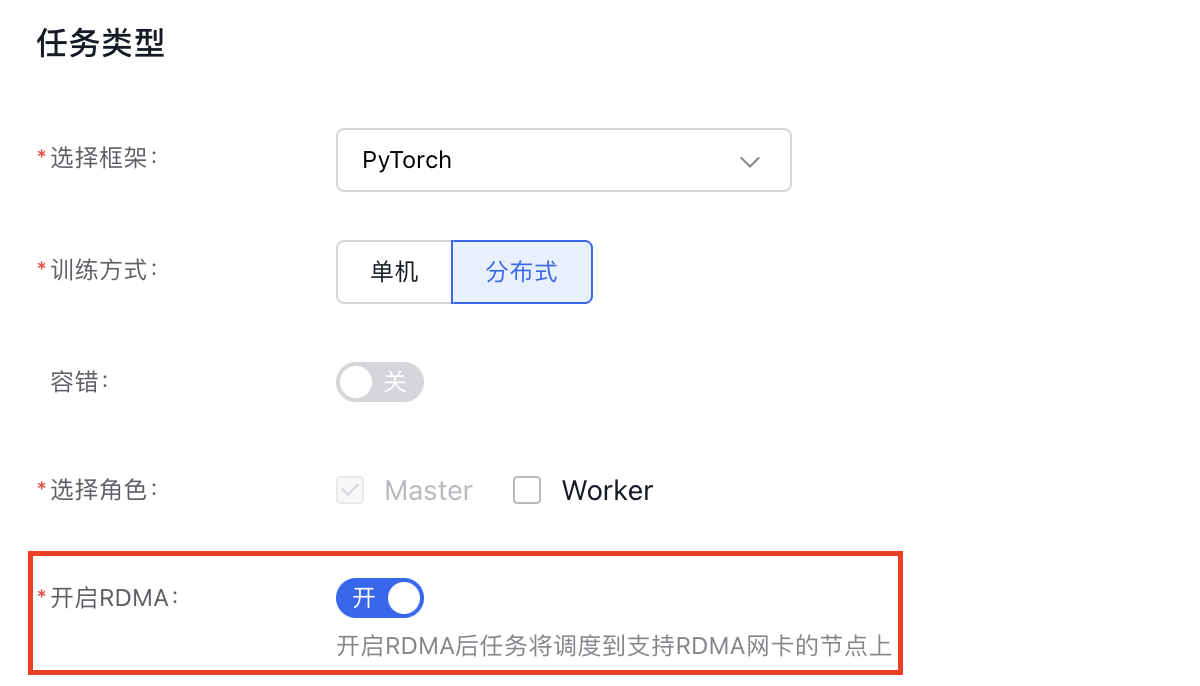
  7. In Create Task - Container Configuration, under the Task Type module, select Distributed for the training method, then select Enable RDMA.

Screenshot 6/3/2024 11.20.45 AM.png

Note: The cloud-native AI console will by default inject the key parameters from the YAML example above into the task; no manual input is required

Previous
Create TensorFlow Task
Next
Create PaddlePaddle Task