

CCE Onepilot Description
Updated at:2025-10-27
Prerequisites
- Enable APM service Introduction to APM Product
Component introduction
CCE Onepilot (Application Performance Monitor Access) integrates multi-programming language probes, enabling automatic APM probe injection and metric reporting environment configuration in the K8S Cluster CCE. After users create workloads with specified labels, they can easily access APM via the CCE console to view real-time metric data for corresponding application instances.
Usage restrictions
- Currently, CCE Onepilot supports probe injection and metric upload for JAVA applications
- This component supports a default capacity of 1,000 Pods. For every additional 1,000 Pods, increase the component’s CPU by 0.5 cores and memory by 512 MB.
-
Usage dependencies
- Cluster version: 1.16 and above (refer to Supported Versions of CCE for details)
- java version: JDK 1.8 and above
Install component
- Enter the cluster details page (refer to View Cluster for specific steps).
- To locate CCE Onepilot on the cluster details page, navigate to: Operation and Maintenance Management -> Component Management -> Monitor and Logs -> CCE Onepilot Component. See the illustration provided for more details.
- Go to the Component Management Monitor and Logs tab, select the CCE Onepilot component, and click Install.
- Click the OK button to complete the component installation.
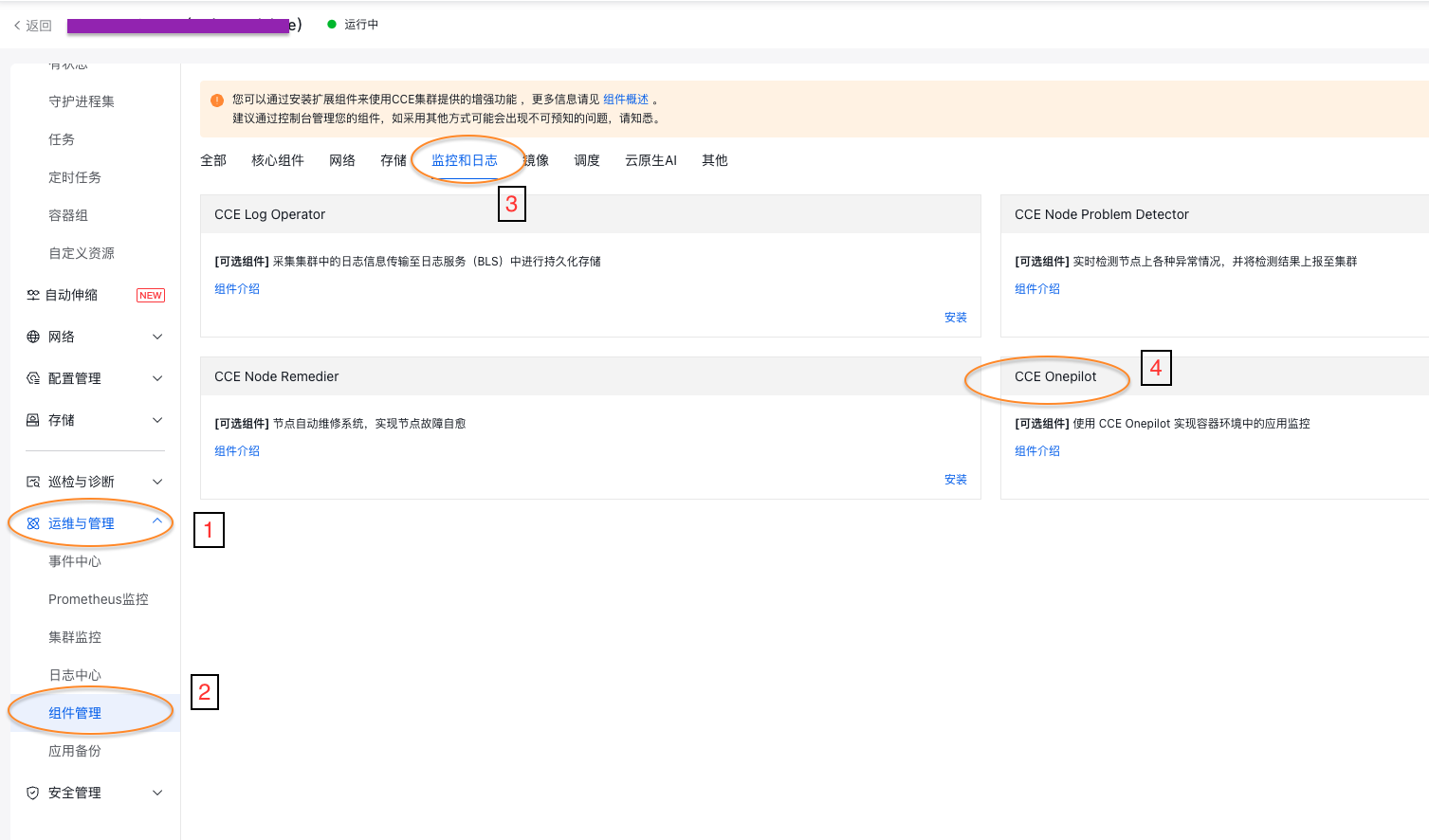
Enable monitoring
- Add the following labels under the spec.template.metadata in the YAML file of the target workload:
Plain Text
1labels:
2  cceOnepilotEnable: "on"
3 apmServiceName: "<your_service_name>" # replace <your_service_name> with your application instance name. If this tag is not set, metrics will be reported to APM using the workload's name metadata.name.
CCE Onepilot will recognize the above labels and automatically inject a probe (agent) and APM-Token (for user authentication; therefore, you need to enable the APM service first) into the Pod
- After adding labels, open the workload list, locate the target workload, and click [Redirect to APM] in the operation column. APM will display metrics such as JVM.
Deployment status
| Name | namespace | Resource usage | Types |
|---|---|---|---|
| cce-onepilot | cce-onepilot | - | Namespace |
| cce-onepilot-server | cce-onepilot | LimitCPU: 250m LimitMemory: 512Mi | Deployment |
| cce-onepilot-configuration | cce-onepilot | - | MutatingWebhookConfiguration |
| cce-onepilot-service | cce-onepilot | - | Service |
| cce-onepilot-tls | cce-onepilot | - | Secret |
| cce-onepilot-cluster-role | cce-onepilot | - | Clusterrole |
| cce-onepilot-role-binding | cce-onepilot | - | Binding |
| cce-onepilot-serviceaccount | cce-onepilot | - | ServiceAccount |
Version records
| Version No. | Cluster version compatibility | Update time | Update content | Impact |
|---|---|---|---|---|
| 1.0.0 | CCE v1.16 or higher | 2025.04.15 | First release | - |