

Configmap Management
ConfigMap
ConfigMap is a K8S API object used to store non-confidential data in key-value pairs. Users can manage ConfigMap in CCE via the page or kubectl.
Manage ConfigMap via the page
Create ConfigMap
Navigate to Product Services - Cloud Container Engine (CCE) - Cluster Details, and click Configuration Management - ConfigMap to enter the ConfigMap list page:

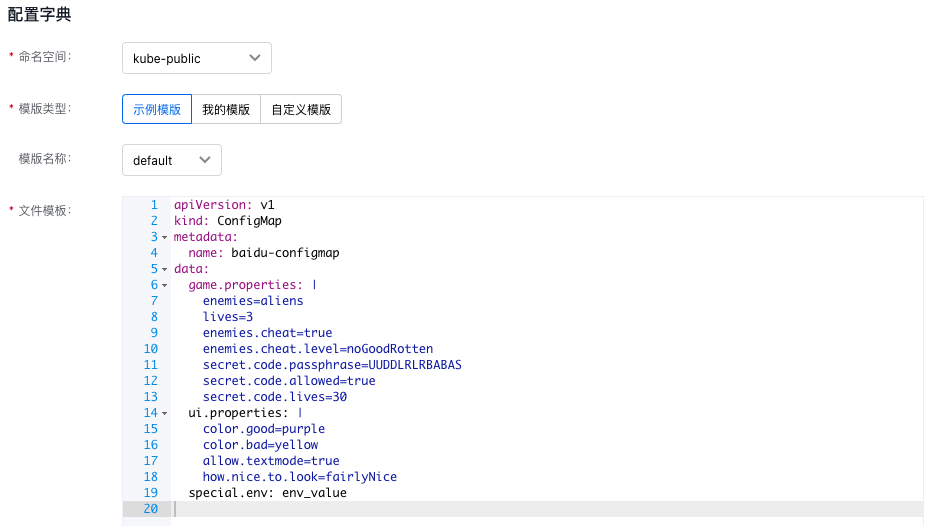
Click Create ConfigMap. Users can create a new ConfigMap in YAML format. Select the namespace, fill in the YAML file, and click OK to submit:
View ConfigMap
Click the ConfigMap name in any row of the list page to open the ConfigMap details page in the right sidebar:
Delete ConfigMap
On the ConfigMap list page, check the ConfigMaps to be deleted, click the Delete button, confirm the information, and then click OK:
Modify ConfigMap
On the ConfigMap list page, click Modify, make modifications, and then click Update to submit. Upon successful submission, return to the list page:
Manage ConfigMaps via kubectl
Example: ConfigMap
1apiVersion: v1
2kind: ConfigMap
3metadata:
4  name: app-config
5data:
6  config.json: |
7    {
8        "Listener": 9443,
9        "MetricsAddress": "0",
10        "EnableLeaderElection": true,
11        "EnableClusterController": true,
12        "EnableInstanceController": true
13    }
The Pod mounts the ConfigMap as a configuration file:
1apiVersion: apps/v1
2kind: Deployment
3metadata:
4  name: app-nginx
5  labels:
6    app: nginx
7spec:
8  selector:
9    matchLabels:
10      app: nginx
11  template:
12    metadata:
13      labels:
14        app: nginx
15    spec:
16      containers:
17        - name: nginx
18          image: registry.baidubce.com/cce/nginx-alpine-go:latest
19          volumeMounts:
20            - mountPath: /app/conf
21              name: app-config
22      volumes:
23        - configMap:
24            defaultMode: 420
25            name: app-config
26          name: app-config
The file corresponding to the configmap app-config will be located in the /app/conf directory of Pod:
1# Enter container using exec:
2$ cat /app/conf/config.json
3{
4    "Listener": 9443,
5    "MetricsAddress": "0",
6    "EnableLeaderElection": true,
7    "EnableClusterController": true,
8    "EnableInstanceController": true
9}
After updating ConfigMap, files in the Pod will be automatically updated within 1 min.