Command Line Scenario Examples
The general issue localization workflow consists of five phases: Issue Identification => Data Export => Critical Error Extraction => View Analysis => Troubleshooting
Scenario 1: Resource quota exceeded
- Issue Identification: pytorchjob fails to enter running state, with corresponding pods remaining pending for an extended period
1% kubectl get pytorchjob
2NAME                     STATE     AGE
3pytorchjob-bert-2-bert   Created   58m
4% kubectl get pod
5pytorchjob-bert-2-bert-master-0         0/2     Pending            0          58m
6pytorchjob-bert-2-bert-worker-0 0/2 Pending 0 58m- Adjust the log level to retrieve view files and log files
1# Adjust log level to 4
2% cce-volcano-cli log -v 4
34
4# Dump log and view files
5cce-volcano-cli dump -l 5000
6copy file volcano-scheduler-7848fb7487-44fpq:/dump/volcano.1695461246.snapshot to ./volcano.1695461246.snapshot success!
7start dump volcano logfile volcano.1695461246.log
8end dump volcano logfile volcano.1695461246.log
9# Adjust log level to 3
10% cce-volcano-cli log -v 3 -k kubeconfig
113- Critical error extraction: Job logs reveal ExceedQueueResource, necessitating analysis of queue quota allocation
1% cce-volcano-cli log job -f volcano.1695461246.log -j pytorchjob-bert-2-bert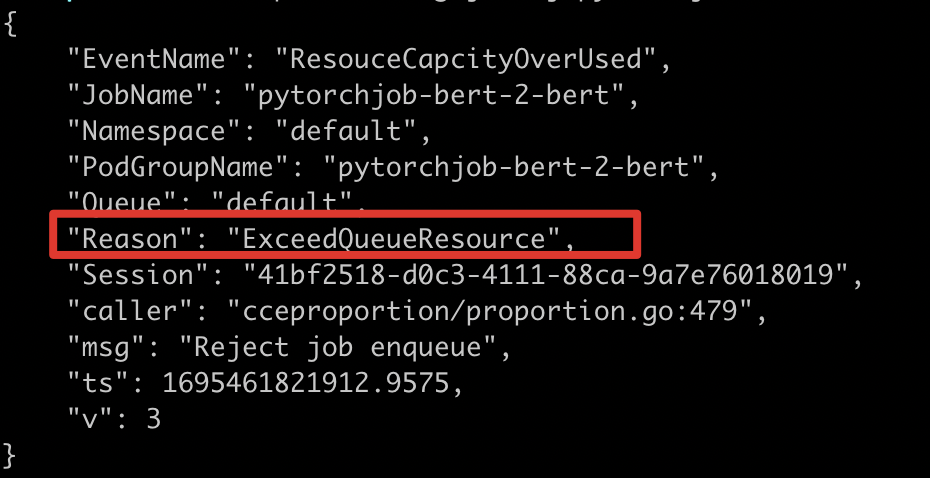
After receiving an insufficient quota error message, you can use the cce-volcano-cli queue command to analyze queue quotas. Common scenarios include the following:
Case 1: Insufficient queue quota
The a800 resources have been exhausted, with a total of 8 cards, 5 allocated, and 4 in queue
1% cce-volcano-cli queue -f volcano.1695461246.snapshot
Case 2: Hybrid card scheduling
For hybrid application scenarios, the tool provides the totalGPU field to count the actual remaining cards. It shows a total of 8 cards, with 5 allocated, 4 in queue, and -1 remaining cards.
Among allocated cards: 1 requested via baidu.com/a800_80g_cgpu, 4 via nvidia.com/gpu. The 4 cards in queue are requested via baidu.com/a800_80g_cgpu
1% cce-volcano-cli queue -f volcano.1695461246.snapshot
Case 3: Podgroup residuals
Excessive inqueue resources; 3 cards remain unused
1% cce-volcano-cli queue -f volcano.1695461246.snapshot
1Use cce-volcano-cli job command for job view analysis, view inqueue job lists, and clean up abnormal jobs
2% cce-volcano-cli job -f volcano.1695461246.snapshot -a
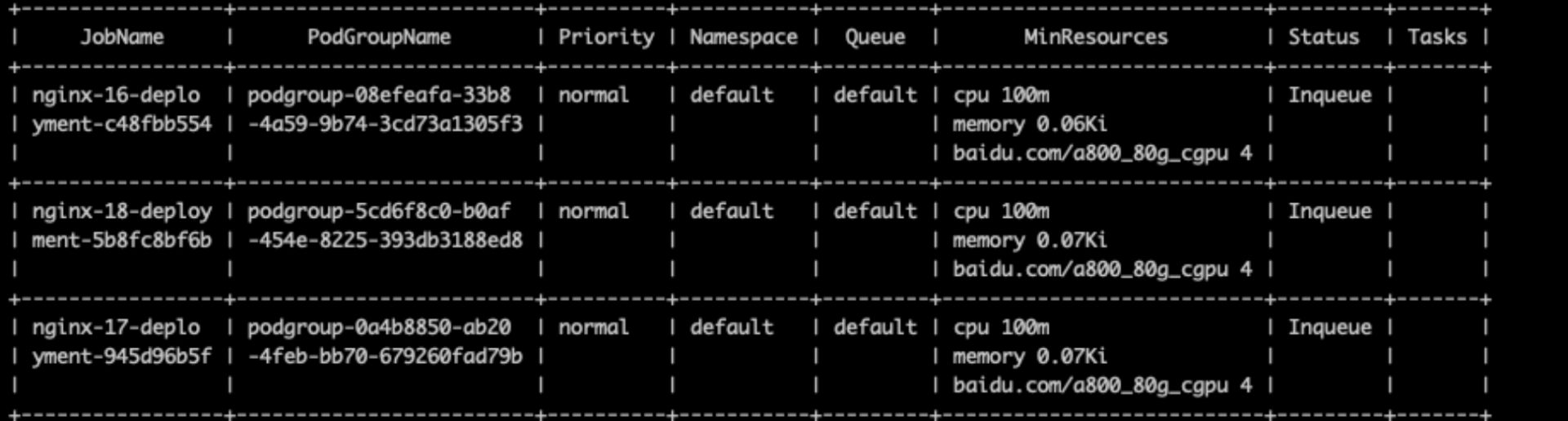
3 The tool provides the -t option to filter such abnormal job lists
4% cce-volcano-cli job -f volcano.1695461246.snapshot -t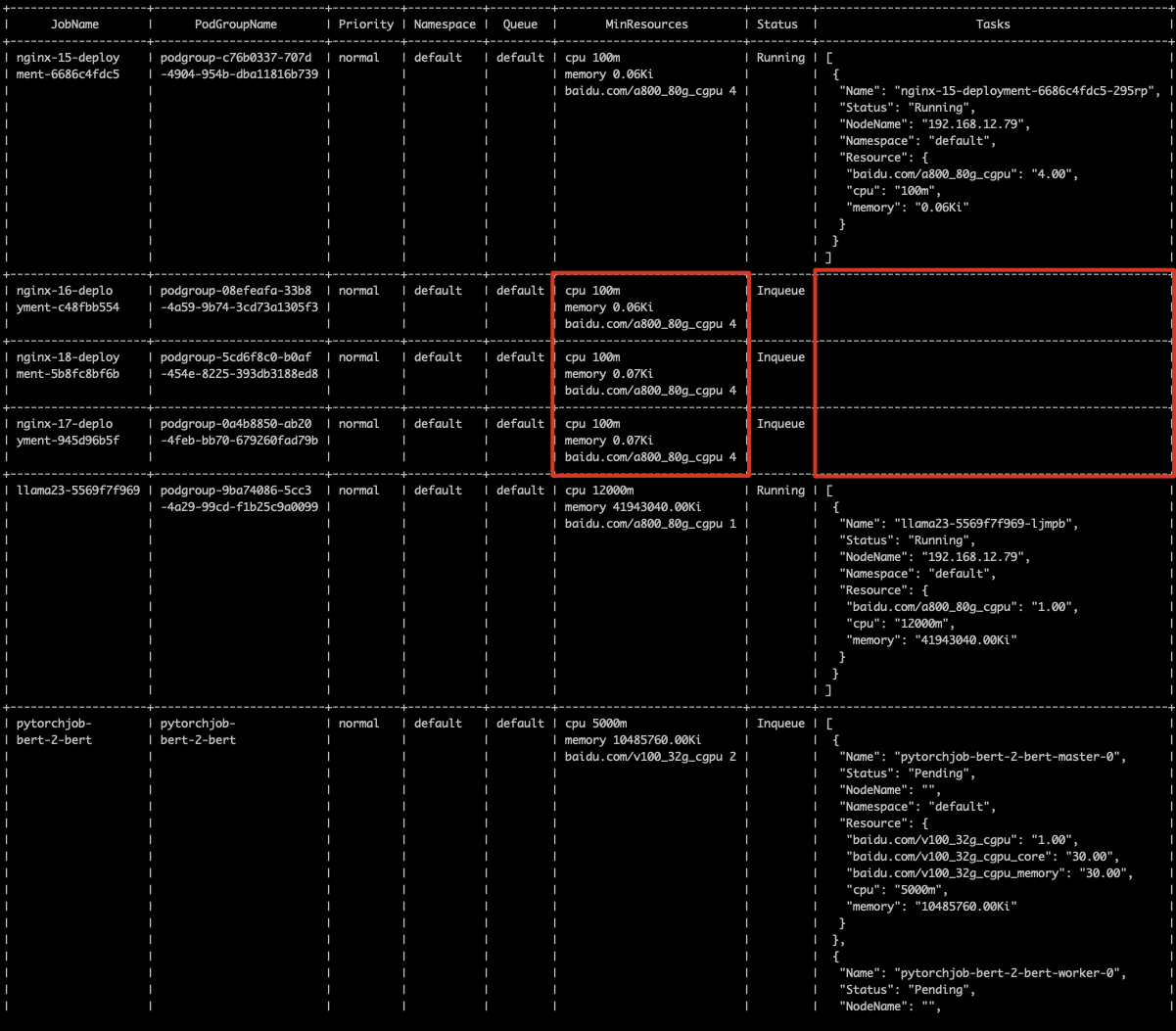
Scenario 2: Affinity, taints, and insufficient GPU resources
- Issue Identification: job remains in created state with pod pending
1% kubectl get PyTorchJob
2NAME              STATE     AGE
3pytorchjob-bert   Created   36s
4% kubectl get pod
5NAME                       READY   STATUS    RESTARTS   AGE
6pytorchjob-bert-master-0 0/2 Pending 0 39s- Key Error Extraction:Through job logs, GangUnschedulable is found, which does not meet gang scheduling, indicating that pod scheduling failure caused the pending state. Continue to investigate the pod failure reason
1# Collect CCE AI Job Scheduler logs
2% cce-volcano-cli dump -l 5000
3# View job-level logs via command line./c
4% cce-volcano-cli log job -f volcano.1698844162.log -j pytorchjob-bert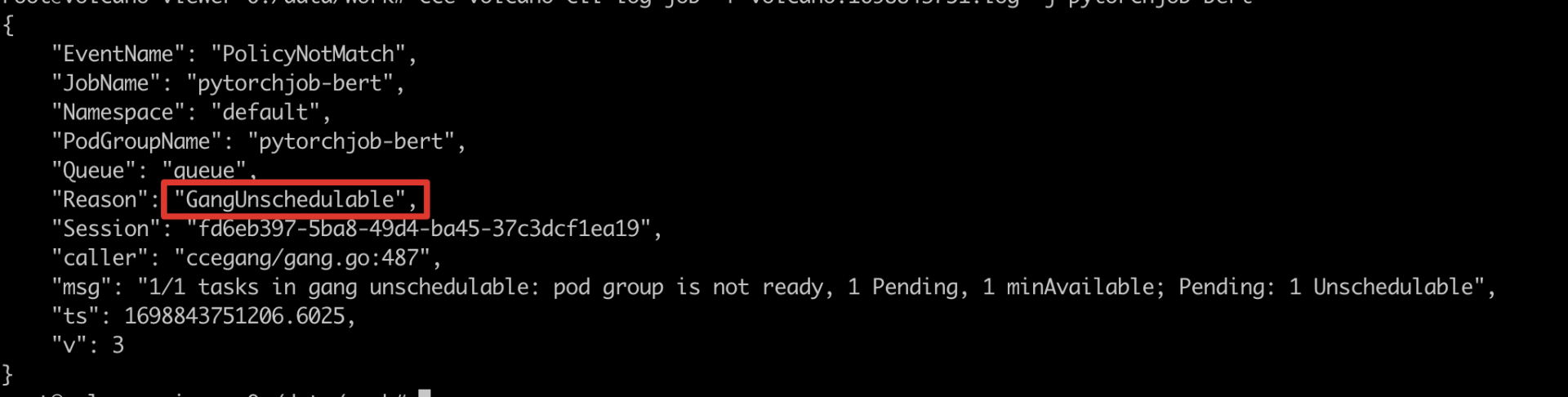
- View pod-level logs via command line
1# View pod-level logs via command line
2% cce-volcano-cli log pod -f volcano.1698844162.log -p pytorchjob-bert-master-0
192.168.14.5 is a cordon
192.168.11.181 has insufficient CPU or memory resources
Nodes 192.168.14.142, 10.0.3, and 10.0.4 have taints
Case 1: Affinity matching
Analysis via node view: 10.0.0.181 has insufficient CPU resources (job requests 1000m CPU, and node has 50m remaining).
Nodes 10.0.0.3, 10.0.0.4 and 10.0.0.142 have GPU resources, but are tainted and cannot be scheduled; it is necessary to confirm whether to use these nodes.
10.0.0.5 is a cordon (status: Unschedulable).
1% cce-volcano-cli node -f volcano.1698844162.snapshot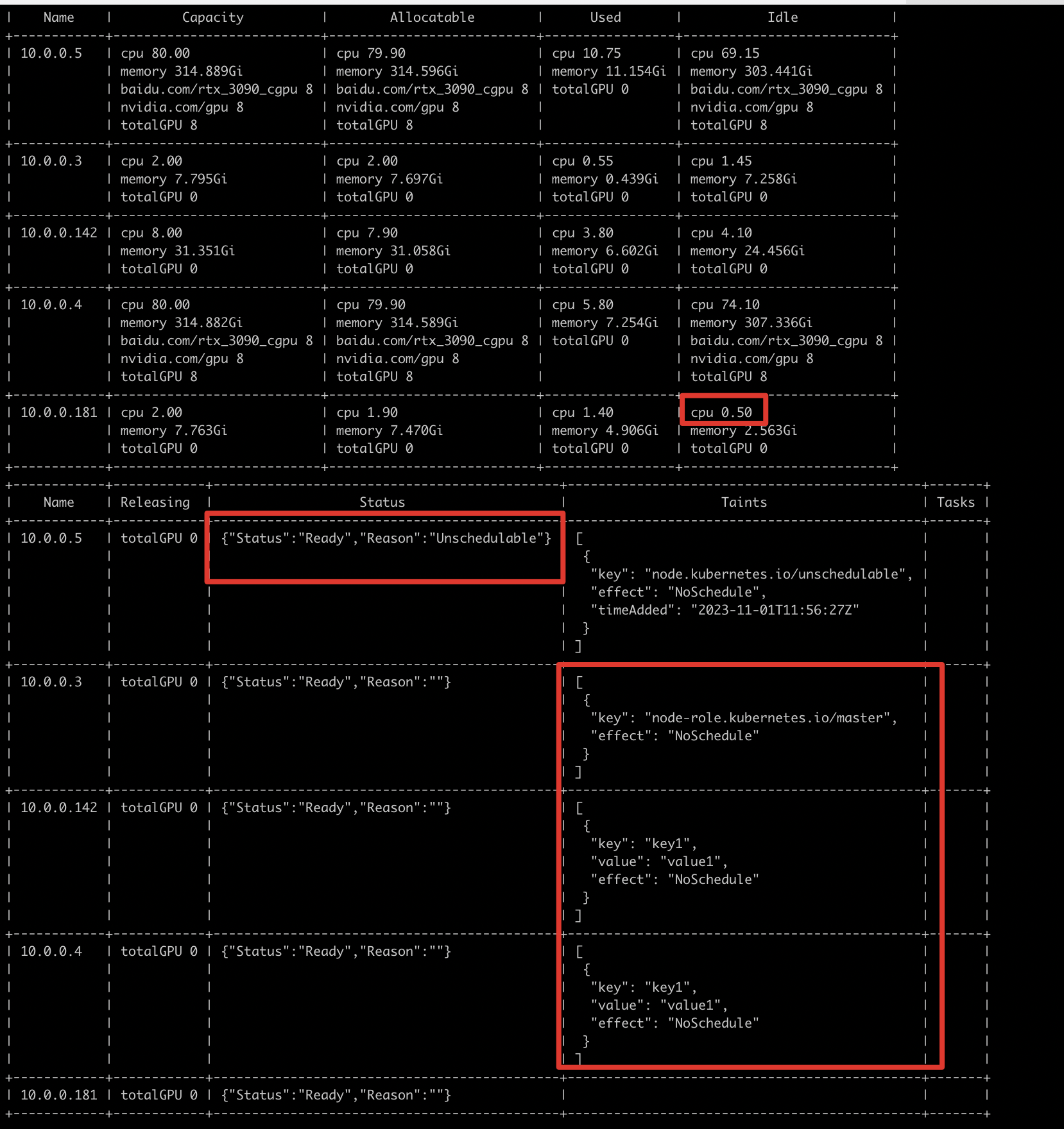
Case 2: GPU offline
If the node contains GPU resources and the required number of cards is less than or equal to the node's available count, scheduling might still fail. Check the node view to verify if GPU cards are offline.
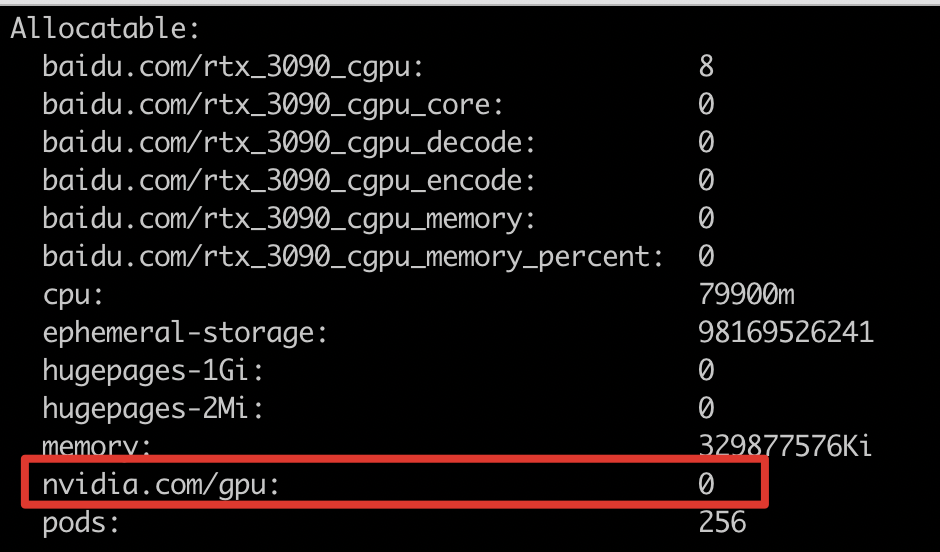
As illustrated below, when the node’s allocatable "nvidia.com/gpu" is less than the node’s capacity, it likely indicates that the GPU card is offline.
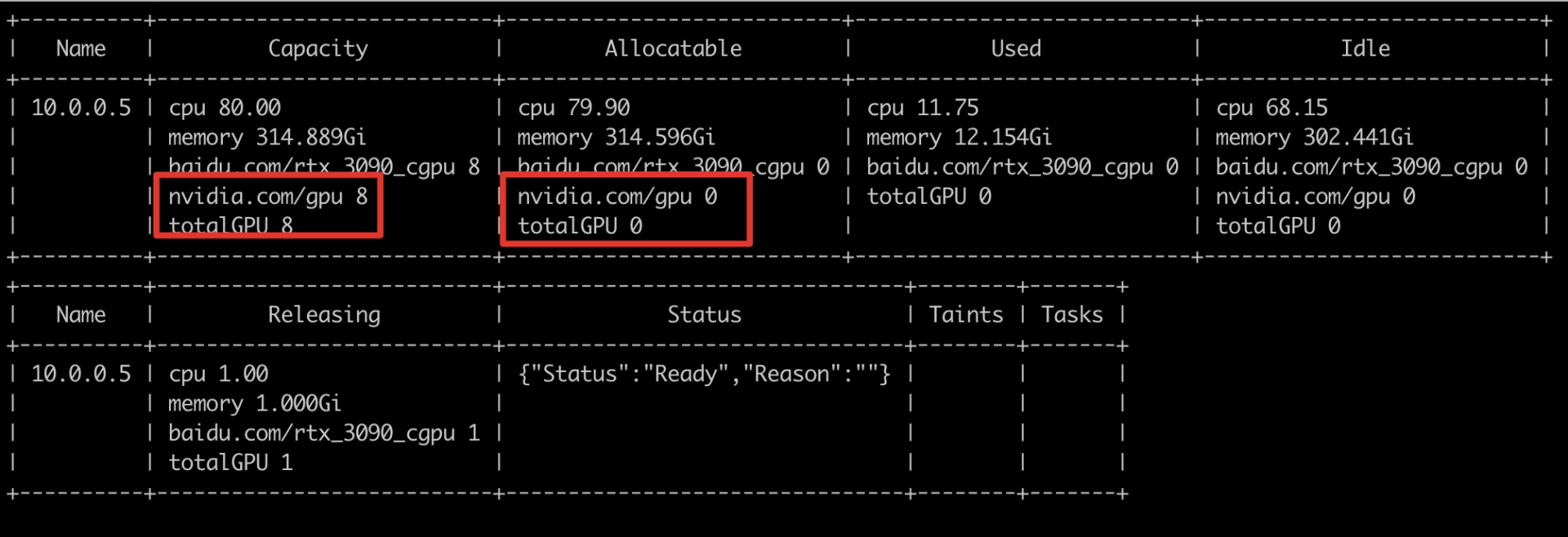
Running "describe node" shows "nvidia.com/gpu" as 0, confirming that the GPU card is offline.