

Configuring Scaling Policies
The Cloud Container Engine (CCE) node group supports configuring multiple standby models and can meet resource usage demands across various scenarios when combined with a scaling strategy.
Introduction of scaling strategy
Different scaling strategies correspond to different scaling methods. For specific information, see the description below:
Model configuration sequence
Scale-up principle: Scale-up is performed in the following sequence: active model is selected first; if active model resources are insufficient, standby models are selected successively (in the sequence of addition)
Note: For instance, if you set A as the active model and B and C as standby models, the system will attempt to scale up in the following order: A, B, and then C. If A is unavailable, it will proceed to scale up B, and if B is also unavailable, it will shift to scaling up C.
Scale-down principle: Scale-down occurs in the reverse priority order (the reverse of the node scale-up sequence) defined during scale-up.
Multi-subnet uniform distribution
Scale-up principle: The scale-up is performed in the sequence of models in each subnet to ensure that the count of nodes in each subnet is as equal as possible.
Scale-down principle: Before scale-down, the count of subnets is first calculated. The scale-down is performed according to the subnet node uniform distribution strategy, to ensure the count of nodes in each subnet is as equal as possible.
Prerequisites
- Successfully create K8S Cluster CCE.
Operation steps
Specify scaling strategies when creating a NodeGroup
- Sign in to Cloud Container Engine Console (CCE).
- Select Cluster List in the left navigation bar.
- On the Cluster List page, click on the desired cluster to open the cluster management page.
- Select Node Management > Node Group from the left navigation bar in the cluster management page.
- On the Node Group page, click Create Node Group to enter the creation page.
- Configure Scaling Strategy in Advanced Settings.
- Click the "Finish" button to complete the creation of the node group.
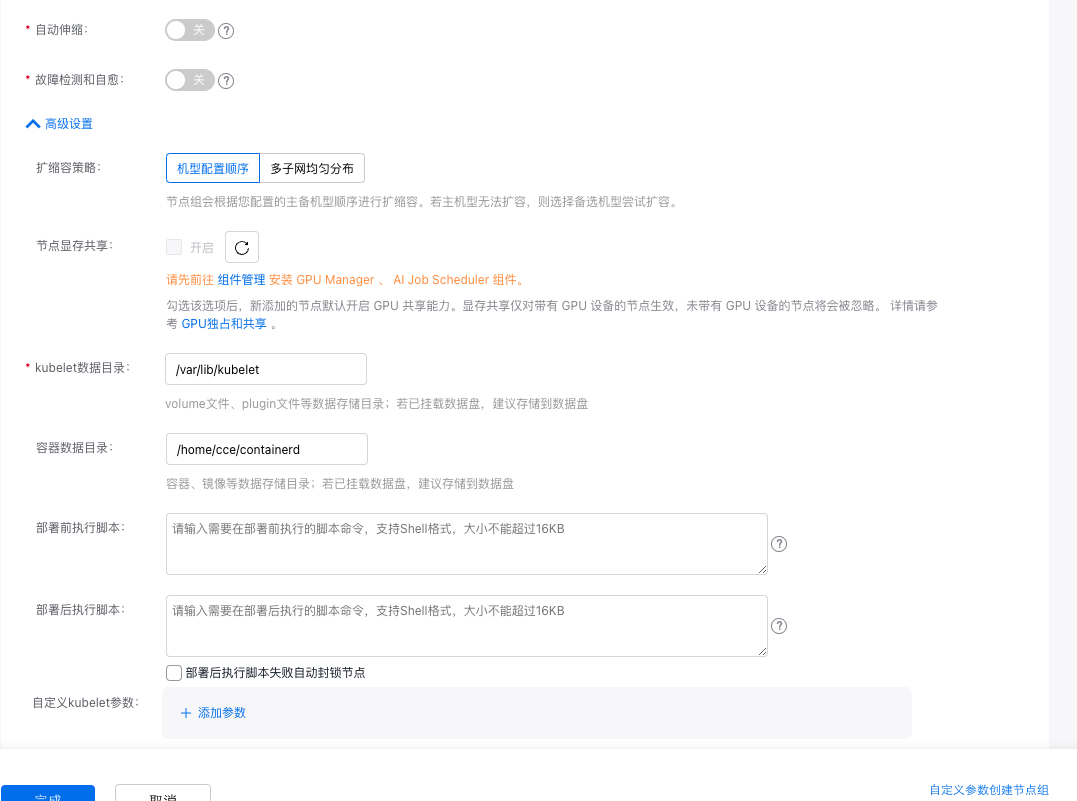
| Policy | Description |
|---|---|
| Model configuration sequence | The node group will scale in the active/standby sequence that you configured. If the active model cannot be scaled up, a standby model will be selected for scaling. |
| Multi-subnet uniform distribution | The node group will distribute nodes as evenly as possible across the configured subnets. This strategy takes effect only when multiple subnets are configured. |
Note:
- This strategy takes effect only when multiple standby models are configured (it is recommended to distribute subnets across different availability zones to enhance the high cross-AZ availability of clusters). For details, refer to Configure Standby Model.
Update the node group scaling strategy
- Sign in to Cloud Container Engine Console (CCE).
- Select Cluster List in the left navigation bar.
- On the Cluster List page, click on the desired cluster to open the cluster management page.
- Select Node Management > Node Group from the left navigation bar in the cluster management page.
- On the Node Group page, click the desired node group to open the Node Group Details page.
- Click Modify in Advanced Configuration.
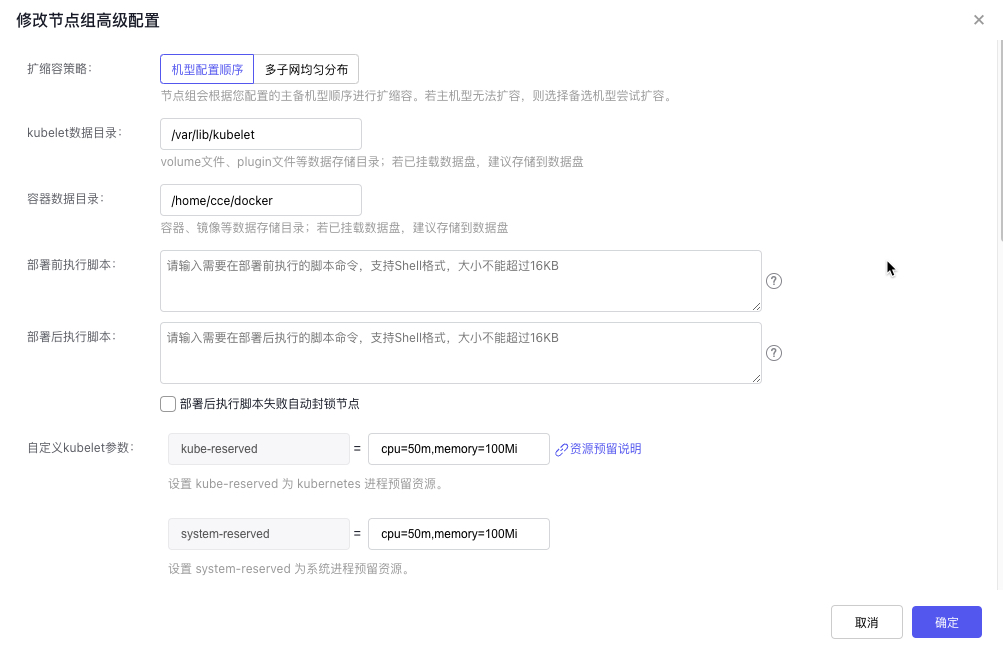
- Update the scaling strategy settings in the "Modify Advanced Configuration of Node Group" pop-up window.
- Click the "OK" button to finalize the update to the scaling strategy.
Note:
- Modifying the advanced configuration of node groups applies only to new scale-up nodes and does not impact existing nodes or ongoing service operations in the node group.