

CCE Node Remedier Description
Component introduction
The CCE node fault self-healing system (CCE-Node-Remedier) is a component designed to automatically perform fault repairs for cluster nodes based on issues reported by CCE-Node-Problem-Detector.
Once the CCE-Node-Problem-Detector (NPD) identifies node faults, it reports these in the form of conditions or events to the Kubernetes cluster. Upon installing CCE-Node-Remedier, the component runs as a deployment in the cluster, actively monitors fault information for all nodes, and executes appropriate repair operations based on user-defined fault handling rules.
After initiating repairs for fault nodes, the CCE-Node-Remedier component provides visibility into the repair progress through CRDs and logs the operations in node events.
Component function
- Provide node fault self-healing function based on detected faults
- Supported fault reporting method: Node Condition
-
Querying fault node repair information:
- Use custom objects (CRDs) to record the repair progress of fault nodes
- Uses events to record repair operations on fault nodes
Application scenarios
Monitor fault information for each node in real-time and take corrective repair actions based on user-defined fault handling rules.
Usage restrictions
- Cluster version 1.18.9 or higher
- CCE-Node-Problem-Detector has been installed. For installation steps, refer to: CCE Node Problem Detector Description
- Be able to access the cluster using kubectl. For operation steps, refer to: Connect to the Cluster via Kubectl
Install component
- Sign in to the Baidu AI Cloud official website and enter the management console.
- Go to Product Services - Cloud Native - Cloud Container Engine (CCE) to access the CCE management console.
- Click Cluster Management > Cluster List in the left navigation bar.
- Click on the target cluster name in the Cluster List page to navigate to the cluster management page.
- On the Cluster Management page, click Component Management.
- From the component management list, locate the CCE Node Remedier component and click on Install.
- Configure the node fault self-healing policies on the Component Configuration page.
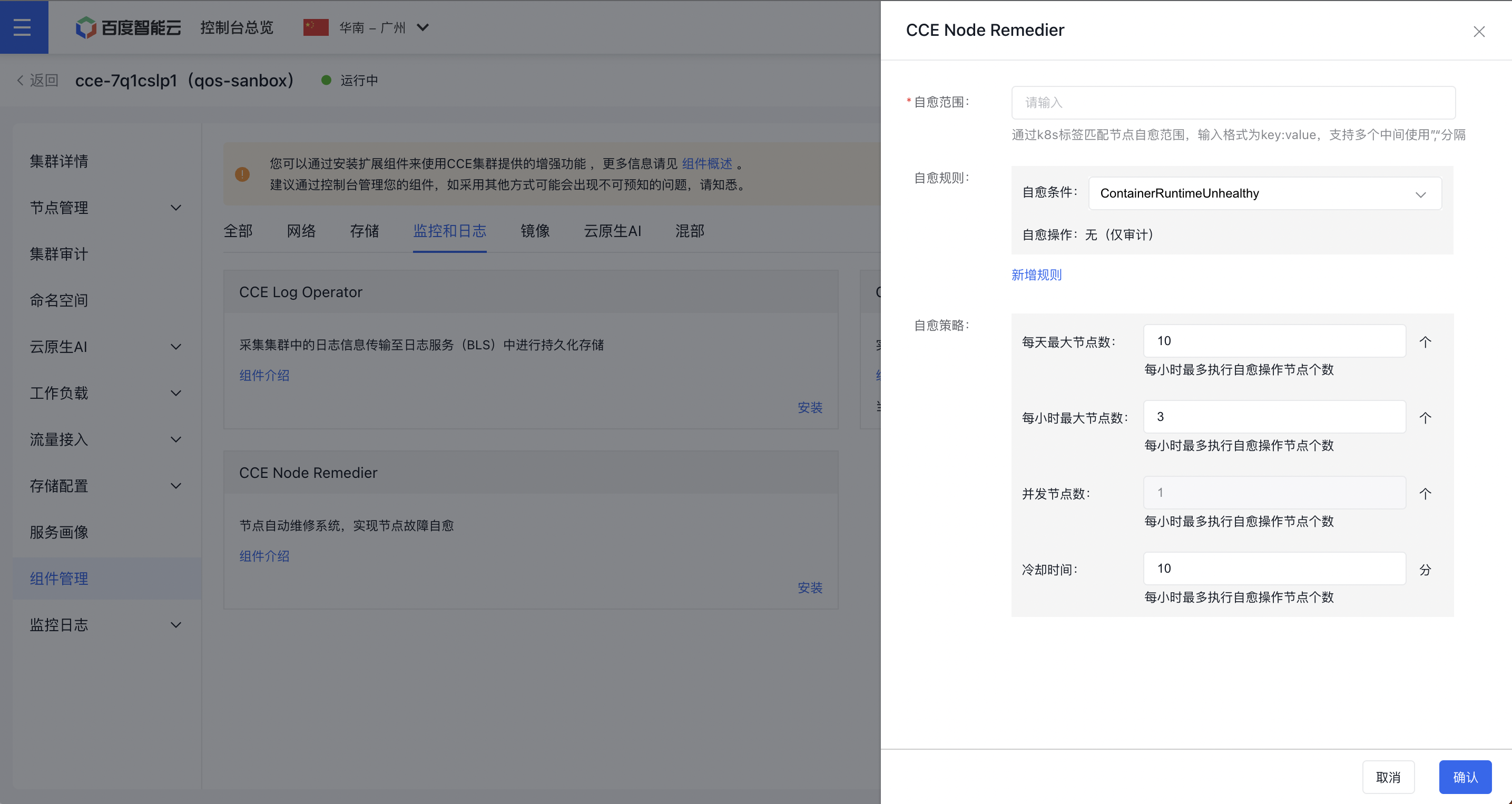
- Click the OK button to finalize the component installation.
Configure fault self-healing policies
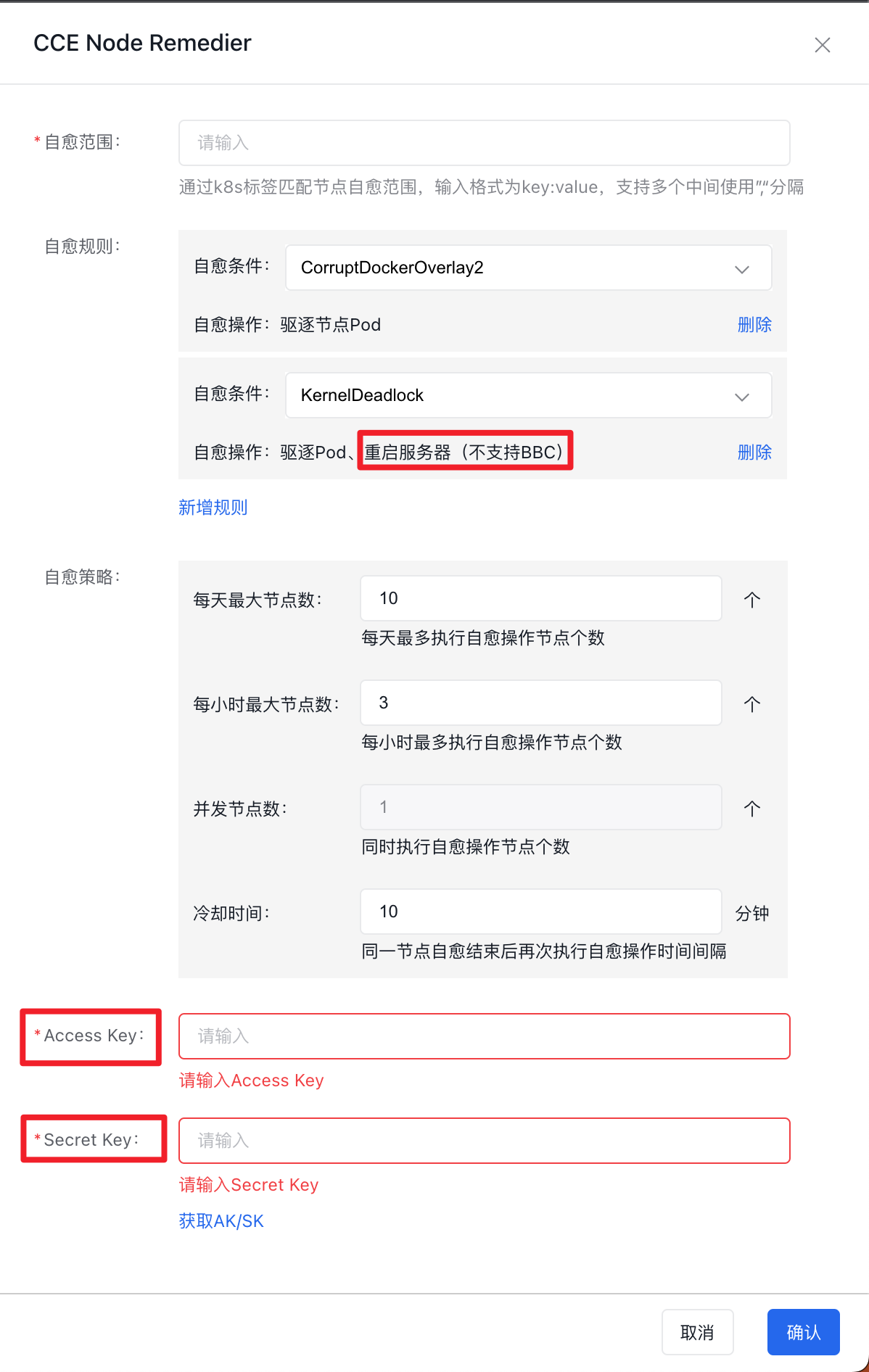
Component configuration items are as shown in the figure:
-
Self-healing scope: Match the node self-healing scope through K8S labels. The input format is key:value, supporting multiple entries separated by commas “,”. For example:
app:nginx,component:backend;- Users need to add the desired labels to nodes in advance or use existing default labels. Reference: Manage Node Labels
-
Self-healing rules: Multiple sets of rules can be configured. Users can add self-healing rules by clicking Add Rule. Each set of rules includes:
- Self-healing condition: The fault type reported by CCE-Node-Problem-Detector and stored in the Node object’s condition;
- Self-healing operation: For the Self-healing Condition, the specific actions that the self-healing system needs to execute are currently not supported for custom Self-healing Operations;
Supported self-healing conditions and operations are as follows:
| Self-healing condition | Self-healing rules |
|---|---|
| ContainerRuntimeUnhealthy | None (audit only) |
| FrequentKubeletRestart | None (audit only) |
| FrequentContainerRuntimeRestart | None (audit only) |
| InodesPressure | None (audit only) |
| CorruptDockerOverlay2 | Evict node Pod |
| KernelDeadlock | Evict Pods and restart the server (BBC not supported) |
| ReadonlyFilesystem | Evict Pods and restart the server (BBC not supported) |
| GPUUnhealthy | Cordon only |
| NICUnhealthy | Cordon only |
-
Self-healing strategy:
- Maximum nodes per day: The maximum nodes that can execute self-healing operations per day, with an integer data type and a default of 10;
- Maximum nodes per hour: The maximum nodes that can execute self-healing operations per hour, with an integer data type and a default of 3;
- Concurrent nodes: The number of nodes executing self-healing operations simultaneously, with an integer data type and a default of 1; Modification is not supported temporarily;
- Cool down time: The interval between consecutive self-healing operations on the same node after the previous self-healing ends, with an integer data type, unit of minutes and a default of 10;
-
Access/Secret Key: When users select a self-healing condition that includes Restart the Server, they need to fill in the AccessKey and SecretKey of their Baidu AI Cloud account
- To learn how to create, view and download Access Key (AK) and Secret Key (SK), please refer to Manage Your AK/SK.
View node fault status and repair information
View node fault status
Node fault status is reported by the CCE-Node-Problem-Detector component. For fault details, refer to: View Cluster Health Check Status
View node fault repair information
CCE-Node-Remedier installs three types of custom resources (CustomResourceDefinition, CRD) in the cluster. Their names and functions are as follows:
NodeRemedier: Abbreviated asnr, used to store node fault repair policies. The object name isdefault-remedier. Query command:
1kubectl -n cce-node-remedier get noderemediers default-remedier -o yaml
2kubectl -n cce-node-remedier get nr default-remedier -o yamlMachineRemediationTemplate: Abbreviated asmrtpl, used to store step templates for node fault repair. The object name isdefault-remediation-template. Query command:
1kubectl -n cce-node-remedier get machineremediationtemplates default-remediation-template -o yaml
2kubectl -n cce-node-remedier get mrtpl default-remediation-template -o yamlRemedyMachine: Abbreviated asrm, used to store specific repair details of fault nodes. Each object corresponds to one fault node. Query command:
1kubectl -n cce-node-remedier get remedymachines
2kubectl -n cce-node-remedier get rms
Example YAML of RemedyMachine:
1apiVersion: apps.baidu.com/v1
2kind: RemedyMachine
3metadata:
4  creationTimestamp: "2023-03-30T01:35:00Z"
5  generation: 1
6  name: cce-node-remedier-default-remedier-cce-covdy1t9-192.168.96.52
7  namespace: cce-node-remedier
8  ownerReferences:
9  - apiVersion: apps.baidu.com/v1
10    blockOwnerDeletion: true
11    controller: true
12    kind: NodeRemedier
13    name: default-remedier
14    uid: 0fe02c17-b344-4c0b-8b4d-f7ed1d21e064
15  resourceVersion: "5442036"
16  uid: 9c15873d-1ffb-4a18-b063-4a2e55328d01
17spec:
18  clusterName: cce-covdy1t9
19  nodeName: 192.168.96.52
20  nodeProvider: baiducloud
21  paused: false
22  reconcileSteps:
23  - CordonNode
24  - DrainNode
25  - RebootNode
26status:
27  healthy: true
28  message: Check step time intervals, latest step is RebootNode, the time internal
29    is left 885 second, please wait
30  reconcileSteps:
31    CordonNode:
32      finish: true
33      finishedTime: "2023-03-30T01:35:00Z"
34      retryCount: 1
35      startTime: "2023-03-30T01:35:00Z"
36      successful: true
37    DrainNode:
38      finish: true
39      finishedTime: "2023-03-30T01:35:45Z"
40      retryCount: 1
41      startTime: "2023-03-30T01:35:45Z"
42      successful: true
43    RebootNode:
44      costSeconds: 27
45      finish: true
46      finishedTime: "2023-03-30T01:36:41Z"
47      retryCount: 1
48      startTime: "2023-03-30T01:36:14Z"
49      successful: true
For the RemedyMachine queried as above:
-
spec.reconcileSteps: Save the specific self-healing steps that need to be executed for this node, including:CordonNode: Cordon the node to prevent new Pods from being scheduled to it;DrainNode: Execute node draining to evict Pods on the node (currently, Pods managed by DaemonSet will not be evicted);RebootNode: Reboot the node (rebboot the BCC node corresponding to the Worker node; BBC node reboot is not supported temporarily);
-
status: Store the fault self-healing status of the nodehealthy: Indicate whether the node is currently healthy;-
reconcileSteps: For the execution results of each repair step for this node, each element includes:finish: Whether the step has been completedsuccessful: Whether the step is executed successfullyretryCount: Number of retries for the stepstartTime: Start execution time of the stepfinishedTime: Finish time of the step
View node fault repair events
- Sign in to the Baidu AI Cloud Official Website and enter the management console.
- Go to Product Services - Cloud Native - Cloud Container Engine (CCE) to access the CCE management console.
- Click Cluster Management > Cluster List in the left navigation bar.
- Click on the target cluster name in the Cluster List page to navigate to the cluster management page.
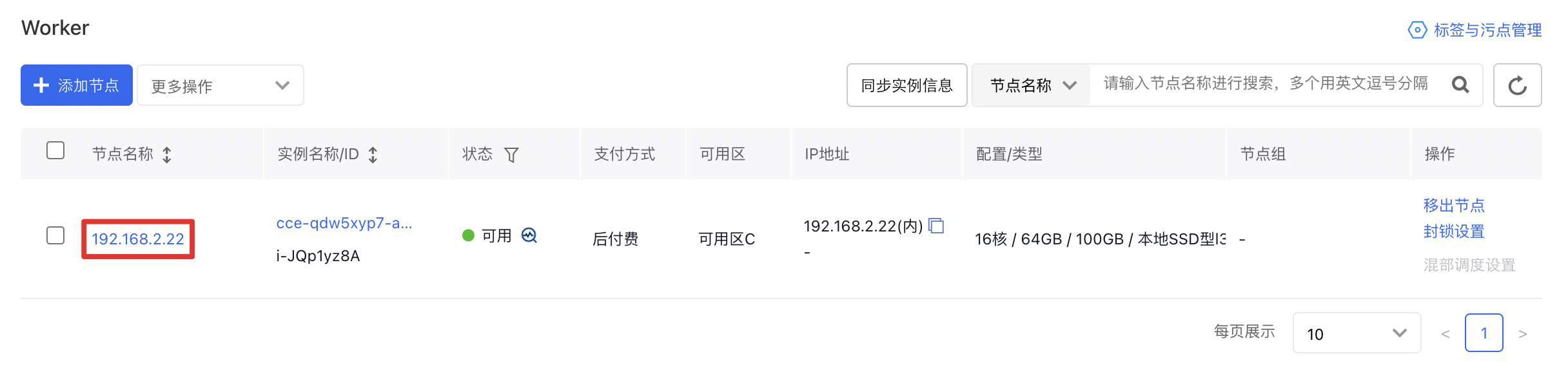
- On the Cluster Management page, click Node Management > Worker to enter the node management interface.
- Click Node Name to view node details:
- Click Event to enter the event center and view events related to the node:

Version records
| Version No. | Cluster version compatibility | Update time | Update content | Impact |
|---|---|---|---|---|
| 0.1.0 | CCE v1.18 or higher | 2023.04.12 | First release | - |
| 0.1.5 | CCE v1.18 or higher | 2024.01.18 | Add three self-healing conditions: CPUUnhealthyExt, MemoryUnhealthyExt and MainboardUnhealthyExt | - |
| 0.1.6 | CCE v1.18 or higher | 2024.01.24 | Add two self-healing operations: Restart Kubelet and container runtime | - |