

BLB ingress annotation description
BLB ingress annotation description
When using BLB-type ingress resources, advanced ingress configurations can be applied by adding annotations to the annotation.
The annotation is located at the following position in the complete ingress YAML:
1apiVersion: extensions/v1beta1
2kind: Ingress
3metadata:
4  annotations:
5    kubernetes.io/cce.ingress.blb-cert-id: cert-5bqpykggjzmi
6    kubernetes.io/cce.ingress.blb-id: lb-13ddfb9e
7    kubernetes.io/cce.ingress.eip: 106.13.169.172
8    kubernetes.io/ingress.class: cce
9……
Ingress can use the following advanced configuration items:
Specify that the current ingress is managed by CCE
Value description
If the value is cce, it indicates that the current ingress is implemented by CCE;
If missing or the value is not cce, CCE will not process this ingress.
Notes
- Ingresses of the BLB type created through the CCE console will automatically include this annotation;
- When creating a BLB-type ingress in the cluster using YAML, you need to manually add this annotation.
Example
kubernetes.io/ingress.class: cce
Retain application BLB/EIP resources when deleting ingress
Value description
If the value is true, the associated application BLB and EIP resources will not be deleted when this ingress resource object is deleted
If missing or the value is false, the associated application BLB and EIP resources will be deleted when this ingress resource object is deleted.
Notes
- CCE does not automatically add this annotation; it must be manually added as needed;
- If this annotation is not added at creation, it can be added before deletion, and doing so will still be effective.
Example
kubernetes.io/cce.ingress.keep-iaas-resource: "true"
Set the BLB name associated with the ingress
Value description
It is used to set the name of the BLB associated with this ingress; otherwise, the default naming format (cluster ID/ingress/namespace/ingress name) will be used to create the BLB;
Occasionally, the default name may exceed the maximum limit of 64 characters. In such instances, manually set the value of this annotation to specify the BLB name.
Notes
- CCE does not automatically add this annotation; it must be manually added as needed;
- Avoid using an existing BLB's name to prevent confusion and potential misuse of the BLB.
Example
kubernetes.io/cce.ingress.blb-name: cce-test-name
Assign an IPv6 address to the ingress
Value description
If the value is true, an IPv6 address will be allocated to the associated application BLB;
If the value is false, CCE will not allocate an IPv6 address to it and will remove any IPv6 address bound to the application BLB.
Notes
- CCE does not automatically include this annotation; you must manually add it, if necessary.
Example
kubernetes.io/cce.ingress.enable-ipv6: "true"
Specify the application BLB used by the ingress
Value description
If set, CCE will configure ingress rules on the specified application BLB;
If this annotation is absent, CCE will create a new application BLB and automatically assign the annotation to the new application's BLB ID.
Notes
- Only application BLB is supported
- You must first create an application BLB, which should reside in the same VPC as the cluster
- For BLB-type ingresses created via the CCE console, if an existing application BLB is selected, the annotation will be automatically included;
- If you create a BLB-type ingress using YAML in the cluster, you must add this annotation by yourself as needed;
- Modifying or deleting this annotation could result in BLB exposure. Be cautious not to overwrite or remove this annotation during ingress resource object modifications.
Example
kubernetes.io/cce.ingress.blb-id: lb-12345678
Configure ingress for VPC intranet access only
Value description
If the value is true, CCE will not create or set an EIP address for it;
If missing or the value is false, CCE will allocate and bind an EIP to the application BLB.
Notes
- Ingresses of the BLB type created through the CCE console will automatically include this annotation when selecting intranet access type;
- If you create a BLB-type ingress using YAML in the cluster, you must add this annotation by yourself as needed;
- If an EIP is already associated with the application BLB, adding this annotation will not automatically unbind it in the backend, so users must handle the unbinding manually.
Example
kubernetes.io/cce.ingress.internal: "true"
Specify the subnet for the new BLB when creating an ingress
Value description
If the value is a valid subnet ID of the cluster's VPC, CCE will create the application BLB in this subnet when a new application BLB is needed;
In the absence of this annotation, CCE will independently choose a subnet to create an application BLB.
Notes
- Ingresses of the BLB type created through the CCE console will automatically include this annotation;
- When defining a BLB-type ingress via YAML in the cluster, make sure to add this annotation if necessary.
Example
kubernetes.io/cce.ingress.vpc-subnet-id: sbn-adfEsDzs
Specify the use of EIP when creating an ingress
Value description
If the value is an EIP address, CCE will bind this EIP to the application BLB corresponding to the ingress;
If the annotation is missing, CCE will automatically create a new EIP and set this annotation accordingly.
Notes
- Ingresses of the BLB type created through the CCE console will automatically include this annotation after specifying a public IP;
- If you create a BLB-type ingress using YAML in the cluster, you must add this annotation by yourself as needed;
- Modification or deletion may lead to EIP exposure. Do not overwrite or lose this annotation when modifying ingress resource objects;
- When an EIP is already connected to an ingress, altering this annotation will not replace the application BLB's bound EIP address. Manual re-binding is required.
Example
kubernetes.io/cce.ingress.eip: 1.2.3.4
Specify the bandwidth for the new EIP when creating an ingress
Value description
Set the EIP bandwidth for the newly created ingress;
If this annotation is missing, the default bandwidth for newly created EIP is 100 Mbps;
The valid range is [1, 5000].
Example
kubernetes.io/cce.ingress.eip-bandwidth-in-mbps: "99"
- Specify the charge type:
Support ByTraffic (pay-as-you-go) and ByBandwidth (pay-by-bandwidth). The corresponding annotation is kubernetes.io/cce.ingress.eip-billing-method.
- Specify the route type:
Support two internet connection types: Enhanced BGP and standard BGP. CCE defaults to support the corresponding annotation kubernetes.io/cce.ingress.eip-route-type, where BGP_S represents enhanced BGP, BGP represents standard BGP, ChinaTelcom represents China Telecom single-line, ChinaUnicom represents China Unicom single-line, and ChinaMobile represents China Mobile single-line. Usage example is as follows:
Example
1# Enhance BGP
2kubernetes.io/cce.ingress.eip-route-type:'BGP_S'
Notes
- New EIP is postpay type by default; using annotations to specify prepay EIP creation is currently unsupported;
- Only applicable to newly created EIPs;
- When the bandwidth quota is not a valid number, a warning event will be triggered;
- When you do not add a bandwidth quota annotation, CCE will create and bind a standard EIP with a default bandwidth quota of 100 and a pay-as-you-go type;
- Enhanced BGP creation is temporarily unavailable in some overseas regions. For details, please refer to;
- The valid range for bandwidth quota varies depending on the combination of internet connection type and bill type, as shown in the table below:
| Internet connection type | Standard BGP | Enhanced BGP |
|---|---|---|
| Pay by traffic | [1, 200] | [100, 1000] |
| Bandwidth billing | [1, 500] | [100, 5000] |
- Failure to meet any of the following four conditions will result in EIP creation failure:
| Internet connection type | Instructions for use of standard BGP | Instructions for use of enhance BGP |
|---|---|---|
| Pay by traffic | The following bandwidth range annotations must be added, with values ranges of [1, 200]kubernetes.io/cce.ingress.eip-bandwidth-in-mbps: "99"kubernetes.io/cce.ingress.eip-billing-method: ByTraffic kubernetes.io/cce.ingress.eip-route-type: BGP |
The following bandwidth range and route type annotations must be added at the same time, with values ranges of [100, 1000] kubernetes.io/cce.ingress.eip-bandwidth-in-mbps: "200" kubernetes.io/cce.ingress.eip-billing-method: ByTraffic kubernetes.io/cce.ingress.eip-route-type: BGP_S |
| Bandwidth billing | The following bandwidth range and billing method annotations must be added at the same time, with values ranges of [1, 500] kubernetes.io/cce.ingress.eip-bandwidth-in-mbps: "99" kubernetes.io/cce.ingress.eip-billing-method: ByBandwidth kubernetes.io/cce.ingress.eip-route-type: BGP |
The following bandwidth range, route type and billing method annotations must be added at the same time, with values ranges of [100, 5000] kubernetes.io/cce.ingress.eip-bandwidth-in-mbps: "5000" kubernetes.io/cce.ingress.eip-billing-method: ByBandwidth kubernetes.io/cce.ingress.eip-route-type: BGP_S |
Specify the charge type for the new EIP when creating an ingress
Value description
If the value is ByBandwidth, the new EIP will be billed by bandwidth;
If the value is ByTraffic, the new EIP will be billed by traffic;
If missing, the default charge type ByBandwidth will be adopted.
Notes
- CCE does not automatically add this annotation; it must be manually added as needed;
- This annotation only takes effect for newly created EIPs and will not change the charge type of existing EIPs.
Example
kubernetes.io/cce.ingress.eip-billing-method: ByBandwidth
Create ingress and specify access timeout duration
Value description
Set the timeout duration for HTTP and HTTPS requests when configuring an ingress.
Notes
- Valid range: [1, 3600];
- Ingresses of the BLB type created through the CCE console will automatically include this annotation after setting the timeout duration;
- When defining a BLB-type ingress via YAML in the cluster, make sure to add this annotation if necessary.
Example
kubernetes.io/cce.ingress.timeout-in-seconds: "20"
Limit the number of backends mounted by default for BLB
Value description
This annotation limits the number of backend services linked to the ingress.
Notes
- CCE does not automatically include this annotation; you must manually add it, if necessary.
Example
kubernetes.io/cce.ingress.max-backend-count: 50
Is HTTPS supported
Value description
If the annotation value is true, CCE will create HTTPS-related configurations for it
If missing or the value is false, CCE will not manage the HTTPS configuration on the associated application BLB.
Notes
- Ingresses of the BLB type created through the CCE console will automatically include this annotation after enabling HTTPS;
- If you create a BLB-type ingress using YAML in the cluster, you must add this annotation by yourself as needed;
- If missing or the value is
false, CCE will not manage the HTTPS configuration on the associated application BLB. In other words, if the application BLB already has HTTPS listeners and forwarding rules, the controller will not delete these HTTPS configurations, and users should handle them manually.
Example
kubernetes.io/cce.ingress.https: "true"
Support HTTP redirection when creating an ingress
Value description
If the value is true, CCE will configure traffic accessing the HTTP port to be forwarded to the HTTPS port.
Notes
- Ingresses of the BLB type created through the CCE console will automatically include this annotation after enabling HTTP redirection;
- When defining a BLB-type ingress via YAML in the cluster, make sure to add this annotation if necessary.
Example
kubernetes.io/cce.ingress.http-redirect: "true"
Specify HTTPS certificate when creating an ingress
Value description
If HTTPS is desired when creating an ingress, an HTTPS certificate must also be configured;
The value assigned to this annotation must be the certificate ID already obtained from Baidu AI Cloud.
Notes
- Ingresses of the BLB type created through the CCE console will automatically include this annotation after selecting the HTTPS certificate;
- When defining a BLB-type ingress via YAML in the cluster, make sure to add this annotation if necessary.
Example
kubernetes.io/cce.ingress.blb-cert-id: xs-asdfDESz
Set HTTP and HTTPS rules
Value description
For Ingress Spec rules, CCE by default creates HTTP forwarding rules instead of HTTPS forwarding rules.
Using the annotations kubernetes.io/cce.ingress.http-rules and kubernetes.io/cce.ingress.https-rules can explicitly indicate whether a rule is HTTP or HTTPS.
Notes
- Ingresses of the BLB type created through the CCE console will automatically include this annotation;
- When defining a BLB-type ingress via YAML in the cluster, make sure to add this annotation if necessary.
Example
1kubernetes.io/cce.ingress.http-rules: >-
2      [
3          { "host":"ad.com",
4            "http":{
5                "paths":[
6                    {"path":"/*","backend":{"serviceName":"service-example","servicePort":80}}
7                ]
8             }
9          }
10      ]
11kubernetes.io/cce.ingress.https-rules: >-
12      [
13          { "host":"ad.com",
14            "http":{
15                "paths":[
16                    {"path":"/*","backend":{"serviceName":"service-example","servicePort":80}}
17                ]
18             }
19          }
20      ]
Use dedicated BLB clusters
Value description
If a dedicated BLB cluster is available, the backend will prioritize creating the application BLB within it.
The following annotations can be used to specify whether to use a dedicated cluster and which dedicated cluster will be used:
- Create an application BLB using a shared cluster
After using this annotationkubernetes.io/no-use-blb-cluster-l4: "true", the application BLB will be created on a L4 shared cluster;
After using this annotationkubernetes.io/no-use-blb-cluster-l7: "true", the application BLB will be created on a L7 shared cluster.
- Specify creation on a dedicated cluster
After using this annotationkubernetes.io/blb-cluster-l4-id: "test", the application BLB will be created on a specified dedicated L4 BLB cluster;
After using this annotationkubernetes.io/blb-cluster-l7-id: "test", the application BLB will be created on a specified dedicated L7 BLB cluster.
Notes
- In dedicated clusters, if no annotation is specifically added, the backend will automatically select the dedicated BLB cluster for BLB creation.
Example
1# Specify a Layer 4 BLB dedicated cluster for ingress only
2kubernetes.io/blb-cluster-l4-id: blb-cluster-l4-id
3kubernetes.io/no-use-blb-cluster-l7: true
4# Specify a Layer 7 BLB dedicated cluster for ingress only
5kubernetes.io/no-use-blb-cluster-l4: true
6kubernetes.io/blb-cluster-l7-id: blb-cluster-l7-id
7# Specify a Layer 4 and Layer 7 BLB dedicated cluster for ingress
8kubernetes.io/blb-cluster-l4-id: blb-cluster-l4-id
9kubernetes.io/blb-cluster-l7-id: blb-cluster-l7-id
10# Explicitly declare that ingress does not use any dedicated cluster
11kubernetes.io/no-use-blb-cluster-l4: true
12kubernetes.io/no-use-blb-cluster-l7: true
Set request scheduling method
Value description
If the value is RoundRobin, weighted round-robin scheduling is used for requests;
If the value is LeastConnection, the least connections algorithm will be used to schedule requests;
If missing, the default scheduling method is RoundRobin.
To set HTTP scheduling method, use kubernetes.io/cce.ingress.blb.listener.http.scheduler; for HTTPS, use kubernetes.io/cce.ingress.blb.listener.https.scheduler.
Notes
- CCE does not automatically add this annotation; it must be manually added as needed;
- This is only applicable when creating a new application BLB listener.
Example
1# HTTP
2kubernetes.io/cce.ingress.blb.listener.http.scheduler: "LeastConnection"
3
4# HTTPS
5kubernetes.io/cce.ingress.blb.listener.https.scheduler: "LeastConnection"
Disable adding X-Forwarded-For (XFF) header
Value description
If the value is true, the application BLB will automatically add the X-Forwarded-For header to the request;
If the value is false, the application BLB will not automatically add the X-Forwarded-For header to the request;
If missing and the behavior is consistent with true, the application BLB will automatically add the X-Forwarded-For header to the request.
To set HTTP requests, use kubernetes.io/cce.ingress.blb.listener.http.enable-x-forwarded-for-header; for HTTPS, use kubernetes.io/cce.ingress.blb.listener.https.enable-x-forwarded-for-header.
Notes
- CCE does not automatically add this annotation; it must be manually added as needed;
- This is only applicable when creating a new application BLB listener.
Example
1kubernetes.io/cce.ingress.blb.listener.http.enable-x-forwarded-for-header: "false",
2kubernetes.io/cce.ingress.blb.listener.https.enable-x-forwarded-for-header: "false"
Real-time configuration updates
Value description
If the value is set to true, CCE will instantly update the BLB and EIP configurations after modifying listener settings, health check rules, or EIP bandwidth settings.
Notes
- CCE does not automatically add this annotation; it must be manually added as needed;
Example
1kubernetes.io/cce.ingress.update-in-time: "true"Use pod direct connection mode
Value description
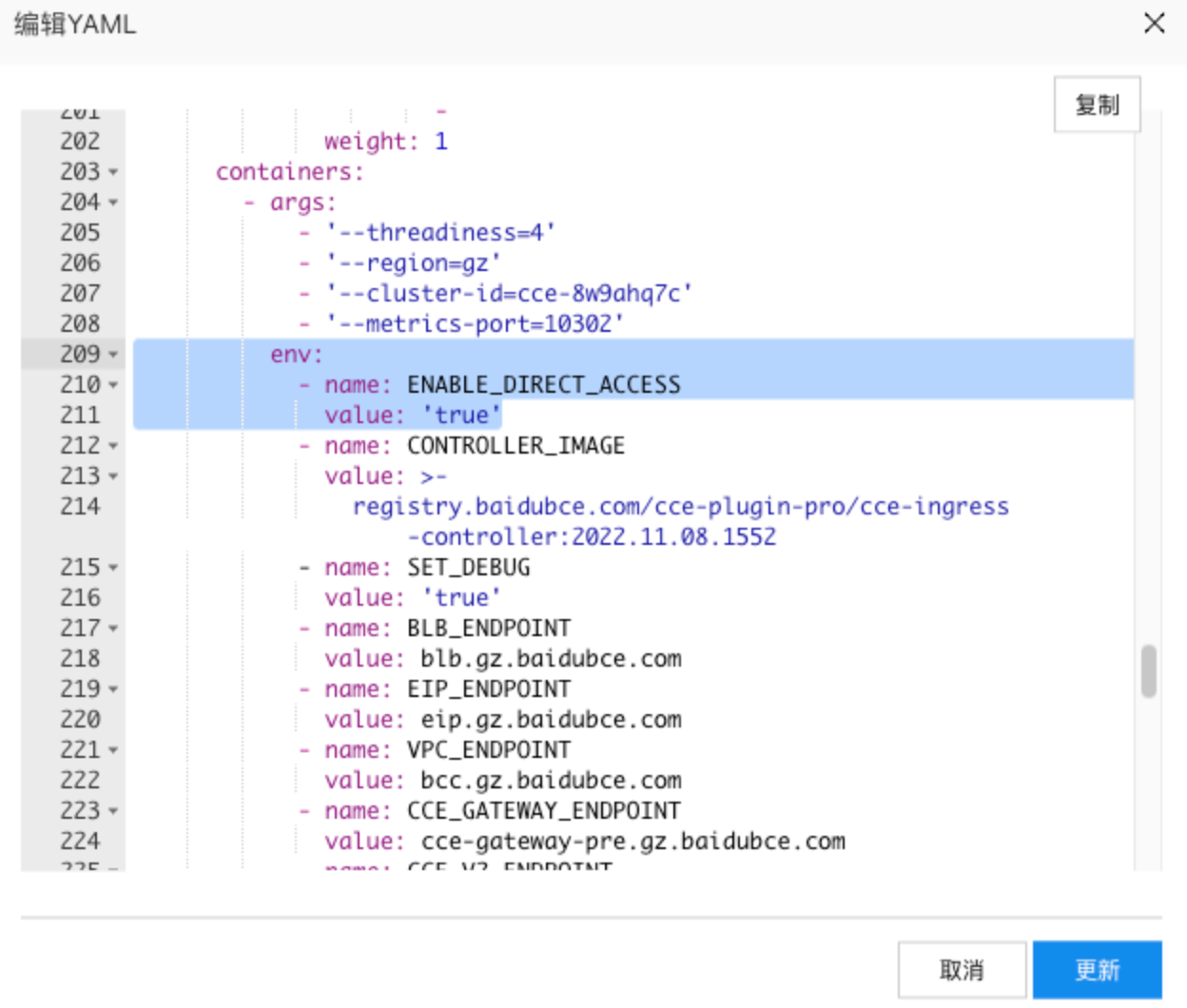
Enabling direct connection mode requires the following two steps:
- Modify the cce-ingress-controller deployment by adding the following environment variables. Skip if already present
To set HTTP requests, use kubernetes.io/cce.ingress.blb.listener.http.enable-x-forwarded-for-header; for HTTPS, use kubernetes.io/cce.ingress.blb.listener.https.enable-x-forwarded-for-header.
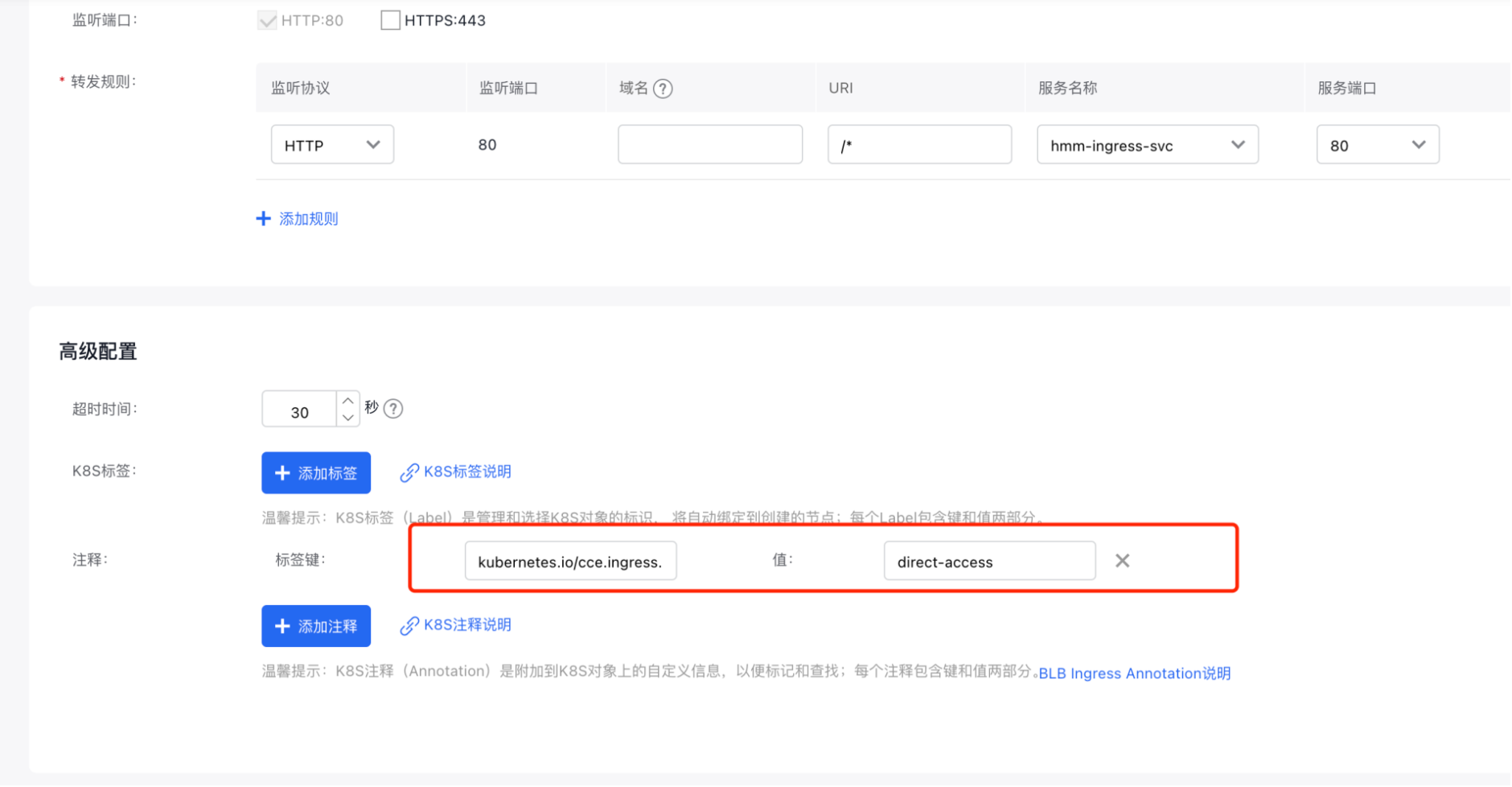
- Add the following annotation to a new ingress
kubernetes.io/cce.ingress.network-mode: direct-access
Notes
- CCE does not automatically add this annotation; it must be manually added as needed;
- It is valid only when creating a new ingress
- When using pod direct connection, the backend addresses of the BLB are displayed in the IP group on the right side of the server group tab. If these addresses are not visible, it means the IP group allow list hasn't been enabled. Please contact the BLB support team for help.
Example
- Environment variables
- Add annotations
kubernetes.io/cce.ingress.network-mode: direct-access
The method for adding annotations in the console is shown below
Custom listener configuration
Value description
Extension protocol configurations serve as an addition to the protocol settings for ports defined in the spec, and these additional settings will apply to the listeners of the application BLB.
Extension protocol content corresponds to kubernetes.io/cce.ingress.listener.customized-listenerAnnotation. The configurable parameters for each protocol are as follows:
1# For HTTP
2protocol                    HTTP
3 Scheduler                   Optional. Load balance method. Support "RoundRobin", "LeastConnection", defaulting to "RoundRobin".
4 Timeout                     Optional. HTTP server timeout duration. Default to 30.
5 RedirectPort                Optional. HTTPS redirected port.
6 DisableXForwardedForHeader  Optional. Whether to disable the XForwardedFor header. Default is false
7 enableXForwardedProtoHeader Optional. Whether to enable the XForwardedProto header. Default is false
8 EnableKeepSession           Optional. Whether to enable session persistence Default is false
9 KeepSessionType             Optional. Cookie handling method for session persistence, valid only when the session persistence is enabled, supporting "insert"/"rewrite". It is "insert" by default.
10 keepSessionTimeout          Optional. Session persistence timeout duration.
11 KeepSessionCookieName       Optional. Name of the cookie when the session persistence type is rewrite.
12# For HTTPS
13protocol                    HTTPS
14 Scheduler                   Optional. Load balance method. Support "RoundRobin", "LeastConnection", defaulting to "RoundRobin".
15 Timeout                     Optional. HTTPS server timeout duration. Default to 30.
16 serverCertIDs               Required. Server certificate ID chain, separated by commas.
17 EncryptionType              Optional. Encryption option. It is tls_cipher_policy_default by default. Support: tls_cipher_policy_default/tls_cipher_policy_1_1/tls_cipher_policy_1_2/tls_cipher_policy_1_2_secure/userDefind.
18 EncryptionProtocols         Optional. In terms of encryption protocol, when encryptionType is userDefined, the protocol type list is a string array composed of the combinations of three protocols: "tlsv10", "tlsv11" and "tlsv12" protocol.
19 AppliedCiphers              Optional. Cipher suite. Different cipher suites are separated by colons ":".
20 DualAuth                    Optional. Choose whether to enable mutual certification. Default is false
21 ClientCertIDs               Optional. Enable mutual certification client certificate chain.
22 DisableXForwardedForHeader  Optional. Whether to disable the XForwardedFor header. Default is false
23 enableXForwardedProtoHeader Optional. Whether to enable the XForwardedProto header. Default is false
24 EnableKeepSession           Optional. Whether to enable session persistence Default is false
25 KeepSessionType             Optional. Cookie handling method for session persistence, valid only when the session persistence is enabled, supporting "insert"/"rewrite". It is "insert" by default.
26 keepSessionTimeout          Optional. Session persistence timeout duration.
27 KeepSessionCookieName       Optional. Name of the cookie when the session persistence type is rewrite.
Notes
- CCE does not automatically add this annotation; it must be manually added as needed;
- Only support custom HTTP listener configurations for port 80 and custom HTTPS listener configurations for port 443;
Example
1kubernetes.io/cce.ingress.listener.customized-listener: |-
2      {
3         "80":{
4            "protocol":"HTTP",
5            "redirectPort":"443",
6            "timeout":"31",
7            "scheduler":"LeastConnection",
8            "enableKeepSession":"true",
9            "keepSessionType":"rewrite",
10            "disableXForwardedForHeader": "true",
11            "enableXForwardedProtoHeader": "true",
12            "extendedAttributes": {
13                "proxy_set_header": ["X-Real-IP $cip"]
14            }
15         },
16         "443":{
17            "protocol":"HTTPS",
18            "serverCertIDs":"cert-5bqpykggjzmi",
19            "timeout":"31",
20            "scheduler":"LeastConnection",
21            "enableKeepSession":"true",
22            "keepSessionType":"rewrite",
23            "encryptionType": "userDefind",
24            "encryptionProtocols": "tlsv10, tlsv11, tlsv12",
25            "appliedCiphers": "ECDHE-ECDSA-AES256-GCM-SHA384:ECDHE-ECDSA-AES256-SHA384:ECDHE-ECDSA-AES256-SHA:ECDHE-ECDSA-AES128-GCM-SHA256:ECDHE-ECDSA-AES128-SHA256:ECDHE-ECDSA-AES128-SHA:ECDHE-RSA-AES256-GCM-SHA384:ECDHE-RSA-AES256-SHA384:ECDHE-RSA-AES256-SHA:ECDHE-RSA-AES128-GCM-SHA256:ECDHE-RSA-AES128-SHA256:ECDHE-RSA-AES128-SHA",
26            "extendedAttributes": {
27                "proxy_set_header": ["X-Real-IP $cip"]
28            }
29         }
30      }
Custom health check rules
Value description
Extension health check protocol configurations are used to customize health check settings for BLB servers or IP groups associated with BLB services.
By default, TCP health checks are used for servers or IP groups linked to the port.
You can use this annotation to adjust the health check methods or related parameters.
Extension health check protocol content corresponds to kubernetes.io/cce.ingress.backend.customized-health-checkAnnotation and supports both TCP and HTTP health check protocols. The configurable parameters for each health check are as follows:
1# TCP health check
2 HealthCheck                 Required, fixed as TCP.
3 HealthCheckTimeoutInSecond  Optional. Health check timeout duration. It is 3 by default, and shall be an integer between 1 and 60.
4 HealthCheckIntervalInSecond Optional. Health check interval. It is 3 by default, and shall be an integer between 1 and 60.
5 HealthCheckDownRetry        Optional. Unhealthy threshold, i.e., the number of consecutive health check failures after which the real server is blocked. It is 3 by default, and shall be an integer between 2 and 5.
6 healthCheckUpRetry          Optional. Healthy threshold, i.e., the number of consecutive successful health checks after which the real server can be set as available again. It is 3 by default, and shall be an integer between 2 and 5.
7# HTTP health check
8 HealthCheck                 Required, fixed as HTTP.
9 HealthCheckTimeoutInSecond  Optional. Health check timeout duration. It is 3 by default, and shall be an integer between 1 and 60.
10 HealthCheckIntervalInSecond Optional. Health check interval. It is 3 by default, and shall be an integer between 1 and 60.
11 HealthCheckDownRetry        Optional. Unhealthy threshold, i.e., the number of consecutive health check failures after which the real server is blocked. It is 3 by default, and shall be an integer between 2 and 5.
12 healthCheckUpRetry          Optional. Healthy threshold, i.e., the number of consecutive successful health checks after which the real server can be set as available again. It is 3 by default, and shall be an integer between 2 and 5.
13 HealthCheckUrlPath          Optional. Health check URI. It is / by default.
14 HealthCheckNormalStatus        Optional. HTTP status codes for successful health checks, supporting combinations of 5 types of status codes such as "http_1xx|http_2xx". It is "http_2xx|http_3xx"
15 by default. healthCheckHost             Optional. The header field of the Layer 7 health check request will include the specified host field, such as "localhost", and the default is "".
Notes
- CCE does not automatically add this annotation; it must be manually added as needed;
- Only TCP or HTTP health checks are allowed;
Example The BLB ingress example using HTTP health checks is shown below:
1kubernetes.io/cce.ingress.backend.customized-health-check: |-
2    {
3            "healthCheck":"HTTP",
4            "healthCheckUrlPath":"/",
5            "healthCheckTimeoutInSecond":"2",
6            "healthCheckIntervalInSecond":"2",
7            "healthCheckDownRetry":"2",
8            "healthCheckUpRetry": "2",
9            "healthCheckNormalStatus": "http_2xx",
10            "healthCheckHost": "baidu.com"
11    }
Configure session persistence
Value description Session persistence involves multiple annotations, explained as follows:
- Enable or disable session persistence
A value of true enables session persistence. Default value is false.
To enable or disable HTTP session persistence, use kubernetes.io/cce.ingress.blb.listener.http.keep-session.enable; for HTTPS, use kubernetes.io/cce.ingress.blb.listener.https.keep-session.enable.
The subsequent annotations will only take effect once session persistence has been enabled.
- Set session persistence type
The value of insert means reinserting cookies; rewrite means rewriting cookies. The default value is insert.
To set HTTP session persistence type, use kubernetes.io/cce.ingress.blb.listener.http.keep-session.type; for HTTPS, use kubernetes.io/cce.ingress.blb.listener.https.keep-session.type.
- Set the session timeout duration (valid only for insert type)
The value is [1,15552000], defaulting to 3,600, in seconds.
To set HTTP session persistence timeout duration, use kubernetes.io/cce.ingress.blb.listener.http.keep-session.timeout; for HTTPS, use kubernetes.io/cce.ingress.blb.listener.https.keep-session.timeout.
- Set the cookie name (valid only for rewrite type)
To set HTTP session persistence cookie name, use kubernetes.io/cce.ingress.blb.listener.http.keep-session.cookie-name; for HTTP, use kubernetes.io/cce.ingress.blb.listener.https.keep-session.cookie-name.
Notes
- CCE does not automatically add this annotation; it must be manually added as needed;
- This is only applicable when creating a new application BLB listener.
Example
1# HTTP
2kubernetes.io/cce.ingress.blb.listener.http.keep-session.enable: "true",
3kubernetes.io/cce.ingress.blb.listener.http.keep-session.type: "insert"
4kubernetes.io/cce.ingress.blb.listener.http.keep-session.timeout: 999
5# HTTPS
6kubernetes.io/cce.ingress.blb.listener.https.keep-session.enable: "true",
7kubernetes.io/cce.ingress.blb.listener.https.keep-session.type: "rewrite",
8kubernetes.io/cce.ingress.blb.listener.https.keep-session.cookie-name: "cce-test"