

Continuous Deployment with Jenkins in CCE Cluster
Overview
Continuous building and deployment is a crucial part of R&D work for enterprises. Currently, most companies use Jenkins clusters to construct CI/CD processes that meet their requirements. The Jenkins continuous deployment process integrates seamlessly with Kubernetes clusters, enhancing deployment efficiency. This document outlines instructions for integrating the Jenkins deployment process with K83S Cluster CCEs.
Operation steps
1. Set the Jenkins storage directory
All applications under the Kubenetes environment are docker image. To keep the data secure in the event of an application restart, the data directory of Jenkins shall be persisted in the storage. Here, one of the much persistent storage provided by CCE is used to maintain consistency of application data for node activiation to escape data under the Kubernetesenvironment. Of course, you can choose to store locally, but in order to maintain the consistency of the application data, it is required to fix Jenkins to a certain Kubernetes node.
Refer to the section [Cloud Container Engine (CCE) - Operation Guide - Storage Management](CCE/Operation guide/Storage Management/Overview.md).
Select any method to deploy and generate PVC and record the name of PVC.
2. Deploy Jenkins Server to Kubernetes
service-account.yaml
1---
2apiVersion: v1
3kind: ServiceAccount
4metadata:
5  name: jenkins
6
7---
8kind: Role
9apiVersion: rbac.authorization.k8s.io/v1beta1
10metadata:
11  name: jenkins
12rules:
13- apiGroups: [""]
14  resources: ["pods"]
15  verbs: ["create","delete","get","list","patch","update","watch"]
16- apiGroups: [""]
17  resources: ["pods/exec"]
18  verbs: ["create","delete","get","list","patch","update","watch"]
19- apiGroups: [""]
20  resources: ["pods/log"]
21  verbs: ["get","list","watch"]
22- apiGroups: [""]
23  resources: ["events"]
24  verbs: ["watch"]
25- apiGroups: [""]
26  resources: ["secrets"]
27  verbs: ["get"]
28
29---
30apiVersion: rbac.authorization.k8s.io/v1beta1
31kind: RoleBinding
32metadata:
33  name: jenkins
34roleRef:
35  apiGroup: rbac.authorization.k8s.io
36  kind: Role
37  name: jenkins
38subjects:
39- kind: ServiceAccount
40  name: jenkins
jenkins.yaml
1# jenkins
2
3---
4apiVersion: apps/v1
5kind: StatefulSet
6metadata:
7  name: jenkins
8  labels:
9    name: jenkins
10spec:
11  selector:
12    matchLabels:
13      name: jenkins
14  serviceName: jenkins
15  replicas: 1
16  updateStrategy:
17    type: RollingUpdate
18  template:
19    metadata:
20      name: jenkins
21      labels:
22        name: jenkins
23    spec:
24      terminationGracePeriodSeconds: 10
25      serviceAccountName: jenkins
26      containers:
27        - name: jenkins
28          image: hub.baidubce.com/jpaas-public/jenkins-github:v0
29          imagePullPolicy: Always
30          ports:
31            - containerPort: 8080
32            - containerPort: 50000
33          resources:
34            limits:
35              cpu: 1
36              memory: 1Gi
37            requests:
38              cpu: 0.5
39              memory: 500Mi
40          env:
41            - name: LIMITS_MEMORY
42              valueFrom:
43                resourceFieldRef:
44                  resource: limits.memory
45                  divisor: 1Mi
46            - name: JAVA_OPTS
47              # value: -XX:+UnlockExperimentalVMOptions -XX:+UseCGroupMemoryLimitForHeap -XX:MaxRAMFraction=1 -XshowSettings:vm -Dhudson.slaves.NodeProvisioner.initialDelay=0 -Dhudson.slaves.NodeProvisioner.MARGIN=50 -Dhudson.slaves.NodeProvisioner.MARGIN0=0.85
48              value: -Xmx$(LIMITS_MEMORY)m -XshowSettings:vm -Dhudson.slaves.NodeProvisioner.initialDelay=0 -Dhudson.slaves.NodeProvisioner.MARGIN=50 -Dhudson.slaves.NodeProvisioner.MARGIN0=0.85
49          volumeMounts:
50            - name: jenkins-home
51              mountPath: /var/jenkins_home
52          livenessProbe:
53            httpGet:
54              path: /login
55              port: 8080
56            initialDelaySeconds: 60
57            timeoutSeconds: 5
58            failureThreshold: 12 # ~2 minutes
59          readinessProbe:
60            httpGet:
61              path: /login
62              port: 8080
63            initialDelaySeconds: 60
64            timeoutSeconds: 5
65            failureThreshold: 12 # ~2 minutes
66      securityContext:
67        fsGroup: 1000
68      volumes:
69        - name: jenkins-home
70          persistentVolumeClaim:
71            claimName: myjenkinspvc
72
73---
74apiVersion: v1
75kind: Service
76metadata:
77  name: jenkins
78spec:
79  type: NodePort
80  selector:
81    name: jenkins
82  # ensure the client ip is propagated to avoid the invalid crumb issue when using LoadBalancer (k8s >=1.7)
83  #externalTrafficPolicy: Local
84  ports:
85    - name: http
86      port: 80
87      targetPort: 8080
88      protocol: TCP
89    - name: agent
90      port: 50000
91      protocol: TCP
Note:
- In the
jenkins.yamlfile, modify theclaimNamefield to: 1. Set the name ofPVCgenerated in theJenkinsstorage directory.
Execute the following commands in the CCE Kubernetes cluster
1kubectl create -f service-account.yaml
2kubectl create -f jenkins.yaml
If the following contents are generated, it indicates successful creation.

3. Initialize Jenkins configuration
At this point, the Jenkins Master service has been deployed and activated, and the port is exposed to 80:30427, 50000:31598. Now, you can now access the Jenkins page via browser at http://<Node_IP>:30427.
Complete the initialization plugin installation of Jenkins on the browser, configure the account information of administrator, which is ignored here. The interface after the initialization is shown as follows:
Note:
- During the initialization, when you are required to enter the initial password for
/var/jenkins_home/secret/initialAdminPassword, you can read it by mounting toPVCpersistent directory directly, or access it inside the container directly.
kubectl exec -it jenkins-0 cat /var/jenkins_home/secrets/initialAdminPassword
4. Install the Kubernetes Plugin in Jenkins
The administrator signs in to the Jenkins Master page and clicks System Management -> Plug-in Management -> Optional Plugins -> Kubernetes, check and execute the installation.

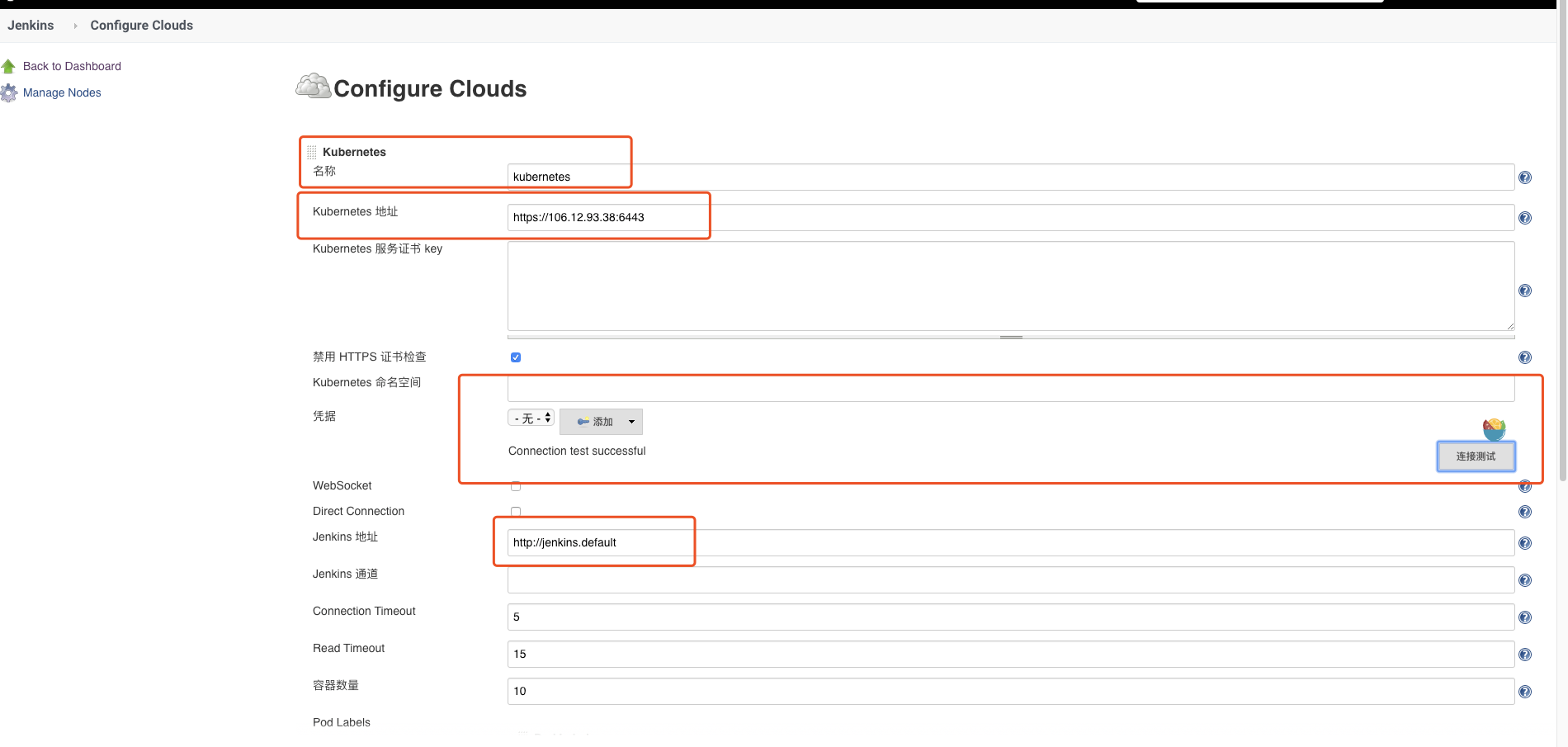
Once installed, click System Management -> System Setting -> Add a Cloud -> select Kubernetes and enter the Kubernetesand Jenkins configuration information.
Description:
-
Nameis set tokubernetesby default, or can be modified to a different name. If you modify it here, you shall specify the parametercloudofpodTemplateas its corresponding name when executingJobin the following; otherwise, you cannot find it. Thecloudis set tokubernetesby default.
-
- Enter
https://kubernetes.defaultinKubernetes URL, and enter theDNSrecords corresponding toKubernetes Service, you can resolve theCluster IPof theServicethrough theDNSrecord.
- Enter
Note: Or, you can enter the complete
DNSrecord ofhttps://kubernetes.default.svc.cluster.local, as it shall meet the name mode of<svc_name>.<namespace_name>.svc.cluster.local, or enter the addresshttps://<ClusterIP>:<Ports>of externalKubernetesdirectly.
-
- Enter
http://jenkins.defaultatJenkins URL, which is to use theDNSrecord corresponding toJenkins Serviceas similar to the above, or use the mode ofhttp://<ClusterIP>:<Node_Port>at the same time. For example, we can enterhttp://x.x.x.x:30427here, and30427here is theNodePortexposed outside.
- Enter
-
- Once configured, click Test Connection button to test if it is possible to connect
Kubernetes. IfConnection Test Successfulappears, it indicates that the connection succeeded, without problem in configuration.
- Once configured, click Test Connection button to test if it is possible to connect
5. Non-clustered Jenkins connects to Kubernetes
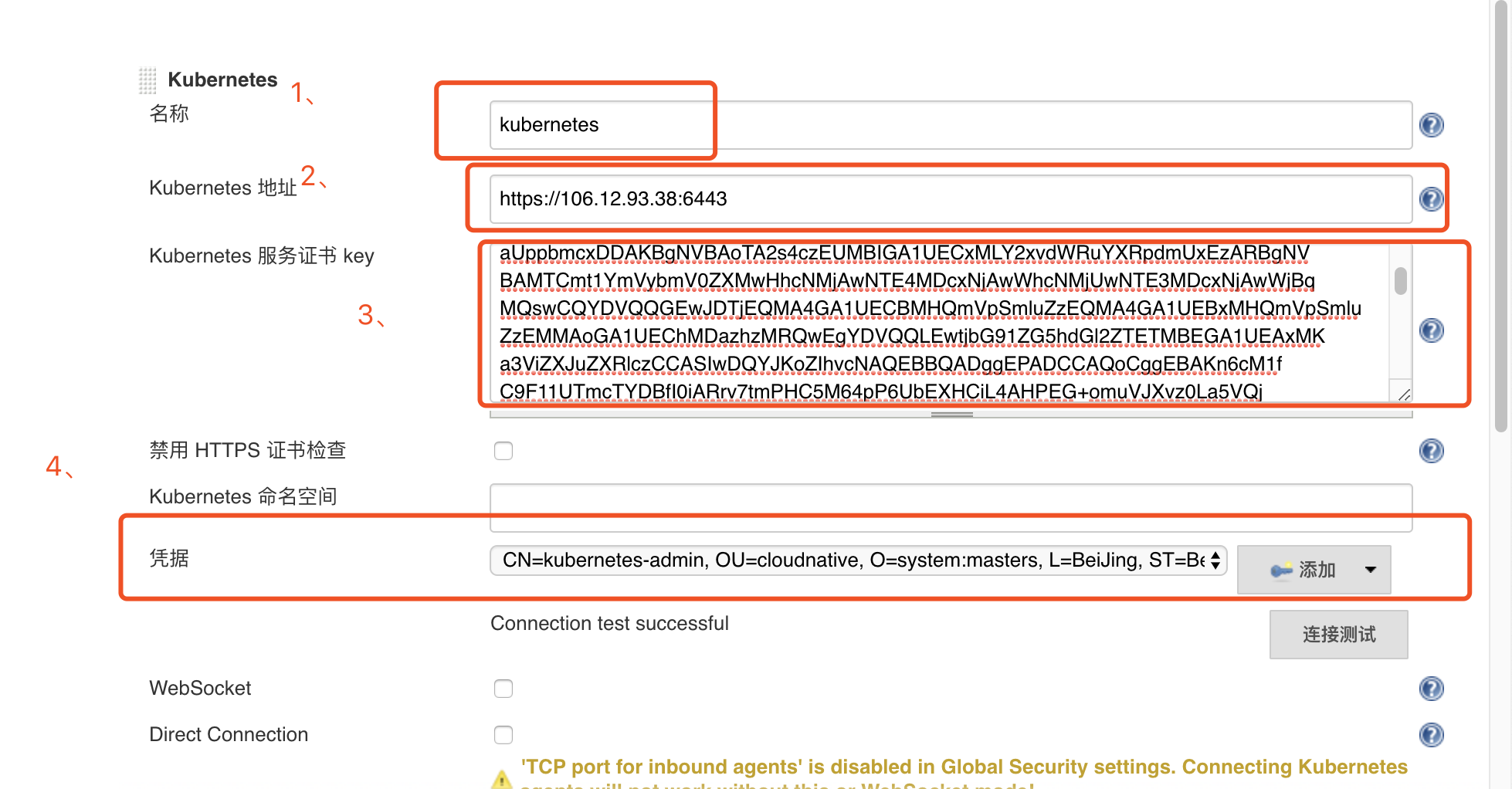
Enter Kubernetes configuration content
Take a kubeconfig file as an example
1apiVersion: v1
2clusters:
3- cluster:
4    certificate-authority-data: LS0tLS1CRUdJTiBDRVJUSUZJQ0FURS0tLS0tCk1JSURwRENDQW95Z0F3SUJBZ0lVUldSdmNwRkxNaTVaUFZJUVllL2o2WkxsZlJJd0RRWUpLb1pJaHZjTkFRRUwKQlFBd2FqRUxNQWtHQTFVRUJoTUNRMDR4RURBT0JnTlZCQWdUQjBKbGFVcHBibWN4RURBT0JnTlZCQWNUQjBKbAphVXBwYm1jeEREQUtCZ05WQkFvVEEyczRjekVVTUJJR0ExVUVDeE1MWTJ4dmRXUnVZWFJwZG1VeEV6QVJCZ05WCkJBTVRDbXQxWW1WeWJtVjBaWE13SGhjTk1qQXdOVEU0TURjeE5qQXdXaGNOTWpVd05URTNNRGN4TmpBd1dqQnEKTVFzd0NRWURWUVFHRXdKRFRqRVFNQTRHQTFVRUNCTUhRbVZwU21sdVp6RVFNQTRHQTFVRUJ4TUhRbVZwU21sdQpaekVNTUFvR0ExVUVDaE1EYXpoek1SUXdFZ1lEVlFRTEV3dGpiRzkxWkc1aGRHbDJaVEVUTUJFR0ExVUVBeE1LCmEzVmlaWEp1WlhSbGN6Q0NBU0l3RFFZSktvWklodmNOQVFFQkJRQURnZ0VQQURDQ0FRb0NnZ0VCQUtuNmNNMWYKQzlGMTFVVG1jVFlEQmZJMGlBUnJ2N3RtUEhDNU02NHBQNlViRVhIQ2lMNEFIUEVHK29tdVZKWHZ6MExhNVZRagp2SjZUblc0K2h4UjNuT2pGSmhGbldVZDcrWUtBM1Fic05qUVNybFNLTVhqRVlTSTA2M3NGS1YzNFZNUERXR3ByClVvVlZWZjduVmVkY0FhRTdzeFg3cXFOeERDS3Fjc2cxWCtDNFFrK01zaExKaUdyRnNnRC8rOHNUVkRzVzRoTEMKZ01zZ1R5WlVwRDlmM2hBTXQ0dzduV3RiWURsOFlvZnhEcU9tYndpVEx3VlNyaXAvZHlVeW9BZXhxbFFWaUgrMwpTNXY5cXRnTXVRRjhUMVNPUkwzcldsMUNYR0JPU3k0YTVBenA0dUx6TTlnbjJzdzZIU3gySG1aZlpxUlI1SXdICkFnQU9ydStFZ1lXVmNoOENBd0VBQWFOQ01FQXdEZ1lEVlIwUEFRSC9CQVFEQWdFR01BOEdBMVVkRXdFQi93UUYKTUFNQkFmOHdIUVlEVlIwT0JCWUVGSjBNOXlyc2F5SXEzZnVuYkhWWHJiZUZZL3RBTUEwR0NTcUdTSWIzRFFFQgpDd1VBQTRJQkFRQkE0UzBoVkpyOTBmNjNPU0tRMzVrUGNvTE9ObTg0TVNUbkI1OHE3alJHOHBtRHVvc09TUXUwCjZpUE9CZVBMOE92eEpObzhRcHBXOWJCR1N1ZFRKMG5CUnMyTmFjWU1BM0FqeUM0Y09nOFFJNGxHcUJWQllvVEcKa0I0cVlsYjl4dVJ2bnBJenVUWkd0RkVYQkpkZXFGZzZzSno2THRIZzFiUmM2cGJGZThuVUZZYnRSMzRPeGl2Qgp5WUNUKzNSbEpxTmhXcjlJK2djNDhMeXNheTBnL3BmQ1lsSzdXQm8rSWFZTXF1Z2Zmc2RQS2dISkU0Tm0xei9pCmlsNnhYMWV3R1RYMEFsMENKN2tNeitHa3hZalFHcHY1UG5iNzRpOHZZMm5uODVhUnliZVZjeENMZkhTazBTN2kKL0hjTXRkRjdxMVE5bndqMlhiclMxRmRCTEVSWGFGQTkKLS0tLS1FTkQgQ0VSVElGSUNBVEUtLS0tLQo=
5    server: https://1.1.1.1:6443
6  name: kubernetes
7contexts:
8- context:
9    cluster: kubernetes
10    user: kubernetes-admin
11  name: kubernetes-admin@kubernetes
12current-context: kubernetes-admin@kubernetes
13kind: Config
14preferences: {}
15users:
16- name: kubernetes-admin
17  user:
18    client-certificate-data: LS0tLS1CRUdJTiBDRVJUSUsdafZJQ0FURS0tLS0tCUJBZ0lVQlRMK3lWNXdNbjNvamdkdzRKSmFBa0RpNTZrd0RRWUpLb1pJaHZjTkFRRUwKQlFBd2FqRUxNQWtHQTFVRUJoTUNRMDR4RURBT0JnTlZCQWdUQjBKbGFVcHBibWN4RURBT0JnTlZCQWNUQjBKbAphVXBwYm1jeEREQUtCZ05WQkFvVEEyczRjekVVTUJJR0ExVUVDeE1MWTJ4dmRXUnVZWFJwZG1VeEV6QVJCZ05WCkJBTVRDbXQxWW1WeWJtVjBaWE13SGhjTk1qQXdOVEU0TURjeE5qQXdXaGNOTXpBd05URTJNRGN4TmpBd1dqQjcKTVFzd0NRWURWUVFHRXdKRFRqRVFNQTRHQTFVRUNCTUhRbVZwU21sdVp6RVFNQTRHQTFVRUJ4TUhRbVZwU21sdQpaekVYTUJVR0ExVUVDaE1PYzNsemRHVnRPbTFoYzNSbGNuTXhGREFTQmdOVkJBc1RDMk5zYjNWa2JtRjBhWFpsCk1Sa3dGd1lEVlFRREV4QnJkV0psY201bGRHVnpMV0ZrYldsdU1JSUJJakFOQmdrcWhraUc5dzBCQVFFRkFBT0MKQVE4QU1JSUJDZ0tDQVFFQTErQjh2aXJGU0ZTQVJEQk4yOWxzRHN2WDlxaHJRTU82WnlCK0E5bWNybUtQZG5NOQozdU80T3FGQ1RjNktxTVNDQStDUHVKdlQwZXFJM29UUWZRMHZmWW40UndVNFhIZ21IbWQ2Nk50SXlQZUdzZGtGClRJc1FxaElzVm1VQS9ZNXBEb2h1Yk9OQWlGbDFOaEliUTNqU3JmMy9MYzVLY3RYM2ZOSGhxOE1hblpYYkVmRUsKY1NsdVI5Um4rQkdET1pubGNMZTkzRWRxME9EeFRsaXV6aFNYektUQUhyZnRLbGlIS3hyVXVkRlFZcGpHaFgrTgpLT2pRTFAzdkUwNjYzbklibGxZb2trYkxpZUVnd3lkcDNWUFpHSXI2aE5kZnd5bEdpU2lHMmw0N045bG1lVVhoCmt6MjZoWG5OeDZXRzdvL2d1aXBLdUpWeHZmT1NXS0tHWmJyZmhRSURBUUFCbzRISE1JSEVNQTRHQTFVZER3RUIKL3dRRUF3SUZvREFkQmdOVkhTVUVGakFVQmdnckJnRUZCUWNEQVFZSUt3WUJCUVVIQXdJd0RBWURWUjBUQVFILwpCQUl3QURBZEJnTlZIUTRFRmdRVVZUQm5ESjJYRUtCMkRRTlJZY2c5SFlsL2VCQXdId1lEVlIwakJCZ3dGb0FVCm5RejNLdXhySWlyZCs2ZHNkVmV0dDRWaiswQXdSUVlEVlIwUkJENHdQSWNFckJJQUFZY0VaRURtSUljRVpFYWsKeUljRVpFRG1INGNFWkVha3dZY0VaRURtSG9jRVpFYWt2b2NFWkVEbUlZY0VhZ3hkSm9jRVpFSUFiREFOQmdrcQpoa2lHOXcwQkFRc0ZBQU9DQVFFQUNFc2JBOWh6cHp6YWdwL2RMemQremx2anJVQ0dqNVFBQjNmQlN0OEN4Z2loCnhKNzBLeWV5TDdVVExOZDRNd09Tcjd0VGxhMTFmZTE4VkRvRUNDV0NzY0FabXZEK014eVJ2alFaL1NjY29xMGwKRkc5RFlBU3dOL2RhMURaeTY2L0FJdllaWEV1WmxQbGtSNnlrQ1F4MHJNYjJtdVdSemdJTS9MUTNwSFVYenJ4cQo3cUlreEtJeWlHZC8yUDdvcFBtSzMvemJIU2wyVnNnc1pFL2tJb1ZNQ3BYc1NEaml2aEpHNUlya1lyamNSa2JzCmV2cDI2b0M0K0lKNkNYNjh0TDROTkFxNzFoRmh1QTJ1TGhVLzFhc3NOY0w4RFpFNnFvTlFpWUZXQjVheE81NEsKZXlxRkM3dDBTbEVNYTFRVnNlbklwTVlTRmRlYTZselhtN3lXSFVCVEdBPT0KLS0tLS1FTkQgQ0VSVElGSUNBVEUtLS0tLQo=
19 client-key-data:LS0tLS1CRUdJTiBSU0EgUFJJVkFURSBLRVkbjRSdlR3Nka0YKVVBL1k1cERvaHViT05BaUZsMU5oSWJRM2pTcmYzL0xjNUtjdFgzZk5IaHE4TWFuWlhiRWZFSwpjU2x1UjlSbitCR0RPWm5sY0xlOTNFZHEwT0R4VGxpdXpoU1h6S1RBSHJmdEtsaUhLeHJVdWRGUVlwakdoWCtOCktPalFMUDN2RTA2NjNuSWJsbFlva2tiTGllRWd3eWRwM1ZQWkdJcjZoTmRmd3lsR2lTaUcybDQ3TjlsbWVVWGgKa3oyNmhYbk54NldHN28vZ3VpcEt1SlZ4dmZPU1dLS0daYnJmaFFJREFRQUJBb0lCQUZRVUhlR2ZIT2xYNkFFbQo0eHd1YVZTMTllNGVtRzlJRERDZ1NoUkx6Q2RyUWI3N2tXeGZPdUN5Ny9VSDdaOWZzZGU2dlo5RUtkTEhTdm1ICnR3QU5nNktjZXZPR1IvWlQ0VnpVSnQzTWttT2JiSDJXTGVjcS9wbU9ySEFWdExZTW9rUkR4T1pwK0RkaXlERUEKQ2xoVUZaSW9yQnQyRGk3OXdQOS9heXFQdWEwSCttK0NpV2JSYzhodkRSZWtIZnd2b2pXTWtzNVNUNkZhSmVzNwpXQW1GNnVTaEs2Y3ovZjV5QjgvNjVmQ0tvYVN2RFlkdk1HVHZ2U3BqRlBoZVlScHRnREVWd2VJMElaRFBXdDQ4CmpnWklpQjVLbmpOdXprc1l6eEUvWnRhV05PS3QxVmtKYTduQ1M2SitOM0JESDFwOE9QVWk0ZVpDVTRzd05kRVMKVDRoV0ZZRUNnWUVBOGthR0Y3aGxmSEhBZkwya3MwNUJNb01mTktOUFFkSkxYV01ZUVk0L0FwYWJlaWhOVzZRSwpabDJ1cjNoRkFZZ3B6ZFp3RkUzbEx5VmhnODZSS05XNVZvSWcwUW5qWEpBc1U5VGt1KzNzVXRqWnFHTkNmdWRHClB1dG1qWFNwR1NvQWQxZDdwQkNkbEdMYWZBd1ArREI3VkFCNHRTQklVd1NHY3hDb2pUOU92T0VDZ1lFQTVCc2gKcnpOTHZJcU81MlpyL2xlZ3BWRC96aFhZWmNhaDhQcFFLNUY1VkJNa3MyalRNL25uVXdvYzl1QXllUlYxbm1lTApNajlXTmI2QkhZNXNRZXZaNUFPQ2pHWGxyL24zd29qSitTTVpyQnlLMVVqdjBVakdXcVlncHBXMUxhM21MREV5CmpGbDBhcnB5MllRSkxoK1VoU3R0c2ZKU25qdVVmTXJVR3pRUTh5VUNnWUIyRDJmSXAxTE5FYUY3Sis3YWNZZlQKMVpHZlZQV0tYYS9jRWkzL3hCRndjWFBTVTFGZkZ0RDZrU3hPMVl6SzhrOXN2dEpmRXBaY0l4c2gzOGRjM3NreQpIcmRmSmpKbEtOeHcvWTE1QnJmaXAwbHBoUFVpWWhFWkdCMGhVWGdWaXlJdkJiSjZnSjVKY09LSEVGbTMxK2hCClJ2bUxTZS8waElBQUVsNFFkb2tvQVFLQmdRQzd6Q3FiVjV3UENmUkZSdW02YU9KMXVJNGlXWkhqbVBsU3NJSzQKbS9oTDQ4YmZmbm9EM01jNmNxVU9DOThDR1V6UXNXYkVZNmpTYnBsV2dCOVkxcGg1UlBxQ0pKSkpvMzc3eGlxaQoxdWNYOEJmTktWTm45b1ozc3paR2NCTE9ITkhYcUZsNWUxeUJVaWVrTlRScHFNNWFKVHNXdWU2VEgzSk1tNkN0CkZOeXZrUUtCZ0VlY05hN2UzNTRJcEtlMGowZ0dzWXZuVXNFOVRKSkRzdmhjYmRhL0E5TEZvV2tRNGFHVmt2SlgKSG5yb29ZWDg2OU1FM2YyaHNxUmVsMng2a1phZWF6ZWNnWld0RzkvR2kzWXRqVWJZVktzU2pWZDVhSkFrM2k1cwpEVWRmMFZUU1QrR0hjRDUzL2NkK3M3WnA1WkFzdWx1czdnQmFPWkdzOUx6VXY5aHIrRzJWCi0tLS0tRU5EIFJTQSBQUklWQVRFIEtFWS0tLS0tCg==- No. 1: Remain unchanged, it defaults to
kubernetes - No. 2: Enter the address of
clusters.cluster.serverin thekubeconfigfile - No. 3: Retrieve the content of
certificate-authority-datafrom thekubeconfigfile and convert it into abase64 encodedfile
1ecbo xxx | base64 -d > /opt/crt/ca.crtFill the content of ca.crt into the Kubernetes Service Certificate Key field in Jenkins Kubernetes, then extract the content of client-certificate-data and client-key-data from the kubeconfig and convert them into base64-encoded files.
1echo xxxxx== | base64 -d > /opt/crt/client.crt
2echo xxxxx== | base64 -d > /opt/crt/client.key
3
4
5# Generate the Client P12 authentication file cert.pfx and download it locally
6openssl pkcs12 -export -out /opt/crt/cert.pfx -inkey /opt/crt/client.key -in /opt/crt/client.crt -certfile /opt/crt/ca.crt
7Enter Export Password:
8Verifying - Enter Export Password:
9
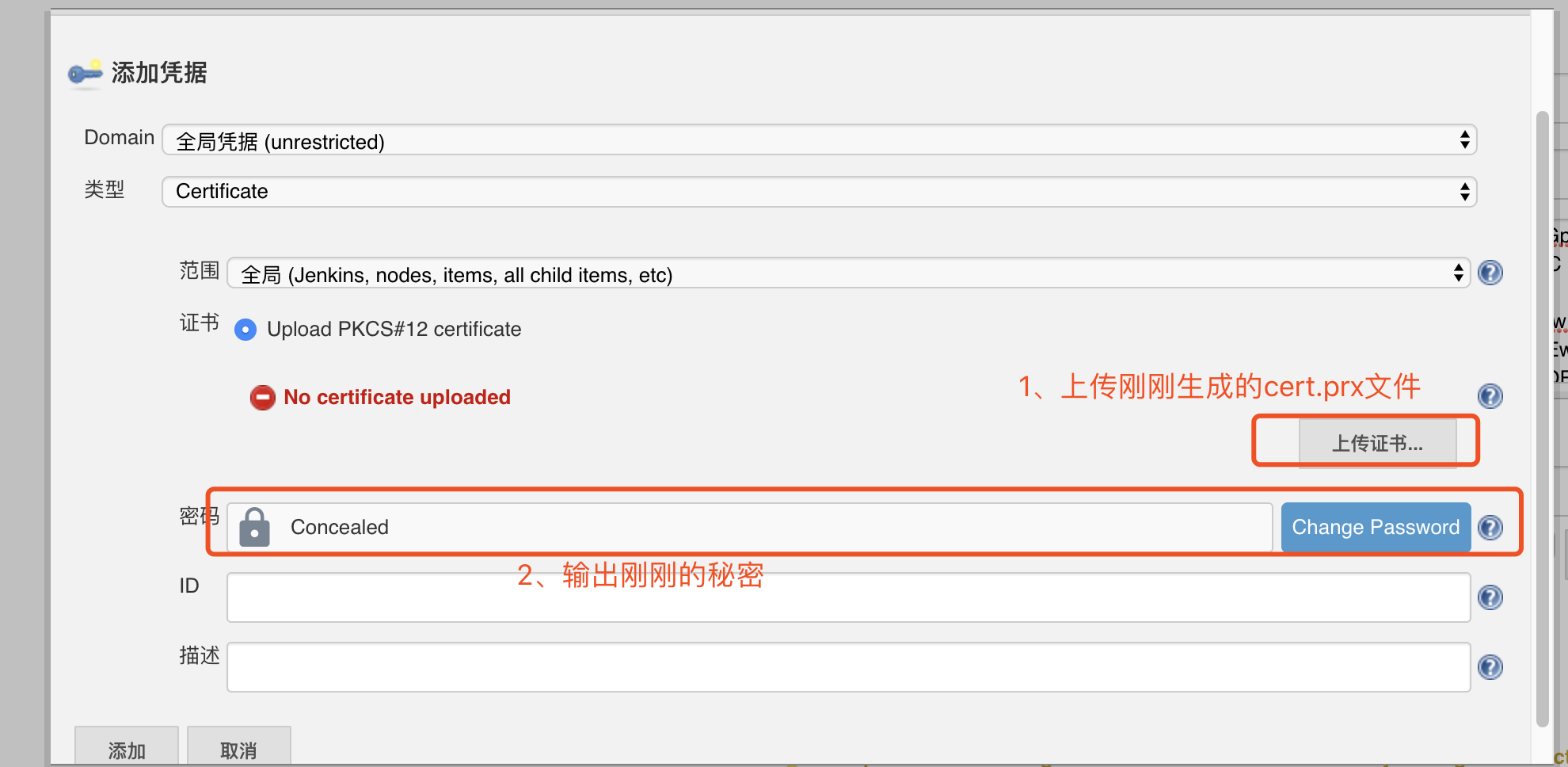
10# Note: Customize a password and remember it- No. 4: Add credentials in cloud
kubernetes
Note:
Upload certificategenerated last time and downloaded locally tocert.pfxfile, enter the key when addingPasswordvalue to generate thecert.pfxfile, and select the certificate in No. 4.
 Finally, click the Connection Test: Its appearance indicates the success of connection
.
Finally, click the Connection Test: Its appearance indicates the success of connection
.
6. Testing and verification
Well, install Jenkins Master through Kubernetes and configure the connection. Next, we can configure a Job to test if the publish will succeed.
Pipeline type support
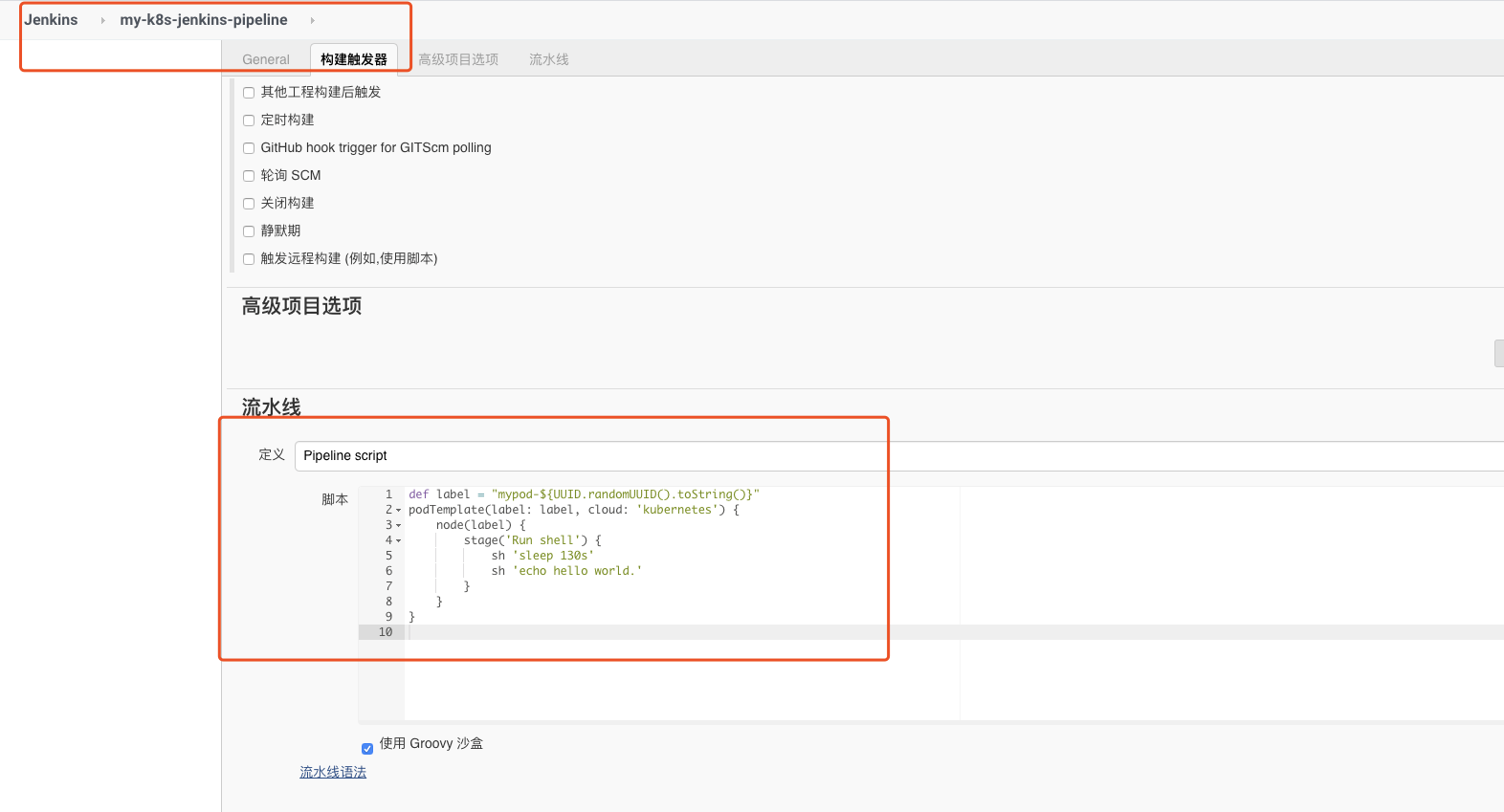
Create a Job of Pipeline type, and name it as my-k8s-jenkins-pipeline, and enter a simple testing script at the Pipeline script as follows:
1def label = "mypod-${UUID.randomUUID().toString()}"
2podTemplate(label: label, cloud: 'kubernetes') {
3    node(label) {
4        stage('Run shell') {
5            sh 'sleep 130s'
6            sh 'echo hello world.'
7        }
8    }
9}
To execute the build, you can see a build task in the Build Queue at this point. After clicking Build Immediately, it will publish successfully after the success of initialization. We can see the entire automatic creation and deletion process through the kubectl command line.
Note:The image used in the example will time out if being pulled directly. The following command can be used to execute in advance in the machine.
1docker pull hub.baidubce.com/jpaas-public/jenkins/jnlp-slave:v0
2docker tag hub.baidubce.com/jpaas-public/jenkins/jnlp-slave:v0 jenkins/jnlp-slave:4.0.1-1