

CCE_Hybrid_Manager Description
Updated at:2025-10-27
Component introduction
A hybrid deployment management component tailored for online and offline jobs in Kubernetes scenarios. By overlapping jobs, it leverages the unused idle resources of online jobs to execute offline jobs, thereby enhancing cluster resource utilization.
Component function
- cce-hybrid-scheduler: An offline task scheduler schedules offline jobs based on SLA configurations and dynamic node resource utilization;
- cce-hybridlet: A hybrid deployment agent detects resource usage of nodes and jobs, and throttles or evicts jobs according to SLA configurations;
- cce-node-sla-controller: Automatically detects and reclaims SLA changes in nodes and node groups while adjusting binding relationships as needed.
Application scenarios
Running jobs using hybrid deployment methods that utilize the idle resources of online jobs significantly improves cluster resource utilization in Kubernetes scenarios.
Limitations
- It only supports Kubernetes clusters running versions v1.16, v1.18, or v1.20.
Install component
- Sign in to the Baidu AI Cloud official website and enter the management console.
- Go to Product Services - Cloud Native - Cloud Container Engine (CCE) to access the CCE management console.
- Click Cluster Management - Cluster List in the left navigation pane.
- Click on the target cluster name in the Cluster List page to navigate to the cluster management page.
- On the Cluster Management page, click Component Management.
- Select the CCE Hybrid Manager component from the component management list and click Install.
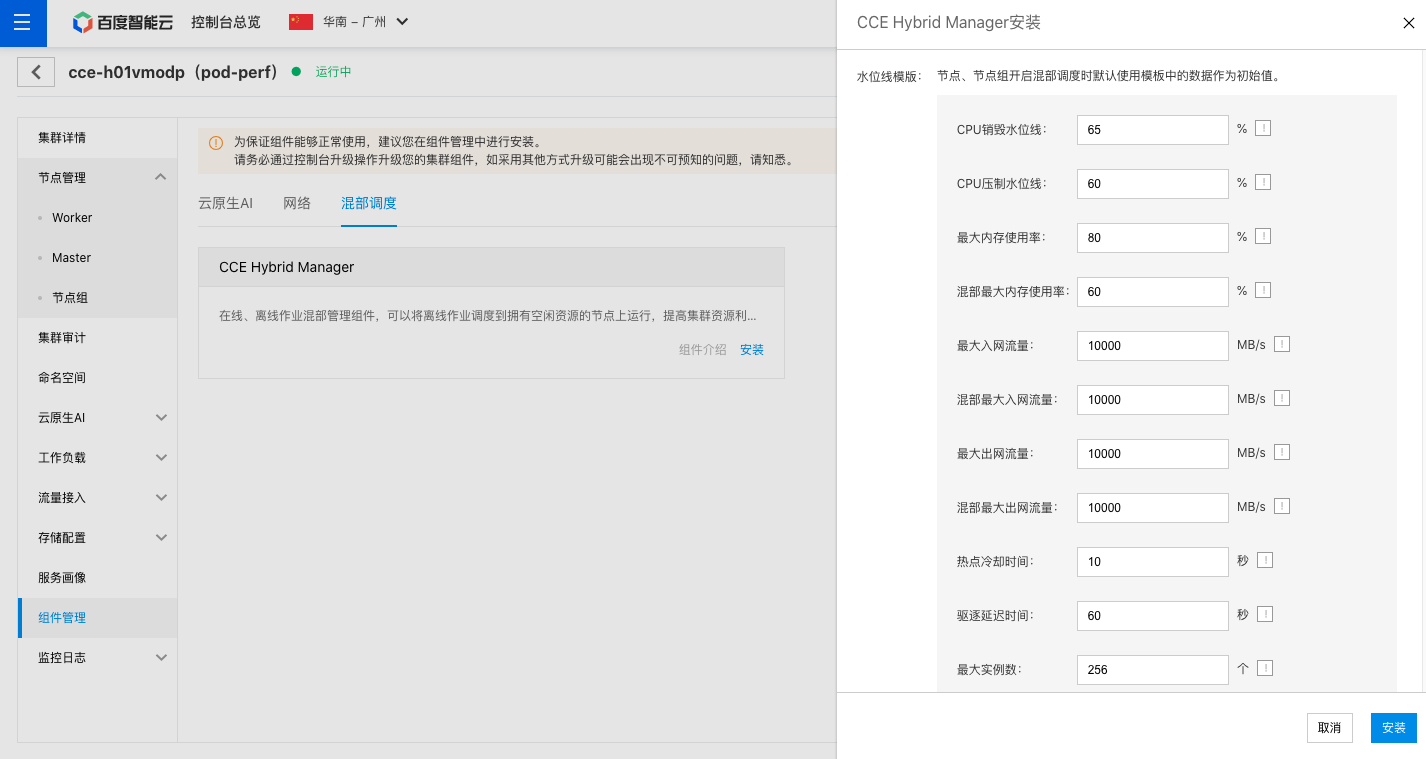
- Complete the relevant configurations on the Component Installation page, as shown in the figure below:
- Click Install to complete the component installation.