

Configure Collection Rules in Cloud Container Engine Console
You can configure log collection rules in the Cloud Container Engine (CCE) console by specifying containers in the cluster that require log collection. This enables the collection, storage, and query analysis of service logs.
Usage restrictions
At present, only pushing collected logs to LogStore BES is supported; direct uploading to BOS or Kafka is not available. Supported log sources include host and container logs, where container logs cover both stdout logs and internal container logs.
Prerequisites
- Successfully create CCE cluster.
- If the Baidu AI Cloud Log Service (BLS) has been activated, you can log in to the Baidu AI Cloud Log Service (BLS) Console to confirm its status.
- The log-operator component has been installed. For details, refer to Component Installation.
Description
If the component is not yet installed, the log center page will prompt you to do so. Follow the interface prompts to complete the installation of the log-operator component.
Operation steps
Install log collection component
- Sign in to Cloud Container Engine (CCE) console.
- Select Cluster List in the left navigation bar.
- On the Cluster List page, click on the desired cluster to open the cluster management page.
- Select Component Management from the left navigation bar in the cluster management page.
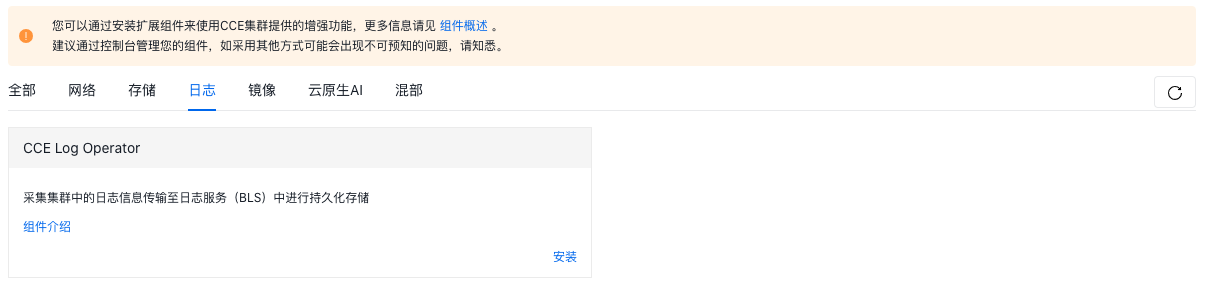
- Under the Log tab in the Component Management page, locate the CCE Log Operator component and click Install.
Create collection rules
- In the left navigation bar of the Cluster Management page, select O&M & Management - Log Center.
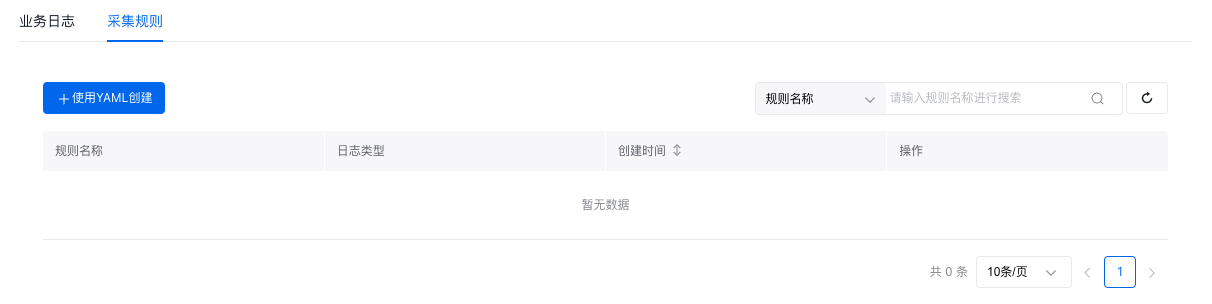
- On the "Collection Rules" tab of the log center management page, click "Create with YAML.\
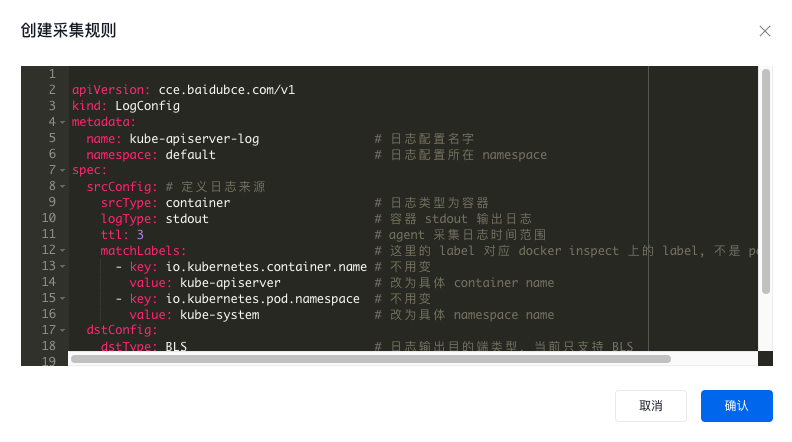
- Set up log collection parameters on the Create Collection Rules page.
Description
- The Cloud Container Engine (CCE) console currently only supports configuring log collection rules through custom resource definitions (CRDs).
- For CRD configuration instructions on log collection rules, see [Configuring Collection Rules Using CRD](CCE/Operation guide/Monitor Logs/Log Center/Configure Collection Rules Using CRD.md).
- Click the OK button to complete the configuration.
Description
- Each CRD resource generates a transmission task (name format: cluster ID + namespace name + rule name) in Baidu Log Service (BLS). It is advised not to directly edit these transmission tasks in the log service console, as the log collection component will overwrite the settings.
Manage collection rules
- In the left navigation bar of the cluster management page, select Monitoring Log - Log Center, then select the Collection Rules tab to view collection rules.
- Click Modify or Delete in the operation column in the collection rule list to update or delete collection rules.
Description
To delete existing log collection rules, you need to specify whether to synchronously delete the associated BLS LogStore resources. If unchecked, the associated BLS LogStore resources will remain. If checked, deleting a log collection rule will also delete the associated BLS LogStore resources. Proceed cautiously.