

Remove a node
Updated at:2025-10-27
If a worker node is no longer necessary, you can remove it from the node group or cluster via the console. Master nodes cannot be removed. Please follow the precautions outlined in this document and perform the operation during off-peak hours.
Prerequisites
- You have successfully created a Kubernetes cluster. For details, see [Create Cluster](CCE/Operation guide/Cluster management/Create cluster.md).
Note
- Removing nodes may result in the cluster being unable to provide sufficient CPU and memory resources for containers. Proceed with caution.
- Node removal involves pod migration, which may impact services. It is advisable to perform this operation during off-peak hours.
- Unexpected risks may arise during the node removal process. Please back up the relevant data beforehand.
- Follow standardized procedures to remove nodes via the console. Do not manually remove nodes using the kubectl delete node method.
- When removing a node, if you opt for the drain node operation, ensure that other cluster nodes have sufficient resources to avoid scheduling failures for business pods.
-
Verify the node affinity rules and scheduling policies for the node being removed to ensure that pods can be rescheduled to other nodes if the node is removed.
Note: If it is still necessary to add an instance to the node group/cluster after removal, refer to Add Node.
Operation steps
- Sign in to the Baidu AI Cloud official website and enter the management console.
- Select Product Services - Cloud Native - Cloud Container Engine (CCE) to enter Cluster Management - Cluster List.
- Click on the target cluster name in the Cluster List page to navigate to the cluster management page.
- On the left sidebar, select Node Management - Nodes to enter the Node List page.
- In the node list, select the nodes to be removed from the cluster and click Remove Node.
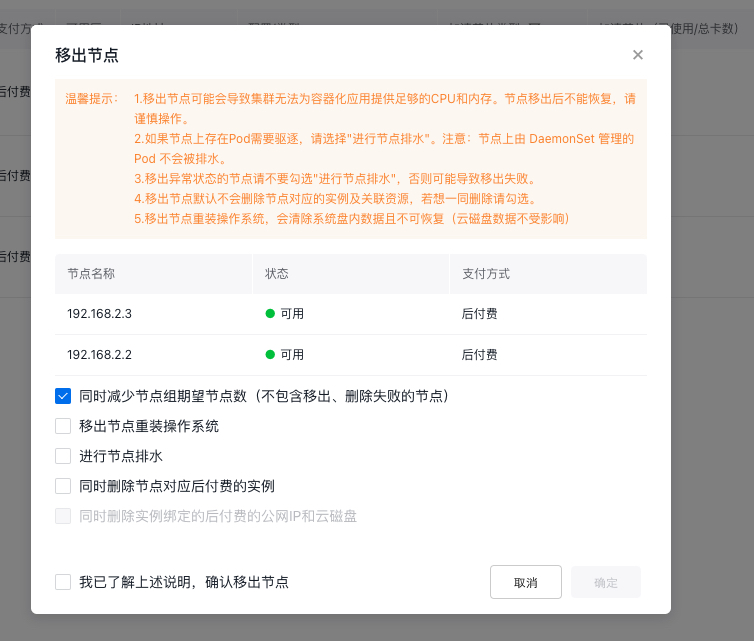
Note:
- Removing nodes does not delete the corresponding instance and associated resources of nodes by default. You can check Simultaneously Delete Instance and Associated Public IP and Cloud Disk Server, which only supports deleting postpay resources, not supports deleting prepay resources. Prepaid instances will be automatically released after the billing cycle expires. You can request a refund before the instance expires to release it early, or convert yearly/monthly subscribed instances to postpaid instances before release.
- Removing a node from a node group automatically reduces the desired node count of the group by default. You can uncheck this option to maintain the current desired instance count through further scale-up, excluding nodes that failed to be removed or deleted.
- If there are pods that require eviction, select the Execute Drain Node option. However, pods managed by daemonSet on the node will not be drained.
- When removing nodes in an abnormal state, avoid selecting Execute Drain Node, as this may lead to removal failure.
- When removing nodes, if you select "Remove Node and Reinstall OS," all data on the system disk will be erased and cannot be recovered. (Data on the cloud disk server will not be affected.)
- Click OK to complete the node removal. You can view the node being removed in the node list until it is not displayed in the list.