Implementing Second-Level Elastic Scaling with cce-autoscaling-placeholder
Component introduction
After enabling auto-scaling for a CCE node group, if Pod scheduling fails due to insufficient resources, the cluster automatically scales up nodes. This typically takes a few minutes. However, during traffic surges, this minute-level scaling may not meet service demands quickly enough. This document outlines how to use K8S PriorityClass to create Pod placeholders, enabling near-instant scaling in CCE for such scenarios.
Implementation principle
The cce-autoscaling-placeholder uses low-priority Pods to preoccupy resources and reserve some resources as a buffer. When Pod is scaled, high-priority Pods can quickly preempt resources from low-priority Pods for scheduling. The low-priority cce-autoscaling-placeholder Pods will be "preempted" and enter the pending status. If a node group is configured and auto scaling is enabled, this will trigger node scale-up. For more information, refer to Node Group Management.
By reserving some resources as buffers, even with slow node scaling, certain Pods can be quickly scaled and scheduled, achieving near-instant scaling. To adjust the buffer resource amount, modify the request or replica count of the cce-autoscaling-placeholder based on actual needs.
Operation steps
- Sign in to the Baidu AI Cloud official website and enter the management console.
- Select Product Tour - Containers - Baidu Container Engine and click to enter the CCE management console.
- Click Helm > Helm Templates in the left navigation bar.
- In Baidu AI Cloud Templates, select the cce-autoscaling-placeholder template, and click Install to deploy it.
- Complete the configurations detailed in the template.
| Parameter name | Parameter meaning | Description |
|---|---|---|
| replicaCount | Pod count | Default to 3 |
| imageID | Image name, general pause | |
| cpu | cpu occupied by a single Pod | - |
| mem | mem occupied by a single Pod | - |
| nodeSelector | Custom nodeSelector | Recommended to be consistent with the InstanceGroup |
| tolerations | Custom tolerations | - |
| affinity | Custom affinity | - |
- Click OK button to complete the deployment.
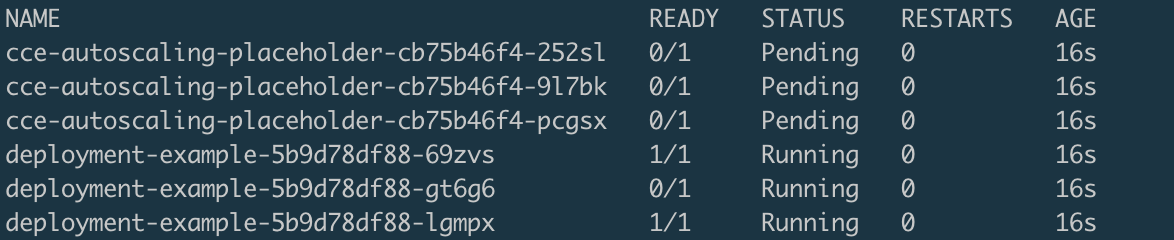
- When creating a Nginx Pod, you will notice that the Nginx Pod can quickly preempt Placeholder Pod for quick startup, while the Placeholder will trigger a new node scale-up, as shown below: