

GPU Runtime Environment Check
Updated at:2025-10-27
Overview
This document serves as a guide for performing cluster checks on the operating environments of nodes equipped with accelerator chips (like GPUs). Such checks ensure these nodes meet the required hardware and software conditions for running AI tasks, thereby enhancing the efficiency and success rate of task execution.
Prerequisites
- A K8S cluster CCE has been created. For specific operations, please refer to Create Cluster
- Nodes containing accelerator chips (such as GPUs) are in an available status
Note
- The check process might take a long time; please be patient.
- It is advised not to carry out other operations on the cluster during the check to avoid affecting its outcome.
Operation steps
- Log in to the Baidu AI Cloud Management Console, navigate to Product Services - Cloud Native - Cloud Container Engine (CCE), and select Cluster Management - Cluster List to access the Cluster List page.
- Click on the target cluster's name, then choose Cluster Check from the left navigation menu under Inspection and Checks.
- On the Cluster Check - GPU Operating Environment Check page, click Check Now.
- In the pop-up dialog box, configure the scope of check items, and then select the nodes that need to be checked.
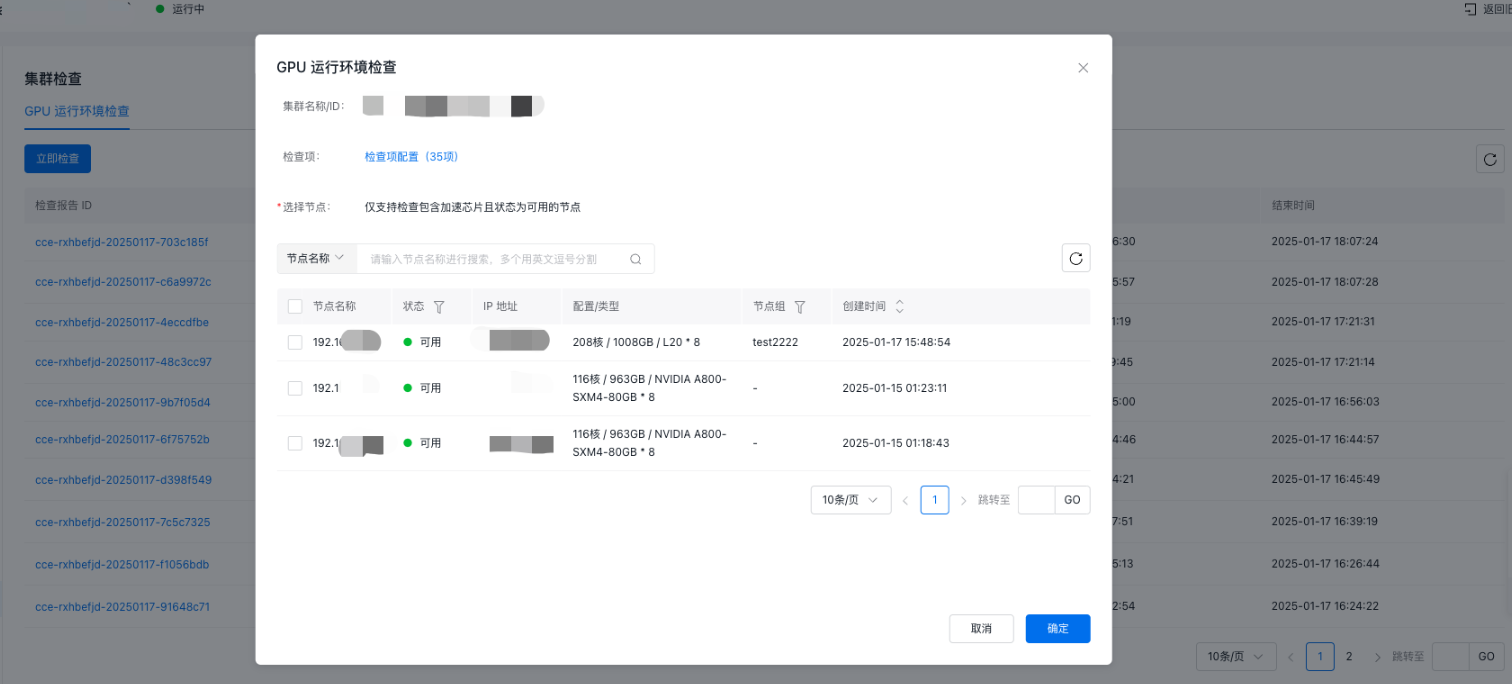
- Click Start Check to begin the process.
- Once the check is complete, the system will generate a report. Users can review the results along with suggestions for improvement.
Description of GPU operation check items
| Level I category | Level II category | Check item description |
|---|---|---|
| Computer software faults | Has agent health check | Check the running status of the Has agent. Only normal running of Has can provide hardware failure reporting capability |
| Has agent version check | Check if the installed Has agent version on the node is too low, as outdated versions may affect the use and accuracy of the latest fault reporting function | |
| Check for enabling of Has Agent accelerator chip detection | Check if the Has agent accelerator chip fault detection capability is enabled | |
| Network interface card firmware version check | Check whether the network interface card firmware versions are consistent across multiple machines | |
| Check for initialization status of the accelerator chip | Inspect for any incorrectly initialized or problematic accelerator chip nodes. Updated versions might cause device malfunctions, leading to improper operation. | |
| Check for expected count of accelerator chips | Check the count of detected accelerator chips in the node and compare it with the expected count to ensure proper device operation | |
| Accelerator chip firmware version check | Check whether the accelerator chip firmware versions are consistent across multiple machines | |
| Persistence mode activation check | Check whether the accelerator chip has persistence mode enabled. Disabling persistence may increase power consumption and degrade performance of the accelerator chip | |
| OS | OS & Kernel version check | Check for consistency of OS and kernel versions across nodes |
| Kernel parameter check | Check whether the kernel parameters set for PFS-L1 are correctly configured, as incorrect threshold settings may impact storage device performance | |
| sGPU kernel dependency check | Check whether the node kernel version supports GPU virtualization function. Lower kernel versions may cause virtualization failure | |
| Graphical interface closing check | Check whether the graphical interface is closed, as an open interface may cause node crash | |
| Kubelet resource reservation check | Check the Kubelet resource reservation. Insufficient reserved resources may cause node hang under high load | |
| home disk mount check | Check the mounting status of the home disk. Incorrect mounting of the home disk will cause storage issues, such as unrecognized data disks. | |
| Image directory, root directory resource reservation check | Check the image directory and root directory resource size. If too small, image pull may fail, and the cluster cannot create tasks | |
| Driver | Check for disabling of nouveau driver | Check the disabling status of the nouveau driver. Failure to disable this driver may cause conflict with the accelerator chip driver, affecting node operation and task creation |
| Network interface card driver check | Check the network interface card driver version, as abnormal versions may cause cluster communication fault | |
| fabric-manager installation check | Check the installation status of the fabric-manager component, as its abnormality may prevent normal training task submission | |
| link_status health status check | Check the link_status health. Abnormal status may cause inter-machine communication failure and multi-machine task execution failure | |
| peermem configuration check | Check the installation status of the peermem package of accelerator chips. Failure of this configuration may cause abnormal video memory management, leading to degraded task performance | |
| HALT configuration check | Check hALT configuration status; an unconfigured hALT may cause the physical machine to reboot or lose power | |
| Network interface card jitter parameter configuration | Check whether the network interface card jitter parameters are configured. Unconfigured jitter parameters will degrade network performance | |
| FW version check | Check whether the FW versions between multiple machines are consistent | |
| BMC version check | Check whether the BMC versions between multiple machines are consistent | |
| ECC Correctable count check | Check if the ECC Correctable count is greater than the threshold. An abnormal value indicates potential hardware errors in storage | |
| Network interface card | MTU configuration check | Check the MTU parameter configuration. Incorrect configuration may cause network slowdown |
| RDMA network interface card MAC address lowercase check | Check whether the MAC address of the RDMA network interface card is in lowercase | |
| GID Index consistency check | Verify whether the GID index of all ROCE network interface cards v2 IPv4 is consistent | |
| Multi-NIC IP configuration check | Check the IP configuration of all network interface cards. Incorrect configuration will result in RDMA network failure | |
| Multi-NIC IP rule configuration check | Check the IP rule configuration of all network interface cards. Incorrect configuration will result in RDMA network failure | |
| Accelerator chip NV Link status check | Check the NVLink status of the accelerator chips of the node, including active status, count, and bandwidth | |
| Accelerator chip NVLink connection topology check | Check for Correct NVLink connections between accelerator chips across multiple nodes | |
| Cluster components & status | Node status | Check the operation of cluster node. Normal operation is required to effectively submit training tasks and deploy inference services |
| Node taints and blocking information | Check node taints and blocking status to ensure correct information for better use of training task tolerations | |
| Component deployment status | Check the liveness of component Pod. Normal operation is required to effectively submit training tasks and deploy inference services |