

Upgrade Cluster Kubernetes Version
Updated at:2025-10-27
Cloud Container Engine (CCE) offers a Kubernetes upgrade feature, enabling a visual upgrade of cluster node Kubernetes versions through the console. The upgrade process includes a pre-check, Master upgrade, and Worker upgrade (the cluster will display the number of nodes requiring an upgrade).
Upgrade notes
- Upgrades cannot be undone. Please proceed cautiously.
- Kubernetes version upgrades are supported incrementally. Skipping multiple versions (e.g., upgrading directly from version 1.16 to 1.20, bypassing version 1.18) is not allowed. Upgrades to the next version can only proceed when the Worker version in the cluster is consistent with the Master version.
- Before upgrade, it is strongly recommended to carefully review CCE Kubernetes Version Upgrade Notes to understand version interpretations, deprecated APIs, etc., of the target version to prevent service incompatibility due to changes in senior version function.
- After completing the Master upgrade, upgrade all Worker versions as soon as possible. It is advisable to avoid performing operations on the cluster during the upgrade.
- Upgrade attempts might fail. To ensure data security, it is highly recommended to take a snapshot before starting the upgrade.
- Applications in the cluster will continue to operate during the upgrade. However, if an application is heavily dependent on the API Server, it may experience temporary disruptions.
Prerequisites
- Clusters can be either standard standalone clusters or managed clusters.
Operation steps
Upgrade Master Kubernetes version
- Log in to the Cloud Container Engine (CCE) console and select Cluster List in the left navigation bar.
- On the Cluster List page, click More - Upgrade Master Kubernetes Version in the left operation bar of the target cluster to access the upgrade page and complete the configuration:
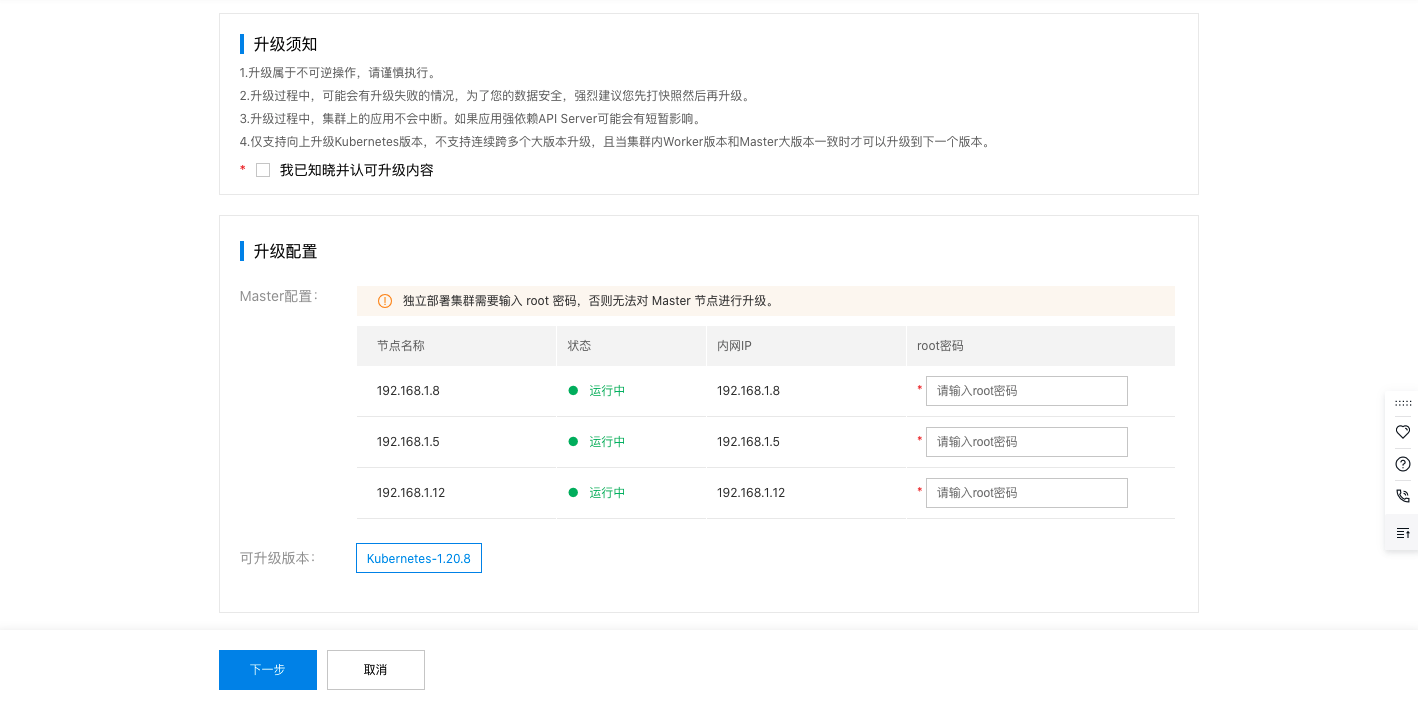
| ConfigMap | Required/Optional | Configuration |
|---|---|---|
| Upgrade notes | Required | Before upgrade, it is strongly recommended to carefully read the upgrade notes and check the Upgrade box. |
| Master configuration | Required | Enter the root password for the Master node (it is not required for managed clusters) |
| Upgradeable versions | Required | Display currently supported major and minor versions for upgrade by default |
- Click Next to access the pre-check page. The upgrade can only be carried out after all check items are passed.
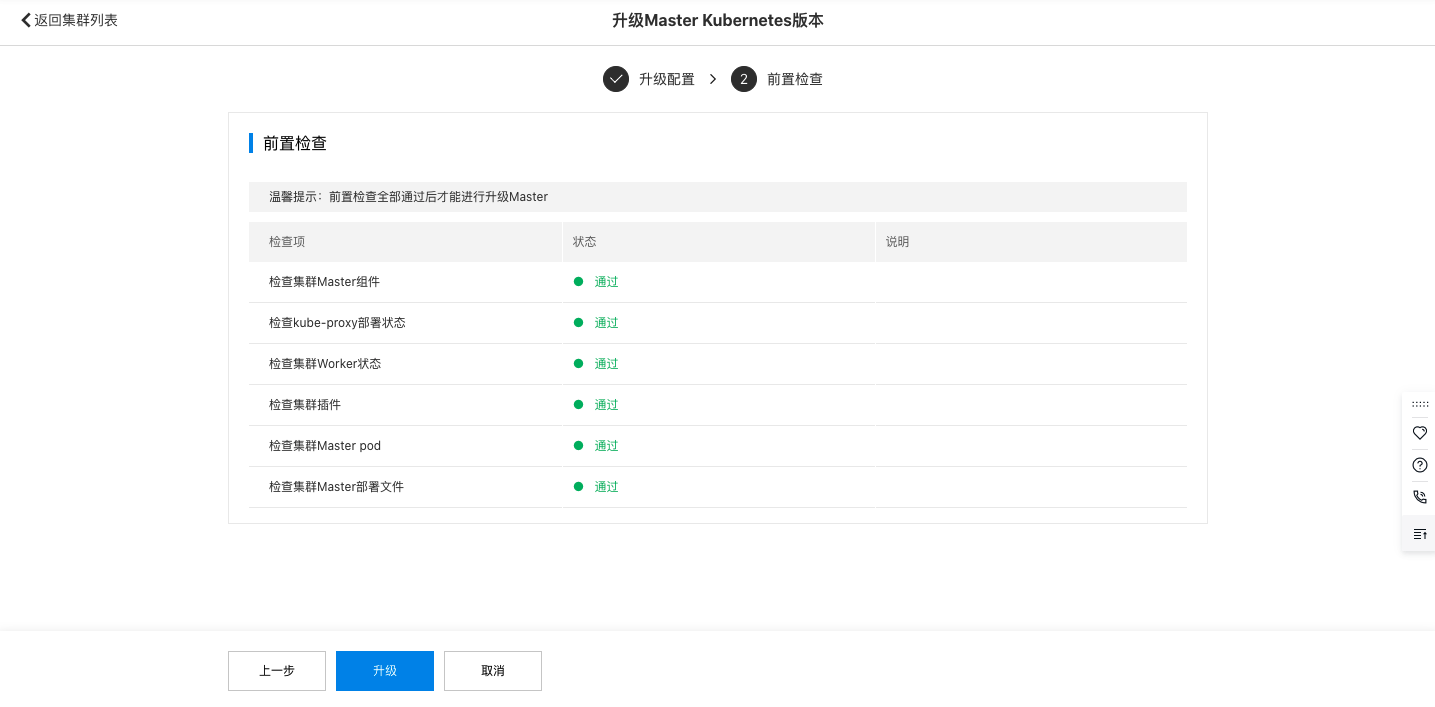
- Click Upgrade to initiate Master Kubernetes version upgrade.
- You can check the upgrade progress at the corresponding cluster status on the cluster list page. Click View Progress, and the system will display the upgrade progress box as shown below:
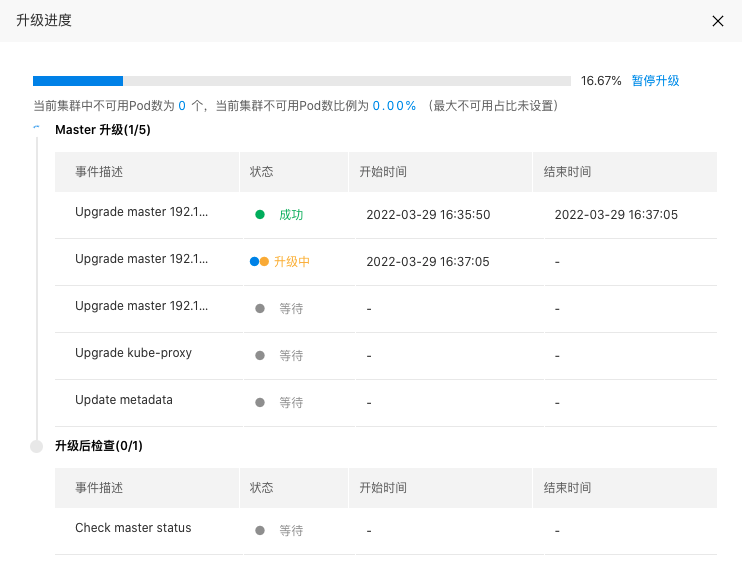
-
You can click Pause Upgrade, Cancel Upgrade as needed to pause or cancel the upgrade task. However, pausing or canceling is generally not recommended.
Description
- Pause upgrade: You can pause the upgrade task at any point. Once paused, any tasks currently in progress will finish, but pending tasks will not continue.
- Cancel upgrade: After pausing an upgrade, you may cancel it. Upon cancellation, tasks already in progress will finish, but pending tasks will not proceed.
Upgrade Worker Kubernetes version
- Log in to the Cloud Container Engine (CCE) console and select Cluster List in the left navigation bar.
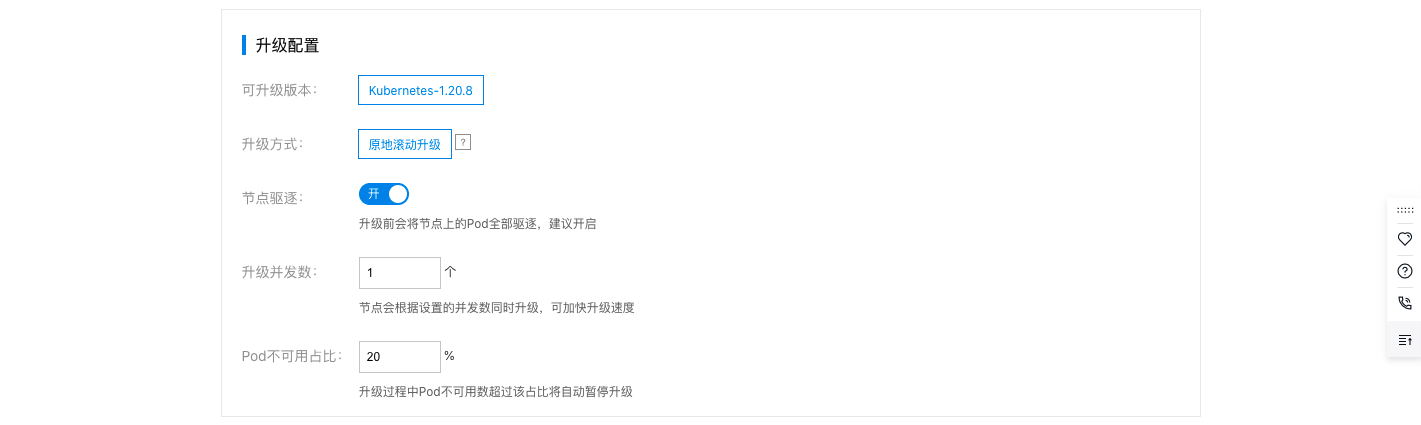
- On the cluster list page, click More - Upgrade Worker Kubernetes Version in the left operation bar of the target cluster to access the upgrade page and complete the configuration:
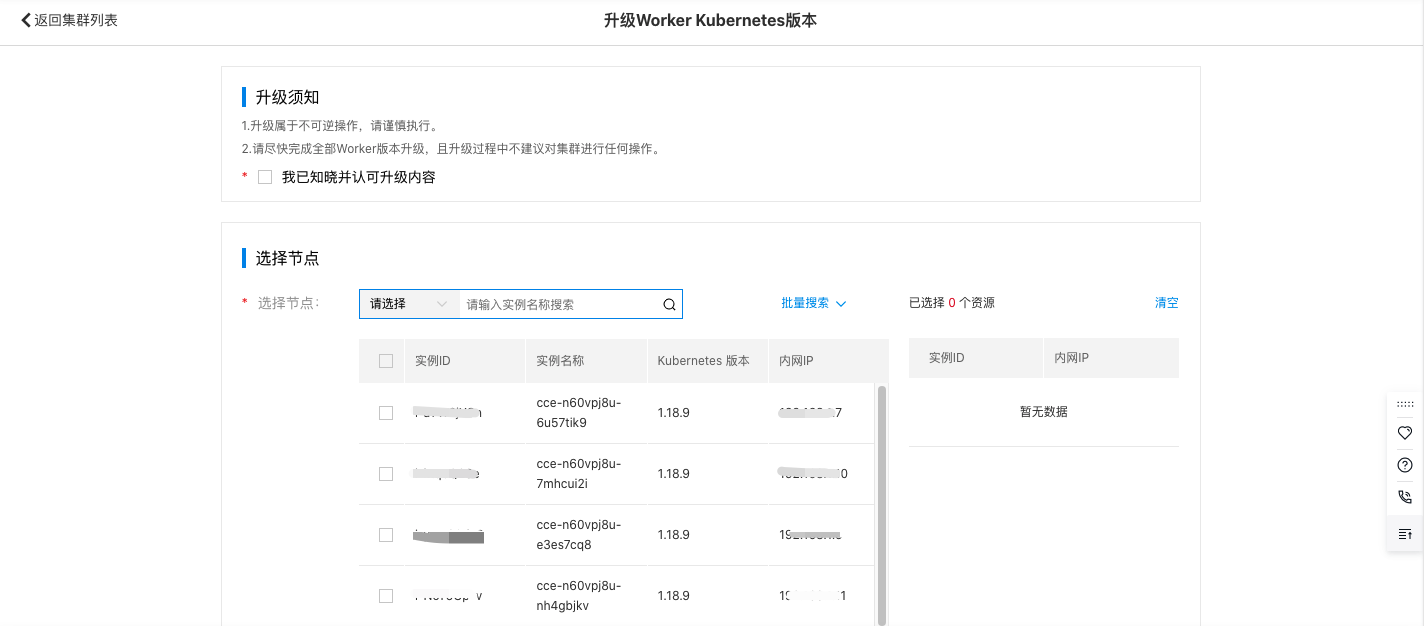
| ConfigMap | Required/Optional | Configuration |
|---|---|---|
| Upgrade notes | Required | Before upgrade, it is strongly recommended to carefully read the upgrade notes and check the Upgrade box. |
| Select node | Required | Select nodes to be upgraded, supporting upgrades for multiple times in batches |
| Upgradeable versions | Required | Display currently supported major and minor versions for upgrade by default |
| Upgrade method | Required | Currently, only in-place rolling upgrade is supported, which does not require reinstall OS and directly upgrades the node |
| Node eviction | Required | It is enabled by default. After being enabled, all pods on the node will be evicted before upgrade. It is recommended to keep this enabled |
| Upgrade concurrency | Required | The input range is 1 - 20. During the upgrade, multiple nodes will be upgraded concurrently based on this concurrency, which can improve upgrade efficiency |
| Unavailable pod ratio | Required | During upgrade, if the ratio of unavailable pods to the total cluster count exceeds the set threshold, the upgrade task will be automatically paused (it is 20% by default) |
- Click Upgrade to start the Worker Kubernetes version upgrade.
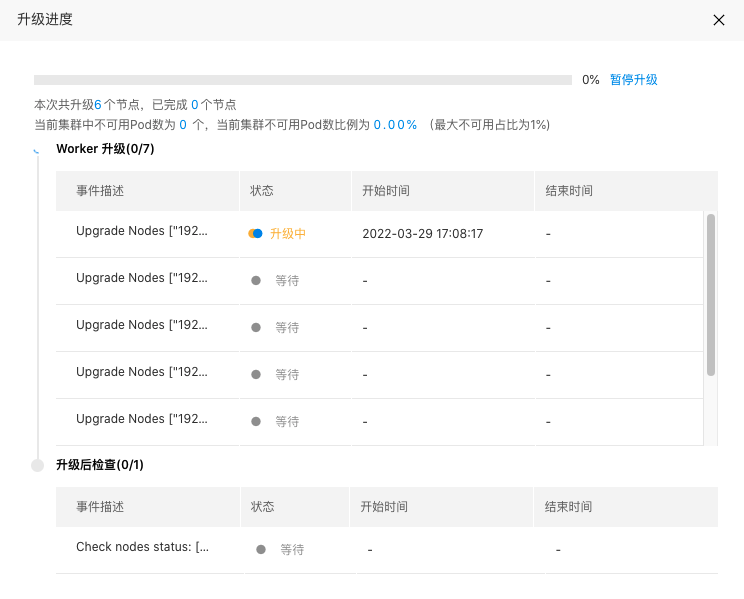
- You can check the upgrade progress at the corresponding cluster status on the Cluster List page. Click View Progress, and the system will display the upgrade progress box as shown below:
-
You can click Pause Upgrade, Cancel Upgrade as needed to pause or cancel the upgrade task. However, pausing or canceling is generally not recommended.
Description
- Pause upgrade: You can pause the upgrade task at any point. Once paused, any tasks currently in progress will finish, but pending tasks will not continue.
- Cancel upgrade: After pausing an upgrade, you may cancel it. Upon cancellation, tasks already in progress will finish, but pending tasks will not proceed.