

Implement Canary Release with CCE Based on Nginx-Ingress
This document outlines a step-by-step approach to implementing blue-green deployment using the ingress function of Baidu AI Cloud's container service.
Background:
Canary and blue-green releases help create a production environment for the new version that mirrors the old version. Without disrupting the old version, a portion of user traffic is directed to the new version following specific rules. Once stable, all user traffic transitions from the old version to the new one.
A/B testing is a form of canary release in which some users continue using the old version while others are routed to the new version. If the new version proves stable, all users are gradually transitioned to it.
Introduction to Ingress-Nginx Annotation
CCE implements the project gateway using the Nginx Ingress Controller. This setup serves as the main entry point for external traffic and acts as a reverse proxy for various services within the project. Ingress-Nginx supports the configuration of Ingress Annotations, enabling canary releases and testing for multiple scenarios, meeting business needs such as canary deployments, blue-green deployments, and A/B testing.
Nginx Annotations support the following four canary rules:
- Nginx.ingress.kubernetes.io/canary-by-header: Traffic split based on request header is suitable for canary releases and A/B testing. When the request header is set to always, requests will always be sent to the canary version; when it is set to never, requests will not be sent to the canary ingress; for any other header value, the header will be ignored, and requests will be prioritized by comparing with other canary rules.
- Nginx.ingress.kubernetes.io/canary-by-header-value: The request header value to match is used to notify ingress to route requests to the service specified in canary ingress. When the request header is set to this value, it will be routed to the canary ingress. This rule allows users to customize the value of the request header and must be used together with the previous annotation (i.e., canary-by-header).
- Nginx.ingress.kubernetes.io/canary-weight: Traffic split based on service weight is suitable for blue-green deployment. The weight range 0-100 routes requests to the service specified in canary ingress by percentage. A weight of 0 means the canary rule will not send any request to the canary ingress service. A weight of 100 means all requests will be sent to the canary ingress.
- nginx.ingress.kubernetes.io/canary-by-cookie: Traffic split based on cookie is suitable for canary releases and A/B testing. Cookie used to notify the ingress to route requests to the service specified in the canary ingress. When cookie is set to always, requests will be routed to canary ingress; when it is set to never, skip canary; for any other value, cookie will be ignored, and requests will be prioritized by comparing with other canary rules.
Canary rule priority: canary-by-header > canary-by-cookie > canary-weight
Install nginx-ingress-controller
Install through component
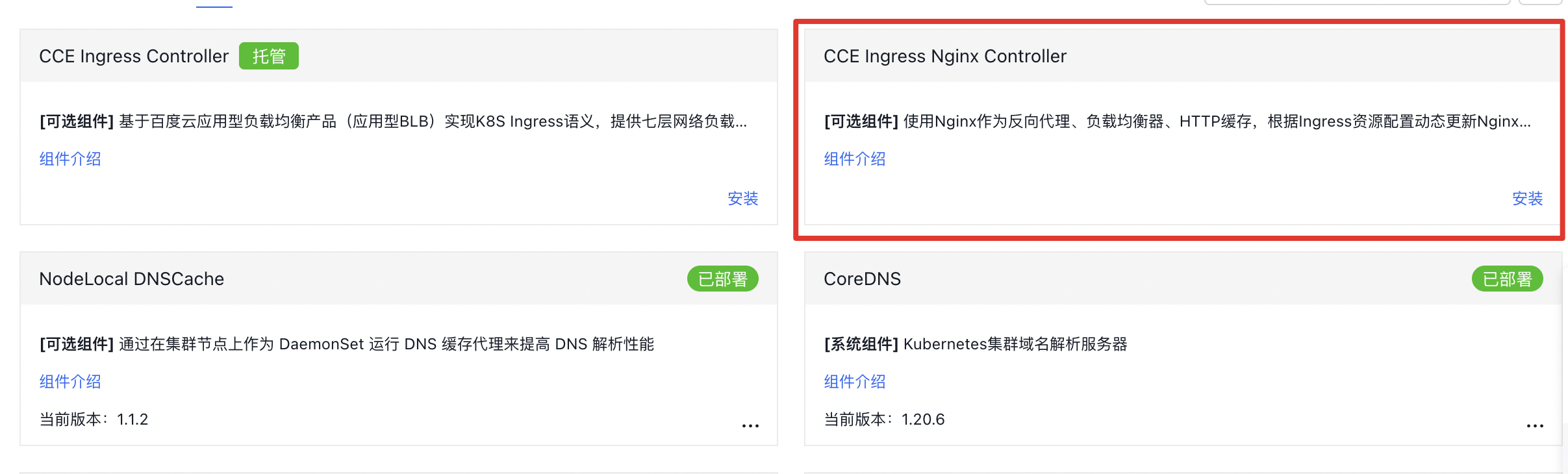
Navigate to Cloud Container Engine > Cluster Details, click Operations and Management > Component Management in the left navigation bar, locate CCE Ingress Nginx Controller, and click Install;
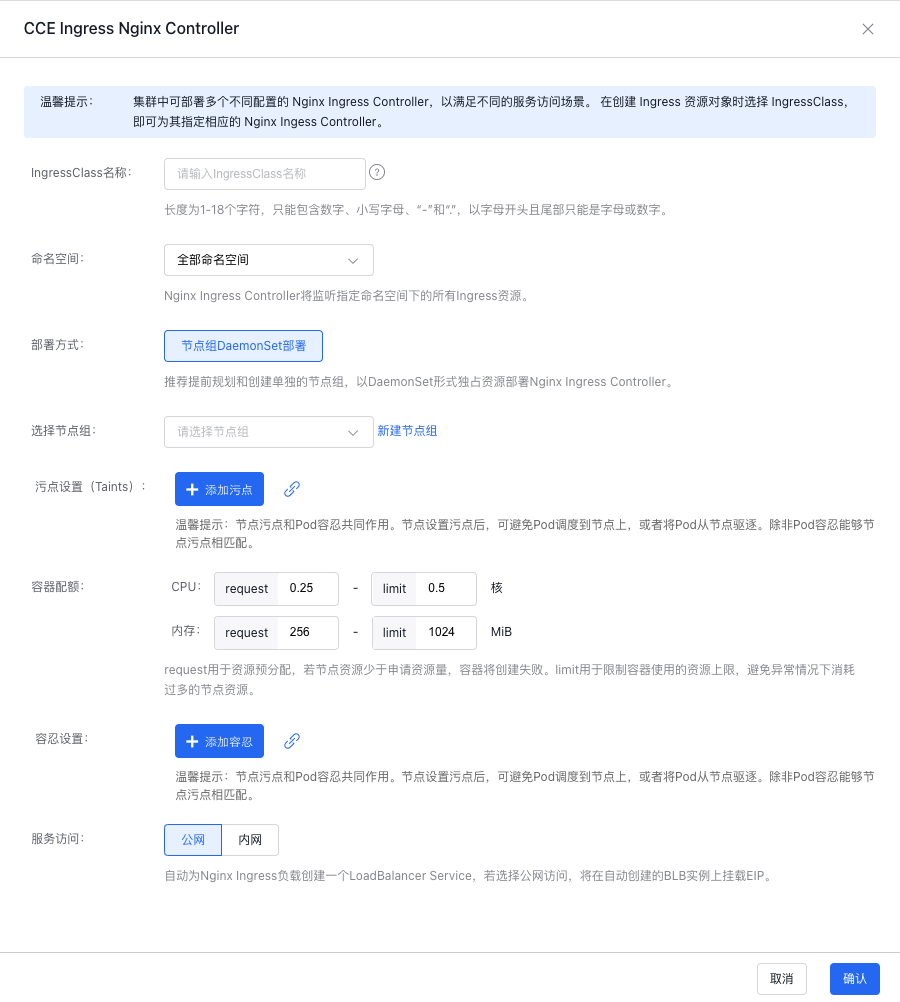
Configure Ingress Nginx Controller: Enter the IngressClass name, select the Namespace, and choose a node group. If no node group exists, click Create Node Group, and configure taints, container quota, tolerations, and service access;
Click OK to finalize the creation.
Install via YAML
1# Refer to the appendix for YAML file content
2kubectl apply -f ingress-nginx.yaml
3kubectl apply -f ingress-nginx-service.yaml
Deploy production tasks
1. Create production application resources
1kubectl apply -f production.yaml1apiVersion: apps/v1
2kind: Deployment
3metadata:
4 name: production
5spec:
6 replicas: 1
7 selector:
8 matchLabels:
9 app: production
10 template:
11 metadata:
12 labels:
13 app: production
14 spec:
15 containers:
16 - name: production
17 image: registry.baidubce.com/jpaas-public/echoserver:1.10
18 ports:
19 - containerPort: 8080
20 env:
21 - name: NODE_NAME
22 valueFrom:
23 fieldRef:
24 fieldPath: spec.nodeName
25 - name: POD_NAME
26 valueFrom:
27 fieldRef:
28 fieldPath: metadata.name
29 - name: POD_NAMESPACE
30 valueFrom:
31 fieldRef:
32 fieldPath: metadata.namespace
33 - name: POD_IP
34 valueFrom:
35 fieldRef:
36 fieldPath: status.podIP
37
38---
39
40apiVersion: v1
41kind: Service
42metadata:
43 name: production
44 labels:
45 app: production
46spec:
47 ports:
48 - port: 80
49 targetPort: 8080
50 protocol: TCP
51 name: http
52 selector:
53 app: production2. Create the application route of production version (ingress)
Create through console
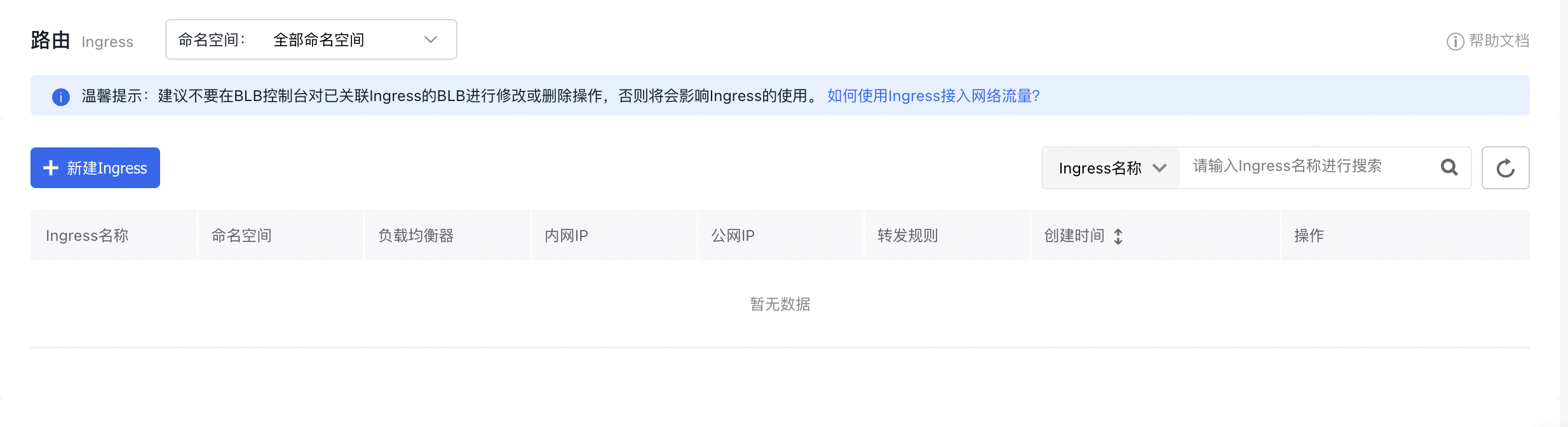
Click Network in the left navigation bar, click Route, and then click "Create Ingress" on the interface;
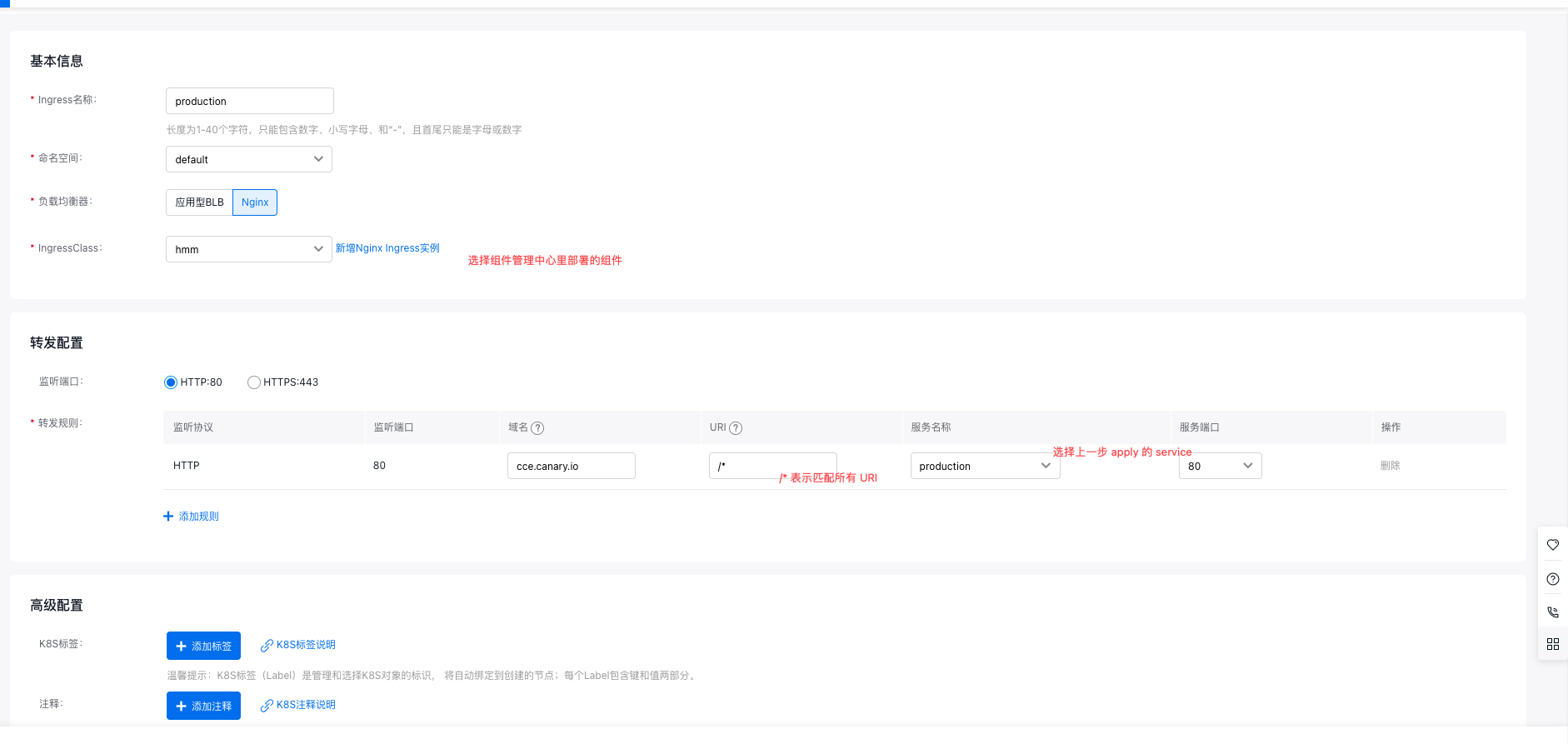
Complete the ingress configuration as shown:
Create via YAML
1kubectl apply -f production.ingress.yaml1apiVersion: networking.k8s.io/v1
2kind: Ingress
3metadata:
4 name: production
5 annotations:
6 kubernetes.io/ingress.class: nginx
7spec:
8 rules:
9 - host: cce.canary.io
10 http:
11 paths:
12 - backend:
13 serviceName: production
14 servicePort: 803. Local access to the application:
Bind hosts: Select clusterIP for intra-cluster access and externalIP (i.e., BLB IP) for extra-cluster access:
1vi /etc/hosts Add a line, e.g., "106.12.7.210 cce.canary.io"
1{ip} cce.canary.io
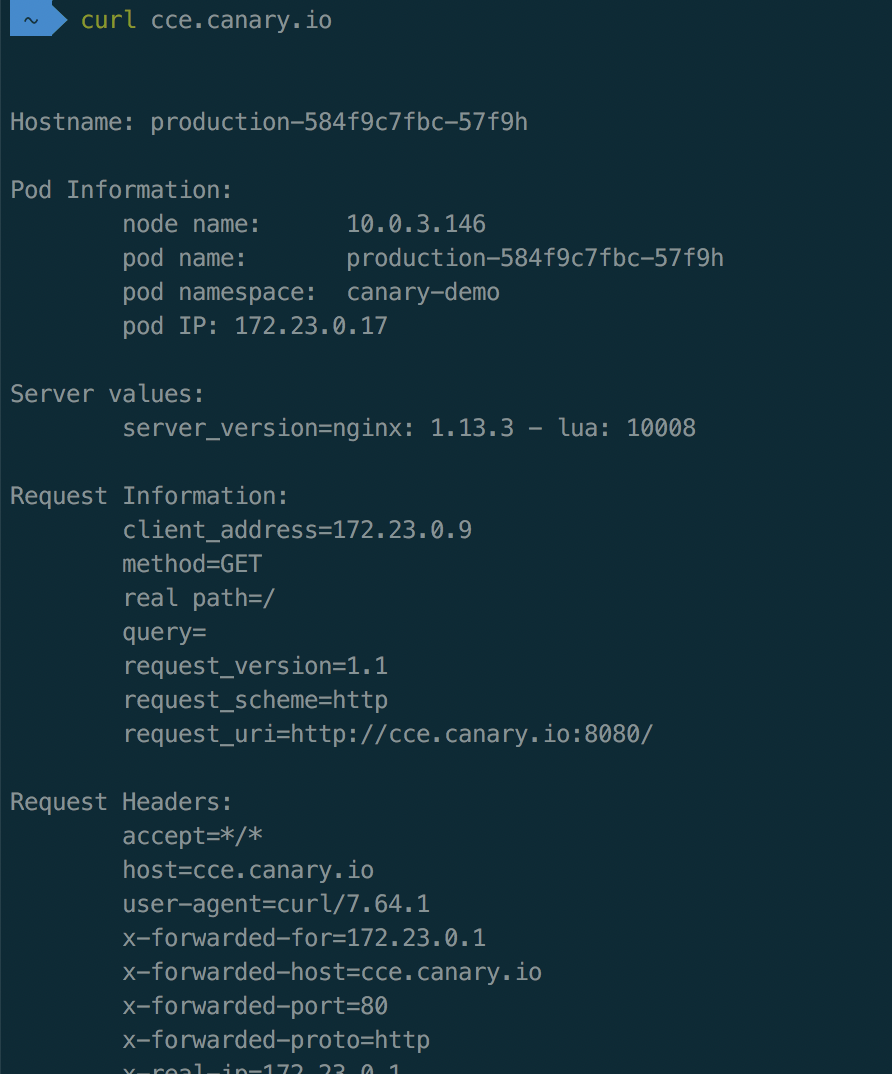
curl cce.canary.io successfully accesses as follows
Create a canary version task
1. Create canary version application resources
1kubectl apply -f canary.yaml1apiVersion: apps/v1
2kind: Deployment
3metadata:
4 name: canary
5spec:
6 replicas: 1
7 selector:
8 matchLabels:
9 app: canary
10 template:
11 metadata:
12 labels:
13 app: canary
14 spec:
15 containers:
16 - name: canary
17 image: registry.baidubce.com/jpaas-public/echoserver:1.10
18 ports:
19 - containerPort: 8080
20 env:
21 - name: NODE_NAME
22 valueFrom:
23 fieldRef:
24 fieldPath: spec.nodeName
25 - name: POD_NAME
26 valueFrom:
27 fieldRef:
28 fieldPath: metadata.name
29 - name: POD_NAMESPACE
30 valueFrom:
31 fieldRef:
32 fieldPath: metadata.namespace
33 - name: POD_IP
34 valueFrom:
35 fieldRef:
36 fieldPath: status.podIP
37
38---
39
40apiVersion: v1
41kind: Service
42metadata:
43 name: canary
44 labels:
45 app: canary
46spec:
47 ports:
48 - port: 80
49 targetPort: 8080
50 protocol: TCP
51 name: http
52 selector:
53 app: canary2. Create the application route of canary version based on weights (ingress)
Create through console
Click Network in the left navigation bar, click Route, and then click "Create Ingress" on the interface;
In Advanced Settings - Annotation, click + Add Annotation and add the following tag keys:
1#Tag settings in advanced configuration are as follows:
2nginx.ingress.kubernetes.io/canary: "true"
3nginx.ingress.kubernetes.io/canary-weight: "30"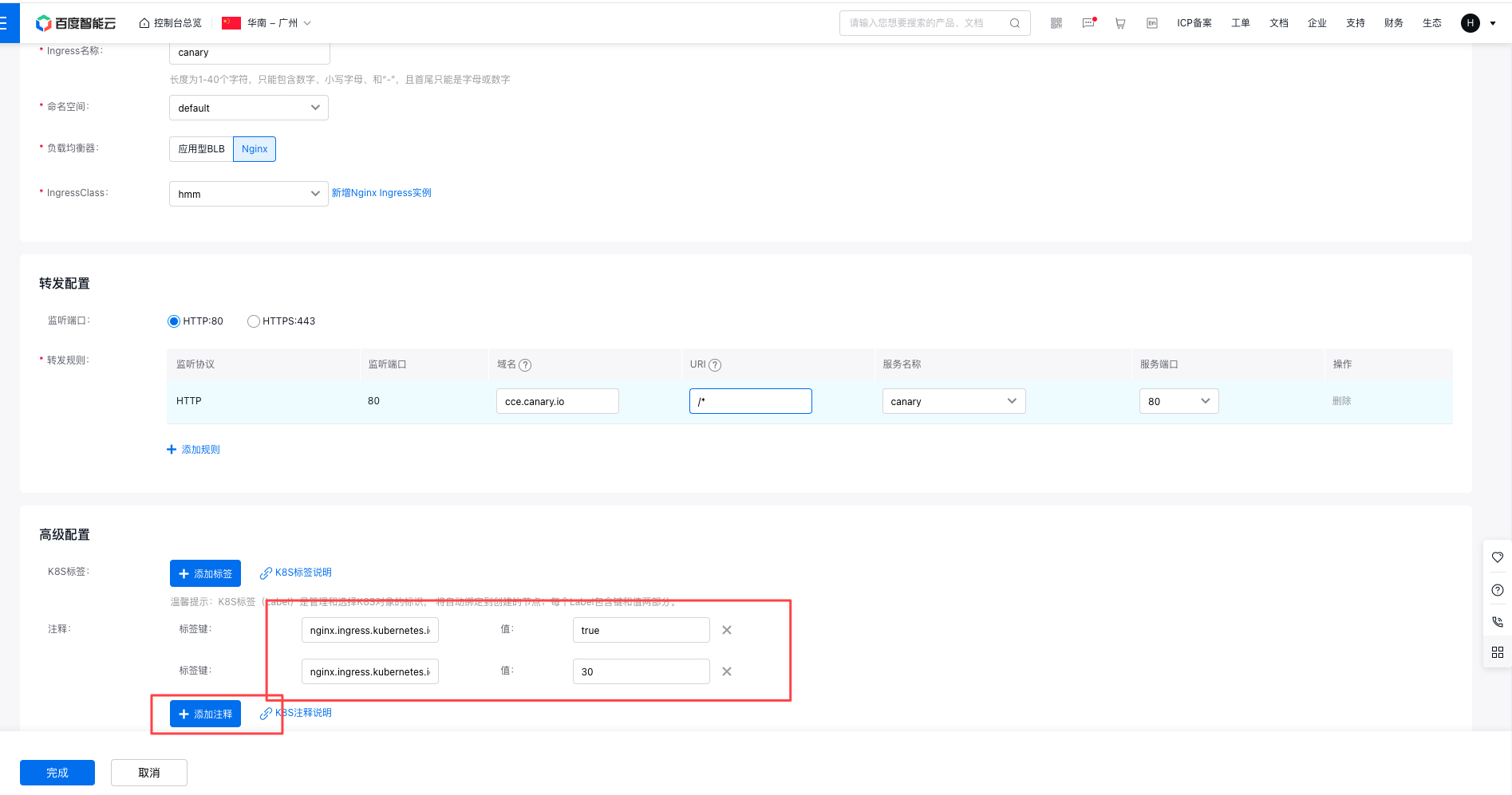
Create via YAML
1kubectl apply -f canary.ingress.yaml -n canary-demo1apiVersion: networking.k8s.io/v1
2kind: Ingress
3metadata:
4 name: canary
5 annotations:
6 kubernetes.io/ingress.class: nginx
7 nginx.ingress.kubernetes.io/canary: "true"
8 nginx.ingress.kubernetes.io/canary-weight: "30"
9spec:
10 rules:
11 - host: cce.canary.io
12 http:
13 paths:
14 - backend:
15 serviceName: canary
16 servicePort: 803. Verify by accessing the application domain name
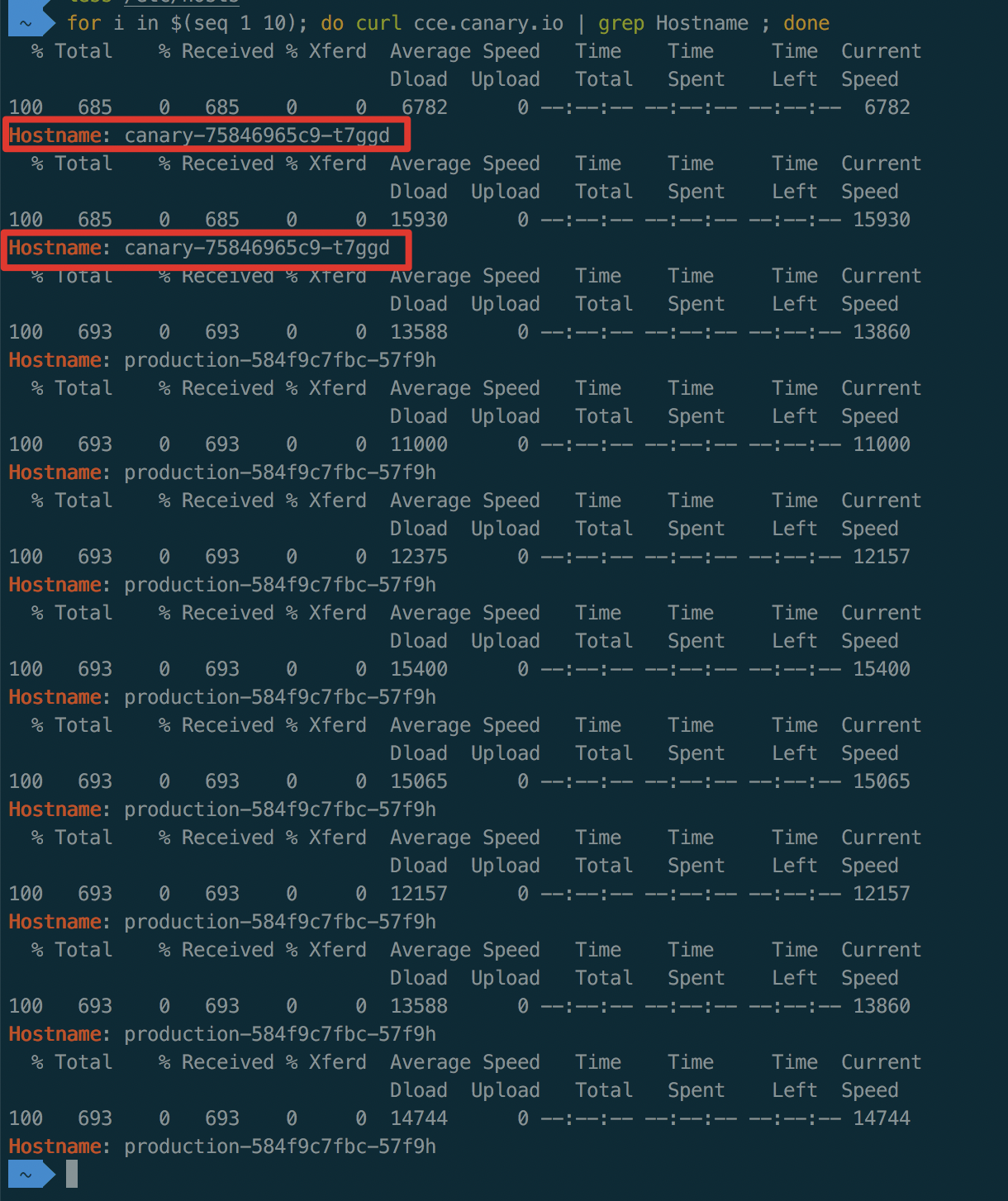
1for i in $(seq 1 10); do curl cce.canary.io | grep Hostname ; doneAs shown below, partial traffic is routed to the canary
After traffic split based on weight (30%) for the canary version, the probability to access canary version is approximately 30%. Minor fluctuations in traffic ratio are normal
Appendix: Ingress-Nginx-Related YAML Files
- ingress-nginx.yaml
1apiVersion: v1
2kind: Namespace
3metadata:
4  name: ingress-nginx
5  labels:
6    app.kubernetes.io/name: ingress-nginx
7    app.kubernetes.io/part-of: ingress-nginx
8
9---
10
11kind: ConfigMap
12apiVersion: v1
13metadata:
14  name: nginx-configuration
15  namespace: ingress-nginx
16  labels:
17    app.kubernetes.io/name: ingress-nginx
18    app.kubernetes.io/part-of: ingress-nginx
19
20---
21kind: ConfigMap
22apiVersion: v1
23metadata:
24  name: tcp-services
25  namespace: ingress-nginx
26  labels:
27    app.kubernetes.io/name: ingress-nginx
28    app.kubernetes.io/part-of: ingress-nginx
29
30---
31kind: ConfigMap
32apiVersion: v1
33metadata:
34  name: udp-services
35  namespace: ingress-nginx
36  labels:
37    app.kubernetes.io/name: ingress-nginx
38    app.kubernetes.io/part-of: ingress-nginx
39
40---
41apiVersion: v1
42kind: ServiceAccount
43metadata:
44  name: nginx-ingress-serviceaccount
45  namespace: ingress-nginx
46  labels:
47    app.kubernetes.io/name: ingress-nginx
48    app.kubernetes.io/part-of: ingress-nginx
49
50---
51apiVersion: rbac.authorization.k8s.io/v1beta1
52kind: ClusterRole
53metadata:
54  name: nginx-ingress-clusterrole
55  labels:
56    app.kubernetes.io/name: ingress-nginx
57    app.kubernetes.io/part-of: ingress-nginx
58rules:
59  - apiGroups:
60      - ""
61    resources:
62      - configmaps
63      - endpoints
64      - nodes
65      - pods
66      - secrets
67    verbs:
68      - list
69      - watch
70  - apiGroups:
71      - ""
72    resources:
73      - nodes
74    verbs:
75      - get
76  - apiGroups:
77      - ""
78    resources:
79      - services
80    verbs:
81      - get
82      - list
83      - watch
84  - apiGroups:
85      - ""
86    resources:
87      - events
88    verbs:
89      - create
90      - patch
91  - apiGroups:
92      - "extensions"
93      - "networking.k8s.io"
94    resources:
95      - ingresses
96    verbs:
97      - get
98      - list
99      - watch
100  - apiGroups:
101      - "extensions"
102      - "networking.k8s.io"
103    resources:
104      - ingresses/status
105    verbs:
106      - update
107
108---
109apiVersion: rbac.authorization.k8s.io/v1beta1
110kind: Role
111metadata:
112  name: nginx-ingress-role
113  namespace: ingress-nginx
114  labels:
115    app.kubernetes.io/name: ingress-nginx
116    app.kubernetes.io/part-of: ingress-nginx
117rules:
118  - apiGroups:
119      - ""
120    resources:
121      - configmaps
122      - pods
123      - secrets
124      - namespaces
125    verbs:
126      - get
127  - apiGroups:
128      - ""
129    resources:
130      - configmaps
131    resourceNames:
132      # Defaults to "<election-id>-<ingress-class>"
133      # Here: "<ingress-controller-leader>-<nginx>"
134      # This has to be adapted if you change either parameter
135      # when launching the nginx-ingress-controller.
136      - "ingress-controller-leader-nginx"
137    verbs:
138      - get
139      - update
140  - apiGroups:
141      - ""
142    resources:
143      - configmaps
144    verbs:
145      - create
146  - apiGroups:
147      - ""
148    resources:
149      - endpoints
150    verbs:
151      - get
152
153---
154apiVersion: rbac.authorization.k8s.io/v1beta1
155kind: RoleBinding
156metadata:
157  name: nginx-ingress-role-nisa-binding
158  namespace: ingress-nginx
159  labels:
160    app.kubernetes.io/name: ingress-nginx
161    app.kubernetes.io/part-of: ingress-nginx
162roleRef:
163  apiGroup: rbac.authorization.k8s.io
164  kind: Role
165  name: nginx-ingress-role
166subjects:
167  - kind: ServiceAccount
168    name: nginx-ingress-serviceaccount
169    namespace: ingress-nginx
170
171---
172apiVersion: rbac.authorization.k8s.io/v1beta1
173kind: ClusterRoleBinding
174metadata:
175  name: nginx-ingress-clusterrole-nisa-binding
176  labels:
177    app.kubernetes.io/name: ingress-nginx
178    app.kubernetes.io/part-of: ingress-nginx
179roleRef:
180  apiGroup: rbac.authorization.k8s.io
181  kind: ClusterRole
182  name: nginx-ingress-clusterrole
183subjects:
184  - kind: ServiceAccount
185    name: nginx-ingress-serviceaccount
186    namespace: ingress-nginx
187
188---
189
190apiVersion: apps/v1
191kind: Deployment
192metadata:
193  name: nginx-ingress-controller
194  namespace: ingress-nginx
195  labels:
196    app.kubernetes.io/name: ingress-nginx
197    app.kubernetes.io/part-of: ingress-nginx
198spec:
199  replicas: 1
200  selector:
201    matchLabels:
202      app.kubernetes.io/name: ingress-nginx
203      app.kubernetes.io/part-of: ingress-nginx
204  template:
205    metadata:
206      labels:
207        app.kubernetes.io/name: ingress-nginx
208        app.kubernetes.io/part-of: ingress-nginx
209      annotations:
210        prometheus.io/port: "10254"
211        prometheus.io/scrape: "true"
212    spec:
213      # wait up to five minutes for the drain of connections
214      terminationGracePeriodSeconds: 300
215      serviceAccountName: nginx-ingress-serviceaccount
216      nodeSelector:
217        kubernetes.io/os: linux
218      containers:
219        - name: nginx-ingress-controller
220          image: registry.baidubce.com/jpaas-public/nginx-ingress-controller:0.30.0
221          args:
222            - /nginx-ingress-controller
223            - --configmap=$(POD_NAMESPACE)/nginx-configuration
224            - --tcp-services-configmap=$(POD_NAMESPACE)/tcp-services
225            - --udp-services-configmap=$(POD_NAMESPACE)/udp-services
226            - --publish-service=$(POD_NAMESPACE)/ingress-nginx
227            - --annotations-prefix=nginx.ingress.kubernetes.io
228          securityContext:
229            allowPrivilegeEscalation: true
230            capabilities:
231              drop:
232                - ALL
233              add:
234                - NET_BIND_SERVICE
235            # www-data -> 101
236            runAsUser: 101
237          env:
238            - name: POD_NAME
239              valueFrom:
240                fieldRef:
241                  fieldPath: metadata.name
242            - name: POD_NAMESPACE
243              valueFrom:
244                fieldRef:
245                  fieldPath: metadata.namespace
246          ports:
247            - name: http
248              containerPort: 80
249              protocol: TCP
250            - name: https
251              containerPort: 443
252              protocol: TCP
253          livenessProbe:
254            failureThreshold: 3
255            httpGet:
256              path: /healthz
257              port: 10254
258              scheme: HTTP
259            initialDelaySeconds: 10
260            periodSeconds: 10
261            successThreshold: 1
262            timeoutSeconds: 10
263          readinessProbe:
264            failureThreshold: 3
265            httpGet:
266              path: /healthz
267              port: 10254
268              scheme: HTTP
269            periodSeconds: 10
270            successThreshold: 1
271            timeoutSeconds: 10
272          lifecycle:
273            preStop:
274              exec:
275                command:
276                  - /wait-shutdown
277
278---
279
280apiVersion: v1
281kind: LimitRange
282metadata:
283  name: ingress-nginx
284  namespace: ingress-nginx
285  labels:
286    app.kubernetes.io/name: ingress-nginx
287    app.kubernetes.io/part-of: ingress-nginx
288spec:
289  limits:
290  - min:
291      memory: 90Mi
292      cpu: 100m
293 type: Container- ingress-nginx-service.yaml
1kind: Service
2apiVersion: v1
3metadata:
4  name: ingress-nginx
5  namespace: ingress-nginx
6  labels:
7    app.kubernetes.io/name: ingress-nginx
8    app.kubernetes.io/part-of: ingress-nginx
9spec:
10  externalTrafficPolicy: Cluster
11  type: LoadBalancer
12  selector:
13    app.kubernetes.io/name: ingress-nginx
14    app.kubernetes.io/part-of: ingress-nginx
15  ports:
16    - name: http
17      port: 80
18      protocol: TCP
19      targetPort: http
20    - name: https
21      port: 443
22      protocol: TCP
23      targetPort: https