CCE AI Job Scheduler Description

CCE CCE

  • Function Release Records
  • Common Tools
    • Command Line Scenario Examples
  • API Reference
    • Overview
    • Common Headers and Error Responses
    • General Description
  • Product Announcement
    • Announcement on the Discontinuation of CCE Standalone Clusters
    • CCE New Cluster Management Release Announcement
    • Upgrade Announcement for CCE Cluster Audit Component kube-external-auditor
    • CCE Console Upgrade Announcement
    • Announcement on Management Fees for CCE Managed Clusters
    • Container Runtime Version Release Notes
    • Announcement on the Decommissioning of CCE Image Repository
    • Kubernetes Version Release Notes
      • CCE Release of Kubernetes v1_26 History
      • CCE Kubernetes Version Update Notes
      • CCE Release of Kubernetes v1_24 History
      • CCE Release of Kubernetes v1_30 History
      • CCE Release of Kubernetes v1_22 History
      • CCE Release of Kubernetes v1_18 History
      • CCE Release of Kubernetes v1_20 History
      • CCE Release of Kubernetes v1_28 History
      • Release Notes for CCE Kubernetes 1_31 Version
      • Kubernetes Version Overview and Mechanism
    • Security Vulnerability Fix Announcement
      • Vulnerability CVE-2019-5736 Fix Announcement
      • Vulnerability CVE-2021-30465 Fix Announcement
      • CVE-2025-1097, CVE-2025-1098, and Other Vulnerabilities Fix Announcement
      • CVE-2020-14386 Vulnerability Fix Announcement
      • Impact Statement on runc Security Issue (CVE-2024-21626)
  • Service Level Agreement (SLA)
    • CCE Service Level Agreement SLA (V1_0)
  • Typical Practices
    • Pod Anomaly Troubleshooting
    • Adding CGroup V2 Node
    • Common Linux System Configuration Parameters Description
    • Encrypting etcd Data Using KMS
    • Configuring Container Network Parameters Using CNI
    • CCE - Public Network Access Practice
    • Practice of using private images in CCE clusters
    • Unified Access for Virtual Machines and Container Services via CCE Ingress
    • User Guide for Custom CNI Plugins
    • CCE Cluster Network Description and Planning
    • Cross-Cloud Application Migration to Baidu CCE Using Velero
    • CCE Resource Recommender User Documentation
    • Continuous Deployment with Jenkins in CCE Cluster
    • CCE Best Practice-Guestbook Setup
    • CCE Best Practice-Container Network Mode Selection
    • CCE Usage Checklist
    • VPC-ENI Mode Cluster Public Network Access Practice
    • CCE Container Runtime Selection
    • Cloud-native AI
      • Elastic and Fault-Tolerant Training Using CCE AITraining Operator
      • Deploy the TensorFlow Serving inference service
      • Best Practice for GPU Virtualization with Optimal Isolation
  • FAQs
    • How do business applications use load balancer
    • Using kubectl on Windows
    • Cluster management FAQs
    • Common Questions Overview
    • Auto scaling FAQs
    • Create a simple service via kubectl
  • Operation guide
    • Prerequisites for use
    • Identity and access management
    • Permission Management
      • Configure IAM Tag Permission Policy
      • Permission Overview
      • Configure IAM Custom Permission Policy
      • Configure Predefined RBAC Permission Policy
      • Configure IAM Predefined Permission Policy
      • Configure Cluster OIDC Authentication
    • Configuration Management
      • Configmap Management
      • Secret Management
    • Traffic access
      • BLB ingress annotation description
      • Use K8S_Service via CCE
      • Use K8S_Ingress via CCE
      • Implement Canary Release with CCE Based on Nginx-Ingress
      • Create CCE_Ingress via YAML
      • LoadBalancer Service Annotation Description
      • Service Reuses Existing Load Balancer BLB
      • Use Direct Pod Mode LoadBalancer Service
      • NGINX Ingress Configuration Reference
      • Create LoadBalancer_Service via YAML
      • Use NGINX Ingress
    • Virtual Node
      • Configuring BCIPod
      • Configuring bci-profile
      • Managing virtual nodes
    • Node management
      • Add a node
      • Managing Taints
      • Setting Node Blocking
      • Setting GPU Memory Sharing
      • Remove a node
      • Customizing Kubelet Parameters
      • Kubelet Container Monitor Read-Only Port Risk Warning
      • Managing Node Tag
      • Drain node
    • Component Management
      • CCE CSI CDS Plugin Description
      • CCE Fluid Description
      • CCE CSI PFS L2 Plugin
      • CCE Calico Felix Description
      • CCE Ingress Controller Description
      • CCE QoS Agent Description
      • CCE GPU Manager Description
      • CCE Ingress NGINX Controller Description
      • CCE P2P Accelerator Description
      • CCE Virtual Kubelet Component
      • CoreDNS Description
      • CCE Log Operator Description
      • CCE Node Remedier Description
      • CCE Descheduler Description
      • CCE Dynamic Scheduling Plugin Description
      • Kube Scheduler Documentation
      • CCE NPU Manager Description
      • CCE CronHPA Controller Description
      • CCE LB Controller Description
      • Kube ApiServer Description
      • CCE Backup Controller Description
      • CCE Network Plugin Description
      • CCE CSI PFS Plugin Description
      • CCE Credential Controller Description
      • CCE Deep Learning Frameworks Operator Description
      • Component Overview
      • CCE Image Accelerate Description
      • CCE CSI BOS Plugin Description
      • CCE Onepilot Description
      • Description of Kube Controller Manager
      • CCE_Hybrid_Manager Description
      • CCE NodeLocal DNSCache Description
      • CCE Node Problem Detector Description
      • CCE Ascend Mindx DL Description
      • CCE RDMA Device Plugin Description
      • CCE AI Job Scheduler Description
    • Image registry
      • Image Registry Basic Operations
      • Using Container Image to Build Services
    • Helm Management
      • Helm Template
      • Helm Instance
    • Cluster management
      • Upgrade Cluster Kubernetes Version
      • CCE Node CDS Dilatation
      • Managed Cluster Usage Instructions
      • Create cluster
      • CCE Supports GPUSharing Cluster
      • View Cluster
      • Connect to Cluster via kubectl
      • CCE Security Group
      • CCE Node Resource Reservation Instructions
      • Operate Cluster
      • Cluster Snapshot
    • Serverless Cluster
      • Product overview
      • Using Service in Serverless Cluster
      • Creating a Serverless Cluster
    • Storage Management
      • Using Cloud File System
      • Overview
      • Using Parallel File System PFS
      • Using RapidFS
      • Using Object Storage BOS
      • Using Parallel File System PFS L2
      • Using Local Storage
      • Using Cloud Disk CDS
    • Inspection and Diagnosis
      • Cluster Inspection
      • GPU Runtime Environment Check
      • Fault Diagnosis
    • Cloud-native AI
      • Cloud-Native AI Overview
      • AI Monitoring Dashboard
        • Connecting to a Prometheus Instance and Starting a Job
        • NVIDIA Chip Resource Observation
          • AI Job Scheduler component
          • GPU node resources
          • GPU workload resources
          • GPUManager component
          • GPU resource pool overview
        • Ascend Chip Resource Observation
          • Ascend resource pool overview
          • Ascend node resource
          • Ascend workload resource
      • Task Management
        • View Task Information
        • Create TensorFlow Task
        • Example of RDMA Distributed Training Based on NCCL
        • Create PaddlePaddle Task
        • Create AI Training Task
        • Delete task
        • Create PyTorch Task
        • Create Mxnet Task
      • Queue Management
        • Modify Queue
        • Create Queue
        • Usage Instructions for Logical Queues and Physical Queues
        • Queue deletion
      • Dataset Management
        • Create Dataset
        • Delete dataset
        • View Dataset
        • Operate Dataset
      • AI Acceleration Kit
        • AIAK Introduction
        • Using AIAK-Training PyTorch Edition
        • Deploying Distributed Training Tasks Using AIAK-Training
        • Accelerating Inference Business Using AIAK-Inference
      • GPU Virtualization
        • GPU Exclusive and Shared Usage Instructions
        • Image Build Precautions in Shared GPU Scenarios
        • Instructions for Multi-GPU Usage in Single-GPU Containers
        • GPU Virtualization Adaptation Table
        • GPU Online and Offline Mixed Usage Instructions
        • MPS Best Practices & Precautions
        • Precautions for Disabling Node Video Memory Sharing
    • Elastic Scaling
      • Container Timing Horizontal Scaling (CronHPA)
      • Container Horizontal Scaling (HPA)
      • Implementing Second-Level Elastic Scaling with cce-autoscaling-placeholder
      • CCE Cluster Node Auto-Scaling
    • Network Management
      • How to Continue Dilatation When Container Network Segment Space Is Exhausted (VPC-ENI Mode)
      • Container Access to External Services in CCE Clusters
      • CCE supports dual-stack networks of IPv4 and IPv6
      • Using NetworkPolicy Network Policy
      • Traffic Forwarding Configuration for Containers in Peering Connections Scenarios
      • CCE IP Masquerade Agent User Guide
      • Creating VPC-ENI Mode Cluster
      • How to Continue Dilatation When Container Network Segment Space Is Exhausted (VPC Network Mode)
      • Using NetworkPolicy in CCE Clusters
      • Network Orchestration
        • Container Network QoS Management
        • VPC-ENI Specified Subnet IP Allocation (Container Network v2)
        • Cluster Pod Subnet Topology Distribution (Container Network v2)
      • Network Connectivity
        • Container network accesses the public network via NAT gateway
      • Network Maintenance
        • Common Error Code Table for CCE Container Network
      • DNS
        • CoreDNS Component Manual Dilatation Guide
        • DNS Troubleshooting Guide
        • DNS Principle Overview
    • Namespace Management
      • Set Limit Range
      • Set Resource Quota
      • Basic Namespace Operations
    • Workload
      • CronJob Management
      • Set Workload Auto-Scaling
      • Deployment Management
      • Job Management
      • View the Pod
      • StatefulSet Management
      • Password-Free Pull of Container Image
      • Create Workload Using Private Image
      • DaemonSet Management
    • Monitor Logs
      • Monitor Cluster with Prometheus
      • CCE Event Center
      • Cluster Service Profiling
      • CCE Cluster Anomaly Event Alerts
      • Java Application Monitor
      • Cluster Audit Dashboard
      • Logging
      • Cluster Audit
      • Log Center
        • Configure Collection Rules Using CRD
        • View Cluster Control Plane Logs
        • View Business Logs
        • Log Overview
        • Configure Collection Rules in Cloud Container Engine Console
    • Application management
      • Overview
      • Secret
      • Configuration dictionary
      • Deployment
      • Service
      • Pod
    • NodeGroup Management
      • NodeGroup Management
      • NodeGroup Node Fault Detection and Self-Healing
      • Configuring Scaling Policies
      • NodeGroup Introduction
      • Adding Existing External Nodes
      • Custom NodeGroup Kubelet Configuration
      • Adding Alternative Models
      • Dilatation NodeGroup
    • Backup Center
      • Restore Management
      • Backup Overview
      • Backup Management
      • Backup repository
  • Quick Start
    • Quick Deployment of Nginx Application
    • CCE Container Engine Usage Process Overview
  • Product pricing
    • Product pricing
  • Product Description
    • Application scenarios
    • Introduction
    • Usage restrictions
    • Features
    • Advantages
    • Core concepts
  • Solution-Fabric
    • Fabric Solution
  • Development Guide
    • EFK Log Collection System Deployment Guide
    • Using Network Policy in CCE Cluster
    • Creating a LoadBalancer-Type Service
    • Prometheus Monitoring System Deployment Guide
    • kubectl Management Configuration
  • API_V2 Reference
    • Overview
    • Common Headers and Error Responses
    • Cluster Related Interfaces
    • Instance Related Interfaces
    • Service domain
    • General Description
    • Kubeconfig Related Interfaces
    • RBAC Related Interfaces
    • Autoscaler Related Interfaces
    • Network Related Interfaces
    • InstanceGroup Related Interfaces
    • Appendix
    • Component management-related APIs
    • Package adaptation-related APIs
    • Task Related Interfaces
  • Solution-Xchain
    • Hyperchain Solution
  • SDK
    • Go-SDK
      • Overview
      • NodeGroup Management
      • Initialization
      • Install the SDK Package
      • Cluster management
      • Node management
All documents
menu
No results found, please re-enter

CCE CCE

  • Function Release Records
  • Common Tools
    • Command Line Scenario Examples
  • API Reference
    • Overview
    • Common Headers and Error Responses
    • General Description
  • Product Announcement
    • Announcement on the Discontinuation of CCE Standalone Clusters
    • CCE New Cluster Management Release Announcement
    • Upgrade Announcement for CCE Cluster Audit Component kube-external-auditor
    • CCE Console Upgrade Announcement
    • Announcement on Management Fees for CCE Managed Clusters
    • Container Runtime Version Release Notes
    • Announcement on the Decommissioning of CCE Image Repository
    • Kubernetes Version Release Notes
      • CCE Release of Kubernetes v1_26 History
      • CCE Kubernetes Version Update Notes
      • CCE Release of Kubernetes v1_24 History
      • CCE Release of Kubernetes v1_30 History
      • CCE Release of Kubernetes v1_22 History
      • CCE Release of Kubernetes v1_18 History
      • CCE Release of Kubernetes v1_20 History
      • CCE Release of Kubernetes v1_28 History
      • Release Notes for CCE Kubernetes 1_31 Version
      • Kubernetes Version Overview and Mechanism
    • Security Vulnerability Fix Announcement
      • Vulnerability CVE-2019-5736 Fix Announcement
      • Vulnerability CVE-2021-30465 Fix Announcement
      • CVE-2025-1097, CVE-2025-1098, and Other Vulnerabilities Fix Announcement
      • CVE-2020-14386 Vulnerability Fix Announcement
      • Impact Statement on runc Security Issue (CVE-2024-21626)
  • Service Level Agreement (SLA)
    • CCE Service Level Agreement SLA (V1_0)
  • Typical Practices
    • Pod Anomaly Troubleshooting
    • Adding CGroup V2 Node
    • Common Linux System Configuration Parameters Description
    • Encrypting etcd Data Using KMS
    • Configuring Container Network Parameters Using CNI
    • CCE - Public Network Access Practice
    • Practice of using private images in CCE clusters
    • Unified Access for Virtual Machines and Container Services via CCE Ingress
    • User Guide for Custom CNI Plugins
    • CCE Cluster Network Description and Planning
    • Cross-Cloud Application Migration to Baidu CCE Using Velero
    • CCE Resource Recommender User Documentation
    • Continuous Deployment with Jenkins in CCE Cluster
    • CCE Best Practice-Guestbook Setup
    • CCE Best Practice-Container Network Mode Selection
    • CCE Usage Checklist
    • VPC-ENI Mode Cluster Public Network Access Practice
    • CCE Container Runtime Selection
    • Cloud-native AI
      • Elastic and Fault-Tolerant Training Using CCE AITraining Operator
      • Deploy the TensorFlow Serving inference service
      • Best Practice for GPU Virtualization with Optimal Isolation
  • FAQs
    • How do business applications use load balancer
    • Using kubectl on Windows
    • Cluster management FAQs
    • Common Questions Overview
    • Auto scaling FAQs
    • Create a simple service via kubectl
  • Operation guide
    • Prerequisites for use
    • Identity and access management
    • Permission Management
      • Configure IAM Tag Permission Policy
      • Permission Overview
      • Configure IAM Custom Permission Policy
      • Configure Predefined RBAC Permission Policy
      • Configure IAM Predefined Permission Policy
      • Configure Cluster OIDC Authentication
    • Configuration Management
      • Configmap Management
      • Secret Management
    • Traffic access
      • BLB ingress annotation description
      • Use K8S_Service via CCE
      • Use K8S_Ingress via CCE
      • Implement Canary Release with CCE Based on Nginx-Ingress
      • Create CCE_Ingress via YAML
      • LoadBalancer Service Annotation Description
      • Service Reuses Existing Load Balancer BLB
      • Use Direct Pod Mode LoadBalancer Service
      • NGINX Ingress Configuration Reference
      • Create LoadBalancer_Service via YAML
      • Use NGINX Ingress
    • Virtual Node
      • Configuring BCIPod
      • Configuring bci-profile
      • Managing virtual nodes
    • Node management
      • Add a node
      • Managing Taints
      • Setting Node Blocking
      • Setting GPU Memory Sharing
      • Remove a node
      • Customizing Kubelet Parameters
      • Kubelet Container Monitor Read-Only Port Risk Warning
      • Managing Node Tag
      • Drain node
    • Component Management
      • CCE CSI CDS Plugin Description
      • CCE Fluid Description
      • CCE CSI PFS L2 Plugin
      • CCE Calico Felix Description
      • CCE Ingress Controller Description
      • CCE QoS Agent Description
      • CCE GPU Manager Description
      • CCE Ingress NGINX Controller Description
      • CCE P2P Accelerator Description
      • CCE Virtual Kubelet Component
      • CoreDNS Description
      • CCE Log Operator Description
      • CCE Node Remedier Description
      • CCE Descheduler Description
      • CCE Dynamic Scheduling Plugin Description
      • Kube Scheduler Documentation
      • CCE NPU Manager Description
      • CCE CronHPA Controller Description
      • CCE LB Controller Description
      • Kube ApiServer Description
      • CCE Backup Controller Description
      • CCE Network Plugin Description
      • CCE CSI PFS Plugin Description
      • CCE Credential Controller Description
      • CCE Deep Learning Frameworks Operator Description
      • Component Overview
      • CCE Image Accelerate Description
      • CCE CSI BOS Plugin Description
      • CCE Onepilot Description
      • Description of Kube Controller Manager
      • CCE_Hybrid_Manager Description
      • CCE NodeLocal DNSCache Description
      • CCE Node Problem Detector Description
      • CCE Ascend Mindx DL Description
      • CCE RDMA Device Plugin Description
      • CCE AI Job Scheduler Description
    • Image registry
      • Image Registry Basic Operations
      • Using Container Image to Build Services
    • Helm Management
      • Helm Template
      • Helm Instance
    • Cluster management
      • Upgrade Cluster Kubernetes Version
      • CCE Node CDS Dilatation
      • Managed Cluster Usage Instructions
      • Create cluster
      • CCE Supports GPUSharing Cluster
      • View Cluster
      • Connect to Cluster via kubectl
      • CCE Security Group
      • CCE Node Resource Reservation Instructions
      • Operate Cluster
      • Cluster Snapshot
    • Serverless Cluster
      • Product overview
      • Using Service in Serverless Cluster
      • Creating a Serverless Cluster
    • Storage Management
      • Using Cloud File System
      • Overview
      • Using Parallel File System PFS
      • Using RapidFS
      • Using Object Storage BOS
      • Using Parallel File System PFS L2
      • Using Local Storage
      • Using Cloud Disk CDS
    • Inspection and Diagnosis
      • Cluster Inspection
      • GPU Runtime Environment Check
      • Fault Diagnosis
    • Cloud-native AI
      • Cloud-Native AI Overview
      • AI Monitoring Dashboard
        • Connecting to a Prometheus Instance and Starting a Job
        • NVIDIA Chip Resource Observation
          • AI Job Scheduler component
          • GPU node resources
          • GPU workload resources
          • GPUManager component
          • GPU resource pool overview
        • Ascend Chip Resource Observation
          • Ascend resource pool overview
          • Ascend node resource
          • Ascend workload resource
      • Task Management
        • View Task Information
        • Create TensorFlow Task
        • Example of RDMA Distributed Training Based on NCCL
        • Create PaddlePaddle Task
        • Create AI Training Task
        • Delete task
        • Create PyTorch Task
        • Create Mxnet Task
      • Queue Management
        • Modify Queue
        • Create Queue
        • Usage Instructions for Logical Queues and Physical Queues
        • Queue deletion
      • Dataset Management
        • Create Dataset
        • Delete dataset
        • View Dataset
        • Operate Dataset
      • AI Acceleration Kit
        • AIAK Introduction
        • Using AIAK-Training PyTorch Edition
        • Deploying Distributed Training Tasks Using AIAK-Training
        • Accelerating Inference Business Using AIAK-Inference
      • GPU Virtualization
        • GPU Exclusive and Shared Usage Instructions
        • Image Build Precautions in Shared GPU Scenarios
        • Instructions for Multi-GPU Usage in Single-GPU Containers
        • GPU Virtualization Adaptation Table
        • GPU Online and Offline Mixed Usage Instructions
        • MPS Best Practices & Precautions
        • Precautions for Disabling Node Video Memory Sharing
    • Elastic Scaling
      • Container Timing Horizontal Scaling (CronHPA)
      • Container Horizontal Scaling (HPA)
      • Implementing Second-Level Elastic Scaling with cce-autoscaling-placeholder
      • CCE Cluster Node Auto-Scaling
    • Network Management
      • How to Continue Dilatation When Container Network Segment Space Is Exhausted (VPC-ENI Mode)
      • Container Access to External Services in CCE Clusters
      • CCE supports dual-stack networks of IPv4 and IPv6
      • Using NetworkPolicy Network Policy
      • Traffic Forwarding Configuration for Containers in Peering Connections Scenarios
      • CCE IP Masquerade Agent User Guide
      • Creating VPC-ENI Mode Cluster
      • How to Continue Dilatation When Container Network Segment Space Is Exhausted (VPC Network Mode)
      • Using NetworkPolicy in CCE Clusters
      • Network Orchestration
        • Container Network QoS Management
        • VPC-ENI Specified Subnet IP Allocation (Container Network v2)
        • Cluster Pod Subnet Topology Distribution (Container Network v2)
      • Network Connectivity
        • Container network accesses the public network via NAT gateway
      • Network Maintenance
        • Common Error Code Table for CCE Container Network
      • DNS
        • CoreDNS Component Manual Dilatation Guide
        • DNS Troubleshooting Guide
        • DNS Principle Overview
    • Namespace Management
      • Set Limit Range
      • Set Resource Quota
      • Basic Namespace Operations
    • Workload
      • CronJob Management
      • Set Workload Auto-Scaling
      • Deployment Management
      • Job Management
      • View the Pod
      • StatefulSet Management
      • Password-Free Pull of Container Image
      • Create Workload Using Private Image
      • DaemonSet Management
    • Monitor Logs
      • Monitor Cluster with Prometheus
      • CCE Event Center
      • Cluster Service Profiling
      • CCE Cluster Anomaly Event Alerts
      • Java Application Monitor
      • Cluster Audit Dashboard
      • Logging
      • Cluster Audit
      • Log Center
        • Configure Collection Rules Using CRD
        • View Cluster Control Plane Logs
        • View Business Logs
        • Log Overview
        • Configure Collection Rules in Cloud Container Engine Console
    • Application management
      • Overview
      • Secret
      • Configuration dictionary
      • Deployment
      • Service
      • Pod
    • NodeGroup Management
      • NodeGroup Management
      • NodeGroup Node Fault Detection and Self-Healing
      • Configuring Scaling Policies
      • NodeGroup Introduction
      • Adding Existing External Nodes
      • Custom NodeGroup Kubelet Configuration
      • Adding Alternative Models
      • Dilatation NodeGroup
    • Backup Center
      • Restore Management
      • Backup Overview
      • Backup Management
      • Backup repository
  • Quick Start
    • Quick Deployment of Nginx Application
    • CCE Container Engine Usage Process Overview
  • Product pricing
    • Product pricing
  • Product Description
    • Application scenarios
    • Introduction
    • Usage restrictions
    • Features
    • Advantages
    • Core concepts
  • Solution-Fabric
    • Fabric Solution
  • Development Guide
    • EFK Log Collection System Deployment Guide
    • Using Network Policy in CCE Cluster
    • Creating a LoadBalancer-Type Service
    • Prometheus Monitoring System Deployment Guide
    • kubectl Management Configuration
  • API_V2 Reference
    • Overview
    • Common Headers and Error Responses
    • Cluster Related Interfaces
    • Instance Related Interfaces
    • Service domain
    • General Description
    • Kubeconfig Related Interfaces
    • RBAC Related Interfaces
    • Autoscaler Related Interfaces
    • Network Related Interfaces
    • InstanceGroup Related Interfaces
    • Appendix
    • Component management-related APIs
    • Package adaptation-related APIs
    • Task Related Interfaces
  • Solution-Xchain
    • Hyperchain Solution
  • SDK
    • Go-SDK
      • Overview
      • NodeGroup Management
      • Initialization
      • Install the SDK Package
      • Cluster management
      • Node management
  • Document center
  • arrow
  • CCECCE
  • arrow
  • Operation guide
  • arrow
  • Component Management
  • arrow
  • CCE AI Job Scheduler Description
Table of contents on this page
  • Component introduction
  • Component function
  • Application scenarios
  • Limitations
  • Install component
  • Version records

CCE AI Job Scheduler Description

Updated at:2025-10-27

Component introduction

The task scheduling component allows for organizing and managing diverse AI tasks. When used with the CCE Deep Learning Frameworks Operator, it enables direct training of deep learning models on CCE.

Component function

  • Support a variety of scheduling strategies and advanced job management capabilities.
  • Scheduling strategies include two types: "spread" and "binpack." "Binpack" prioritizes centralized GPU card sharing and usage by multiple Pods, ideal for improving GPU resource utilization. "Spread" aims to distribute multiple Pods across different GPU cards for scenarios requiring high GPU availability.
  • Preemption modes support intra-queue priority preemption and inter-queue oversell/preemption. Intra-queue priority preemption: In the same queue, high-priority tasks can preempt resources of low-priority tasks to ensure the operation of high-priority tasks; inter-queue oversell/preemption: When queue A is fully utilized and queue B has idle resources, new tasks submitted to queue A will be scheduled to queue B. If queue B later receives new tasks and lacks resources, the oversell tasks will be killed to ensure the running of queue B tasks.
    For the use of preemption functions, refer to the relevant descriptions in Queue Management and Task Management.

Application scenarios

Run deep learning tasks directly on CCE clusters to boost AI engineering efficiency.

Limitations

  • Supports only Kubernetes clusters of version 1.18 or higher.

Install component

  1. Sign in to the Baidu AI Cloud official website and enter the management console.
  2. Go to Product Services - Cloud Native - Cloud Container Engine (CCE) to access the CCE management console.
  3. Click Cluster Management - Cluster List in the left navigation bar.
  4. Click on the target cluster name in the Cluster List page to navigate to the cluster management page.
  5. On the Cluster Management page, click Component Management.
  6. From the component management list, choose the CCE AI Job Scheduler Component and click Install.
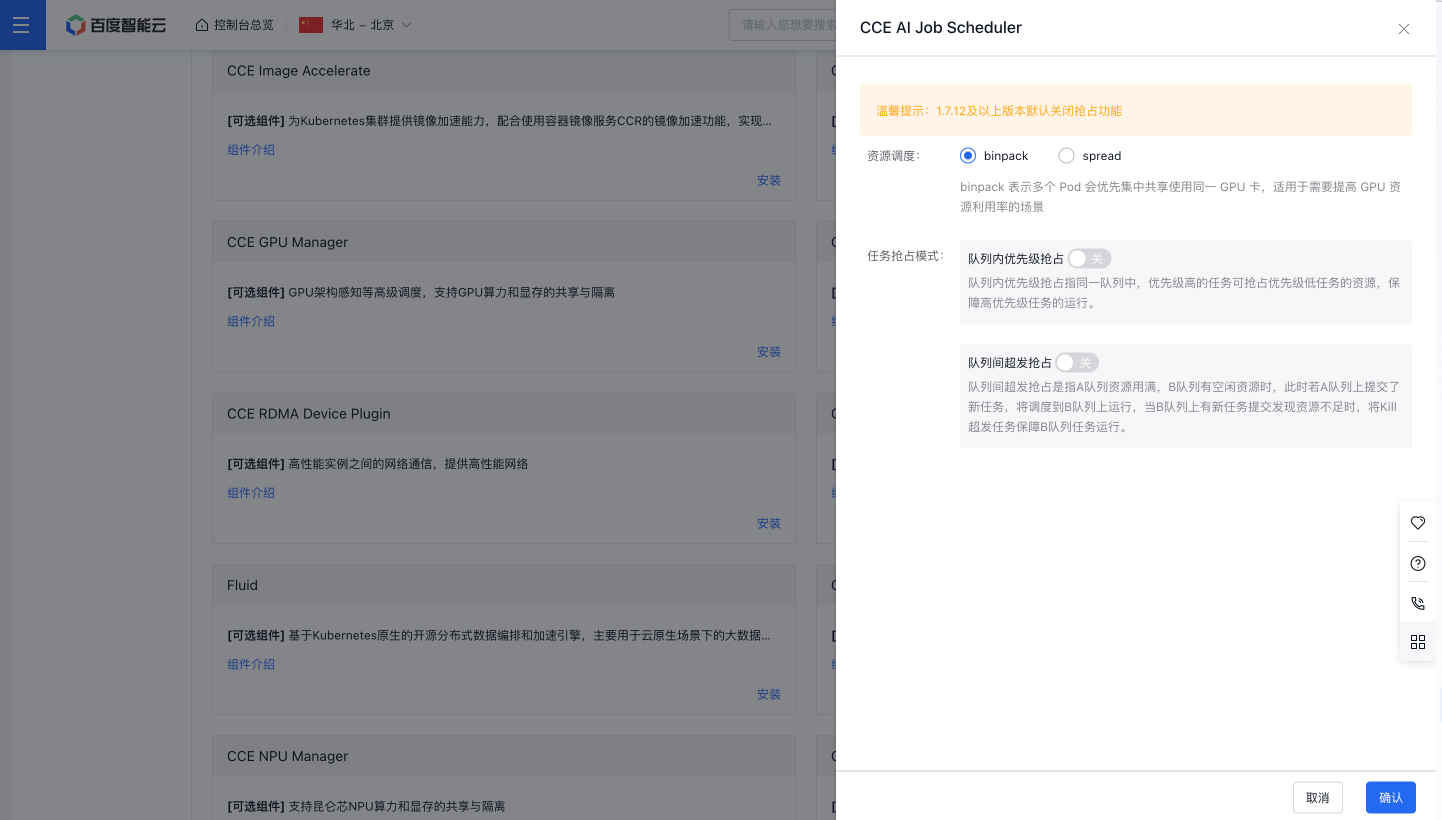
  7. On the Component Configuration page, finish setting up the deep learning framework.
Screenshot 6/5/2024 2.24.08 PM.png

  • Scheduling strategies include two options: spread and binpack. Binpack prioritizes centralized use of the same GPU card for multiple Pods, ideal for enhancing GPU resource usage. Spread aims to distribute multiple Pods across different GPU cards, ensuring high availability of GPU resources.
  • Preemption modes include intra-queue priority preemption and inter-queue oversell/preemption. For intra-queue priority preemption: Within the same queue, high-priority tasks can seize resources from lower-priority tasks to maintain their operations. For inter-queue oversell/preemption: If queue A is fully utilized and queue B has idle resources, tasks submitted to queue A are scheduled to queue B. In case queue B later experiences a resource shortage due to new tasks, oversell tasks will be terminated to maintain the operation of tasks in queue B.
  1. Click the OK button to finalize the component installation.

Version records

Version No. Cluster version compatibility Change time Change content Impact
1.7.25 CCE v1.18+ 2024.11.07 New Function:
  • Control plane modules support specified node deployment; webhook components support host network deployment; add taint tolerations
  • Optimized tor metadata synchronization: When configuring rdma information using the volcano-node-spec package, support configuring ehc fields
    Optimize:
  • Improve resource application for full-machine scenarios by using scalar comparison to reduce data copying and improve performance
  • Add the myriator plugin to support scheduling large-model tasks in a tor by index sorting and optimize hotspot functions to improve scheduling performance
    Bug Fixes:
  • Fix crashes caused by concurrent map access (conflicts between writing to the map during binding and reading during preemption)
  • This upgrade will not affect service.
    Do not support upgrading from versions below v1.5.8 to this version.
    For versions below v1.7.13, please contact Baidu AI Cloud for assistance with upgrading.
    1.7.24 CCE v1.18+ 2024.09.30 New Function:
  • Queues support configuring scheduling strategies (e.g., StrictFIFO)
  • This upgrade will not affect service.
    Do not support upgrading from versions below v1.5.8 to this version.
    For versions below v1.7.13, please contact Baidu AI Cloud for assistance with upgrading.
    1.7.23 CCE v1.18+ 2024.09.27 New Function:
  • Queues support independent configuration of priority preemption switches for refined control of priority preemption capabilities
  • Add observable metrics for scheduling phases to support visualization of scheduling phase time consumption
  • In intra-queue priority preemption scenarios, the task quota application considers non-preemptable resources within the queue
  • Performance optimization of NPU topology-aware scheduling strategies
    Bug Fixes:
  • [Non-impact on service] Fixed occasional panic caused by concurrent access to scheduling caches
  • This upgrade will not affect service.
    Do not support upgrading from versions below v1.5.8 to this version.
    For versions below v1.7.13, please contact Baidu AI Cloud for assistance with upgrading.
    1.7.22 CCE v1.18+ 2024.09.03 New Function:
  • RDMA TOR topology-aware scheduling adapted to EHC Cluster
  • Support unified schedulers for NPU and GPU
    Optimize:
  • Support intra-queue preemption/oversell (lowest) tasks
  • Support delayed scheduling of oversell (lowest) tasks to prioritize scheduling normal tasks with high/medium/low priorities
  • This upgrade will not affect service.
    Do not support upgrading from versions below v1.5.8 to this version.
    For versions below v1.7.13, please contact Baidu AI Cloud for assistance with upgrading.
    1.7.21 CCE v1.18+ 2024.08.14 Optimize:
  • Refine certificate creation logic during installation to resolve timeouts caused by inaccessible cluster nodes.
  • RDMA information synchronization components adapted to BCC/HPAS, supporting RDMA information configuration via external configuration
  • NPU plugins support preemption for intra-queue/inter-queue NPU scenarios (for NPU)
    Bug Fixes:
  • [Non-impact on service] Fix occasional scheduling failures when multiple PodSpecs exist in a job
  • This upgrade will not affect service.
    Do not support upgrading from versions below v1.5.8 to this version.
    For versions below v1.7.13, please contact Baidu AI Cloud for assistance with upgrading.
    1.7.20 CCE v1.18+ 2024.07.22 New Function:
  • Support NPU chip resource view dashboard
    Bug Fixes:
  • [Non-impact on service] Fix potential scheduling failures of some Pods affecting others when a task has multiple Pod configurations
  • [Non-impact on service] Handle cases where existing queues have the same name as root, causing root queue update failures
  • [Non-impact on service] Fix queue information not updating due to initialization failures in some volcano controller functions
  • This upgrade will not affect service.
    Do not support upgrading from versions below v1.5.8 to this version.
    For versions below v1.7.13, please contact Baidu AI Cloud for assistance with upgrading.
    1.7.19 CCE v1.18+ 2024.07.05 New Function:
  • Support cluster configuration to uniformly apply GPU resource Pods to the volcano scheduler
    Optimize:
  • Optimize the RDMA affinity check strategy in the preemption scenario, and enable HPN check if preemption is enabled
  • Optimize the optimal strategy for applying rdma resources for single tasks, and try to make the binpack effect more pronounced
    Bug Fixes:
  • Resolve the issue where RDMA resource views are incompatible with resources released during termination, causing a scheduler panic
  • Fix the issue of not setting a default queue when tasks do not specify a queue
  • This upgrade will not affect service.
    Do not support upgrading from versions below v1.5.8 to this version.
    For versions below v1.7.13, please contact Baidu AI Cloud for assistance with upgrading.
    1.7.18 CCE v1.18+ 2024.06.26 New Function:
  • Queue metrics support P800 chips; add P800 resource view dashboard;
  • Resource view command line interfaces adapted to P800 chips support task diagnosis in P800 clusters;
  • Physical queues support custom resource management node labels to be compatible with user-existing resource management labels;
  • RDMA affinity scheduling strategies support extended custom resource descriptors (e.g., baidu/gpu_hzz1o_8);
    Optimize:
  • MPIJob RDMA TOR strategy optimization: Only Pods that apply for CPU are removed from the distribution constraint of the same RDMA POD within a job
  • IB scenario adaptation: For IB instances unable to obtain RDMA TOR information, TOR affinity scheduling strategies do not need to be disabled
    Bug Fixes:
  • Fix inference services not being controlled by physical queues; support adaptation of multiple workloads to physical queues
  • Fix the weak effectiveness of anti-affinity deployment strategies due to low pod/node affinity weights
  • Resolve abnormal calculation in volcano view tool dumps
  • This upgrade will not affect service.
    Do not support upgrading from versions below v1.5.8 to this version.
    For versions below v1.7.13, please contact Baidu AI Cloud for assistance with upgrading.
    1.7.17 CCE v1.18+ 2024.06.02 New Function:
  • Add queue resource view dashboard with rich metrics; support elastic/hierarchical queues; supports multiple chips (e.g., nvidia and Kunlun);
    Optimize:
  • Enhance stability for mixed cluster schedulers, and support identifying GPU cards allocated by other cluster schedulers to avoid mixing schedulers on a single node;
  • Add validation for resource applications between queue capability, deserved and guarantee to avoid invalid queue creation;
  • This upgrade will not affect service.
    Do not support upgrading from versions below v1.5.8 to this version.
    For versions below v1.7.13, please contact Baidu AI Cloud for assistance with upgrading.
    1.7.16 CCE v1.18+ 2024.05.23 New Function:
  • Add a forced interception switch for GPU resource schedulers.
    Optimize:
  • Fix queues failing to ignore rdma resources
  • Fix invalid injection of node affinity scheduling
  • This upgrade will not affect service.
    Do not support upgrading from versions below v1.5.8 to this version.
    For versions below v1.7.13, please contact Baidu AI Cloud for assistance with upgrading.
    1.7.15 CCE v1.18+ 2024.05.17 New Function:
  • Support new Kunlun chips and topology-aware scheduling.
    Optimize:
  • Optimize hierarchical queue scheduling failure messages to expose events for non-leaf queue scheduling failures
  • This upgrade will not affect service.
    Do not support upgrading from versions below v1.5.8 to this version.
    For versions below v1.7.13, please contact Baidu AI Cloud for assistance with upgrading.
    1.7.14 CCE v1.18+ 2024.05.09 New Function:
  • Introduce elastic queue capabilities, enabling resource reservation, sharing, and reclamation support.
  • Launch physical queue capabilities, supporting the directed scheduling of queue tasks to designated resource pools.
  • Support configuring minimum guaranteed replicas for workloads via task/service labels.
    Bug Fixes:
  • Fix resource view failure to self-recover after node resource outOfSync inconsistencies
  • Optimized preemption strategy: Preemption is not triggered if the preemptor task still cannot be scheduled after preempting victims
  • This upgrade will not affect service.
    Do not support upgrading from versions below v1.5.8 to this version.
    For versions below v1.7.13, please contact Baidu AI Cloud for assistance with upgrading.
    1.7.13 CCE v1.18+ 2024.04.15 New Function:
  • Release hierarchical queue capabilities, and support hierarchical queue quota management capabilities
    Optimize:
  • When enabling intra-queue preemption function, add calculation of preemptable resources during queue enqueue; allow enqueue if scheduling conditions are met after expected preemption;
  • Add PodGroup events in RDMA topology-aware strategy
    Bug Fixes:
  • Fix scheduler restart caused by incorrect resource view calculation in preemption scenarios
  • This upgrade will not affect service.
    Do not support upgrading from versions below v1.5.8 to this version.
    1.7.12 CCE v1.18+ 2024.03.28 New Function
  • RDMA affinity strategy supports scheduling based on RDMA POD/TOR topology to improve multi-machine training performance
    Optimize
  • Default deployment strategy optimization
    a. Disable online/offline mixed deployment by default
    b. Disable intra-queue/inter-queue preemption by default
    c. Disable VPC TOR affinity scheduling by default
    d. Support SLA policy switches for specific customer scenarios
    Bug Fixes:
  • Fix failure to allocate Kunlun card IDs in Kunlun topology-aware scheduling
  • Fix enqueue failures caused by an incorrectly deserved quota for inference services
  • Fix crashes caused by concurrent memory access in webhook/controller
  • This upgrade will not affect service.
    Do not support upgrading from versions below v1.5.8 to this version.
    1.7.11 CCE v1.18+ 2024.01.31 Optimize:
  • Resource view optimization: Add pod_group_uid label to workload metrics and node type labels to node resource metrics
  • View tools support user-defined volcano namespaces
  • Optimize internal card partitioning protocols in the scheduler to avoid card errors caused by failure to write card partitioning information to the apiserver
    Bug Fixes:
  • Fix scheduler preferring nodes with terminating resources over idle nodes when multiple nodes meet scheduling requirements
  • Fix controller restart caused by missing task annotations
  • Fix scheduler restart caused by unlocked concurrent map access
  • Fix scheduler restart caused by abnormal queue monitor metric reporting
  • This upgrade will not affect service.
    Do not support upgrading from versions below v1.5.8 to this version.
    1.7.10 CCE v1.18+ 2023.12.21 Optimize:
  • Priority scheduling strategies support cross-namespace
    Bug Fixes:
  • Fix panic caused by tor scheduling failure when no tor is available for selection
  • Fix panic caused by the device-affinity plugin and add a switch for the device-affinity strategy
  • Fix volcano webhook to ignore namespaces with the kubernetes.io/mutate-pod-webhook: unavailable label; by default, add this label to kube-system and volcano-system during installation
  • Fix owner reference management for Pods
  • This upgrade will not affect service.
    Do not support upgrading from versions below v1.5.8 to this version.
    1.7.9 CCE v1.18+ 2023.11.28 New Function:
  • Resource views support resource statistics dashboards and node resource dashboards
  • Resource views support workload detail dashboards
  • volcano stability dashboard metrics
    Optimize:
  • Support tasks specifying non-preemptable status via the preemptable label
    Bug Fixes:
    - Fix view errors caused by view synchronization delays after scheduler restart
  • Fix volcano to add binpack strategy for nvidia.com/gpu resources
  • Fix preemption to ensure card type consistency; no preemption if types differ
  • Fix null pointer exception in tor strategy
  • Fix panic caused by concurrent access to devices
  • Fix panic caused by concurrent access during collector metric collection
  • This upgrade will not affect service.
    Do not support upgrading from versions below v1.5.8 to this version.
    1.7.8 CCE v1.18+ 2023.10.30 New Function:
  • Support PodGroup lifecycle management for standard K8S workloads (Pod/Job/Deployment/StatefulSet)
  • Add the command line interface to support resource view check for cluster nodes/queues and independent troubleshooting of unschedulable tasks
    Optimize:
  • Support MPIJob to view preempted events.
    Bug Fixes:
  • Resolve residual queue/cluster quotas for unsupported workloads;
  • Resolve incorrect queue quota overuse judgments caused by unignored RDMA resources in elastic tasks
  • Resolve scheduler panic caused by incorrect resource view metric logic in GPU shared card scenarios
  • Resolve inconsistent webhook certificates during upgrades from versions below v1.7.3 due to unreasonable rolling strategies
  • This upgrade will not affect service.
    Do not support upgrading from versions below v1.5.8 to this version.
    1.7.7 CCE v1.18+ 2023.10.11 New Function:
  • Add numa scheduling for new Kunlun r480 chips (dependent on GPU-Manager version 1.5.25)
  • Support exclusive card mode for H800 chips (dependent on GPU-Manager version 1.5.25)
  • Support exclusive/shared card mode for 4090 chips (dependent on GPU-Manager version 1.5.25)
  • Resource views support grafana monitor dashboards, displaying cluster resource overviews and node resource details (consistent with Baige pages)
    Optimize:
  • Support podgroup management of deployment
  • Command line tool adds options to support filtering job lists based on job type and podgroup status, and supports the summary option to sum up the resource consumption of the selected job list
  • Add the totalgpu field to the command line to count the actual number of gpu cards when nvidia and cgpu descriptors are mixed
    Bug Fixes:
  • Fix the selection of Pods in the terminating phase during GPU card selection
  • Fix grafana monitor display issues for notready nodes
  • Fix scheduling freezing caused by terminating in the predicate phase
  • This upgrade will not affect service.
    Do not support upgrading from versions below v1.5.8 to this version.
    1.7.6 CCE v1.18+ 2023.09.22 New Function:
  • Add cluster resource views/scheduling problem diagnosis tools
  • Support multi-shared cards per container
  • TOR architecture awareness capability has added support for MPIJob type tasks, and is compatible with Training operator 1.5+/Baidu Deep Learning Framework component 1.6+.
    Optimize:
  • Log optimization: Support dynamic adjustment of log levels; adjust to JSON format
    Bug Fixes:
  • Resolve scheduler panics caused by errors in elastic queue resource calculations. For the podgroup supporting minResources in versions 1.7.x and above, address scheduler panics when some Pods in the podgroup are running but exclude all resources defined in minResources. For more details, see https://github.com/volcano-sh/volcano/issues/3105
  • Fix scheduler panic caused by null candidate nodes after device affinity strategy calculation during Pod scheduling
  • Fix failure to obtain podgroup labels for jobs due to insufficient controller permissions
  • This upgrade will not affect service.
    Do not support upgrading from versions below v1.5.8 to this version.
    1.7.4 CCE v1.18+ 2023.06.14 New Function:
  • Support high availability for volcano scheduler/admission/controller with default 3-replica mode
    Optimize
  • Queues support usage statistics
  • Optimize the admission certificate issuance process, and use secrets to store access certificates
  • Add resource configuration parameters to scheduler/admission/controller
    Bug Fixes:
  • Fix scheduler panic caused by concurrent reading/writing of node resources
  • This upgrade will not affect service.
    Do not support upgrading from versions below v1.5.8 to this version.
    1.7.3 CCE v1.18+ 2023.05.06 New Function:
  • Support custom preemption strategies
  • This upgrade will not affect service.
    Do not support upgrading from versions below v1.5.8 to this version.
    1.7.2 CCE v1.18+ 2023.04.24 New Function:
  • Support exclusive/shared mode for A800 chips
  • Support custom scheduler names and scheduling resource groups
  • This upgrade will not affect service.
    Do not support upgrading from versions below v1.5.8 to this version.
    1.7.0 CCE v1.18+ 2023.04.14 New Function:
  • volcano upgraded to community version 1.7
  • This upgrade will not affect service.
    Do not support upgrading from versions below v1.5.8 to this version.

    Previous
    CCE RDMA Device Plugin Description
    Next
    Image registry