Using AIAK-Training PyTorch Edition

CCE CCE

  • Function Release Records
  • Common Tools
    • Command Line Scenario Examples
  • API Reference
    • Overview
    • Common Headers and Error Responses
    • General Description
  • Product Announcement
    • Announcement on the Discontinuation of CCE Standalone Clusters
    • CCE New Cluster Management Release Announcement
    • Upgrade Announcement for CCE Cluster Audit Component kube-external-auditor
    • CCE Console Upgrade Announcement
    • Announcement on Management Fees for CCE Managed Clusters
    • Container Runtime Version Release Notes
    • Announcement on the Decommissioning of CCE Image Repository
    • Kubernetes Version Release Notes
      • CCE Release of Kubernetes v1_26 History
      • CCE Kubernetes Version Update Notes
      • CCE Release of Kubernetes v1_24 History
      • CCE Release of Kubernetes v1_30 History
      • CCE Release of Kubernetes v1_22 History
      • CCE Release of Kubernetes v1_18 History
      • CCE Release of Kubernetes v1_20 History
      • CCE Release of Kubernetes v1_28 History
      • Release Notes for CCE Kubernetes 1_31 Version
      • Kubernetes Version Overview and Mechanism
    • Security Vulnerability Fix Announcement
      • Vulnerability CVE-2019-5736 Fix Announcement
      • Vulnerability CVE-2021-30465 Fix Announcement
      • CVE-2025-1097, CVE-2025-1098, and Other Vulnerabilities Fix Announcement
      • CVE-2020-14386 Vulnerability Fix Announcement
      • Impact Statement on runc Security Issue (CVE-2024-21626)
  • Service Level Agreement (SLA)
    • CCE Service Level Agreement SLA (V1_0)
  • Typical Practices
    • Pod Anomaly Troubleshooting
    • Adding CGroup V2 Node
    • Common Linux System Configuration Parameters Description
    • Encrypting etcd Data Using KMS
    • Configuring Container Network Parameters Using CNI
    • CCE - Public Network Access Practice
    • Practice of using private images in CCE clusters
    • Unified Access for Virtual Machines and Container Services via CCE Ingress
    • User Guide for Custom CNI Plugins
    • CCE Cluster Network Description and Planning
    • Cross-Cloud Application Migration to Baidu CCE Using Velero
    • CCE Resource Recommender User Documentation
    • Continuous Deployment with Jenkins in CCE Cluster
    • CCE Best Practice-Guestbook Setup
    • CCE Best Practice-Container Network Mode Selection
    • CCE Usage Checklist
    • VPC-ENI Mode Cluster Public Network Access Practice
    • CCE Container Runtime Selection
    • Cloud-native AI
      • Elastic and Fault-Tolerant Training Using CCE AITraining Operator
      • Deploy the TensorFlow Serving inference service
      • Best Practice for GPU Virtualization with Optimal Isolation
  • FAQs
    • How do business applications use load balancer
    • Using kubectl on Windows
    • Cluster management FAQs
    • Common Questions Overview
    • Auto scaling FAQs
    • Create a simple service via kubectl
  • Operation guide
    • Prerequisites for use
    • Identity and access management
    • Permission Management
      • Configure IAM Tag Permission Policy
      • Permission Overview
      • Configure IAM Custom Permission Policy
      • Configure Predefined RBAC Permission Policy
      • Configure IAM Predefined Permission Policy
      • Configure Cluster OIDC Authentication
    • Configuration Management
      • Configmap Management
      • Secret Management
    • Traffic access
      • BLB ingress annotation description
      • Use K8S_Service via CCE
      • Use K8S_Ingress via CCE
      • Implement Canary Release with CCE Based on Nginx-Ingress
      • Create CCE_Ingress via YAML
      • LoadBalancer Service Annotation Description
      • Service Reuses Existing Load Balancer BLB
      • Use Direct Pod Mode LoadBalancer Service
      • NGINX Ingress Configuration Reference
      • Create LoadBalancer_Service via YAML
      • Use NGINX Ingress
    • Virtual Node
      • Configuring BCIPod
      • Configuring bci-profile
      • Managing virtual nodes
    • Node management
      • Add a node
      • Managing Taints
      • Setting Node Blocking
      • Setting GPU Memory Sharing
      • Remove a node
      • Customizing Kubelet Parameters
      • Kubelet Container Monitor Read-Only Port Risk Warning
      • Managing Node Tag
      • Drain node
    • Component Management
      • CCE CSI CDS Plugin Description
      • CCE Fluid Description
      • CCE CSI PFS L2 Plugin
      • CCE Calico Felix Description
      • CCE Ingress Controller Description
      • CCE QoS Agent Description
      • CCE GPU Manager Description
      • CCE Ingress NGINX Controller Description
      • CCE P2P Accelerator Description
      • CCE Virtual Kubelet Component
      • CoreDNS Description
      • CCE Log Operator Description
      • CCE Node Remedier Description
      • CCE Descheduler Description
      • CCE Dynamic Scheduling Plugin Description
      • Kube Scheduler Documentation
      • CCE NPU Manager Description
      • CCE CronHPA Controller Description
      • CCE LB Controller Description
      • Kube ApiServer Description
      • CCE Backup Controller Description
      • CCE Network Plugin Description
      • CCE CSI PFS Plugin Description
      • CCE Credential Controller Description
      • CCE Deep Learning Frameworks Operator Description
      • Component Overview
      • CCE Image Accelerate Description
      • CCE CSI BOS Plugin Description
      • CCE Onepilot Description
      • Description of Kube Controller Manager
      • CCE_Hybrid_Manager Description
      • CCE NodeLocal DNSCache Description
      • CCE Node Problem Detector Description
      • CCE Ascend Mindx DL Description
      • CCE RDMA Device Plugin Description
      • CCE AI Job Scheduler Description
    • Image registry
      • Image Registry Basic Operations
      • Using Container Image to Build Services
    • Helm Management
      • Helm Template
      • Helm Instance
    • Cluster management
      • Upgrade Cluster Kubernetes Version
      • CCE Node CDS Dilatation
      • Managed Cluster Usage Instructions
      • Create cluster
      • CCE Supports GPUSharing Cluster
      • View Cluster
      • Connect to Cluster via kubectl
      • CCE Security Group
      • CCE Node Resource Reservation Instructions
      • Operate Cluster
      • Cluster Snapshot
    • Serverless Cluster
      • Product overview
      • Using Service in Serverless Cluster
      • Creating a Serverless Cluster
    • Storage Management
      • Using Cloud File System
      • Overview
      • Using Parallel File System PFS
      • Using RapidFS
      • Using Object Storage BOS
      • Using Parallel File System PFS L2
      • Using Local Storage
      • Using Cloud Disk CDS
    • Inspection and Diagnosis
      • Cluster Inspection
      • GPU Runtime Environment Check
      • Fault Diagnosis
    • Cloud-native AI
      • Cloud-Native AI Overview
      • AI Monitoring Dashboard
        • Connecting to a Prometheus Instance and Starting a Job
        • NVIDIA Chip Resource Observation
          • AI Job Scheduler component
          • GPU node resources
          • GPU workload resources
          • GPUManager component
          • GPU resource pool overview
        • Ascend Chip Resource Observation
          • Ascend resource pool overview
          • Ascend node resource
          • Ascend workload resource
      • Task Management
        • View Task Information
        • Create TensorFlow Task
        • Example of RDMA Distributed Training Based on NCCL
        • Create PaddlePaddle Task
        • Create AI Training Task
        • Delete task
        • Create PyTorch Task
        • Create Mxnet Task
      • Queue Management
        • Modify Queue
        • Create Queue
        • Usage Instructions for Logical Queues and Physical Queues
        • Queue deletion
      • Dataset Management
        • Create Dataset
        • Delete dataset
        • View Dataset
        • Operate Dataset
      • AI Acceleration Kit
        • AIAK Introduction
        • Using AIAK-Training PyTorch Edition
        • Deploying Distributed Training Tasks Using AIAK-Training
        • Accelerating Inference Business Using AIAK-Inference
      • GPU Virtualization
        • GPU Exclusive and Shared Usage Instructions
        • Image Build Precautions in Shared GPU Scenarios
        • Instructions for Multi-GPU Usage in Single-GPU Containers
        • GPU Virtualization Adaptation Table
        • GPU Online and Offline Mixed Usage Instructions
        • MPS Best Practices & Precautions
        • Precautions for Disabling Node Video Memory Sharing
    • Elastic Scaling
      • Container Timing Horizontal Scaling (CronHPA)
      • Container Horizontal Scaling (HPA)
      • Implementing Second-Level Elastic Scaling with cce-autoscaling-placeholder
      • CCE Cluster Node Auto-Scaling
    • Network Management
      • How to Continue Dilatation When Container Network Segment Space Is Exhausted (VPC-ENI Mode)
      • Container Access to External Services in CCE Clusters
      • CCE supports dual-stack networks of IPv4 and IPv6
      • Using NetworkPolicy Network Policy
      • Traffic Forwarding Configuration for Containers in Peering Connections Scenarios
      • CCE IP Masquerade Agent User Guide
      • Creating VPC-ENI Mode Cluster
      • How to Continue Dilatation When Container Network Segment Space Is Exhausted (VPC Network Mode)
      • Using NetworkPolicy in CCE Clusters
      • Network Orchestration
        • Container Network QoS Management
        • VPC-ENI Specified Subnet IP Allocation (Container Network v2)
        • Cluster Pod Subnet Topology Distribution (Container Network v2)
      • Network Connectivity
        • Container network accesses the public network via NAT gateway
      • Network Maintenance
        • Common Error Code Table for CCE Container Network
      • DNS
        • CoreDNS Component Manual Dilatation Guide
        • DNS Troubleshooting Guide
        • DNS Principle Overview
    • Namespace Management
      • Set Limit Range
      • Set Resource Quota
      • Basic Namespace Operations
    • Workload
      • CronJob Management
      • Set Workload Auto-Scaling
      • Deployment Management
      • Job Management
      • View the Pod
      • StatefulSet Management
      • Password-Free Pull of Container Image
      • Create Workload Using Private Image
      • DaemonSet Management
    • Monitor Logs
      • Monitor Cluster with Prometheus
      • CCE Event Center
      • Cluster Service Profiling
      • CCE Cluster Anomaly Event Alerts
      • Java Application Monitor
      • Cluster Audit Dashboard
      • Logging
      • Cluster Audit
      • Log Center
        • Configure Collection Rules Using CRD
        • View Cluster Control Plane Logs
        • View Business Logs
        • Log Overview
        • Configure Collection Rules in Cloud Container Engine Console
    • Application management
      • Overview
      • Secret
      • Configuration dictionary
      • Deployment
      • Service
      • Pod
    • NodeGroup Management
      • NodeGroup Management
      • NodeGroup Node Fault Detection and Self-Healing
      • Configuring Scaling Policies
      • NodeGroup Introduction
      • Adding Existing External Nodes
      • Custom NodeGroup Kubelet Configuration
      • Adding Alternative Models
      • Dilatation NodeGroup
    • Backup Center
      • Restore Management
      • Backup Overview
      • Backup Management
      • Backup repository
  • Quick Start
    • Quick Deployment of Nginx Application
    • CCE Container Engine Usage Process Overview
  • Product pricing
    • Product pricing
  • Product Description
    • Application scenarios
    • Introduction
    • Usage restrictions
    • Features
    • Advantages
    • Core concepts
  • Solution-Fabric
    • Fabric Solution
  • Development Guide
    • EFK Log Collection System Deployment Guide
    • Using Network Policy in CCE Cluster
    • Creating a LoadBalancer-Type Service
    • Prometheus Monitoring System Deployment Guide
    • kubectl Management Configuration
  • API_V2 Reference
    • Overview
    • Common Headers and Error Responses
    • Cluster Related Interfaces
    • Instance Related Interfaces
    • Service domain
    • General Description
    • Kubeconfig Related Interfaces
    • RBAC Related Interfaces
    • Autoscaler Related Interfaces
    • Network Related Interfaces
    • InstanceGroup Related Interfaces
    • Appendix
    • Component management-related APIs
    • Package adaptation-related APIs
    • Task Related Interfaces
  • Solution-Xchain
    • Hyperchain Solution
  • SDK
    • Go-SDK
      • Overview
      • NodeGroup Management
      • Initialization
      • Install the SDK Package
      • Cluster management
      • Node management
All documents
menu
No results found, please re-enter

CCE CCE

  • Function Release Records
  • Common Tools
    • Command Line Scenario Examples
  • API Reference
    • Overview
    • Common Headers and Error Responses
    • General Description
  • Product Announcement
    • Announcement on the Discontinuation of CCE Standalone Clusters
    • CCE New Cluster Management Release Announcement
    • Upgrade Announcement for CCE Cluster Audit Component kube-external-auditor
    • CCE Console Upgrade Announcement
    • Announcement on Management Fees for CCE Managed Clusters
    • Container Runtime Version Release Notes
    • Announcement on the Decommissioning of CCE Image Repository
    • Kubernetes Version Release Notes
      • CCE Release of Kubernetes v1_26 History
      • CCE Kubernetes Version Update Notes
      • CCE Release of Kubernetes v1_24 History
      • CCE Release of Kubernetes v1_30 History
      • CCE Release of Kubernetes v1_22 History
      • CCE Release of Kubernetes v1_18 History
      • CCE Release of Kubernetes v1_20 History
      • CCE Release of Kubernetes v1_28 History
      • Release Notes for CCE Kubernetes 1_31 Version
      • Kubernetes Version Overview and Mechanism
    • Security Vulnerability Fix Announcement
      • Vulnerability CVE-2019-5736 Fix Announcement
      • Vulnerability CVE-2021-30465 Fix Announcement
      • CVE-2025-1097, CVE-2025-1098, and Other Vulnerabilities Fix Announcement
      • CVE-2020-14386 Vulnerability Fix Announcement
      • Impact Statement on runc Security Issue (CVE-2024-21626)
  • Service Level Agreement (SLA)
    • CCE Service Level Agreement SLA (V1_0)
  • Typical Practices
    • Pod Anomaly Troubleshooting
    • Adding CGroup V2 Node
    • Common Linux System Configuration Parameters Description
    • Encrypting etcd Data Using KMS
    • Configuring Container Network Parameters Using CNI
    • CCE - Public Network Access Practice
    • Practice of using private images in CCE clusters
    • Unified Access for Virtual Machines and Container Services via CCE Ingress
    • User Guide for Custom CNI Plugins
    • CCE Cluster Network Description and Planning
    • Cross-Cloud Application Migration to Baidu CCE Using Velero
    • CCE Resource Recommender User Documentation
    • Continuous Deployment with Jenkins in CCE Cluster
    • CCE Best Practice-Guestbook Setup
    • CCE Best Practice-Container Network Mode Selection
    • CCE Usage Checklist
    • VPC-ENI Mode Cluster Public Network Access Practice
    • CCE Container Runtime Selection
    • Cloud-native AI
      • Elastic and Fault-Tolerant Training Using CCE AITraining Operator
      • Deploy the TensorFlow Serving inference service
      • Best Practice for GPU Virtualization with Optimal Isolation
  • FAQs
    • How do business applications use load balancer
    • Using kubectl on Windows
    • Cluster management FAQs
    • Common Questions Overview
    • Auto scaling FAQs
    • Create a simple service via kubectl
  • Operation guide
    • Prerequisites for use
    • Identity and access management
    • Permission Management
      • Configure IAM Tag Permission Policy
      • Permission Overview
      • Configure IAM Custom Permission Policy
      • Configure Predefined RBAC Permission Policy
      • Configure IAM Predefined Permission Policy
      • Configure Cluster OIDC Authentication
    • Configuration Management
      • Configmap Management
      • Secret Management
    • Traffic access
      • BLB ingress annotation description
      • Use K8S_Service via CCE
      • Use K8S_Ingress via CCE
      • Implement Canary Release with CCE Based on Nginx-Ingress
      • Create CCE_Ingress via YAML
      • LoadBalancer Service Annotation Description
      • Service Reuses Existing Load Balancer BLB
      • Use Direct Pod Mode LoadBalancer Service
      • NGINX Ingress Configuration Reference
      • Create LoadBalancer_Service via YAML
      • Use NGINX Ingress
    • Virtual Node
      • Configuring BCIPod
      • Configuring bci-profile
      • Managing virtual nodes
    • Node management
      • Add a node
      • Managing Taints
      • Setting Node Blocking
      • Setting GPU Memory Sharing
      • Remove a node
      • Customizing Kubelet Parameters
      • Kubelet Container Monitor Read-Only Port Risk Warning
      • Managing Node Tag
      • Drain node
    • Component Management
      • CCE CSI CDS Plugin Description
      • CCE Fluid Description
      • CCE CSI PFS L2 Plugin
      • CCE Calico Felix Description
      • CCE Ingress Controller Description
      • CCE QoS Agent Description
      • CCE GPU Manager Description
      • CCE Ingress NGINX Controller Description
      • CCE P2P Accelerator Description
      • CCE Virtual Kubelet Component
      • CoreDNS Description
      • CCE Log Operator Description
      • CCE Node Remedier Description
      • CCE Descheduler Description
      • CCE Dynamic Scheduling Plugin Description
      • Kube Scheduler Documentation
      • CCE NPU Manager Description
      • CCE CronHPA Controller Description
      • CCE LB Controller Description
      • Kube ApiServer Description
      • CCE Backup Controller Description
      • CCE Network Plugin Description
      • CCE CSI PFS Plugin Description
      • CCE Credential Controller Description
      • CCE Deep Learning Frameworks Operator Description
      • Component Overview
      • CCE Image Accelerate Description
      • CCE CSI BOS Plugin Description
      • CCE Onepilot Description
      • Description of Kube Controller Manager
      • CCE_Hybrid_Manager Description
      • CCE NodeLocal DNSCache Description
      • CCE Node Problem Detector Description
      • CCE Ascend Mindx DL Description
      • CCE RDMA Device Plugin Description
      • CCE AI Job Scheduler Description
    • Image registry
      • Image Registry Basic Operations
      • Using Container Image to Build Services
    • Helm Management
      • Helm Template
      • Helm Instance
    • Cluster management
      • Upgrade Cluster Kubernetes Version
      • CCE Node CDS Dilatation
      • Managed Cluster Usage Instructions
      • Create cluster
      • CCE Supports GPUSharing Cluster
      • View Cluster
      • Connect to Cluster via kubectl
      • CCE Security Group
      • CCE Node Resource Reservation Instructions
      • Operate Cluster
      • Cluster Snapshot
    • Serverless Cluster
      • Product overview
      • Using Service in Serverless Cluster
      • Creating a Serverless Cluster
    • Storage Management
      • Using Cloud File System
      • Overview
      • Using Parallel File System PFS
      • Using RapidFS
      • Using Object Storage BOS
      • Using Parallel File System PFS L2
      • Using Local Storage
      • Using Cloud Disk CDS
    • Inspection and Diagnosis
      • Cluster Inspection
      • GPU Runtime Environment Check
      • Fault Diagnosis
    • Cloud-native AI
      • Cloud-Native AI Overview
      • AI Monitoring Dashboard
        • Connecting to a Prometheus Instance and Starting a Job
        • NVIDIA Chip Resource Observation
          • AI Job Scheduler component
          • GPU node resources
          • GPU workload resources
          • GPUManager component
          • GPU resource pool overview
        • Ascend Chip Resource Observation
          • Ascend resource pool overview
          • Ascend node resource
          • Ascend workload resource
      • Task Management
        • View Task Information
        • Create TensorFlow Task
        • Example of RDMA Distributed Training Based on NCCL
        • Create PaddlePaddle Task
        • Create AI Training Task
        • Delete task
        • Create PyTorch Task
        • Create Mxnet Task
      • Queue Management
        • Modify Queue
        • Create Queue
        • Usage Instructions for Logical Queues and Physical Queues
        • Queue deletion
      • Dataset Management
        • Create Dataset
        • Delete dataset
        • View Dataset
        • Operate Dataset
      • AI Acceleration Kit
        • AIAK Introduction
        • Using AIAK-Training PyTorch Edition
        • Deploying Distributed Training Tasks Using AIAK-Training
        • Accelerating Inference Business Using AIAK-Inference
      • GPU Virtualization
        • GPU Exclusive and Shared Usage Instructions
        • Image Build Precautions in Shared GPU Scenarios
        • Instructions for Multi-GPU Usage in Single-GPU Containers
        • GPU Virtualization Adaptation Table
        • GPU Online and Offline Mixed Usage Instructions
        • MPS Best Practices & Precautions
        • Precautions for Disabling Node Video Memory Sharing
    • Elastic Scaling
      • Container Timing Horizontal Scaling (CronHPA)
      • Container Horizontal Scaling (HPA)
      • Implementing Second-Level Elastic Scaling with cce-autoscaling-placeholder
      • CCE Cluster Node Auto-Scaling
    • Network Management
      • How to Continue Dilatation When Container Network Segment Space Is Exhausted (VPC-ENI Mode)
      • Container Access to External Services in CCE Clusters
      • CCE supports dual-stack networks of IPv4 and IPv6
      • Using NetworkPolicy Network Policy
      • Traffic Forwarding Configuration for Containers in Peering Connections Scenarios
      • CCE IP Masquerade Agent User Guide
      • Creating VPC-ENI Mode Cluster
      • How to Continue Dilatation When Container Network Segment Space Is Exhausted (VPC Network Mode)
      • Using NetworkPolicy in CCE Clusters
      • Network Orchestration
        • Container Network QoS Management
        • VPC-ENI Specified Subnet IP Allocation (Container Network v2)
        • Cluster Pod Subnet Topology Distribution (Container Network v2)
      • Network Connectivity
        • Container network accesses the public network via NAT gateway
      • Network Maintenance
        • Common Error Code Table for CCE Container Network
      • DNS
        • CoreDNS Component Manual Dilatation Guide
        • DNS Troubleshooting Guide
        • DNS Principle Overview
    • Namespace Management
      • Set Limit Range
      • Set Resource Quota
      • Basic Namespace Operations
    • Workload
      • CronJob Management
      • Set Workload Auto-Scaling
      • Deployment Management
      • Job Management
      • View the Pod
      • StatefulSet Management
      • Password-Free Pull of Container Image
      • Create Workload Using Private Image
      • DaemonSet Management
    • Monitor Logs
      • Monitor Cluster with Prometheus
      • CCE Event Center
      • Cluster Service Profiling
      • CCE Cluster Anomaly Event Alerts
      • Java Application Monitor
      • Cluster Audit Dashboard
      • Logging
      • Cluster Audit
      • Log Center
        • Configure Collection Rules Using CRD
        • View Cluster Control Plane Logs
        • View Business Logs
        • Log Overview
        • Configure Collection Rules in Cloud Container Engine Console
    • Application management
      • Overview
      • Secret
      • Configuration dictionary
      • Deployment
      • Service
      • Pod
    • NodeGroup Management
      • NodeGroup Management
      • NodeGroup Node Fault Detection and Self-Healing
      • Configuring Scaling Policies
      • NodeGroup Introduction
      • Adding Existing External Nodes
      • Custom NodeGroup Kubelet Configuration
      • Adding Alternative Models
      • Dilatation NodeGroup
    • Backup Center
      • Restore Management
      • Backup Overview
      • Backup Management
      • Backup repository
  • Quick Start
    • Quick Deployment of Nginx Application
    • CCE Container Engine Usage Process Overview
  • Product pricing
    • Product pricing
  • Product Description
    • Application scenarios
    • Introduction
    • Usage restrictions
    • Features
    • Advantages
    • Core concepts
  • Solution-Fabric
    • Fabric Solution
  • Development Guide
    • EFK Log Collection System Deployment Guide
    • Using Network Policy in CCE Cluster
    • Creating a LoadBalancer-Type Service
    • Prometheus Monitoring System Deployment Guide
    • kubectl Management Configuration
  • API_V2 Reference
    • Overview
    • Common Headers and Error Responses
    • Cluster Related Interfaces
    • Instance Related Interfaces
    • Service domain
    • General Description
    • Kubeconfig Related Interfaces
    • RBAC Related Interfaces
    • Autoscaler Related Interfaces
    • Network Related Interfaces
    • InstanceGroup Related Interfaces
    • Appendix
    • Component management-related APIs
    • Package adaptation-related APIs
    • Task Related Interfaces
  • Solution-Xchain
    • Hyperchain Solution
  • SDK
    • Go-SDK
      • Overview
      • NodeGroup Management
      • Initialization
      • Install the SDK Package
      • Cluster management
      • Node management
  • Document center
  • arrow
  • CCECCE
  • arrow
  • Operation guide
  • arrow
  • Cloud-native AI
  • arrow
  • AI Acceleration Kit
  • arrow
  • Using AIAK-Training PyTorch Edition
Table of contents on this page
  • Prerequisites
  • Supported version list
  • Acceleration features
  • Practical workflow
  • 1. Obtain the training image
  • 2. Task submission
  • 3. Apply acceleration capabilities
  • 3.1 Accelerate distributed training under low-configuration network conditions
  • 3.2 AMP O2 mixed precision mode for further computation acceleration
  • 3.3 FusedOptimizer to accelerate parameter update efficiency
  • 3.4 Ultra-large BatchSize training: Enable the LAMB optimizer

Using AIAK-Training PyTorch Edition

Updated at:2025-10-27

Prerequisites

  • The CCE cloud-native AI service has been successfully activated.

Supported version list

The PyTorch version of AIAK-Training currently supports specific versions. If other versions are needed, users can submit a support ticket.

CUDA version PyTorch version Python version
11.7 1.12.0 3.8

Acceleration features

  • For low-bandwidth network environments, communication optimization has been enhanced by adding a hierarchical Allreduce algorithm and enabling communication compression methods like PowerSGD and FP16.
  • The NVIDIA Apex AMP O2 mixed precision mode has been added, offering compatibility with the native Torch AMP workflow to facilitate transitioning more computations to FP16 for faster training.
  • A fused optimizer is supported, integrating computation kernels to minimize overheads like memory access and kernel launches, improving performance during parameter updates.
  • The LAMB optimizer algorithm is supported, addressing convergence challenges in ultra-large-batch training scenarios.

Practical workflow

1. Obtain the training image

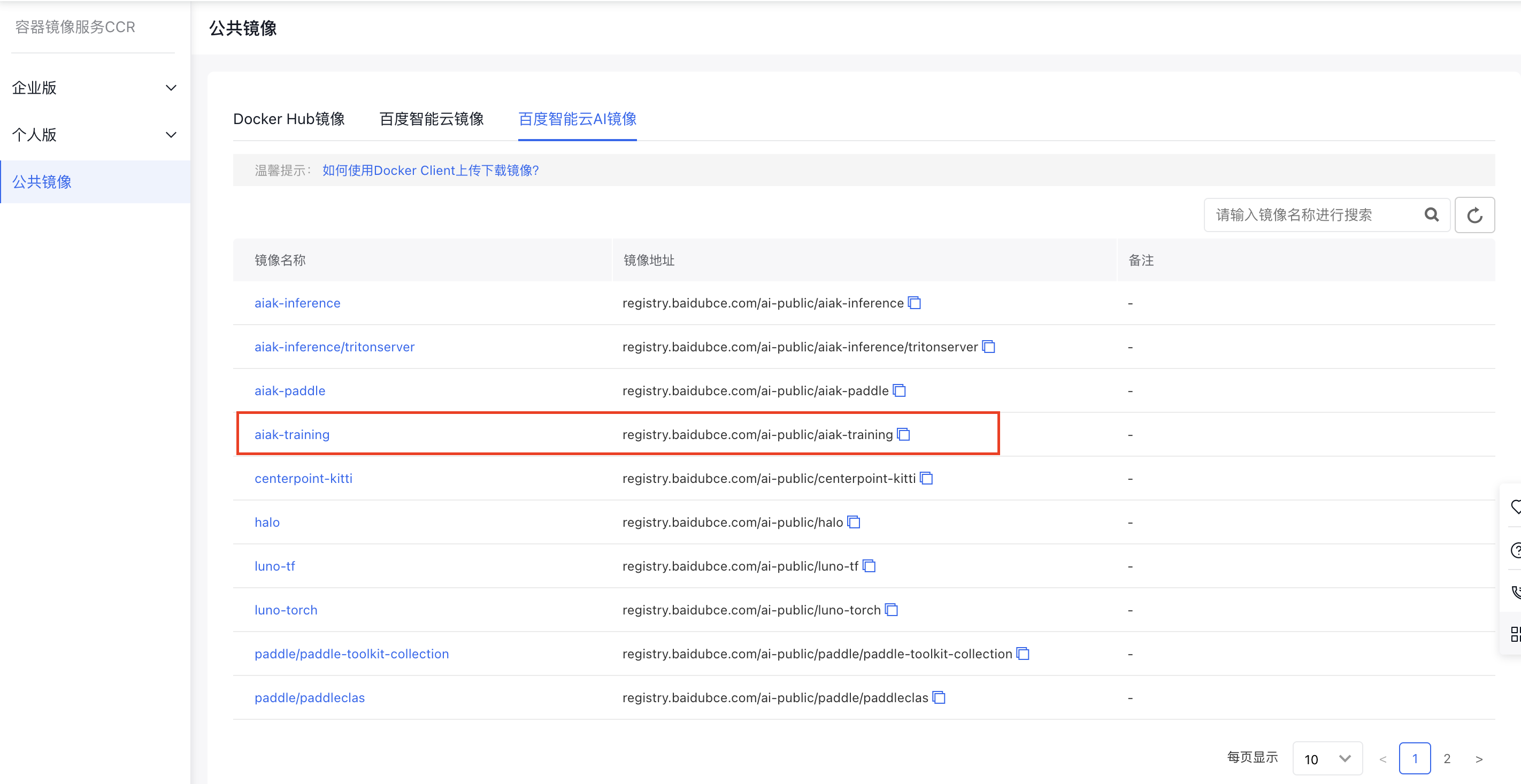
In the “Baidu AI Cloud AI Images” section of CCR public images, select the “aiak-training” accelerated image as the base training image. This image comes pre-installed with CUDA, Python, PyTorch, AIAK-Training acceleration software, and other necessary components. Screenshot 6/18/2024 2.49.38 PM.png
2. Task submission

Submit the task. For detailed steps, refer to the Create a New PyTorch Task document. During the process, set the image address to the address of the aforementioned aiak-training image.

3. Apply acceleration capabilities

3.1 Accelerate distributed training under low-configuration network conditions

In environments with limited network bandwidth, cross-machine gradient synchronization becomes a significant bottleneck for distributed training speed. To address this issue, AIAK-Training has implemented a hierarchical AllReduce algorithm to minimize the impact of cross-machine communication. Additionally, we have streamlined the use of communication compression hooks (such as PowerSGD and FP16) provided by the official PyTorch. Users can now activate these hooks directly via environment variables without modifying their code. Note: In scenarios where communication is not a bottleneck (e.g., single-machine multi-GPU setups or RDMA environments), these features may not provide acceleration benefits.

Function Environment variables Default Value description Recommendation
Hierarchical AllReduce AIAK_HIERARCHICAL_ALLREDUCE 0
  • 0 = Disable this feature
  • 1 = Enable this feature
  • Recommended to enable in TCP network environments
  • Communication compression algorithm AIAK_FP16_COMPRESSION 0
  • 0 = Disable this feature
  • 1 = Compress gradients using FP16 format
  • 2 = Compress gradients using BF16 format
  • Priority set to 1 (FP16 compression). BF16 is currently an experimental feature and requires NCCL version 2.9.6 or above
  • After enabling this feature, gradients will be converted to float16/bfloat16 before communication, and converted back to float32 after communication
  • AIAK_POWERSGD_COMPRESSION 0
  • 0 = Disable this feature
  • 1 = Enable PowerSGD compression
  • 2 = Enable batched powersgd compression
  • Priority set to 1 (PowerSGD compression). Batched PowerSGD offers better performance but causes more precision loss. If the model precision meets requirements when AIAK_MATRIX_APPROXIMATION_RANK=1, consider using batched PowerSGD
  • This feature can be used independently or combined with FP16 compression (compression algorithms will be applied in a stacked manner)
  • AIAK_MATRIX_APPROXIMATION_RANK 1
  • Can be set starting from 1, in multiples of 2 (e.g., 1, 2, 4, ...)
  • This hyperparameter for the PowerSGD algorithm determines the compression rate; a smaller value means stronger compression.
  • Generally, set it to 1-4. If precision is significantly affected, try increasing the value
  • AIAK_START_COMPRESS_ITER 1000
  • Indicate the step from which to start the compression algorithm; default is 1,000
  • If there is a warmup phase in training, this value should usually not be less than the number of warmup steps
  • Using gradient compression too early may affect final convergence. If adjusting this value, it is recommended to set it to no less than 10% of the total training steps
  • 3.2 AMP O2 mixed precision mode for further computation acceleration

    The official PyTorch offers the AMP (automatic mixed precision) feature, which users can leverage to improve model computation efficiency. Building on this, AIAK-Training has incorporated the O2 mode from NVIDIA APEX AMP and made it API-level compatible with Torch AMP. Users only need to add a single line of code to enable a more aggressive pure FP16 training mode quickly. Follow these steps:

    1. After preparing the model and optimizer, users should add a single line of code to call the aiak_amp_decorate function. Moreover, when using DDP, ensure that aiak_amp_decorate is called before initializing DDP. (See Line 6 in the example below)
    2. When applying gradient clipping, replace model.parameters() in clip_grad_norm(model.parameters(), max_norm) with torch.cuda.amp.aiak_amp_parameters(optimizer). (See Line 25 in the example below)
    Plain Text
    1# Define the model and optimizer
    2model = Model().cuda()
    3optimizer = optim.SGD(model.parameters(), ...)
    4# Add the aiak_amp_decorate wrapper call to enable Apex AMP O2 mode
    5model, optimizer = torch.cuda.amp.aiak_amp_decorate(model, optimizer)
    6# Construct the DDP model after initializing O2 optimization
    7model = DDP(model)
    8# Relevant code for the native torch AMP workflow (no modifications required)
    9scaler = GradScaler()
    10
    11for input, target in data:
    12    optimizer.zero_grad()
    13# Run forward in the autocast-enabled region
    14    with autocast():
    15        output = model(input)
    16        loss = loss_fn(output, target)
    17# Use the scaler to scale the loss (FP16) and perform backward propagation to get scaled gradients (FP16)
    18    scaler.scale(loss).backward()
    19# When using gradient clipping, follow the native torch AMP calling rules and call unscale to restore gradients
    20    scaler.unscale_(optimizer)
    21# For gradient clipping, replace model.parameters() with amp.amp_parameters(optimizer)
    22    torch.nn.utils.clip_grad_norm_(torch.cuda.amp.aiak_amp_parameters(optimizer), max_norm)
    23# The scaler updates parameters: it will automatically unscale gradients first; if NaN or Inf values exist, the update will be skipped automatically
    24    scaler.step(optimizer)
    25# Update the scaler factor
    26    scaler.update()

    Detailed parameters of the aiak_amp_decorate API:

    Parameter item Required or not Default value Description
    model Yes None Model
    optimizer Yes None Optimizer
    keep_batchnorm_fp32 No TRUE Generally, no changes are required. This setting determines whether to retain BatchNorm computation precision in FP32; it is usually set to True by default.
    loss_scale No None
  • In most cases, no modifications are necessary.
  • If a float value is specified, it will be used as a static value for gradient scaling; if set to the string “dynamic,” the loss scale will automatically adjust over time (auto-dynamic scaling); if set to None, it behaves the same as “dynamic.”
  • num_losses No 1
  • In most cases, no modifications are necessary.
  • It indicates the number of loss/backward passes to use
  • min_loss_scale No None
  • In most cases, no modifications are necessary.
  • It indicates the lower limit of the loss scale during dynamic scaling
  • max_loss_scale No 2.**24
  • In most cases, no modifications are necessary.
  • It indicates the upper limit of the loss scale during dynamic scaling
  • Additional information: When using O2 mode, parameters of PyTorch’s native GradScaler class (such as backoff_factor, growth_factor, and growth_interval) will automatically update according to O2 mode. Users do not need to adjust these manually, as manual changes will not take effect.

    3.3 FusedOptimizer to accelerate parameter update efficiency

    To enable the optimizer fusion feature, users only need to set the following environment variable:

    Function Environment variables Default Value description Recommendation
    Optimizer operator fusion AIAK_FUSED_OPTIMIZER 0
  • 0 = Disable this feature
  • 1 = Enable this feature
  • Accelerate the efficiency of the optimizer step phase; recommended to enable

    3.4 Ultra-large BatchSize training: Enable the LAMB optimizer

    The LAMB optimizer is used similarly to other optimizers. A specific example is as follows:

    Plain Text
    1import torch.optim as optim
    2...
    3optimizer = optim.LAMB(model.parameters(), lr=args.lr, weight_decay=args.weight_decay, eps=args.eps, betas=args.betas)

    Detailed parameters of the LAMB optimizer:

    Parameter item Required or not Default value Description
    params Yes None Model parameters
    lr No 1e-3 Initial learning rate; default is 1e-3; users can configure it as needed.=
    weight_decay No 0 Weight decay coefficient; users can configure it as needed
    betas No (0.9, 0.999)
  • In most cases, no modifications are necessary.
  • betas = (beta1, beta2); coefficients used for calculating running averages of gradients and squared gradients.
  • beta1: The exponential decay rate for the first-moment estimation (e.g., 0.9).
  • beta2: The exponential decay rate for the second-moment estimation (e.g., 0.999).
  • eps No 1e-8
  • In most cases, no modifications are necessary.
  • A small smoothing factor to prevent division by zero.
  • adam_w_mode No TRUE
  • In most cases, no modifications are necessary.
  • Indicates whether to apply L2 regularization; this is enabled by default.
  • grad_averaging No TRUE
  • In most cases, no modifications are necessary.
  • Specifies whether to include the coefficient (1 - beta2) in the average gradient calculation.
  • set_grad_none No TRUE
  • In most cases, no modifications are necessary.
  • Indicates whether to set gradients to None when calling zero_grad.
  • max_grad_norm No 1
  • In most cases, no modifications are necessary.
  • Specifies the coefficient used for gradient clipping.
  • Previous
    AIAK Introduction
    Next
    Deploying Distributed Training Tasks Using AIAK-Training