

Logging
CCE Logging
The CCE logging feature allows users to manage service logs and container logs within Kubernetes clusters. This feature supports exporting logs from the cluster to external Elasticsearch services or Baidu AI Cloud’s BOS storage for analysis or long-term retention.
Create log rules
Click "Monitor Logs" - "Logging" in the left navigation bar to access the log rule list page. Then, click "Create Log Rule" from the log rule list.
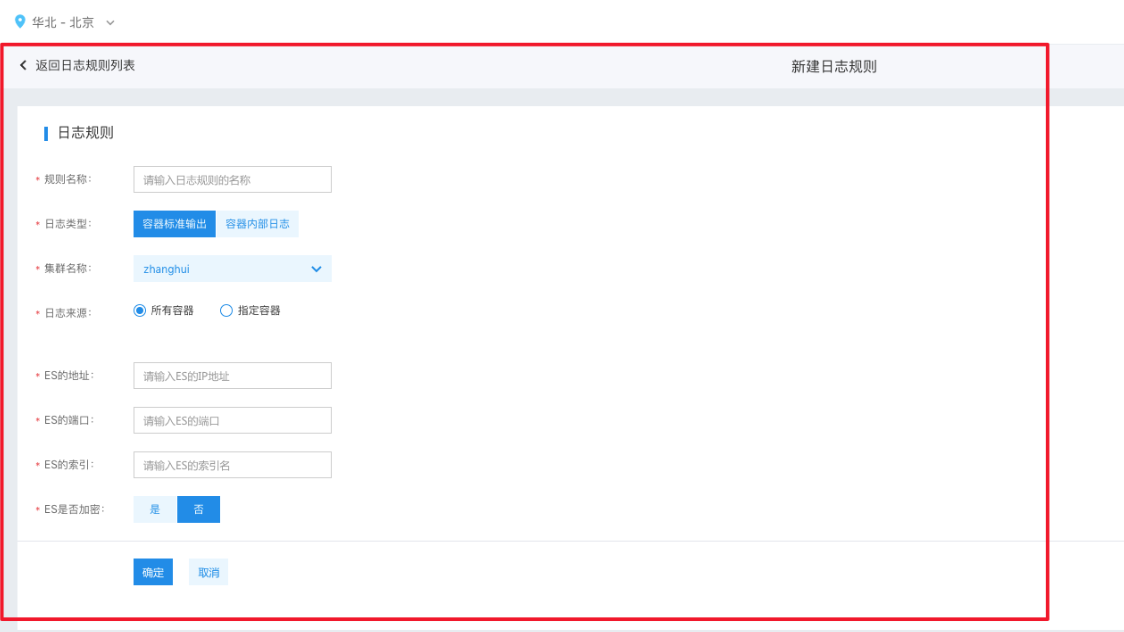
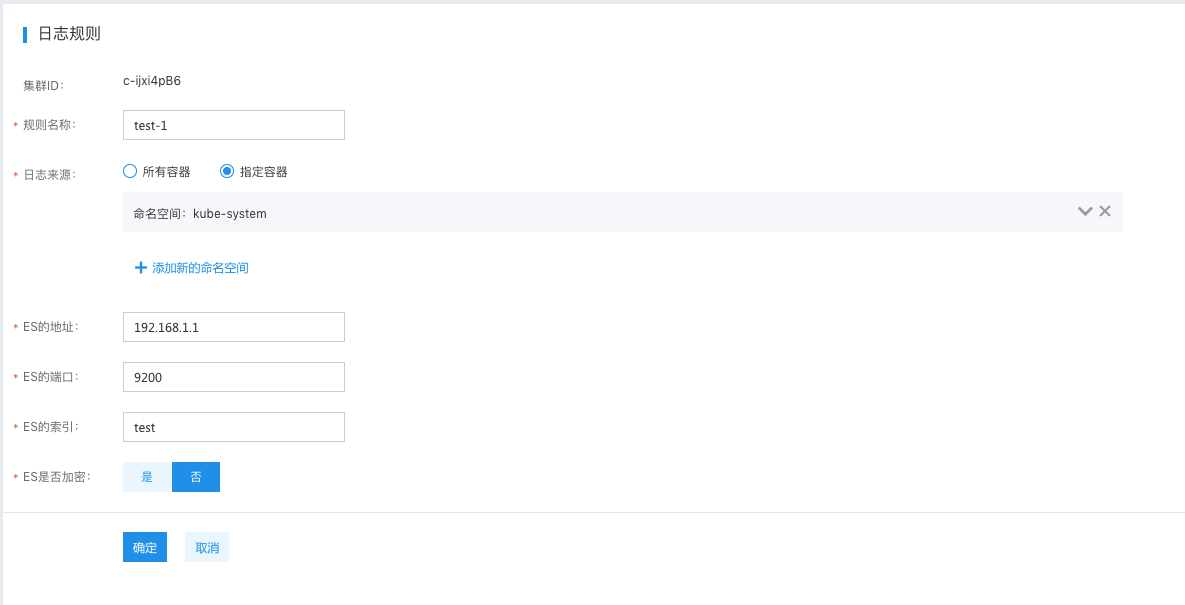
- Rule name: User-defined name, which is used to identify and describe different log rules
- Log type: The “container stdout” refers to logs output by the container itself during runtime, which can be viewed via the docker logs command. The “internal logs of container” refers to logs from service processes running inside the container, which are stored at a specific path in the container
- The cluster name and log source can be obtained from the object requiring log output. If “specified container” is selected, it supports selecting across five resource dimensions: Deployment, Job, CronJob, DaemonSet, and StatefulSet
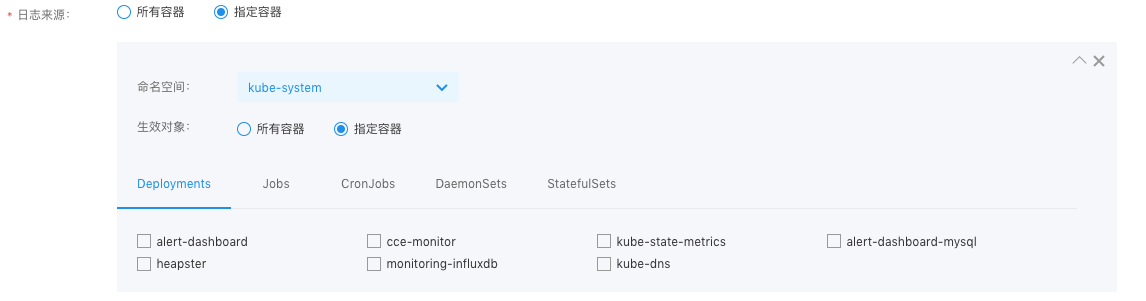
- The address, port, index, and encryption configurations of Elasticsearch are used to assist the CCE log service in exporting logs to the corresponding Elasticsearch service. Please fill in Elasticsearch service information to ensure the CCE cluster can establish a proper connection with this Elasticsearch service. For production environments, it is recommended to directly use the BES (Baidu Elasticsearch) service.
- To integrate with BOS storage, create a Secret resource in the following format that can connect to BOS storage. After that, when choosing BOS storage, specify the namespace and name of the Secret. If the machine has internet access, BOS Endpoint can be set to any region. Otherwise, it needs to match the region of the CCE cluster.
- Due to permission restrictions, creating a BOS Secret currently requires the root account's AK/SK; otherwise, the certification and authorization process cannot be completed.
1apiVersion: v1
2kind: Secret
3metadata:
4    name: bos-secret
5data:
6    bosak: dXNlcm5hbWU=  # echo -n "bosak...." | base64
7    bossk: cGFzc3dvcmQ=  # echo -n "bossk...." | base64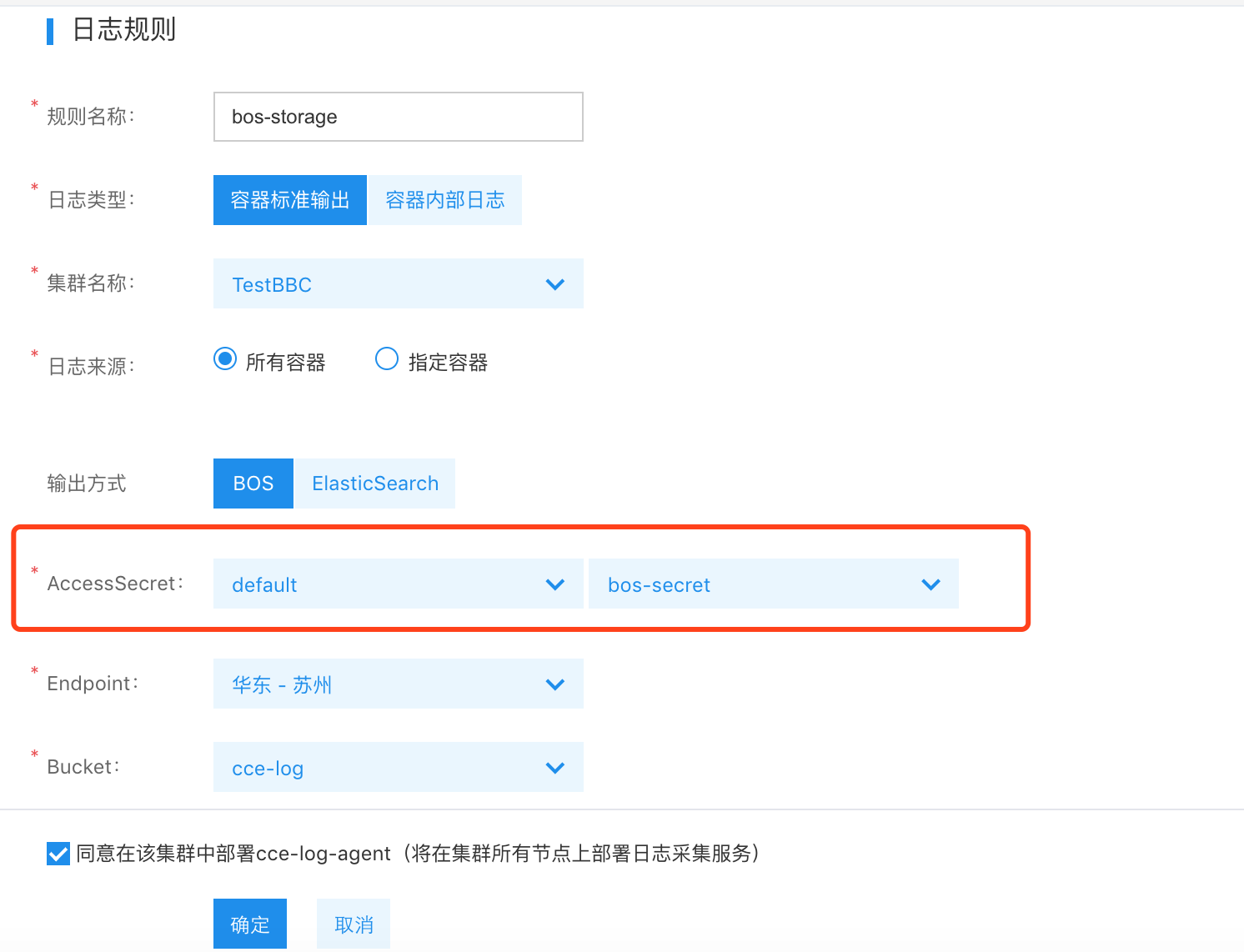
Configure kubernetes resources
After configuring logging rules, ensure logs in Kubernetes are correctly output by passing specified environment variables when creating relevant Kubernetes resources:
- Pass the environment variable cce_log_stdout and set the value to true for indicating the container’s stdout to be correct. If collection is not required, it is unnecessary to pass this environment variable
- Pass the environment variable cce_log_internal and specify the value as the absolute path of the log file in the container. A file path not a directory must be entered here
- When collecting files from a container, the directory containing the log files must be mounted to the host using the emptydir format.
Refer to the following YAML example:
1apiVersion: apps/v1
2kind: Deployment
3metadata:
4  name: tomcat
5spec:
6  selector:
7    matchLabels:
8      app: tomcat
9  replicas: 4
10  template:
11    metadata:
12      labels:
13        app: tomcat
14    spec:
15      containers:
16      - name: tomcat
17        image: "tomcat:7.0"
18        env:
19        - name: cce_log_stdout
20          value: "true"
21        - name: cce_log_internal
22          value: "/usr/local/tomcat/logs/catalina.*.log"
23        volumeMounts:
24        - name: tomcat-log
25          mountPath: /usr/local/tomcat/logs
26      volumes:
27      - name: tomcat-log
28        emptyDir: {}
Modify and delete log rules
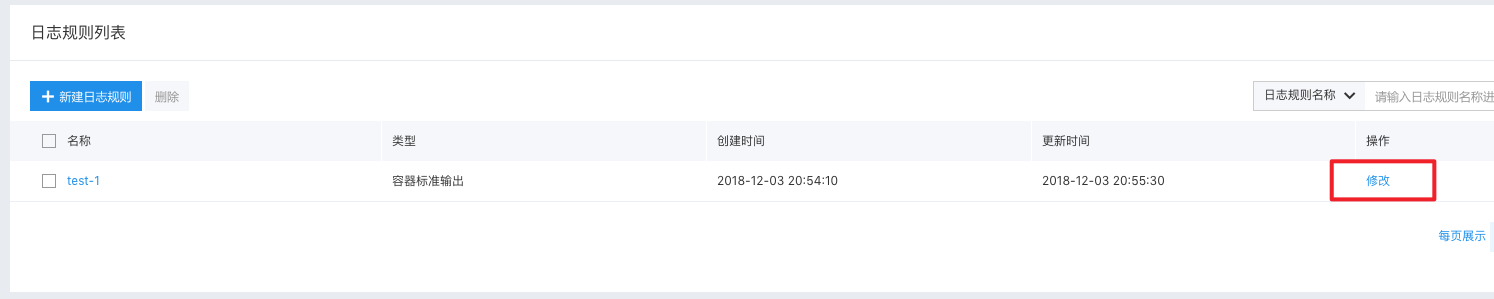
Once log rules are created, users can modify or delete them at any time. Click "Modify" to edit existing log rules. The logic for editing is similar to that of creation, but changing the cluster or log type is not allowed.
Use the BES (Baidu AI Cloud Elasticsearch) service
For production environments, it is recommended to use the BES service. For details, refer to: Elasticsearch Create Cluster
Self-built Elasticsearch in K8S cluster (for reference only)
This method is only intended for testing purposes. For production environments, it is recommended to use the BES service directly. Use the following YAML file to deploy Elasticsearch in a CCE cluster:
1apiVersion: v1
2kind: Service
3metadata:
4  name: elasticsearch-logging
5  namespace: kube-system
6  labels:
7    k8s-app: elasticsearch-logging
8    kubernetes.io/cluster-service: "true"
9    addonmanager.kubernetes.io/mode: Reconcile
10    kubernetes.io/name: "Elasticsearch"
11spec:
12  ports:
13  - port: 9200
14    protocol: TCP
15    targetPort: db
16  selector:
17    k8s-app: elasticsearch-logging
18---
19# RBAC authn and authz
20apiVersion: v1
21kind: ServiceAccount
22metadata:
23  name: elasticsearch-logging
24  namespace: kube-system
25  labels:
26    k8s-app: elasticsearch-logging
27    kubernetes.io/cluster-service: "true"
28    addonmanager.kubernetes.io/mode: Reconcile
29---
30kind: ClusterRole
31apiVersion: rbac.authorization.k8s.io/v1
32metadata:
33  name: elasticsearch-logging
34  labels:
35    k8s-app: elasticsearch-logging
36    kubernetes.io/cluster-service: "true"
37    addonmanager.kubernetes.io/mode: Reconcile
38rules:
39- apiGroups:
40  - ""
41  resources:
42  - "services"
43  - "namespaces"
44  - "endpoints"
45  verbs:
46  - "get"
47---
48kind: ClusterRoleBinding
49apiVersion: rbac.authorization.k8s.io/v1
50metadata:
51  namespace: kube-system
52  name: elasticsearch-logging
53  labels:
54    k8s-app: elasticsearch-logging
55    kubernetes.io/cluster-service: "true"
56    addonmanager.kubernetes.io/mode: Reconcile
57subjects:
58- kind: ServiceAccount
59  name: elasticsearch-logging
60  namespace: kube-system
61  apiGroup: ""
62roleRef:
63  kind: ClusterRole
64  name: elasticsearch-logging
65  apiGroup: ""
66---
67# Elasticsearch deployment itself
68apiVersion: apps/v1
69kind: StatefulSet
70metadata:
71  name: elasticsearch-logging
72  namespace: kube-system
73  labels:
74    k8s-app: elasticsearch-logging
75    version: v6.3.0
76    kubernetes.io/cluster-service: "true"
77    addonmanager.kubernetes.io/mode: Reconcile
78spec:
79  serviceName: elasticsearch-logging
80  replicas: 2
81  selector:
82    matchLabels:
83      k8s-app: elasticsearch-logging
84      version: v6.3.0
85  template:
86    metadata:
87      labels:
88        k8s-app: elasticsearch-logging
89        version: v6.3.0
90        kubernetes.io/cluster-service: "true"
91    spec:
92      serviceAccountName: elasticsearch-logging
93      containers:
94      - image: hub.baidubce.com/jpaas-public/elasticsearch:v6.3.0
95        name: elasticsearch-logging
96        resources:
97          # need more cpu upon initialization, therefore burstable class
98          limits:
99            cpu: 1000m
100          requests:
101            cpu: 100m
102        ports:
103        - containerPort: 9200
104          name: db
105          protocol: TCP
106        - containerPort: 9300
107          name: transport
108          protocol: TCP
109        volumeMounts:
110        - name: elasticsearch-logging
111          mountPath: /data
112        env:
113        - name: "NAMESPACE"
114          valueFrom:
115            fieldRef:
116              fieldPath: metadata.namespace
117      volumes:
118      - name: elasticsearch-logging
119        emptyDir: {}
120      # Elasticsearch requires vm.max_map_count to be at least 262144.
121      # If your OS already sets up this number to a higher value, feel free
122      # to remove this init container.
123      initContainers:
124      - image: alpine:3.6
125        command: ["/sbin/sysctl", "-w", "vm.max_map_count=262144"]
126        name: elasticsearch-logging-init
127        securityContext:
128          privileged: true
After successful deployment, a service named elasticsearch-logging will be created. As shown in the diagram below, when creating log rules, the service’s name can be used as the ES address and the service’s port is used as a port:

Deploy kibana using the following YAML. After successful deployment, access the kibana service via the created LoadBalancer named kibana-logging:
1apiVersion: v1
2kind: Service
3metadata:
4  name: kibana-logging
5  namespace: kube-system
6  labels:
7    k8s-app: kibana-logging
8    kubernetes.io/cluster-service: "true"
9    addonmanager.kubernetes.io/mode: Reconcile
10    kubernetes.io/name: "Kibana"
11spec:
12  ports:
13  - port: 5601
14    protocol: TCP
15    targetPort: ui
16  selector:
17    k8s-app: kibana-logging
18  type: LoadBalancer
19---
20apiVersion: apps/v1
21kind: Deployment
22metadata:
23  name: kibana-logging
24  namespace: kube-system
25  labels:
26    k8s-app: kibana-logging
27    kubernetes.io/cluster-service: "true"
28    addonmanager.kubernetes.io/mode: Reconcile
29spec:
30  replicas: 1
31  selector:
32    matchLabels:
33      k8s-app: kibana-logging
34  template:
35    metadata:
36      labels:
37        k8s-app: kibana-logging
38      annotations:
39        seccomp.security.alpha.kubernetes.io/pod: 'docker/default'
40    spec:
41      containers:
42      - name: kibana-logging
43        image: hub.baidubce.com/jpaas-public/kibana:v6.3.0
44        resources:
45          # need more cpu upon initialization, therefore burstable class
46          limits:
47            cpu: 1000m
48          requests:
49            cpu: 100m
50        env:
51          - name: ELASTICSEARCH_URL
52            value: http://elasticsearch-logging:9200
53          - name: SERVER_BASEPATH
54            value: ""
55        ports:
56        - containerPort: 5601
57          name: ui
58          protocol: TCP
Note
In production environments, it is recommended to use Baidu AI Cloud’s Elasticsearch service or a dedicated self-built Elasticsearch cluster