

Setting GPU Memory Sharing
Updated at:2025-10-27
Enabling memory sharing for GPU nodes allows GPU resources to be allocated to multiple containers based on memory size, improving resource utilization.
Instructions for use
Memory sharing settings apply exclusively to GPU nodes.
Prerequisites
You have successfully installed the CCE GPU Manager and AI Job Scheduler components for this cluster.
Operation steps
- Sign in to the Baidu AI Cloud official website and enter the management console.
- Select Product Services - Cloud Native - Cloud Container Engine (CCE) to enter Cluster Management - Cluster List.
- Click on the target cluster name in the Cluster List page to navigate to the cluster management page.
- On the left sidebar, select Node Management - Nodes to enter the Node List page.
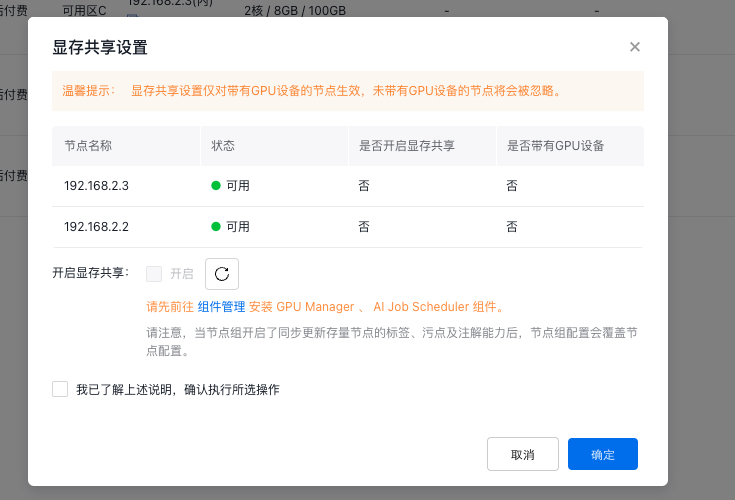
- In the node list, select the GPU node for which you want to enable memory sharing, and click Memory Sharing Settings.
-
Enable or disable memory sharing as needed, check “I have read the above instructions and confirm to execute the selected operation”, then click OK to complete the set memory sharing.
Note:
- If the selected node is part of a node group, the node group configuration will override individual node configurations when label, taint, and annotation updates are synchronized for existing nodes in the group.