

Set access logs
Updated at:2025-11-03
Overview
When users need to track requests to access BOS, they can enable the logging function for the BOS. The logging function can be applied in access statistics and security audits, etc. Each access log records detailed information of a single access request, including requester, bucket name, request time, and request operation. For format of access logs, please refer to [Set Access Logs](BOS/Developer Guide/Bucket Basic Operations/Set access logs.md). When a bucket enables the access log function, it will automatically write the access requests to this bucket into the user-specified bucket as log files in accordance with a fixed naming rule on an hourly basis.
Description:
- There is some delay in storing and delivering access logs to the target bucket. Typically, it takes 2 to 3 hours from the time an access request occurs to when the corresponding logs are saved in the target bucket. However, factors like the network environment may cause some logs to be stored with a longer delay.
- Log files are the same as regular files in nature. BOS cannot clear them, and you must manually delete unwanted log files. If you do not delete them, log files will be retained indefinitely. If you need to delete outdated log files regularly, it is recommended to configure lifecycle rules to remove outdated files.
Set access logs
- Sign in to the Baidu AI Cloud Object Storage (BOS) Management Console.
- Click Bucket List to access the Bucket List page, then click the desired bucket name to enter the Bucket Details page. You can conveniently switch between buckets by using the dropdown menu.
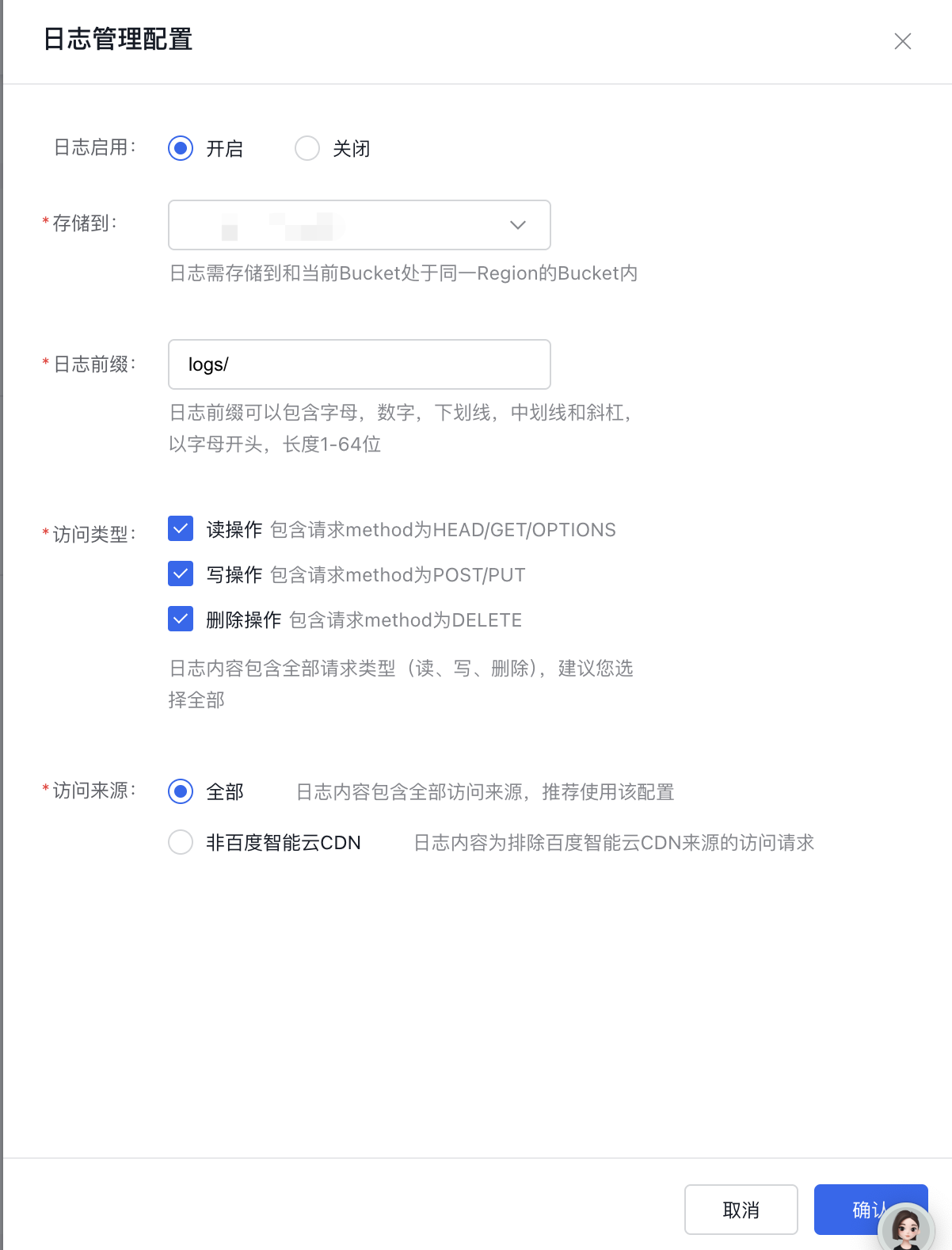
- Under Basic Configuration, select Log Management Configuration to configure logging for this bucket. By default, logging function is disabled. On the Logging Configuration page, click Modify Configuration, set the Logging Startup status to enabling, and proceed to configure the generation and delivery rules.
Configuration parameter description
| Parameters | Description |
|---|---|
| LogShipper bucket | Set the target bucket information for log delivery after generation. Note that the target bucket must reside in the same region as the log-generating bucket. You can configure either the log source bucket or other buckets in the same region for log storage |
| Log file prefix | Set the delivery path details for the generated logs. The prefix can consist of letters, numbers, underscores, hyphens, and slashes. It must start with a letter and have a length between 1 and 64 characters. |
| Access type | Default logs will include all request types, namely read/write/delete. Read: include requests with HEAD/GET/OPTIONS methods; write: include requests with POST/PUT methods; delete: include requests with DELETE method. Log content can be customized, but selecting all operation types is recommended. |
| Access type | Default logs will include all request types, namely read/write/delete. Read: include requests with HEAD/GET/OPTIONS methods; write: include requests with POST/PUT methods; batch deletion: include requests with POST method. Special reminder: To record batch deletion, select writing. Delete: include requests with the DELETE method. You may customize the log content as needed. Log content can be customized, but selecting all operation types is recommended. |
| Access source | It can be used to distinguish request types, with two configurations: All Access and Exclude Baidu AI Cloud CDN Service Requests. By default, all sources are included, and you can exclude request logs from Baidu AI Cloud CDN. |
Note:
- The target bucket for log storage and the source bucket must be in the same region;
- The logging feature is free of additional charges; however, you will incur storage costs for the log files. There are no fees for transmitting log files, but accessing the generated log files will be billed like regular data transmission costs.
- All access sources are included in the logs by default. It is advisable to maintain this configuration.
- For access type configuration, since batch deletion requests to use the POST method, select writing operations if you need to record batch deletions. The default all-access-type configuration is recommended.
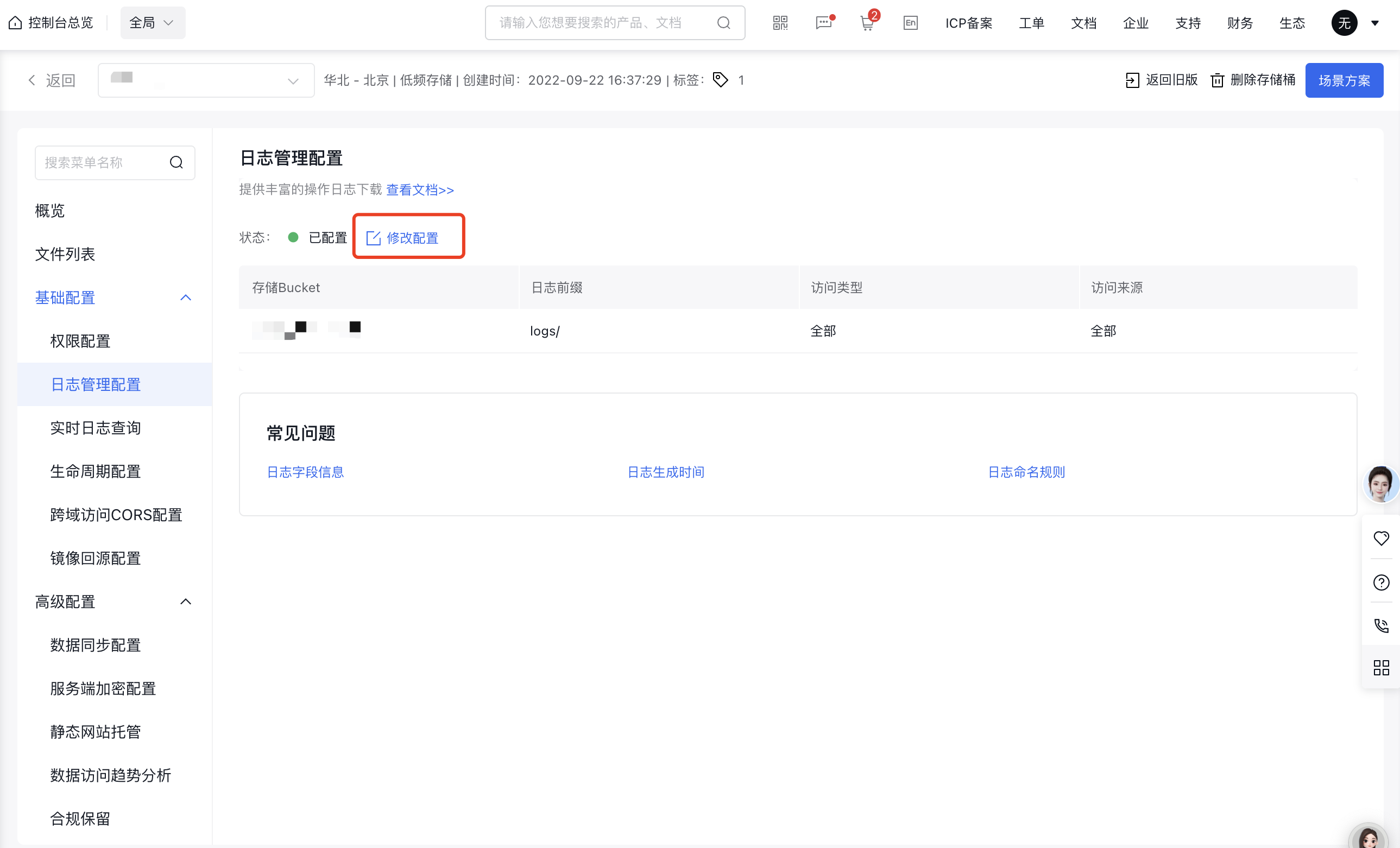
- Click OK to save the configuration. You can view and modify the relevant information on the current page.
Related APIs
- PutBucketLogging API: Use the PutBucketLogging API to enable access logging for the bucket and specify the bucket where the logs will be stored and the file prefix of the access logs.
- GetBucketLogging API: Use the GetBucketLogging API to obtain the access log configuration of a certain bucket.
- DeleteBucketLogging API: Use the DeleteBucketLogging API to disable the access log recording function of the bucket.