

Product introduction
Overview
Baidu AI Cloud Object Storage (BOS) delivers a stable, secure, efficient, and highly scalable storage solution that supports all types of data storage, including text, multimedia, and binary files, with a maximum single file size of 48.8 TB.
The multi-regional data storage across clusters achieves unified resource utilization, simplifies usage, and enhances work efficiency. The “Storage + Computing Framework” acts as a “power” engine for your data, seamlessly integrating the processes of transmission, storage, processing, and release.
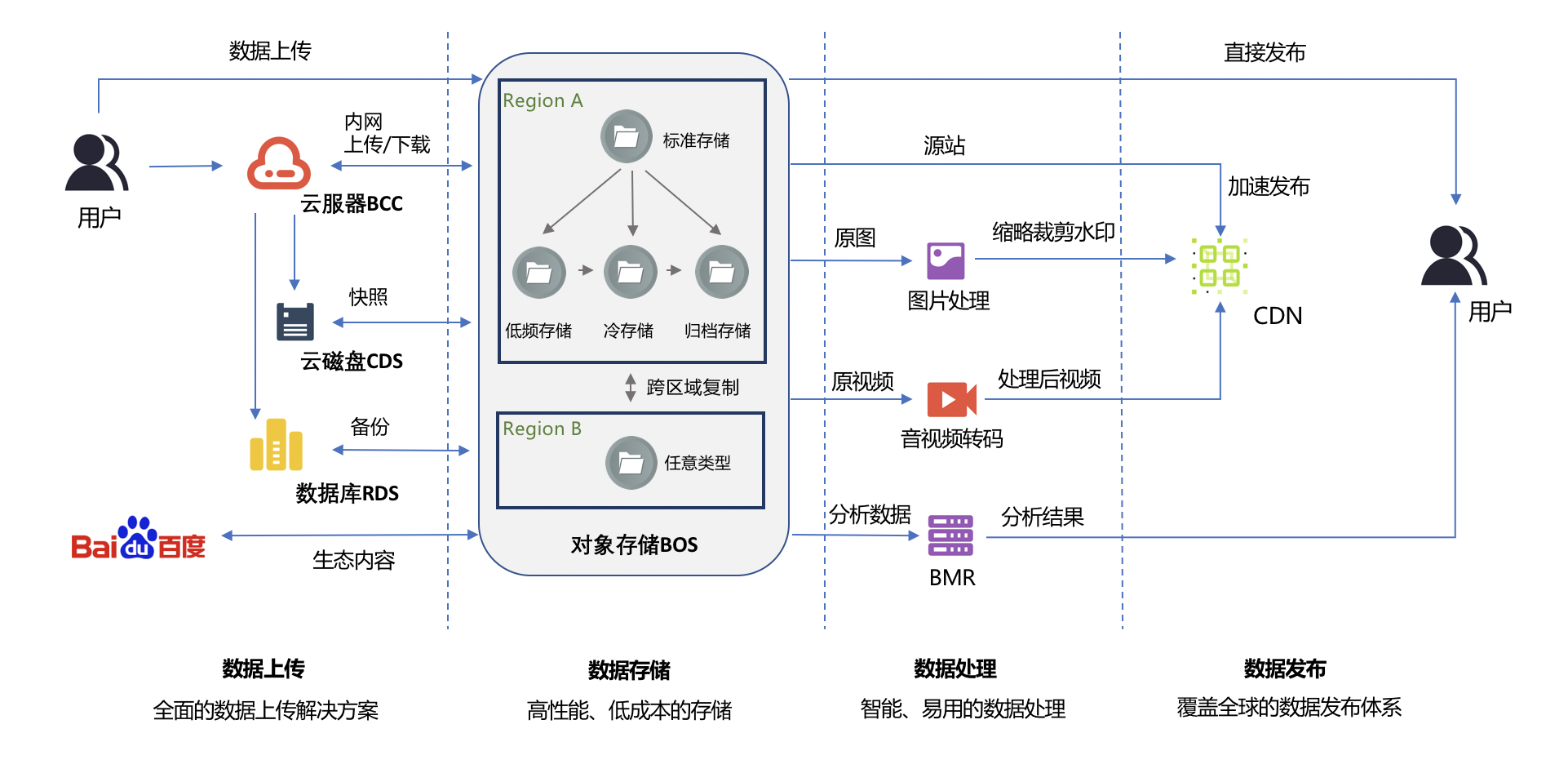
Application scenarios
BOS is applicable to various scenarios such as data distribution, data backup, big data analysis, and audio and video file processing. For details, please refer to Application Scenarios.
Hierarchical storage
Different types of data exhibit varying usage patterns and access frequencies and follow a natural aging curve. As data ages, its access frequency diminishes, eventually entering an archived state. Hierarchical storage allows for the allocation of different types of data into various storage classes, reducing overall storage costs while fulfilling service requirements.
BOS offers 6 storage types for different storage scenarios: standard storage - multi-AZ, standard storage, infrequent access storage - multi-AZ, infrequent access storage, cold storage, and archive storage. You can specify the storage class of an object when uploading a file, and the storage class of the object shall be subject to the one specified during upload. In addition, you can set the default storage class of the bucket. If no storage class is specified when uploading a file, the file will inherit the default storage class of the bucket. For a detailed introduction to various storage classes, please refer to Hierarchical Storage.
Charge item
The billing items of BOS include 4 parts: storage fees, traffic fees, request fees, and data processing fees. Each item has different billing prices according to your usage. For details, please refer to Overview of Billing Items.
Manage BOS
-
Manage BOS through the console
You can log in to the BOS Management Console to perform operations such as bucket management, object management, data release, data processing, event notification, and monitoring and alarming. For details, please refer to Console Operation Guide.
-
Manage BOS through API or SDK
BOS provides APIs and SDKs in various languages to facilitate your rapid secondary development. For details, please refer to API Reference and [SDK Reference](BOS/SDK/SDK Overview.md).
-
Manage BOS through tools
BOS provides various types of management tools, and you can manage your BOS through these tools. For details, please refer to Peripheral Tools.
Product functions
BOS provides rich product functions and has complete product capabilities in data migration to the cloud, bucket management, file management, data release, data processing, etc. For details, please refer to Product Functions.