Image Scaling
Overview
This document explains how to resize images (resize).
Resizing parameters
| Parameter | Values | Description |
|---|---|---|
| m | lfit, mfit, fill, pad and fixed |
|
| w | 1-4096 |
|
| h | 1-4096 |
|
| l | 1-4096 |
|
| s | 1-4096 |
|
| p | 1-1000 |
|
| wp | 1-1000 |
|
| hp | 1-1000 |
|
| align | 0-100 |
|
| limit | 0,1 |
|
| color | 8-bit hexadecimal color code |
|
| radius | 1-50 |
|
| sigma | 1-50 |
|
Effect examples
- lfit resizing
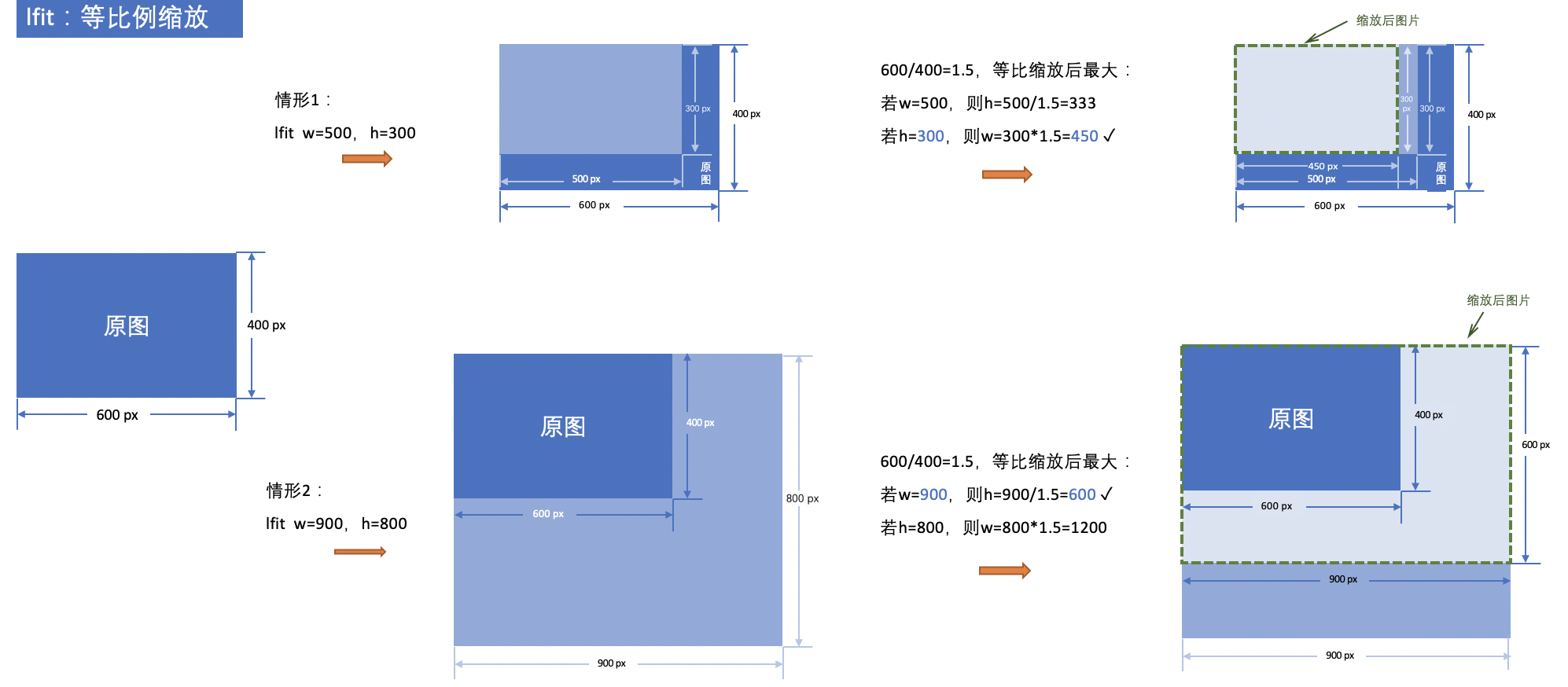
For example, if the original image size is 600 px × 400 px.
Scenario 1: Resizing parameters: w = 500 px, h = 300 px. According to the lfit proportional resizing rule, the w/h ratio of the resized image equals the w/h = 1.5 of the original image. Therefore, if w = 500 px, then h = 500/1.5 = 333 px; if h = 300 px, then w = 300 × 1.5 = 450 px. To fit the largest image within the specified w × h rectangle, that is, w × h of the resized image must not exceed 500 px × 300 px. The resulting thumbnail size is 450 px × 300 px.
Scenario 2: Resizing parameters: w = 900 px, h = 800 px. According to the lfit proportional resizing rule, the w/h ratio of the resized image equals the w/h = 1.5 of the original image. Therefore, if w = 900 px, then h = 900/1.5 = 600 px; if h = 800 px, then w = 800 × 1.5 = 1,200 px. To fit the largest image within the specified w × h rectangle, that is, w × h of the resized image must not exceed 900 px × 800 px. The resulting thumbnail size is 900 px × 600 px.
- mfit resizing
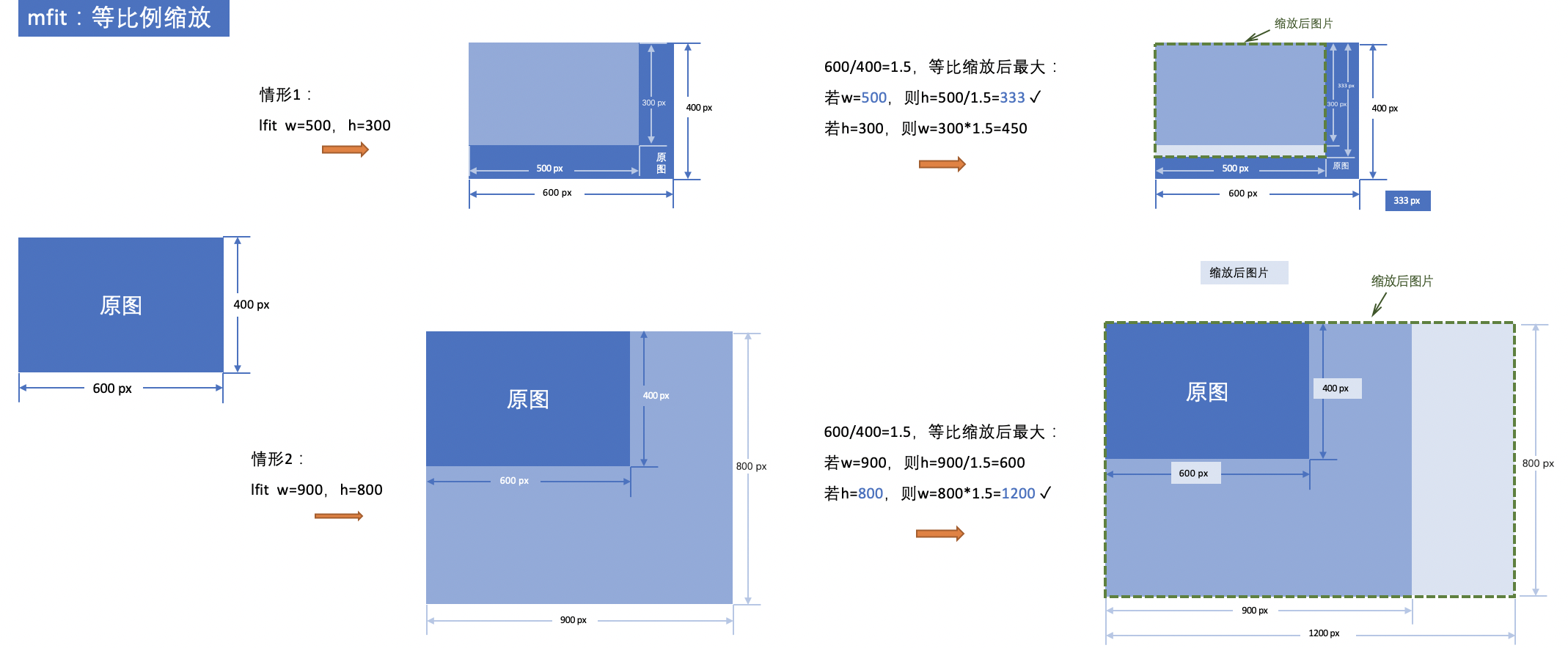
For example, if the original image size is 600 px × 400 px.
Scenario 1: Resizing parameters: w = 500 px, h = 300 px. According to the mift proportional resizing rule, the w/h ratio of the resized image equals the w/h = 1.5 of the original image. Therefore, if w = 500 px, then h = 500/1.5 = 333 px; if h = 300 px, then w = 300 × 1.5 = 450 px. To fit the smallest image covering the specified w × h rectangle, that is, w × h of the resized image must not be smaller than 500 px × 300 px. The resulting thumbnail size is 500 px × 333 px.
Scenario 2: Resizing parameters: w = 900 px, h = 800 px. According to the lfit proportional resizing rule, the w/h ratio of the resized image equals the w/h = 1.5 of the original image. Therefore, if w = 900 px, then h = 900/1.5 = 600 px; if h = 800 px, then w = 800 × 1.5 = 1,200 px. To fit the smallest image covering the specified w × h rectangle, that is, w × h of the resized image must not be smaller than 1200 px × 800 px. The resulting thumbnail size is 1200 px × 800 px.
- pad resizing
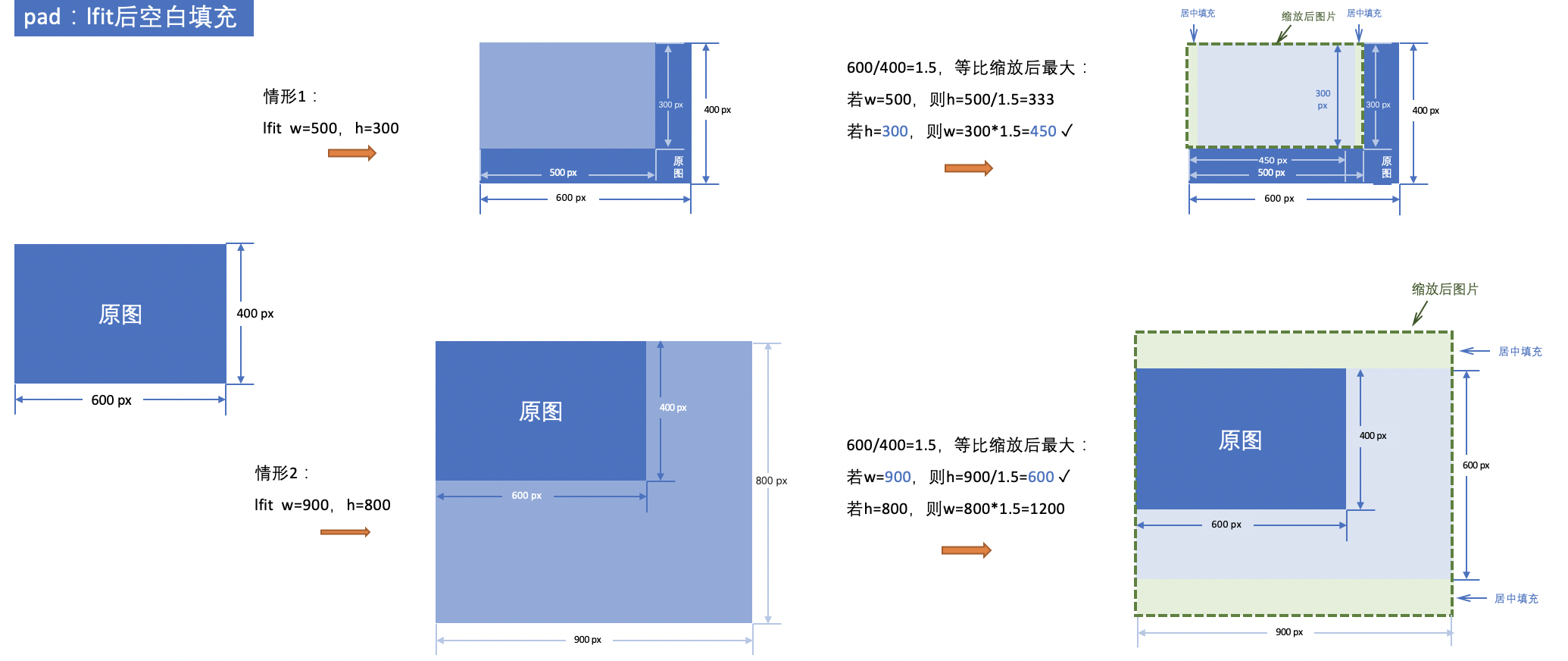
For example, if the original image size is 600 px × 400 px.
Scenario 1: Resizing parameters: w = 500 px, h = 300 px. According to the lfit proportional resizing rule, the w/h ratio of the resized image equals the w/h = 1.5 of the original image. Therefore, if w = 500 px, then h = 500/1.5 = 333 px; if h = 300 px, then w = 300 × 1.5 = 450 px. To fit the largest image within the specified w × h rectangle, that is, w × h of the resized image must not exceed 500 px × 300 px. The resulting thumbnail size is 450 px × 300 px. Under the pad resizing rule, the area between the thumbnail and the w × h rectangle needs to be filled. The example below shows filling with a green background.
Scenario 2: Resizing parameters: w = 900 px, h = 800 px. According to the lfit proportional resizing rule, the w/h ratio of the resized image equals the w/h = 1.5 of the original image. Therefore, if w = 900 px, then h = 900/1.5 = 600 px; if h = 800 px, then w = 800 × 1.5 = 1,200 px. To fit the largest image within the specified w × h rectangle, that is, w × h of the resized image must not exceed 900 px × 800 px. The resulting thumbnail size is 900 px × 600 px. Under the pad resizing rule, the area between the thumbnail and the w × h rectangle needs to be filled. The example below shows filling with a green background.
- fill resizing
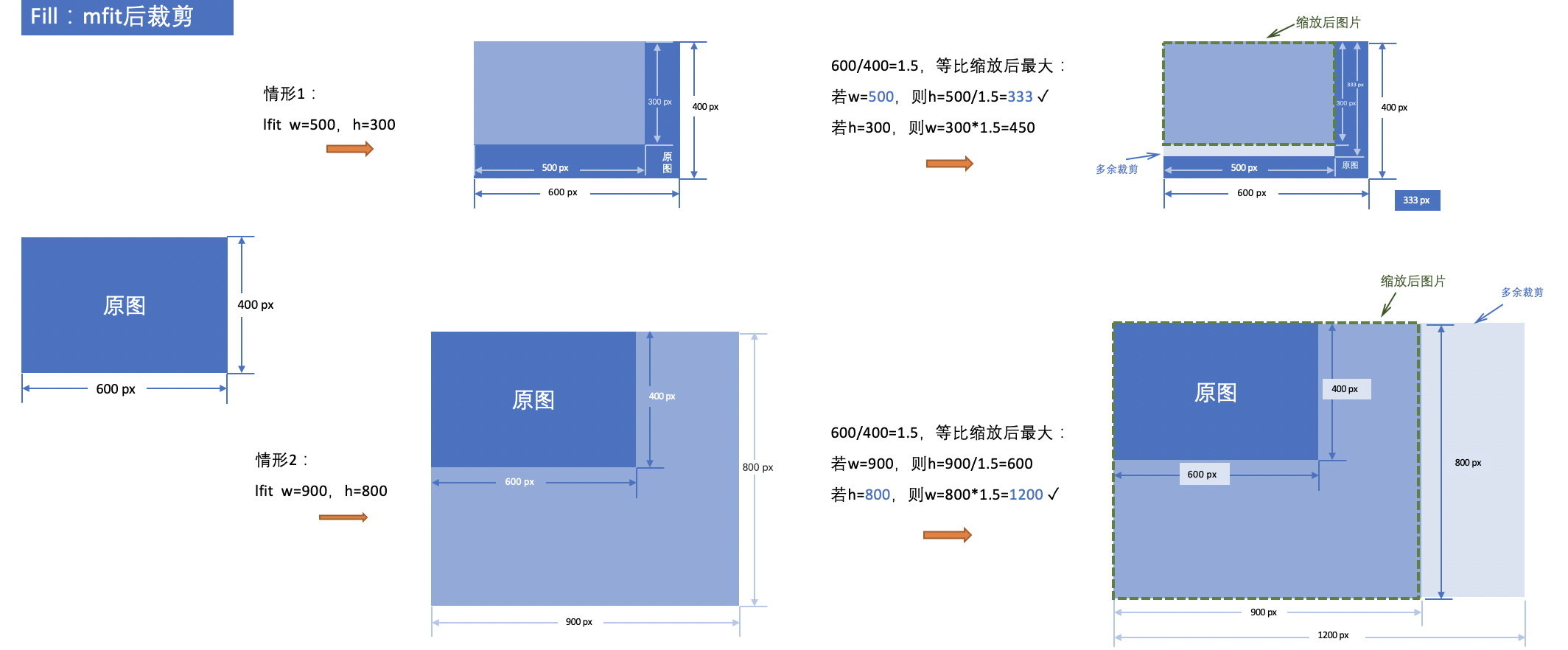
For example, if the original image size is 600 px × 400 px.
Scenario 1: Resizing parameters: w = 500 px, h = 300 px. According to the mift proportional resizing rule, the w/h ratio of the resized image equals the w/h = 1.5 of the original image. Therefore, if w = 500 px, then h = 500/1.5 = 333 px; if h = 300 px, then w = 300 × 1.5 = 450 px. To fit the smallest image covering the specified w × h rectangle, that is, w × h of the resized image must not be smaller than 500 px × 300 px. The resulting thumbnail size is 500 px × 333 px. Under the fill resizing rule, the area between the thumbnail and the w × h rectangle needs to be cropped.
Scenario 2: Resizing parameters: w = 900 px, h = 800 px. According to the lfit proportional resizing rule, the w/h ratio of the resized image equals the w/h = 1.5 of the original image. Therefore, if w = 900 px, then h = 900/1.5 = 600 px; if h = 800 px, then w = 800 × 1.5 = 1,200 px. To fit the smallest image covering the specified w × h rectangle, that is, w × h of the resized image must not be smaller than 1200 px × 800 px. The resulting thumbnail size is 1200 px × 800 px. Under the fill resizing rule, the area between the thumbnail and the w × h rectangle needs to be cropped.
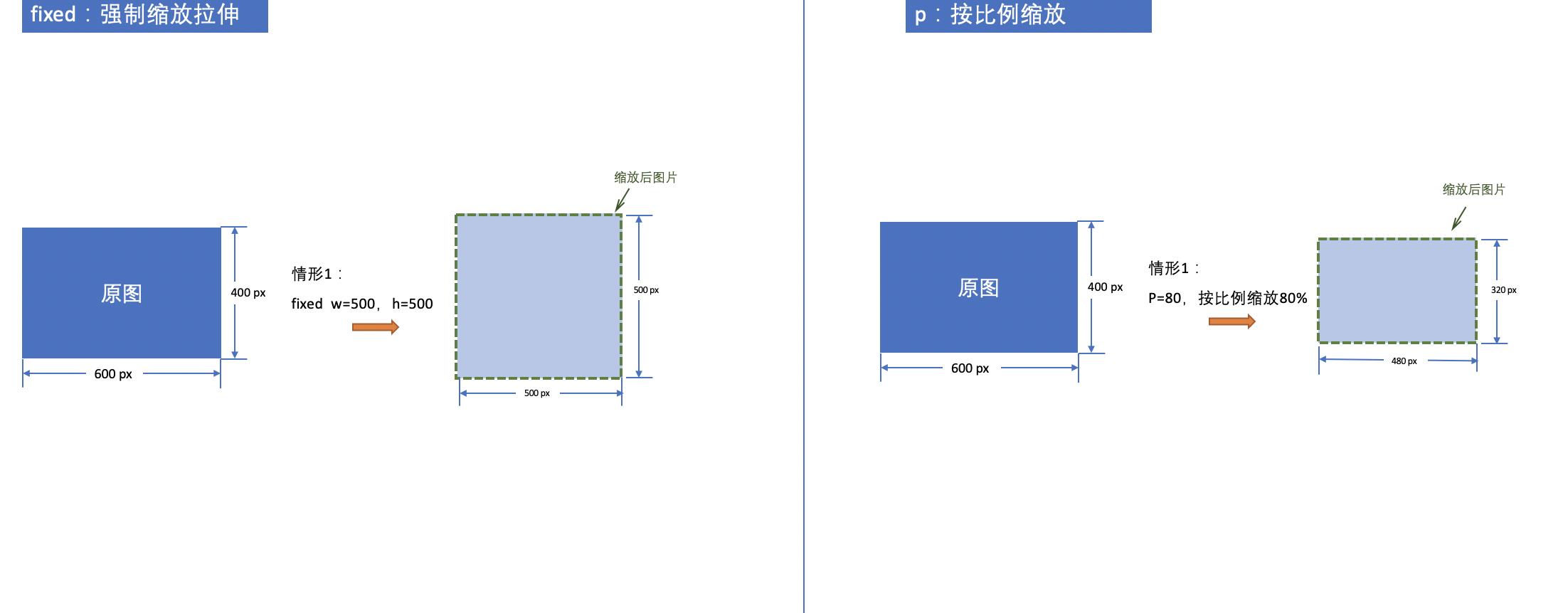
- fixed resizing
If the original image size is 600 px × 400 px and resizing parameters are w = 500 px and h = 300 px, the image will be forcefully stretched to fit the specified width and height according to the fixed resizing rule.
- proportional resizing
If the original image size is 600 px × 400 px and the resizing parameter is p = 80, the image will be proportionally resized to 80% of its original dimensions. Both the length and width of the thumbnail will be 80% of the original image size.
Usage cases
- Proportionally resize the image (lfit) with a maximum resized width of 200 and a maximum height of 100.
https://doc.bce.baidu.com/bce-documentation/BOS/image.jpg?x-bce-process=image/resize,m_lfit,w_200,h_100

- Proportionally resize the image (mfit) with a minimum resized width of 200 and a minimum height of 100.
https://doc.bce.baidu.com/bce-documentation/BOS/image.jpg?x-bce-process=image/resize,m_mfit,w_200,h_100

- Proportionally resize the image (fill) with a minimum resized width of 200 and a minimum height of 100, and centrally crop the part exceeding the 200 * 100 area (default centered cropping).
https://doc.bce.baidu.com/bce-documentation/BOS/image.jpg?x-bce-process=image/resize,m_fill,w_200,h_100

- Proportionally resize the image (fill) with a minimum resized width of 200 and a minimum height of 100, and crop the part exceeding the 200 × 100 area starting from the top.
https://doc.bce.baidu.com/bce-documentation/BOS/image.jpg?x-bce-process=image/resize,m_fill,w_200,h_100,align_0

- Proportionally resize the image (pad) with a maximum resized width of 200 and a maximum height of 100, and fill the unfilled areas within the 200 * 100 rectangle.
https://doc.bce.baidu.com/bce-documentation/BOS/image.jpg?x-bce-process=image/resize,m_pad,w_200,h_100,color_FF0000

- Fixed resizing (fixed) to a resized width of 200 and height of 100.
https://doc.bce.baidu.com/bce-documentation/BOS/image.jpg?x-bce-process=image/resize,m_fixed,w_200,h_100

- Proportionally resize the image to 50% of the original size.
https://doc.bce.baidu.com/bce-documentation/BOS/image.jpg?x-bce-process=image/resize,p_50

- Resize the image to 50% of the original width.
https://doc.bce.baidu.com/bce-documentation/BOS/image.jpg?x-bce-process=image/resize,wp_50

- Resize the image to 50% of the original height.
https://doc.bce.baidu.com/bce-documentation/BOS/image.jpg?x-bce-process=image/resize,hp_50

- Proportionally resize the image (pad) with a maximum resized width of 200 and a maximum height of 100, and blur the background of the unfilled areas within the 200 * 100 rectangle.
https://doc.bce.baidu.com/bce-documentation/BOS/image.jpg?x-bce-process=image/resize,m_pad,w_200,h_100,radius_2,sigma_50